Ọrọ Iṣaaju
Thank you for choosing the Cecotec Conga 9090 IA Robot Vacuum Cleaner. This advanced 4-in-1 robot is designed to vacuum, sweep, mop, and scrub simultaneously, providing comprehensive floor cleaning. Equipped with Artificial Intelligence and laser technology, it offers maximum cleaning precision by recognizing household objects and adapting its cleaning path. This manual provides essential information for the safe and efficient operation and maintenance of your robot vacuum cleaner.
Awọn Itọsọna Aabo
Jọ̀wọ́ ka àwọn ìlànà ààbò wọ̀nyí dáadáa kí o tó lo ẹ̀rọ náà kí o sì tọ́jú wọn fún ìtọ́kasí ọjọ́ iwájú. Àìtẹ̀lé àwọn ìlànà wọ̀nyí lè yọrí sí ìkọlù iná mànàmáná, iná, tàbí ìpalára ńlá.
- Ṣe idaniloju agbara voltage ibaamu awọn voltage pato lori aami igbelewọn ohun elo.
- Maṣe fi ohun elo, okun agbara, tabi pulọọgi sinu omi tabi omi miiran.
- Keep the appliance away from heat sources, direct sunlight, humidity, and sharp edges.
- Do not use the appliance on wet surfaces or in areas with standing water.
- Ṣe abojuto awọn ọmọde lati rii daju pe wọn ko ṣere pẹlu ohun elo.
- Ṣaaju ki o to nu tabi itọju, nigbagbogbo yọọ ohun elo kuro ni iṣan agbara.
- Ma ṣe ṣiṣẹ ohun elo ti okun tabi plug ba bajẹ.
- Yọọ eyikeyi awọn kebulu alaimuṣinṣin, awọn ohun kekere, tabi awọn ohun ẹlẹgẹ lati agbegbe mimọ ṣaaju ṣiṣe lati ṣe idiwọ ikọlu tabi ibajẹ.
Package Awọn akoonu
Daju pe gbogbo awọn paati wa ati ni ipo ti o dara nigbati ṣiṣi silẹ.
- Cecotec Conga 9090 IA Robot Vacuum Cleaner
- Special Silicone Brush for pets
- Jalisco Brush
- Vibration Wash Basin (Water Tank)
- Solid Tank (Dust Bin)
- Isakoṣo latọna jijin
- 2 Mops
- 2 Awọn gbọnnu ẹgbẹ
- 1 Ajọ ti o ga julọ
- Self-Cleaning Brush
- Gbigba agbara gbigba agbara
- Adapter agbara

Image: The Conga 9090 IA robot vacuum cleaner along with its comprehensive set of accessories, including various brushes, remote control, and a mobile phone showing the companion app.
Ọja Pariview
The Conga 9090 IA features advanced components for intelligent and efficient cleaning.
- AI and Laser Technology: The robot uses a front camera and a three-dimensional sensor to recognize common household objects and adapt its cleaning path accordingly. It also identifies floors and rooms, automatically mapping them.
- Jalisco Brush: A specialized brush designed for effective cleaning on various floor types.
- Twerking Scrub Tank: Provides three intelligent scrubbing levels for thorough mopping.
- Room Assist: Intelligent room management for customized cleaning.

Image: The robot vacuum intelligently detects and navigates around obstacles like shoes, thanks to its advanced AI and laser technology.

Image: The robot vacuum positioned on a floor, ready to clean various small debris, demonstrating its powerful suction.

Image: The robot vacuum near its charging base, illustrating its object detection capabilities for items such as socks and power cables.
Ṣeto
- Gbigbe Ibusọ Gbigba agbara: Place the charging station against a wall in an open area, ensuring there are no obstacles within 1 meter to the sides and 2 meters in front. Connect the power adapter to the charging station and a power outlet.
- Idiyele Ibẹrẹ: Place the robot on the charging station. Ensure the charging contacts on the robot align with those on the station. The robot will begin charging automatically. For first use, fully charge the robot (approximately 3-4 hours).
- Fi Awọn Brushes ẹgbẹ sori ẹrọ: Snap the left (L) and right (R) side brushes into their corresponding slots on the bottom of the robot until they click into place.
- Install Main Brush: If not already installed, insert the Jalisco brush into its compartment on the underside of the robot.
- Download the Conga App: Wa fun "Conga" in your smartphone's app store (iOS or Android) and download the official application.
- Sopọ si Wi-Fi: Follow the in-app instructions to connect your robot to your home Wi-Fi network. This will enable smart features, mapping, and remote control.
Awọn ilana Iṣiṣẹ
Your Conga 9090 IA offers various cleaning modes and smart functionalities.
Awọn ọna mimọ
- Ipo Aifọwọyi: The robot automatically plans the optimal cleaning path for your entire home.
- Ipo eti: Fọ pẹlú Odi ati aga egbegbe.
- Ipo Aami: Concentrates cleaning on a specific dirty area.
- Ipò bíbo: Utilizes the vibration wash basin for deep mopping. You can select from three intelligent scrubbing levels via the app.
- Awọn agbegbe ihamọ: Use the app to define no-go zones or virtual walls to prevent the robot from entering specific areas.

Image: The robot vacuum demonstrating its ability to respect virtual boundaries, preventing it from entering designated areas like a play zone.
Smart Awọn ẹya ara ẹrọ
- Ohun elo Iṣakoso: Use the Conga app to start/stop cleaning, select modes, schedule cleaning, view maps, and manage rooms.
- Iṣakoso ohun: The robot is compatible with Amazon Echo and Google Home. You can control it using voice commands.

Image: The robot vacuum can be controlled via voice commands through smart home devices like Amazon Echo.
Itoju
Itọju deede ṣe idaniloju iṣẹ ṣiṣe ti o dara julọ ati ki o fa igbesi aye ti ẹrọ igbale robot rẹ.
Cleaning Schedule
- Lẹhin lilo kọọkan: Empty the dust bin and clean the main brush.
- Osẹ-ọsẹ: Clean the side brushes, filters, and sensors.
- Oṣooṣu: Clean the charging contacts and wheels. Replace filters and brushes as needed.
Detailed Cleaning Instructions
- Dust Bin and Filters: Open the robot's cover, remove the dust bin, and empty its contents. Tap the filter gently to remove dust. Do not wash the HEPA filter with water.
- Omi omi ati mop: Remove the water tank and empty any remaining water. Detach and wash the mop pad with water. Allow it to air dry completely before reattaching.
- Main Brush (Jalisco Brush): Remove the main brush cover and lift out the brush. Use the provided cleaning tool to remove hair and debris.
- Awọn brushes ẹgbẹ: Pull the side brushes upwards to remove them. Clean any tangled hair or debris. If damaged, replace them.
- Awọn sensọ ati Awọn olubasọrọ gbigba agbara: Use a clean, dry cloth to wipe the anti-drop sensors (on the bottom) and the charging contacts (on the robot and charging station).
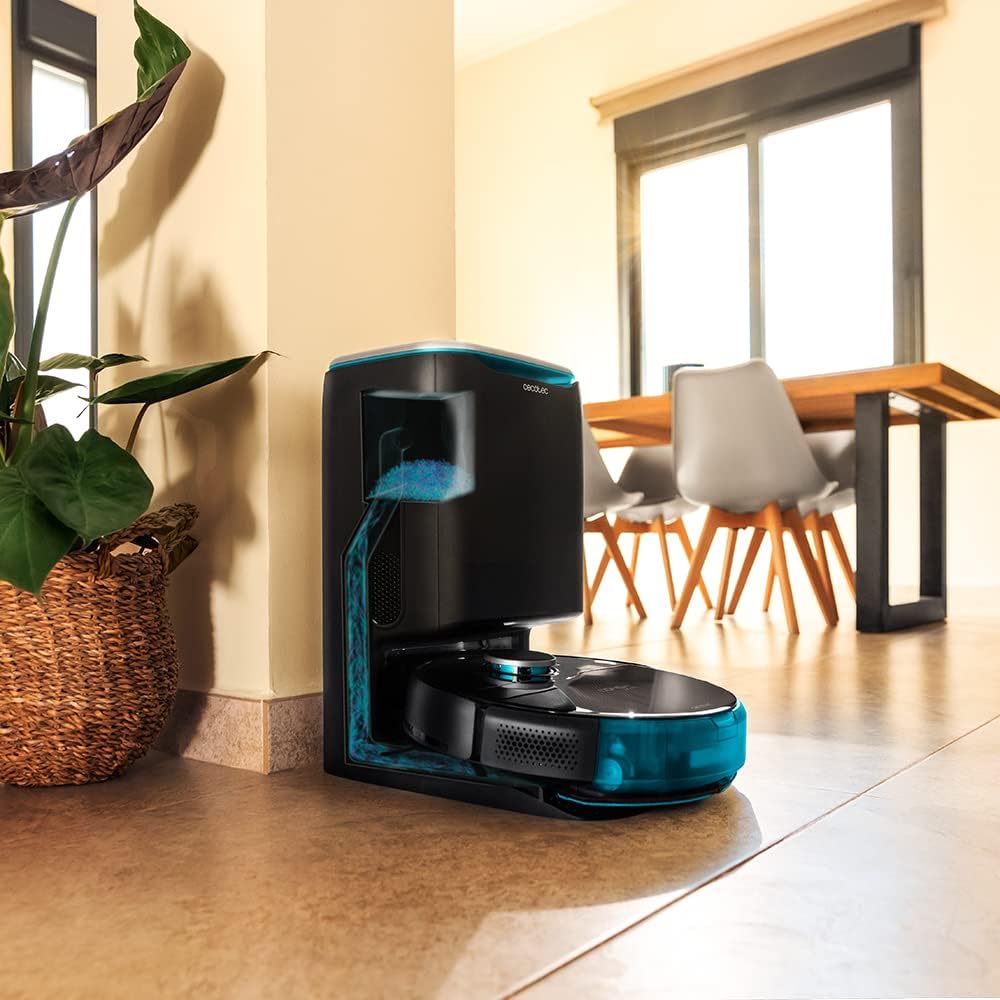
Image: The robot vacuum is compatible with the CongaHome 10.000 self-emptying station for convenient dust disposal.
Laasigbotitusita
If you encounter issues with your robot vacuum cleaner, refer to the table below for common problems and solutions.
| Isoro | Owun to le Fa | Ojutu |
|---|---|---|
| Robot ko ni tan-an tabi gba agbara. | Batiri kekere; gbigba agbara awọn olubasọrọ ni idọti; ohun ti nmu badọgba agbara ko ti sopọ. | Place robot on charging station; clean charging contacts; ensure power adapter is securely connected. |
| Iṣẹ ṣiṣe mimọ ti ko dara. | Dust bin full; brushes tangled; filter clogged. | Empty dust bin; clean main and side brushes; clean or replace filter. |
| Robot di nigbagbogbo. | Too many obstacles; sensors dirty. | Clear the cleaning area of loose cables and small objects; clean all sensors. |
| App Asopọmọra oran. | Incorrect Wi-Fi password; weak Wi-Fi signal; robot not in pairing mode. | Verify Wi-Fi password; ensure robot is within Wi-Fi range; reset robot and re-attempt pairing as per app instructions. |
| Robot ṣe ariwo dani. | Brush or wheel obstructed; foreign object inside. | Check and clean main brush, side brushes, and wheels for obstructions. |
Awọn pato
| Ẹya ara ẹrọ | Ẹ̀kúnrẹ́rẹ́ |
|---|---|
| Brand | Cecotec |
| Orukọ awoṣe | Conga 9090 AI |
| Nọmba awoṣe | 05416 |
| Àwọ̀ | Dudu |
| Ọja Mefa | 17.5 x 40 x 54.2 cm |
| Iwọn Nkan | 4.1 kilo |
| Agbara (Eruku Bin) | 2.5 liters |
| Ariwo Ipele | 64 dB |
| Tiipa aifọwọyi | Rara |
| Awọn ẹrọ ibaramu | Amazon iwoyi, Google Home |
| Pataki Ẹya | Eto siseto |
Atilẹyin ọja ati Support
For warranty information, technical support, or service requests, please refer to the warranty card included with your product or visit the official Cecotec webojula. Tọju iwe-ẹri rira rẹ bi ẹri rira fun awọn iṣeduro atilẹyin ọja.
O tun le ṣàbẹwò awọn Cecotec Store on Amazon fun alaye ọja diẹ sii ati awọn orisun atilẹyin.