Ọrọ Iṣaaju
This manual provides detailed instructions for the installation, operation, and maintenance of your Podofo 7-inch LCD Monitor Reversing Camera System. This system is designed to enhance safety and convenience when reversing or parking various vehicles, including trucks, SUVs, vans, and motorhomes. Please read this manual thoroughly before using the product to ensure proper function and longevity.

Figure 1: Applicable Vehicle Models. The system is suitable for a wide range of vehicles including trucks, school buses, fire trucks, vans, buses, and RVs.
Ọja Pariview ati Awọn akoonu Package
The Podofo Reversing Camera System includes a high-definition 7-inch LCD monitor and an IP69 waterproof camera with night vision capabilities. It supports dual camera input and is designed for simple installation with a 10-meter 4-pin extension cable.
Awọn ẹya pataki:
- 7-inch TFT LCD Monitor: 800x480 resolution, NTSC/PAL system, 2 video inputs, adjustable display (up/down/left/right), DC 12V-24V power.
- IP69 Waterproof Camera: Metal housing, 420TV lines, 648x488 pixels (NTSC), 18 IR LEDs for night vision, 120° wide viewigun igun.
- Dual Channel Input: Supports connection of up to two cameras with V1/V2 switching.
- Adjustable Reverse Lines: Customize width and height of parking guidelines.
- Cable ti o tọ: 10-meter 4-pin extension cable for stable signal transmission.
- Ohun elo jakejado: Compatible with RVs, cars, campers, trucks, and caravans (DC 12V-24V).
Awọn akoonu idii:
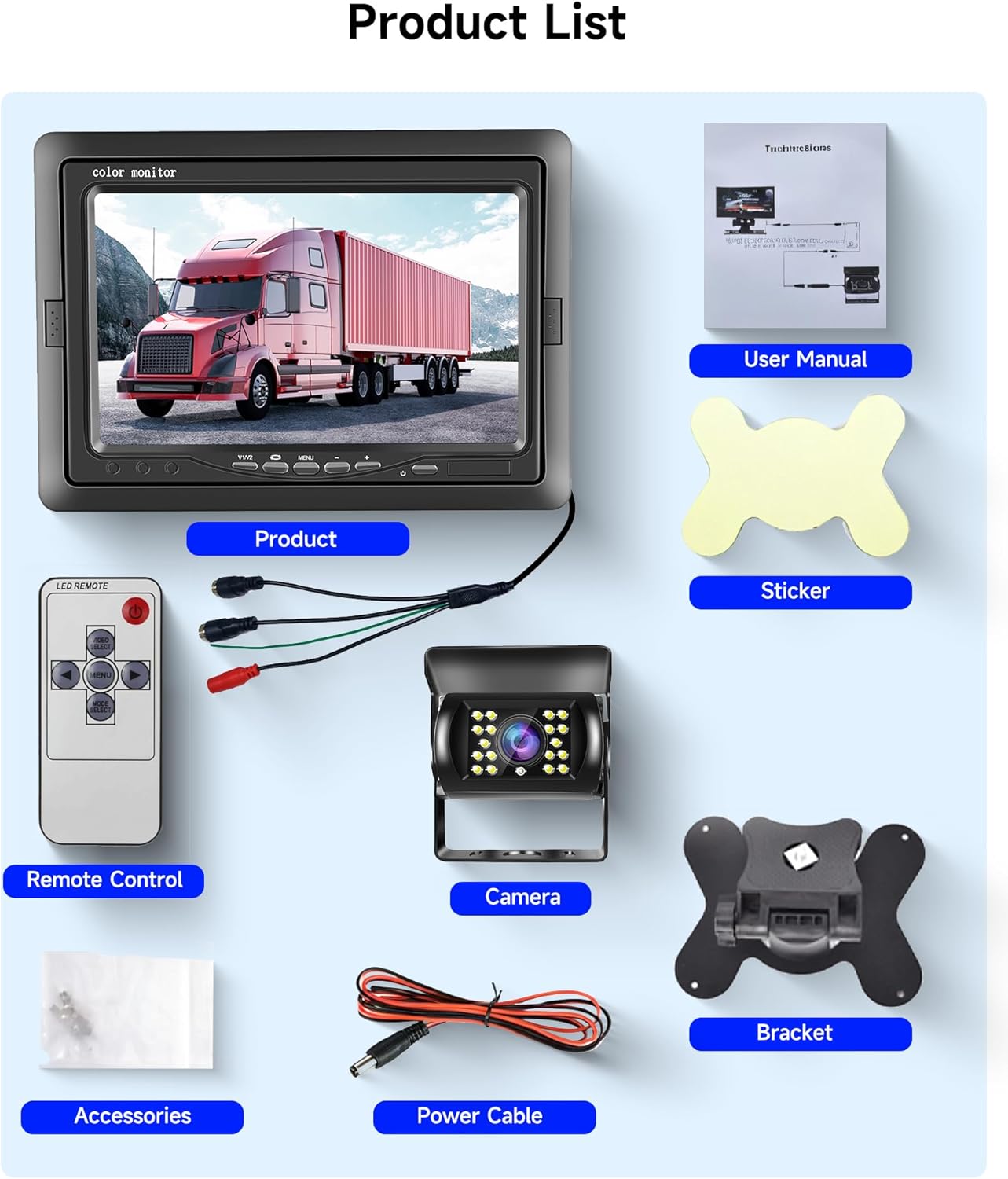
Àwòrán 2: Àkóónú Àpò. The image displays the 7-inch monitor, remote control, reversing camera, 10-meter cable, mounting bracket, power cable, small accessories, user manual, and a sticker.
- Atẹle 1 x 7-inch
- 1 x Kamẹra Yiyipada
- 1 x 10-meter Cable
- 1 x Isakoṣo latọna jijin
- 1 x Atọka iṣagbesori
- 1 x Okun Agbara
- 1 x Itọsọna olumulo
- Accessories (screws, adhesive pad)
Eto ati fifi sori
Follow these steps for proper installation of your reversing camera system. Ensure the vehicle's power is off before beginning installation.
1. Mount the Monitor:

Figure 3: Monitor Installation Steps. The image illustrates how to attach the monitor to its bracket and then secure the bracket to a flat surface, such as a dashboard, using an adhesive pad or screws.
- Attach the mounting bracket to the back of the 7-inch monitor.
- Choose a suitable location on your dashboard or windshield that does not obstruct your view.
- Secure the bracket using the provided adhesive pad or screws.
- Ṣatunṣe igun atẹle fun aipe viewing.
2. Gbe Kamẹra naa:
- Install the reversing camera at the rear of your vehicle, typically above the license plate or near the bumper.
- Ensure the camera has a clear, unobstructed view.
- The camera features a metal housing and an adjustable angle for optimal positioning.
3. Aworan aworan:
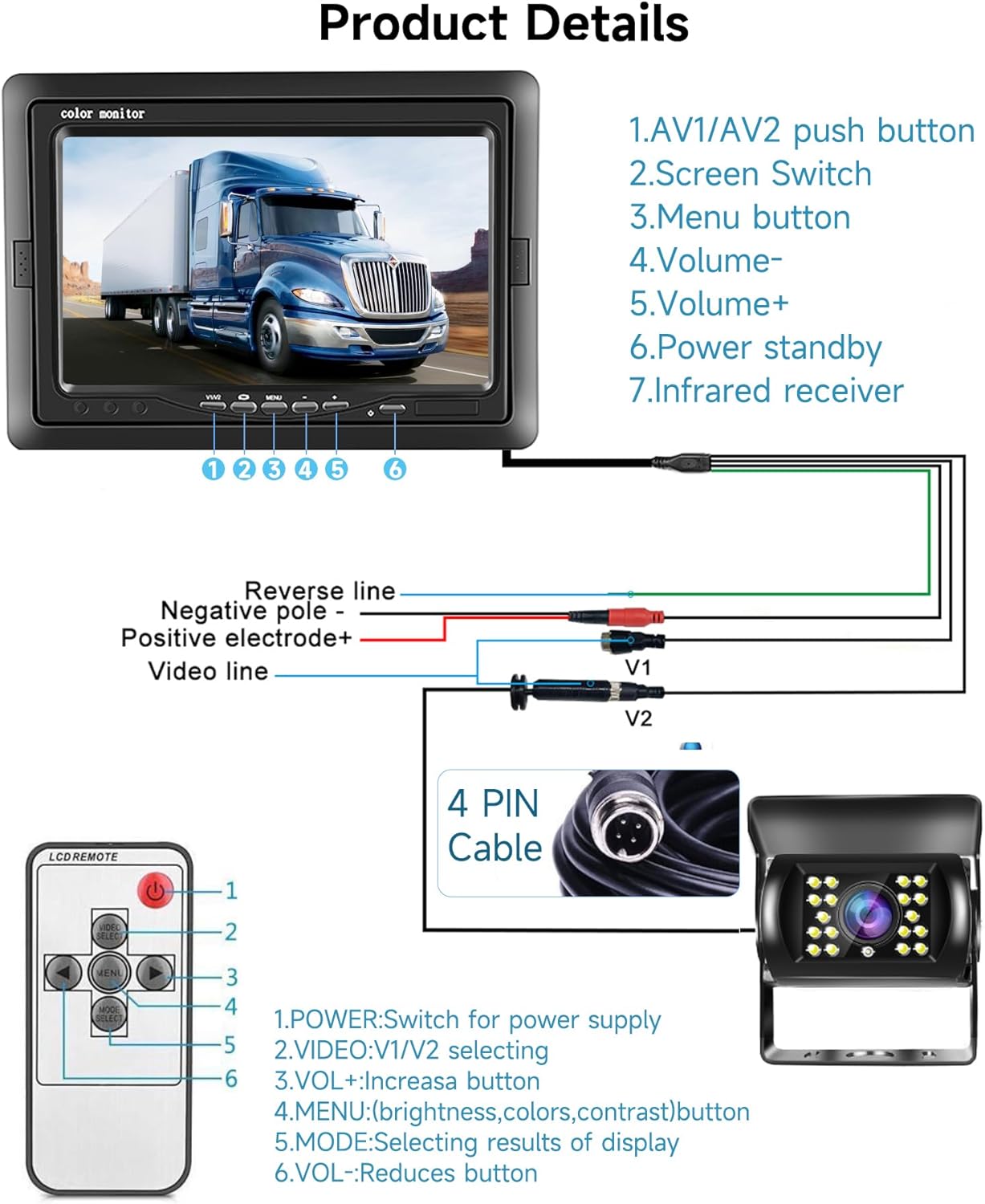
Figure 4: Wiring Connections. This diagram illustrates how to connect the monitor to the camera using the 4-pin cable, and how to connect the power supply (DC 12V-24V) to the monitor and camera. It also shows the reverse line trigger connection.
- Connect the 10-meter 4-pin extension cable to the camera.
- Route the cable through the vehicle to the monitor's location, ensuring it is secured and away from moving parts or heat sources.
- Connect the other end of the 4-pin cable to the monitor's V1 or V2 input.
- Connect the monitor's power cable to a DC 12V-24V power source in your vehicle. The red wire is positive (+), and the black wire is negative (-).
- For automatic activation when reversing, connect the reverse trigger wire (usually green or blue) from the monitor's harness to the vehicle's reverse light power wire.
- If installing a second camera, connect it to the remaining video input (V1 or V2) on the monitor.
Awọn ilana Iṣiṣẹ
Once installed, operate your Podofo reversing camera system using the monitor buttons or the remote control.
Awọn iṣakoso atẹle:
- Bọtini agbara: Tan-an/pa a atẹle naa.
- V1/V2 Button: Switches between video input channels (Camera 1 and Camera 2).
- Bọtini Akojọ: Accesses the on-screen display (OSD) menu for settings.
- +/- Awọn bọtini: Navigate menu options and adjust values (e.g., brightness, contrast, color, volume).
Awọn iṣẹ iṣakoso latọna jijin:
- Agbara: Switch for power supply.
- VIDEO (V1/V2): Selects video input.
- VOL+ / VOL-: Ṣatunṣe iwọn didun.
- Akojọ: Accesses display settings (brightness, colors, contrast).
- Ipo: Selects display results.
Awọn Eto Ifihan:

Figure 5: Monitor Display Features. This image highlights the clear display quality of the TFT LCD monitor, the ability to toggle reverse lines on/off, and the mirror image function for the camera view.
- Imọlẹ, Iyatọ, Awọ: Adjust these settings via the MENU to optimize image quality.
- Reverse Lines: The system supports adjustable parking guidelines. Access the menu to adjust the width and height of these lines to match your vehicle and preference. You can also toggle them on or off.
- Aworan Digi: The camera image can be mirrored if needed, which is useful for front camera applications or specific vehicle setups.
- Iṣalaye iboju: The display can be adjusted up/down/left/right to suit mounting preferences.
Night Vision and Waterproof Features:
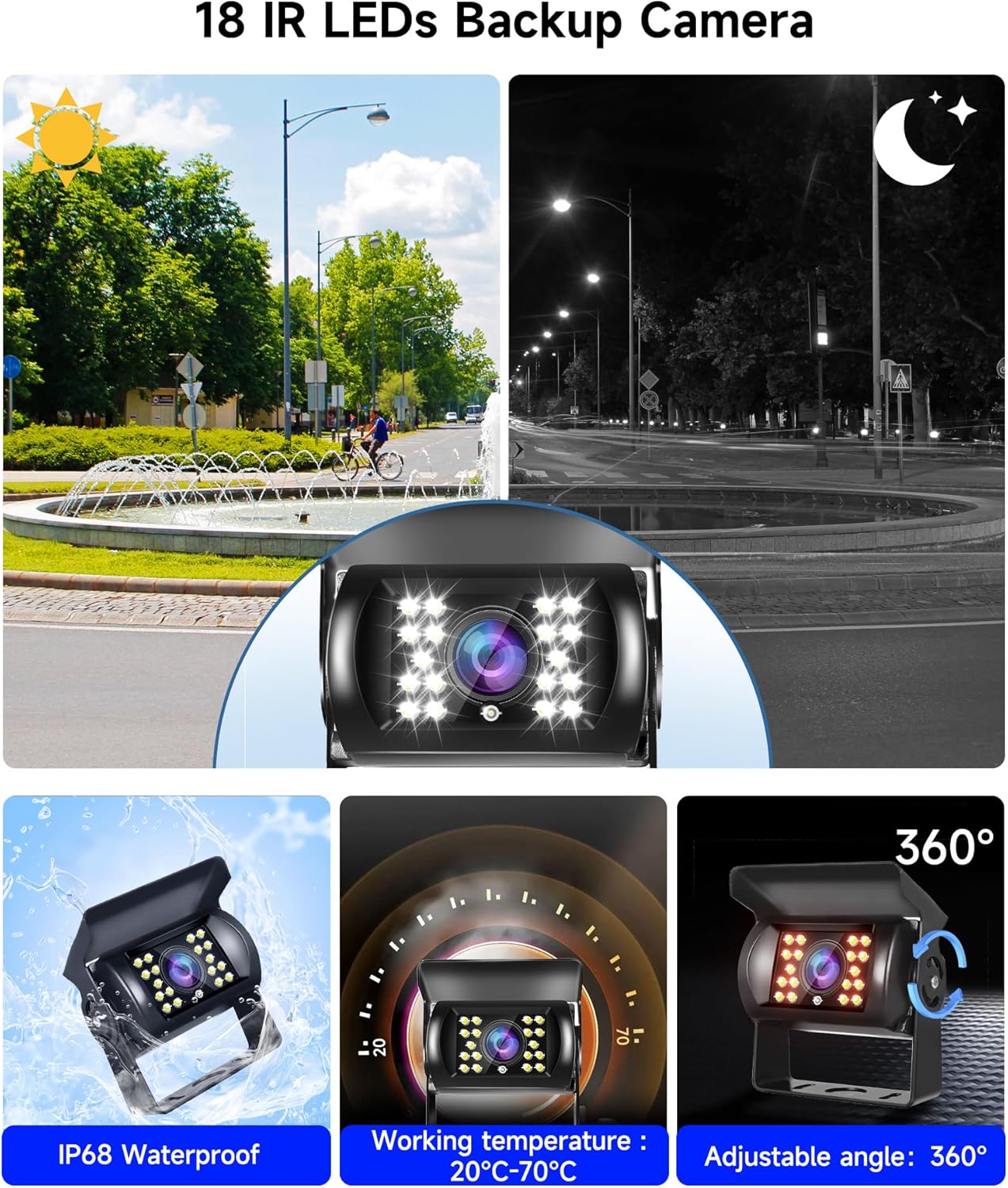
Figure 6: Camera Features. This image shows the camera's 18 IR LEDs providing clear vision in both daylight and low-light conditions, its IP68 waterproof rating, operational temperature range, and 360-degree adjustable mounting angle.
- The camera is equipped with 18 IR LEDs, providing clear vision even in complete darkness.
- With an IP69 waterproof rating, the camera is designed to withstand harsh weather conditions, including rain, snow, and dusty environments.
Itoju
Regular maintenance ensures optimal performance and extends the lifespan of your Podofo reversing camera system.
- Nsọ lẹnsi Kamẹra nu: Fọ lẹnsi kamẹra lẹẹkọọkan pẹlu asọ, damp cloth to remove dirt, dust, or water spots that may obscure the view. Yago fun abrasive ose.
- Fífọ iboju Atẹle: Use a soft, lint-free cloth to clean the monitor screen. For stubborn smudges, a screen cleaner designed for electronics can be used.
- Ayẹwo USB: Regularly check all cables for any signs of wear, damage, or loose connections. Secure any loose cables to prevent interference or disconnection.
- Aabo iṣagbesori: Ensure the monitor and camera mounts remain secure. Tighten any screws if necessary.
- Awọn ipo Ayika: While the camera is IP69 waterproof, extreme temperatures outside the specified operating range (-20°C to 70°C for camera, -10°C to 40°C for monitor) should be avoided if possible.
Laasigbotitusita
If you encounter issues with your Podofo reversing camera system, refer to the following troubleshooting guide:
| Isoro | Owun to le Fa | Ojutu |
|---|---|---|
| Ko si aworan lori atẹle |
|
|
| Flicker tabi aworan ti o daru |
|
|
| Monitor does not turn on automatically when reversing |
|
|
| Iran oru ko sise |
|
|
Awọn pato
| Ẹya ara ẹrọ | Ẹya ara ẹrọ | Iye |
|---|---|---|
| Atẹle | Iwon iboju | 7 inches |
| Ipinnu | 800*480 | |
| Ohun elo Ile | ABS | |
| TV System | NTSC/PAL | |
| Awọn igbewọle fidio | 2 (V1/V2) | |
| Ibi ti ina elekitiriki ti nwa | DC 12V - 24V | |
| Agbara agbara | 5W | |
| Awọn iwọn otutu ti nṣiṣẹ | -10°C ~ +40°C | |
| Ibi ipamọ otutu | -25°C ~ +80°C | |
| Awọn ede | English, Russian, Chinese, Japanese, Korean | |
| Kamẹra | Ohun elo Ile | Irin |
| Sensọ Aworan | CMOS | |
| Mabomire Rating | IP69 | |
| Ipinnu Ipetele | Awọn ọna 420TV | |
| Effective Pixels (NTSC) | 648× 488 awọn piksẹli | |
| Ibi ti ina elekitiriki ti nwa | DC 12V - 24V | |
| Awọn iwọn otutu ti nṣiṣẹ | -20°C ~ +70°C (RH95% MAX) | |
| Ibi ipamọ otutu | -40°C ~ +85°C (RH95% MAX) | |
| USB | Gigun | 10 mita |
| Asopọmọra Iru | 4-pin (proprietary) |
Atilẹyin ọja ati Support
Podofo offers a comprehensive warranty and dedicated customer support for your product.
- Atilẹyin ọja: This product comes with a 2-year manufacturer's warranty. Please retain your proof of purchase for warranty claims.
- Oluranlowo lati tun nkan se: Podofo provides lifetime technical support for this product. If you encounter any issues or have questions not covered in this manual, please contact our professional customer service team.
- Ibi iwifunni: Refer to the contact details provided on the Podofo official website or your purchase documentation for support.


