Ọrọ Iṣaaju
Thank you for choosing the Tribit FlyBuds 3 True Wireless Earbuds. This manual provides detailed instructions on how to set up, operate, maintain, and troubleshoot your earbuds to ensure optimal performance and longevity. Please read this manual carefully before using the product.
Package Awọn akoonu
Jọwọ ṣayẹwo package fun awọn nkan wọnyi:
- Tribit FlyBuds 3 True Wireless Earbuds (L/R)
- Ngba agbara Case
- USB-C Ngba agbara Cable
- Multiple Sizes of Eartips (S/M/L)
- Itọsọna olumulo
Ọja Pariview

Nọmba 1: Tribit FlyBuds 3 Earbuds and Charging Case. This image shows the pink charging case open with one earbud inside and the other earbud outside, displaying its design.
Nọmba 2: Tribit FlyBuds 3 Charging Case Controls. This image highlights the multi-function button on the charging case, indicating its uses for battery voltage check, re-pairing, and power output.
The Tribit FlyBuds 3 consist of two wireless earbuds and a portable charging case. The charging case not only protects and charges the earbuds but also functions as a power bank for other devices.
- Awọn afetigbọ: Each earbud features a touch control area for managing playback, calls, and voice assistant.
- Ngba agbara: Equipped with LED indicators for battery status and a multi-function button for various operations including pairing and power output.
Ṣeto
1. Ngba agbara si Earbuds ati Ọran
Ṣaaju lilo akọkọ, gba agbara ni kikun awọn agbekọri ati apoti gbigba agbara.
- Gbigba agbara si ọran naa: Connect the USB-C charging cable to the charging port on the case and a power source. The LED indicators on the case will show the charging progress.
- Ngba agbara si Earbuds: Place the earbuds into the charging case. They will automatically begin charging. The case LEDs will indicate the earbuds' charging status.

Nọmba 3: Long-lasting Battery. This image shows the earbuds inside the charging case, emphasizing the 100 hours of cycle playtime, 20 times recharge capability, and 5 hours of music playtime per charge.
The Tribit FlyBuds 3 offer up to 5 hours of music playback per charge, and the charging case provides an additional 100 hours of playtime, allowing for multiple recharges on the go.
2. Using the Charging Case as a Power Bank
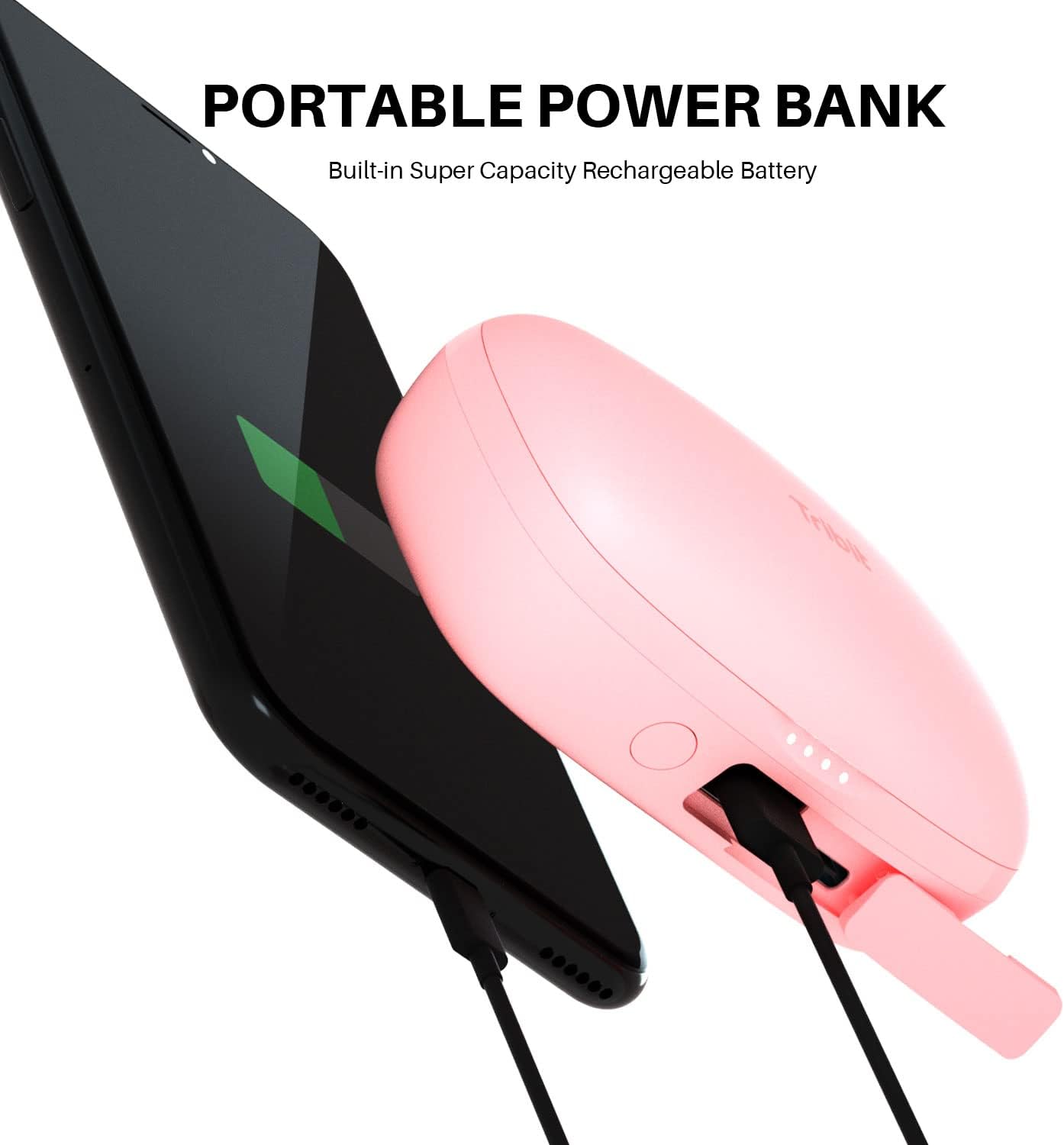
The charging case can also serve as a portable power bank for your smartphone or other small devices.
- Connect your device to the USB-A output port on the charging case using an appropriate cable.
- Press the multi-function button on the case to initiate charging for your connected device.

Nọmba 4: Portable Power Bank Feature. This image illustrates the Tribit FlyBuds 3 charging case connected via a cable to a smartphone, demonstrating its capability to charge other devices.
3. Sisopọ pẹlu Ẹrọ Rẹ
The FlyBuds 3 feature one-step pairing for convenience.
- Pipọpọ akọkọ: Open the charging case. The earbuds will automatically enter pairing mode and connect to the last paired device. If no device is found, they will enter discovery mode.
- Sísopọ̀ mọ́ ẹ̀rọ tuntun kan: With the earbuds in the case and the lid open, press and hold the multi-function button on the charging case for 10 seconds until the LED indicators flash, indicating re-pairing mode. Then, select "Tribit FlyBuds 3" from your device's Bluetooth list.
Ṣiṣẹ
1. Wọ awọn Earbuds
For optimal sound quality and comfort, choose the eartips that best fit your ears. Insert the earbuds into your ear canal and gently twist them to secure a snug fit.

Nọmba 5: Earbud in Ear. This image shows a person wearing one of the pink Tribit FlyBuds 3 earbuds, demonstrating its discreet and comfortable fit.

Nọmba 6: Close-up of Earbud Fit. A detailed view of the Tribit FlyBuds 3 earbud properly seated in a person's ear, highlighting its ergonomic design.
2. Awọn iṣakoso ifọwọkan
The Tribit FlyBuds 3 utilize touch controls for various functions. The touch control area is located on the outer surface of each earbud.
| Iṣe | Išẹ |
|---|---|
| Fọwọ ba ẹyọkan (L/R) | Mu ṣiṣẹ/sinmi orin, Dahun/pari ipe |
| Tẹ ni kia kia lẹẹmeji (Ẹkọ Atẹti ọtun) | Next Track |
| Tẹ ni kia kia lẹẹmeji (Agbohun Akọkọ osi) | Ti tẹlẹ Track |
| Tẹ ni kia kia Mẹta (Ẹkọ Atẹti ọtun) | Iwọn didun soke |
| Tẹ ni kia kia Mẹta (Ẹkọ Atẹti osi) | Iwọn didun isalẹ |
| Tẹ mọlẹ (2s) | Kọ ipe, Mu Oluranlọwọ Ohun ṣiṣẹ |
Itoju
Proper maintenance ensures the longevity and performance of your Tribit FlyBuds 3.
- Ninu: Mọ awọn afikọti nigbagbogbo ati apoti gbigba agbara pẹlu asọ ti o gbẹ, asọ ti ko ni lint. Maṣe lo awọn kẹmika lile tabi awọn ohun elo abrasive.
- Awọn ohun-ọṣọ: Remove and clean the eartips with water and mild soap if necessary. Ensure they are completely dry before reattaching.
- Awọn olubasọrọ gbigba agbara: Periodically clean the charging contacts on both the earbuds and inside the case with a dry cotton swab to ensure proper charging.
- Omi Resistance: The FlyBuds 3 boast an IPX8 waterproof rating, meaning they are protected against prolonged immersion in water. However, it is recommended to dry them thoroughly after exposure to water before placing them back in the charging case to prevent damage to the charging contacts.
- Ibi ipamọ: Nigbati o ko ba si ni lilo, tọju awọn afikọti sinu apoti gbigba agbara wọn lati daabobo wọn ki o jẹ ki wọn gba agbara. Tọju ni itura, ibi gbigbẹ kuro lati awọn iwọn otutu to gaju.
Laasigbotitusita
If you encounter issues with your Tribit FlyBuds 3, try the following solutions:
- Awọn agbekọri ti ko so pọ:
- Rii daju pe awọn agbekọri mejeeji ti gba agbara.
- Place both earbuds back into the charging case, close the lid, and then open it again to re-initiate pairing.
- Forget "Tribit FlyBuds 3" from your device's Bluetooth settings and attempt to re-pair.
- Ṣe atunto ile-iṣẹ kan (wo isalẹ).
- Agbekọri agbekọri kan ṣoṣo ti n ṣiṣẹ:
- Rii daju pe awọn agbekọri mejeeji ti gba agbara.
- Place both earbuds back into the charging case and close the lid for 5 seconds, then open it again.
- Nu awọn olubasọrọ gbigba agbara kuro lori awọn agbekọri mejeeji ati inu ọran naa.
- Ko si ohun tabi iwọn kekere:
- Mu iwọn didun pọ si lori ẹrọ rẹ mejeeji ati awọn agbekọri.
- Rii daju pe awọn agbekọri ti sopọ daradara si ẹrọ rẹ.
- Gbiyanju orisun ohun afetigbọ miiran tabi ohun elo.
- Awọn iṣoro gbigba agbara:
- Rii daju pe okun gbigba agbara ti sopọ ni aabo.
- Gbiyanju okun gbigba agbara ti o yatọ tabi ohun ti nmu badọgba agbara.
- Nu awọn olubasọrọ gbigba agbara lori awọn agbekọri ati apoti naa.
Atunto ile-iṣẹ
If the above steps do not resolve the issue, you can perform a factory reset:
- Gbe awọn afikọti mejeeji sinu ọran gbigba agbara.
- Press and hold the multi-function button on the charging case for 10 seconds until the LED indicators flash rapidly. This clears the pairing history.
- Remove "Tribit FlyBuds 3" from your device's Bluetooth list.
- Repeat the pairing process as described in the "Setup" section.
Awọn pato
| Ẹya ara ẹrọ | Ẹ̀kúnrẹ́rẹ́ |
|---|---|
| Brand | Tribit |
| Awoṣe | FlyBuds 3 |
| Asopọmọra Technology | Ailokun (Bluetooth) |
| Fọọmù ifosiwewe | Ninu Eti |
| Igbesi aye batiri (Earbuds) | Titi di wakati 5 |
| Lapapọ akoko ere (pẹlu Ọran) | Titi di wakati 100 |
| Omi Resistance Ipele | IPX8 mabomire |
| Ọna Iṣakoso | Fọwọkan |
| Awọn Lilo Ni pato Fun Ọja | Sinima ati ere |
Atilẹyin ọja ati Support
Tribit products are designed with quality and reliability in mind. For information regarding warranty coverage and customer support, please refer to the warranty card included in your product packaging or visit the official Tribit website. If you experience any issues not covered in this manual, please contact Tribit customer service for assistance.
Tribit Official Webojula: www.tribit.com


