1. Ifihan
The Sonel CMM 30 is an advanced industrial multimeter engineered for versatility, modern functionality, and exceptional durability. This device integrates 11 fundamental measurement functions along with additional features, providing a broad spectrum of applications for professionals. Its robust design includes drop protection and an IP67 rated casing, ensuring reliable performance even in challenging environments.
Key features include a smartphone application for remote reading and data saving via wireless communication, an automatically adjusting backlight for optimal screen visibility, and a built-in flashlight for illumination in dark conditions. This manual provides essential information for the safe and effective use of your CMM 30 multimeter.
2. Alaye Aabo
Always adhere to the following safety precautions to prevent electric shock, injury, or damage to the meter or equipment under test.
- Read and understand all instructions and safety information in this manual before operating the meter.
- Ma ṣe lo mita naa ti o ba han pe o bajẹ tabi ti idabobo ti o wa lori awọn itọsọna idanwo ba ni ipalara.
- Nigbagbogbo ge asopọ agbara si awọn Circuit ki o si mu gbogbo ga-voltage capacitors before making resistance, continuity, diode, or capacitance measurements.
- Lo iṣọra nigbati o ba n ṣiṣẹ pẹlu voltages loke 30V AC RMS, 42V tente oke, tabi 60V DC. Awọn wọnyi ni voltages duro a mọnamọna ewu.
- Maṣe kọja awọn ifilelẹ titẹ sii ti o pọju fun iṣẹ eyikeyi.
- Rii daju pe iyipada iṣẹ wa ni ipo to pe fun wiwọn ti o fẹ ṣaaju ki o to somọ awọn itọsọna idanwo si Circuit.
- Replace batteries as soon as the low battery indicator appears to ensure accurate readings.
- Má ṣe lo mita náà níbi tí afẹ́fẹ́, èéfín, tàbí eruku bá ń gbóná.
3. Package Awọn akoonu
Verify that all items listed below are present and undamaged upon opening the package:
- Sonel CMM 30 Industrial Multimeter
- Awọn itọsọna Idanwo (Pupa ati Dudu)
- Ìwádìí Ìwọ̀n Òtútù (Hemrocouple irú K)
- 4 x AAA Batteries (pre-installed or separate)
- Afowoyi Olumulo (iwe-ipamọ yii)
Ti awọn ohun kan ba nsọnu tabi bajẹ, jọwọ kan si olupese rẹ lẹsẹkẹsẹ.
4. Ọja Ipariview
Familiarize yourself with the components of your Sonel CMM 30 multimeter:
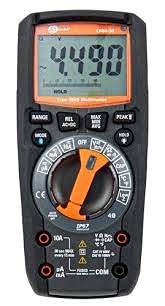
olusin 4.1: Iwaju view of the Sonel CMM 30 Industrial Multimeter. This image displays the device's main components, including the digital display, the central rotary function switch, and the various input terminals for test leads.
4.1. Ifihan
The large LCD shows measurement readings, units, function indicators, and battery status. It features an automatic backlight that adjusts to ambient light conditions for optimal visibility.
4.2. Yiyi iṣẹ Yipada
This central switch is used to select the desired measurement function (e.g., Voltage, Current, Resistance, Capacitance, Temperature, Frequency).
4.3. Awọn bọtini iṣẹ
Various buttons provide additional controls and features:
- RANGE: Ó máa ń yí padà láàárín ìpele tí a fi ọwọ́ ṣe àti ìpele tí a fi ara ṣe.
- Ipo: Selects sub-functions within a main rotary switch position (e.g., AC/DC voltage, Diode/Ìtẹ̀síwájú).
- MU: Dii ti isiyi àpapọ kika.
- Max/MIN/AVG: Records maximum, minimum, and average readings.
- REL: Relative mode, subtracts a stored value from subsequent measurements.
- Bluetooth/Light: Activates Bluetooth connectivity for the smartphone app and controls the built-in flashlight.
4.4. Input Jacks
These are the connection points for the test leads:
- COM: Common terminal for the black test lead.
- VΩHzCAP°C: Iṣagbewọle fun voltage, resistance, frequency, capacitance, and temperature measurements (red test lead).
- mAµA: Ìfilọ́lẹ̀ fún milliampere ati microampere current measurements (red test lead).
- 10A: Input for up to 10 Ampere current measurements (red test lead).
5. Eto
5.1. Fifi sori batiri
The Sonel CMM 30 requires 4 AAA batteries. These may be pre-installed or included separately.
- Rii daju pe multimeter ti wa ni pipa.
- Wa ibi ipamọ batiri naa ni ẹhin mita naa.
- Lo ẹ̀rọ ìdènà láti tú ìdènà (àwọn) tí ó ń so ìbòrí batiri náà mọ́.
- Yọ ideri batiri kuro.
- Insert the 4 AAA batteries, observing the correct polarity (+ and -) as indicated inside the compartment.
- Padà ideri batiri náà kí o sì di skru náà mú dáadáa.
Akiyesi: Always use fresh batteries of the same type. Remove batteries if the meter is not used for an extended period to prevent leakage.
6. Awọn ilana Iṣiṣẹ
6.1. Agbara lori / Paa
Turn the rotary function switch from the OFF position to any desired measurement function to power on the meter. To power off, turn the switch back to the OFF position.
6.2. Basic Measurement Procedures
Before any measurement, ensure the test leads are correctly inserted into the appropriate input jacks for the selected function.
6.2.1. Ofurufutage Wiwọn (AC/DC)
- Insert the black test lead into the COM jack and the red test lead into the VΩHzCAP°C jack.
- Yi iyipada iyipo pada si V~ (AC Vol)tage) tabi V- (DC Voltage) position. If both are combined, use the MODE button to select AC or DC.
- Connect the test leads in parallel across the circuit or component to be measured.
- Ka voltage iye lori ifihan.
6.2.2. Ìwọ̀n Ìwọ̀n Lọ́wọ́lọ́wọ́ (AC/DC)
Iṣọra: Never connect the meter in parallel for current measurement. Always connect in series with the circuit.
- Insert the black test lead into the COM jack. For currents up to 10A, insert the red test lead into the 10A jack. For smaller currents (mA/µA), insert the red test lead into the mAµA jack.
- Turn the rotary switch to the A~ (AC Current) or A- (DC Current) position, or the mA/µA position as appropriate. Use the MODE button to select AC or DC if needed.
- Open the circuit where current is to be measured and connect the meter in series.
- Ka iye lọwọlọwọ lori ifihan naa.
6.2.3. Resistance Wiwọn
- Insert the black test lead into the COM jack and the red test lead into the VΩHzCAP°C jack.
- Turn the rotary switch to the Ω (Resistance) position.
- Ensure the circuit or component is de-energized before connecting the test leads across it.
- Ka iye resistance lori ifihan.
6.2.4. Iwọn Iwọn agbara
- Insert the black test lead into the COM jack and the red test lead into the VΩHzCAP°C jack.
- Turn the rotary switch to the CAP (Capacitance) position.
- Ensure the capacitor is fully discharged before connecting the test leads across it.
- Ka iye kapasito lori ifihan.
6.2.5. Iwọn Iwọn otutu
- Insert the temperature probe into the VΩHzCAP°C and COM jacks, observing polarity if applicable.
- Turn the rotary switch to the °C/°F (Temperature) position.
- Fi opin ohun elo iwọn otutu si ori tabi nitosi ohun ti a fẹ wọn iwọn otutu rẹ.
- Ka iye iwọn otutu lori ifihan naa.
6.3. Awọn ẹya ara ẹrọ ti ilọsiwaju
6.3.1. True RMS Measurement
The CMM 30 features True RMS for AC voltage and current measurements, providing accurate readings for non-sinusoidal waveforms.
6.3.2. Wireless Communication and Smartphone App
The CMM 30 can connect wirelessly to a smartphone application, allowing for remote reading and saving of measurements. This is particularly useful in hard-to-reach or hazardous locations.
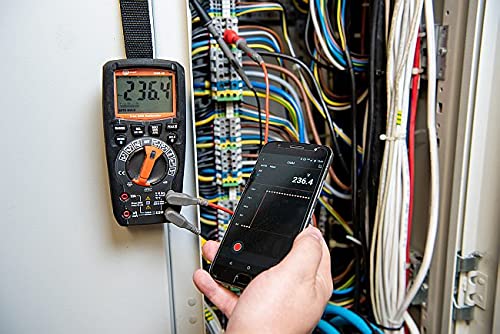
Figure 6.1: The Sonel CMM 30 Multimeter connected to an electrical panel, demonstrating its wireless communication feature. A smartphone displays the measurement reading remotely, highlighting the convenience for inaccessible areas.
Lati lo ẹya ara ẹrọ yii:
- Download the official Sonel CMM app from your smartphone's app store.
- Mu Bluetooth ṣiṣẹ lori foonuiyara rẹ.
- Press the Bluetooth button on the multimeter to activate its wireless communication.
- Follow the app's instructions to pair with your CMM 30 and begin remote monitoring.
6.3.3. Itumọ ti Flashlight
The integrated flashlight assists in illuminating measurement areas, especially in low-light conditions. Activate it by pressing the dedicated light button.
6.4. Durability and IP67 Rating
The CMM 30 is designed with an IP67 rating, signifying its protection against dust ingress and immersion in water up to 1 meter for 30 minutes. This makes it suitable for demanding industrial environments.
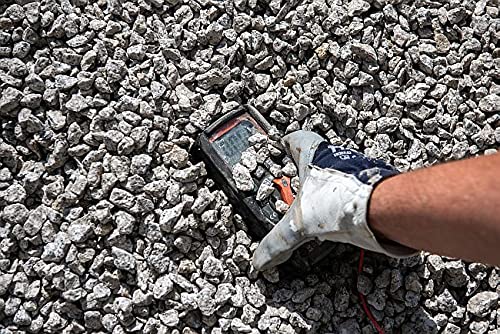
Figure 6.2: The Sonel CMM 30 Multimeter partially submerged in gravel, illustrating its robust construction and resistance to dust and debris, a testament to its IP67 rating.
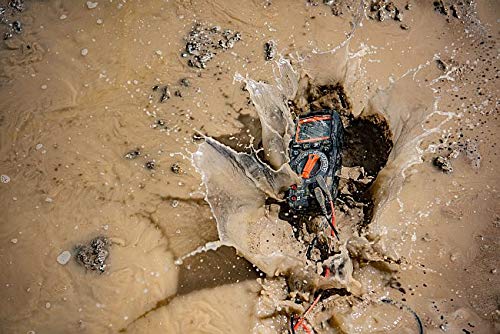
Figure 6.3: The Sonel CMM 30 Multimeter creating a splash as it impacts a muddy puddle, demonstrating its exceptional water resistance and ability to withstand harsh, wet conditions.
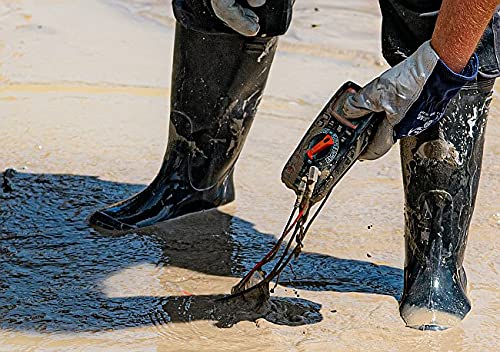
Figure 6.4: A person, wearing protective boots and gloves, retrieves the Sonel CMM 30 Multimeter from a muddy environment. This image emphasizes the device's resilience and ease of handling even after exposure to challenging conditions.
7. Itọju
7.1. Ninu
Nu mita c naaasing pẹlu ipolowoamp Aṣọ àti ọṣẹ ìfọṣọ díẹ̀. Má ṣe lo àwọn ohun ìfọṣọ tàbí àwọn ohun tí ó ń yọ́ omi. Rí i dájú pé mita náà gbẹ pátápátá kí o tó lò ó.
7.2. Batiri Rirọpo
Refer to Section 5.1 for battery replacement instructions. Replace batteries promptly when the low battery indicator appears on the display.
7.3. Ibi ipamọ
When not in use for extended periods, store the multimeter in a dry, cool place, away from direct sunlight and extreme temperatures. Remove the batteries to prevent leakage.
8. Laasigbotitusita
| Isoro | Owun to le Fa | Ojutu |
|---|---|---|
| Mita ko ni agbara lori. | Awọn batiri ti o ku tabi ti ko tọ ti fi sori ẹrọ. | Ṣayẹwo polarity batiri tabi ropo awọn batiri. |
| A kò fi kíkà tàbí "OL" (Overload) hàn. | Iṣẹ́ tí kò tọ́ ni a yàn; ìṣípo ṣíṣí; ìwọ̀n kọjá ìwọ̀n. | Select correct function; check circuit continuity; switch to a higher range or auto-range. |
| Awọn kika ti ko pe. | Batiri kekere; awọn itọsọna idanwo idọti/jacks; idamu ita. | Replace batteries; clean leads/jacks; move away from strong electromagnetic fields. |
| Awọn oran asopọ Bluetooth. | Bluetooth not enabled on meter/phone; app issues; distance. | Ensure Bluetooth is on; restart app/phone; reduce distance between devices. |
9. Awọn pato
| Ẹya ara ẹrọ | Sipesifikesonu |
|---|---|
| Brand | kẹhin ere |
| Nọmba awoṣe | OMO001 |
| Àwọ̀ | Dudu |
| Iwọn Nkan | 418 g |
| Package Mefa | 30 x 15 x 10 cm |
| Awọn batiri | Awọn batiri AAA 4 nilo (pẹlu) |
| Awọn iṣẹ wiwọn | AC/DC Voltage, AC/DC Current, Resistance, Capacity, Temperature, Duty Cycle, Frequency |
| Ibiti o wa | Afowoyi ati Aifọwọyi |
| RMS otitọ | Yes (for AC voltage ati lọwọlọwọ) |
| Ingress Idaabobo (IP) Rating | IP67 |
| Asopọmọra | Wireless (Smartphone App) |
| Afikun Awọn ẹya ara ẹrọ | HOLD function, Built-in flashlight, Backlight auto-adjustment |
10. Atilẹyin ọja ati Support
10.1. atilẹyin ọja Information
Sonel products are manufactured to high standards and are warranted against defects in materials and workmanship for a period specified by your regional distributor from the date of purchase. This warranty does not cover damage caused by misuse, unauthorized modification, accident, or neglect. Please retain your proof of purchase for warranty claims.
10.2. Imọ Support
For technical assistance, troubleshooting beyond this manual, or warranty inquiries, please contact your local Sonel distributor or the authorized service center. Contact information can typically be found on the Sonel official webojula tabi nipasẹ rẹ ojuami ti o ra.
When contacting support, please have your product model number (SON001) and purchase date readily available.


