1. Awọn Ilana Aabo pataki
Please read these instructions carefully before using the product and retain them for future reference. Failure to follow these instructions may result in electric shock, fire, or other hazards.
- Ma ṣe fi ohun elo yii han si ojo tabi ọrinrin.
- Ma ṣe dina eyikeyi awọn ṣiṣi atẹgun. Fi sori ẹrọ ni ibamu pẹlu awọn ilana ti olupese.
- Maṣe fi sori ẹrọ nitosi awọn orisun ooru gẹgẹbi awọn imooru, awọn iforukọsilẹ ooru, awọn adiro, tabi awọn ohun elo miiran (pẹlu ampliifiers) ti o gbe ooru jade.
- Dabobo okun agbara lati ma rin tabi fun pọ, ni pataki ni awọn ifibọ, awọn apo itọju, ati aaye ti wọn jade kuro ninu ohun elo.
- Lo awọn asomọ/awọn ẹya ara ẹrọ ti olupese pato.
- Yọọ ohun elo yi nigba iji manamana tabi nigba lilo fun igba pipẹ.
- Tọkasi gbogbo iṣẹ si awọn oṣiṣẹ iṣẹ ti o peye. Iṣẹ nilo nigbati ohun elo ba ti bajẹ ni ọna eyikeyi, gẹgẹbi okun ipese agbara tabi plug ti bajẹ, omi ti ta silẹ tabi awọn nkan ti ṣubu sinu ẹrọ, ohun elo naa ti farahan si ojo tabi ọrinrin, ko ṣiṣẹ deede. , tabi ti lọ silẹ.
- The stylus is delicate; handle with care to avoid damage.
2. Ọja Ipariview
The Udreamer UD001 is a belt-driven vinyl record player featuring built-in speakers, Bluetooth connectivity, USB playback, AUX-IN, and RCA line-out. It supports 3 speeds for various record types.

Aworan: Iwaju view of the Udreamer UD001 Vinyl Record Player with a record on the platter and the dust cover open.
2.1 Irinše ati idari
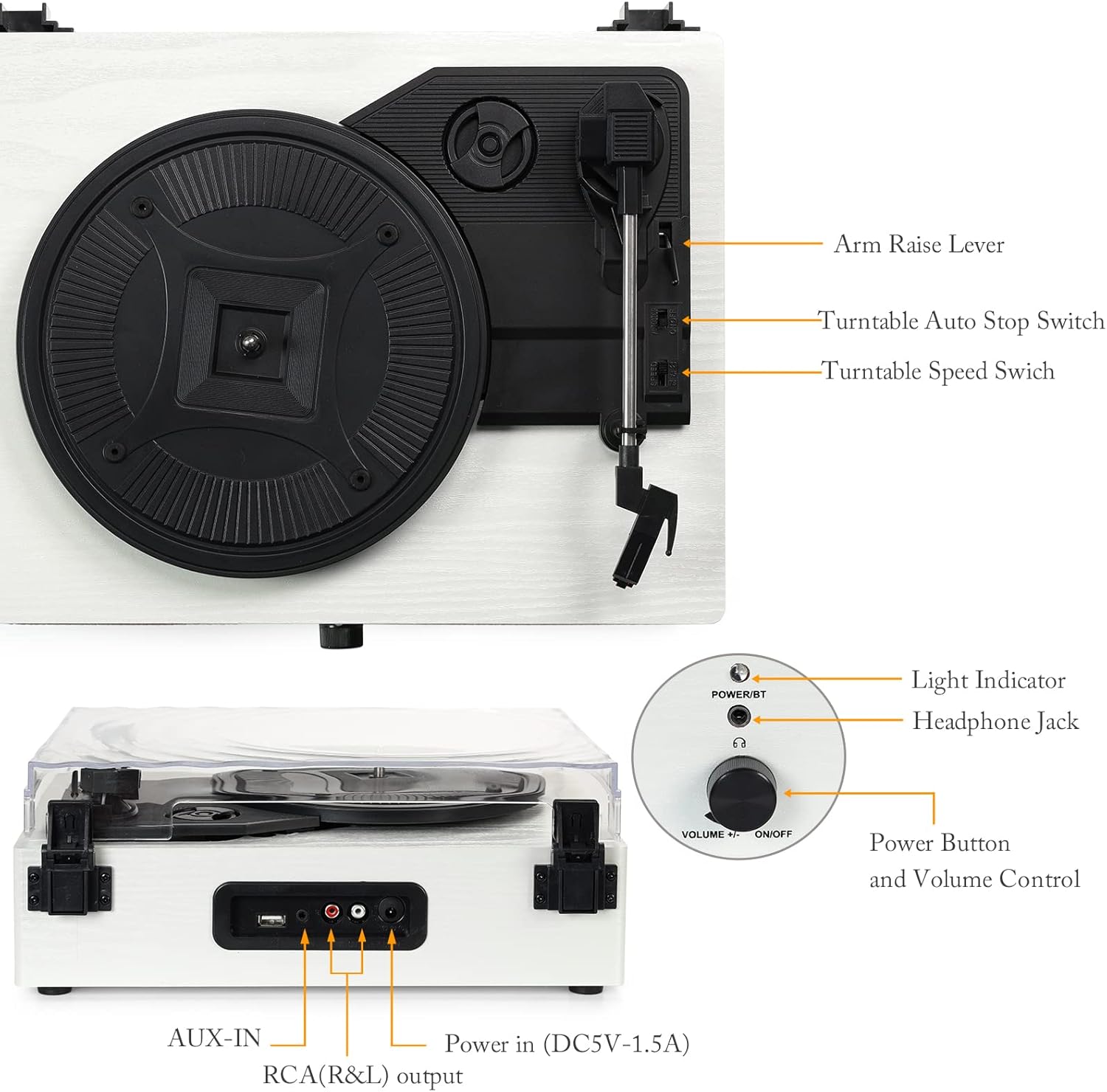
Aworan: Alaye view of the turntable with labels pointing to key components including the arm raise lever, auto stop switch, speed switch, light indicator, headphone jack, power button, volume control, AUX-IN, RCA(R&L) output, and power input.
- Platter: Supports the record during playback.
- Ideri Ekuru: Protects the turntable from dust.
- Ohun orin: Holds the stylus and cartridge.
- Stylus: The needle that reads the record grooves.
- Arm Raise Lever: Lifts and lowers the tonearm.
- Turntable Auto Stop Switch: Enables or disables automatic stopping of the platter at the end of a record.
- Turntable Speed Switch: Selects playback speed (33, 45, or 78 RPM).
- Power Button/Volume Control: Ó ń tan/pa ẹ̀rọ náà, ó sì ń ṣe àtúnṣe ìwọ̀n rẹ̀.
- Atọka Imọlẹ: Shows power and Bluetooth status.
- Jack agbekari: Fun ikọkọ gbigbọ.
- Ibudo USB: Fun ohun orin lati inu kọnputa filasi USB kan.
- Akoko-IN: Fun sisopọ awọn ohun elo ita gbangba.
- RCA (R&L) Output: Fun asopọ si ita amplifiers tabi agbara agbohunsoke.
- Power In (DC5V-1.5A): Sopọ si ohun ti nmu badọgba agbara.

Aworan: Isunmọ views illustrating the stylus, the belt-driven platter mechanism, and the three supported record speeds (33, 45, 78 RPM) for 7-inch, 10-inch, and 12-inch records.
3. Eto
3.1 Ṣiṣii silẹ
Carefully remove the turntable from its packaging. Ensure all components are present and undamaged. The package should include the UD001 turntable unit and an operation manual.

Image: The Udreamer UD001 turntable, its packaging box, power adapter, and instruction manual.
3.2 Asopọ agbara
- Connect the power adapter to the 'Power In (DC5V-1.5A)' port on the rear of the turntable.
- Pulọọgi ohun ti nmu badọgba agbara sinu iṣan ogiri ti o dara.
3.3 Initial Platter and Belt Setup
The turntable platter and drive belt may require minor setup. Ensure the drive belt is correctly positioned around the motor pulley and the inner rim of the platter. Refer to the diagram in the 'Product Overview' section for visual guidance.
4. Awọn ilana Iṣiṣẹ
4.1 Ṣíṣe àwo orin fínílì
- Gbe igbasilẹ kan sori apẹrẹ ti o yipada.
- Select the appropriate speed (33, 45, or 78 RPM) using the Turntable Speed Switch, matching the record's speed.
- If playing a 45 RPM single, place the included 45 RPM adapter on the center spindle.
- Turn the Power Button/Volume Control knob clockwise to power on the unit. The light indicator will illuminate.
- Lift the tonearm using the Arm Raise Lever.
- Carefully move the tonearm over the desired starting groove of the record.
- Gently lower the tonearm onto the record using the Arm Raise Lever. The record will begin to play.
- Adjust the volume using the Power Button/Volume Control knob.
- To stop playback, lift the tonearm using the Arm Raise Lever and return it to its rest. Turn the Power Button/Volume Control knob counter-clockwise to power off.

Image: Close-up of the Turntable Auto Stop Switch and Turntable Speed Switch, located near the tonearm base.
Iṣẹ Duro Aifọwọyi: The Turntable Auto Stop Switch controls whether the platter stops automatically at the end of a record. Set to 'ON' for automatic stop, 'OFF' for continuous rotation.
4.2 Sisopọ Bluetooth
The UD001 can connect wirelessly to Bluetooth-enabled devices for audio playback through its built-in speakers.
- Turn on the turntable by rotating the Power Button/Volume Control knob clockwise. The light indicator will flash blue, indicating Bluetooth pairing mode.
- Mu Bluetooth ṣiṣẹ lori ẹrọ ita rẹ (fun apẹẹrẹ, foonuiyara, tabulẹti).
- Wa fun 'Turntable' in your device's Bluetooth settings and select it to pair.
- Once paired, the light indicator will turn solid blue. You can now play audio from your device through the turntable's speakers.
- Adjust volume using the turntable's volume knob or your external device.

Image: A smartphone displaying a Bluetooth pairing menu with 'Turntable' selected, next to the Udreamer UD001 turntable, indicating a successful wireless connection.
4.3 USB Sisisẹsẹhin
The USB port allows playback of digital audio files lati kọnputa filasi USB kan.
- Insert a USB flash drive into the USB port on the rear of the turntable.
- The unit will automatically switch to USB mode and begin playing compatible audio files.
- Use the turntable's volume control to adjust the audio output.

Image: Close-up of the rear panel connections, clearly labeling the USB port, AUX-IN port, RCA (R&L) output ports, and DC power input.
4.4 Ìsopọ̀ AUX-IN
Connect external audio sources (e.g., MP3 players, CD players) using the AUX-IN port.
- Connect a 3.5mm audio cable (not included) from your external audio device's headphone or line-out jack to the AUX-IN port on the rear of the turntable.
- The turntable will automatically switch to AUX-IN mode.
- Play audio from your external device. Adjust volume using both the external device and the turntable's volume control.
Ìlà RCA 4.5 Jáde
For enhanced audio, connect the turntable to external powered speakers or an amplifier using the RCA output ports.
- Connect an RCA cable (not included) from the RCA (R&L) output ports on the rear of the turntable to the corresponding input jacks on your external amplifier tabi agbara agbohunsoke.
- Ensure the external audio system is powered on and set to the correct input.
- Audio will now play through your external system. Adjust volume using the external system's controls.
4.6 Agbekọri Lilo
For private listening, connect headphones to the headphone jack on the front panel.
- Plug your headphones into the 3.5mm Headphone Jack on the front of the turntable.
- Audio will automatically be routed to the headphones, muting the built-in speakers.
- Adjust volume using the turntable's volume control.

Image: A woman wearing red headphones, holding a vinyl record, and listening to music, illustrating the use of the headphone jack for private listening.
5. Itọju
5.1 Ninu Unit
- Wipe the exterior of the turntable with a soft, dry cloth. Do not use abrasive cleaners or solvents.
- Jẹ́ kí a ti ìbòrí eruku náà pa nígbà tí a kò bá lò ó láti dènà kí eruku kó jọ.
5.2 Stylus Itọju
- Gently clean the stylus periodically using a soft brush, brushing from back to front.
- Yago fun fifọwọkan stylus pẹlu awọn ika ọwọ rẹ.
- Replace the stylus when sound quality deteriorates or if the stylus is visibly damaged. Consult the manufacturer for compatible replacement styli.
6. Laasigbotitusita
- Ko si Agbara:
- Rí i dájú pé ohun tí a fi ń ṣe àtúnṣe agbára náà so mọ́ ẹ̀rọ tí ń yípo àti ibi tí ó ń ṣiṣẹ́.
- Confirm the Power Button/Volume Control knob is turned clockwise to the 'ON' position.
- Ko si Ohun:
- Adjust the volume control on the turntable and any connected external devices.
- Tí o bá ń lo agbekọri, rí i dájú pé wọ́n ti so mọ́ ara wọn dáadáa.
- If using RCA output, verify the external amplifier/speakers are on and set to the correct input.
- Check that the stylus is properly seated and not damaged.
- Record Skipping:
- Rí i dájú pé àkọsílẹ̀ náà mọ́ tónítóní, tí kò sì ní eruku tàbí ìdọ̀tí kankan.
- Place the turntable on a stable, level surface to minimize vibrations.
- Check the stylus for damage or excessive wear.
- Awọn oran Asopọ Bluetooth:
- Ensure the turntable is in Bluetooth pairing mode (flashing blue light).
- Make sure your external device's Bluetooth is enabled and within range.
- Gbiyanju yiyo ati tun so pọ ẹrọ naa.
7. Awọn pato
| Ẹya ara ẹrọ | Ẹ̀kúnrẹ́rẹ́ |
|---|---|
| Nọmba awoṣe | UD001 |
| Ọja Mefa | 12.8 x 9.8 x 4.7 inches |
| Iwọn Nkan | 5.02 iwon |
| Sisisẹsẹhin Awọn iyara | 33 1/3, 45, 78 RPM |
| Wakọ Iru | Igbanu-Iwakọ |
| Asopọmọra | Bluetooth, USB, AUX-IN, RCA Line Out, Headphone Jack |
| Awọn Agbọrọsọ ti a ṣe sinu | Bẹẹni |
| Orisun agbara | Okun Itanna |
| Voltage | 2.4E+2 Folti (240V) |
| Awọn ẹrọ ibaramu | Agbekọri, Agbọrọsọ |
8. Atilẹyin ọja ati Support
For warranty information or technical support, please refer to the contact details provided with your purchase documentation or visit the official Udreamer webojula. Jeki ẹri rira rẹ fun awọn iṣeduro atilẹyin ọja.


