Ọrọ Iṣaaju
This manual provides instructions for the proper installation, operation, and maintenance of your Rebel KOM1030 Wi-Fi Signal Amplifier. This device is designed to extend the coverage of your existing Wi-Fi network, providing a stronger and more reliable wireless signal in areas with weak or no coverage.

Image: The Rebel KOM1030 Wi-Fi Signal Amplifier shown with an Ethernet cable and a separate power adapter, illustrating the product and its basic components.
Package Awọn akoonu
Rii daju pe gbogbo awọn nkan wa ninu package:
- Ìfihàn Wi-Fi KOM1030 Rebel Ampitanna
- Afowoyi Olumulo (iwe-ipamọ yii)
Key Awọn ẹya ara ẹrọ
- Supports up to 10 simultaneous users.
- Operates on 2.4 GHz frequency band.
- Data transfer rate up to 300 Mbit/s.
- Ipele alailowaya titi di mita 100 (ẹsẹ 328).
- Equipped with 2 integrated antennas.
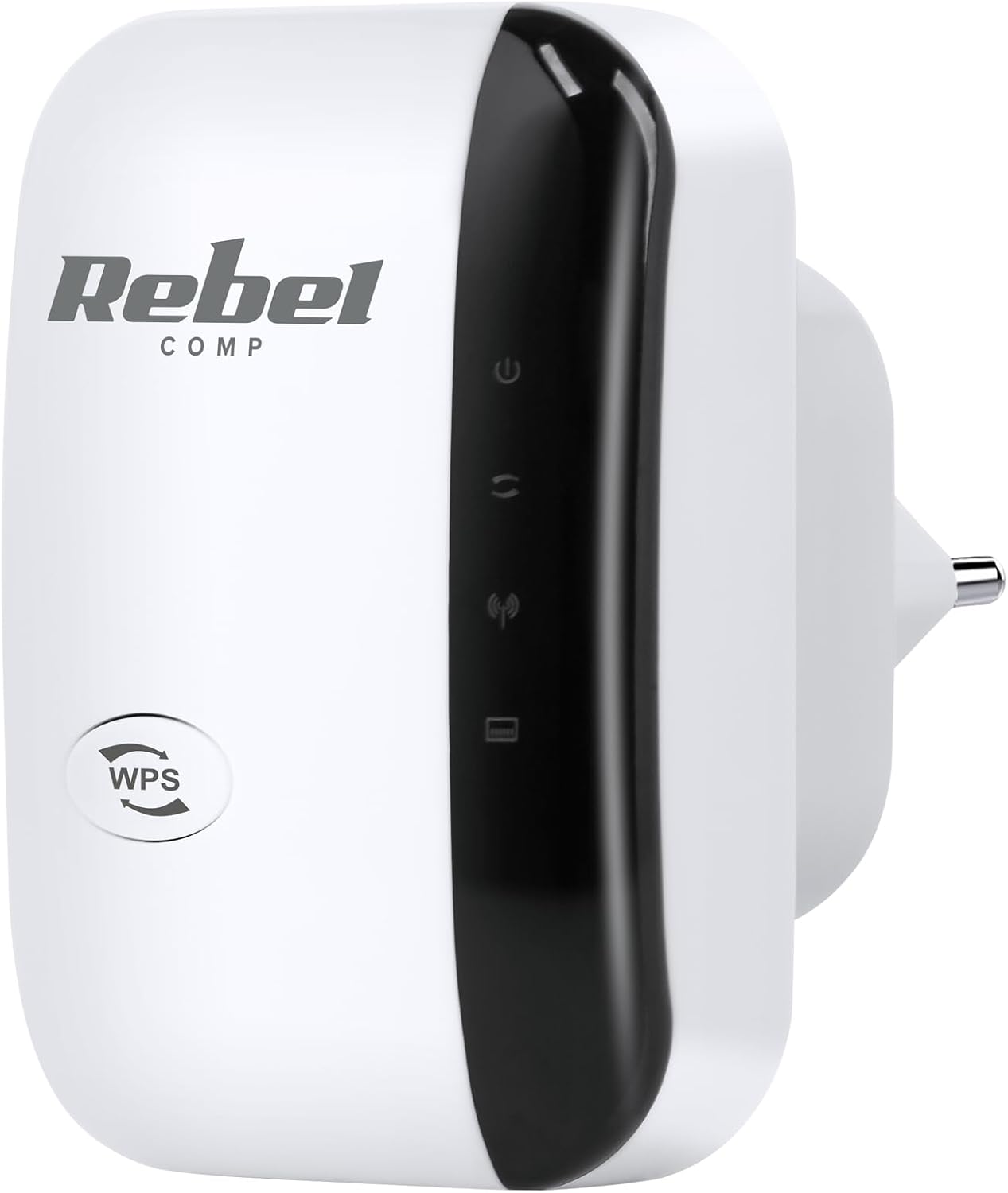
Aworan: Iwaju view of the Rebel KOM1030 Wi-Fi Signal Amplifier, showing the WPS button and indicator lights.
Awọn ilana iṣeto
1. Ti ara Asopọ
- Yọ Ẹrọ naa kuro: Carefully remove the Rebel KOM1030 from its packaging.
- Wọle: Insert the device directly into a standard electrical outlet. Ensure it is securely plugged in.

Image: The Rebel KOM1030 Wi-Fi Signal Amplifier plugged into a wall power outlet, demonstrating proper physical connection.
2. Awọn ọna iṣeto ni
The Rebel KOM1030 can be configured using two primary methods: WPS (Wi-Fi Protected Setup) or via a web kiri ayelujara.
Method A: WPS Setup (Recommended for compatible routers)
- Agbara Tan: Plug the Rebel KOM1030 into a power outlet near your main router.
- Mu WPS ṣiṣẹ lori olulana: Press the WPS button on your main Wi-Fi router. Refer to your router's manual for the exact location and procedure.
- Mu WPS ṣiṣẹ lori Atunṣe: Within two minutes, press the WPS button on the Rebel KOM1030. The WPS indicator light on the repeater should start blinking.
- Duro fun Asopọmọra: The devices will attempt to establish a connection. Once connected, the Wi-Fi indicator light on the repeater will become solid.
- Relocate (Optional): After successful setup, you can unplug the repeater and move it to a more central location between your router and the area needing extended coverage.

Aworan: Apa view of the Rebel KOM1030, highlighting the WPS button and the LAN port, which are crucial for setup and wired connections.
Ọna B: Web Browser Oṣo
- Agbara Tan: Plug the Rebel KOM1030 into a power outlet.
- Sopọ̀ mọ́ Wi-Fi Repeater: On your computer or mobile device, connect to the Wi-Fi network broadcast by the repeater (e.g., "Rebel_Repeater" or similar, check the device label if available). This network will not have internet access initially.
- Wiwọle Web Ni wiwo: Ṣii a web ẹrọ aṣawakiri ki o tẹ adiresi IP aiyipada (fun apẹẹrẹ, http://192.168.10.1) tabi orukọ ìkápá (fun apẹẹrẹ, http://rebelrepeater.net). Refer to the device label or packaging for the exact address.
- Wo ile: Enter the default username and password (commonly "admin" for both, or as specified on the device label).
- Yan Ipo: Choose "Repeater Mode" or "Extender Mode" from the setup wizard.
- Ṣayẹwo fun Awọn nẹtiwọki: The repeater will scan for available Wi-Fi networks. Select your main Wi-Fi network from the list.
- Tẹ ọrọ igbaniwọle sii: Input the password for your main Wi-Fi network.
- Configure Repeater SSID (Optional): You can choose to keep the same network name (SSID) as your main router or create a new one (e.g., "YourNetwork_EXT").
- Wa awọn Eto: Save the settings and wait for the repeater to restart.
- Jẹrisi Asopọmọra: Once restarted, the Wi-Fi indicator light should be solid, indicating a successful connection.
3. Ibi ti o dara julọ
For best performance, place the Rebel KOM1030 in a location that is:
- Approximately halfway between your main router and the area where you need improved Wi-Fi coverage.
- Within the range of your existing Wi-Fi network, where the signal is still strong and stable.
- Away from large metal objects, concrete walls, microwaves, and other devices that may cause interference.

Image: The Rebel KOM1030 Wi-Fi Signal Amplifier mounted on a wall, demonstrating a typical placement for extending Wi-Fi coverage.

Image: An overhead floor plan illustrating how a Wi-Fi repeater extends network coverage from a central router to previously uncovered areas.
Ṣiṣẹ ẹrọ naa
Once configured, the Rebel KOM1030 operates automatically to extend your Wi-Fi signal. Observe the indicator lights for status information.
Awọn imọlẹ Atọka
- Atọka Agbara: Solid light indicates the device is powered on.
- Atọka Wi-Fi:
- Solid: Successfully connected to the main Wi-Fi network and extending signal.
- Blinking: Attempting to connect or WPS pairing in progress.
- Off: No Wi-Fi connection or device is not configured.
- Atọka LAN: Solid or blinking light indicates an active connection through the Ethernet port.
Àjọlò Port Lilo
The integrated LAN port allows you to connect a wired device (e.g., a desktop computer, gaming console, or smart TV) to the repeater, providing network access to devices that do not have Wi-Fi capabilities or for a more stable connection.
Itoju
- Ninu: Lo asọ asọ ti o gbẹ lati nu ẹrọ naa. Maṣe lo awọn olutọpa olomi tabi awọn aerosols.
- Awọn imudojuiwọn famuwia: Lorekore ṣayẹwo olupese ká website for firmware updates. Updates can improve performance, add features, or fix bugs. Refer to the manufacturer's instructions for updating firmware.
- Atunto Ẹrọ naa: If the device is not functioning correctly, you may perform a factory reset. Locate the "Reset" button (often a small pinhole) on the device. With the device powered on, use a paperclip or similar pointed object to press and hold the Reset button for approximately 5-10 seconds until the lights flash. The device will revert to factory default settings, requiring re-configuration.
Laasigbotitusita
Ko si Wiwọle si Intanẹẹti Lẹhin Eto
- Ensure the repeater is within range of your main router and receiving a strong signal.
- Daju pe olulana akọkọ rẹ ni asopọ intanẹẹti ti nṣiṣe lọwọ.
- Re-run the setup process, ensuring the correct Wi-Fi network and password are selected.
- Try relocating the repeater to a different power outlet or a more optimal position.
Iyara Asopọ Lọra
- The repeater might be too far from the main router. Move it closer to improve signal strength.
- Ṣàyẹ̀wò fún ìdènà láti ọ̀dọ̀ àwọn ẹ̀rọ itanna mìíràn (fún àpẹẹrẹ, máìkrówéfù, àwọn fóònù aláìlókùn).
- Ensure your main router is providing adequate speed.
- Consider connecting wired devices directly to the repeater's LAN port for potentially better performance.
WPS Setup Fails
- Ensure you press the WPS button on both the router and the repeater within the specified time frame (usually 2 minutes).
- Some routers may require WPS to be enabled in their settings.
- Ti WPS ba n tẹsiwaju lati kuna, lo web kiri setup ọna.
Ko le Wiwọle Web Oju-iwe iṣakoso
- Ensure your device is connected to the repeater's Wi-Fi network (not your main router's).
- Verify the IP address or domain name entered in the browser is correct.
- Gbiyanju lati nu kaṣe ẹrọ aṣawakiri rẹ kuro tabi lilo ẹrọ aṣawakiri miiran.
- Perform a factory reset on the repeater and try again.
Awọn pato
| Ẹya ara ẹrọ | Ẹ̀kúnrẹ́rẹ́ |
|---|---|
| Brand | Olote |
| Nọmba awoṣe | KOM1030 |
| Alailowaya Ibaraẹnisọrọ Alailowaya | 802.11bgn |
| Igbohunsafẹfẹ Band | 2.4 GHz |
| Data Gbigbe Oṣuwọn | Titi di 300 Mbps |
| Alailowaya Ibiti | Titi de awọn mita 100 (328 ẹsẹ) |
| Eriali | 2 ese eriali |
| Awọn olumulo atilẹyin | Titi di awọn olumulo igbakana 10 |
| Awọn irinše to wa | Repeater, User Manual |
| Iwọn Nkan | 65 giramu |

Image: The Rebel KOM1030 Wi-Fi Signal Amplifier displayed alongside its key technical specifications, including IEEE 802.11 b/g/n, 2.4 GHz frequency, and 300 Mb/s data rate.
Atilẹyin ọja ati Support
For warranty information and technical support, please refer to the documentation provided with your purchase or visit the official Rebel brand webojula. Awọn ofin atilẹyin ọja le yatọ nipasẹ agbegbe ati alagbata.
Olubasọrọ Support: If you encounter issues not covered in this manual, please contact Rebel customer support through their official channels.


