1. Ifihan
O ṣeun fun riraasing the beFree Sound BFS-855 5.1 Channel Surround Sound Bluetooth Speaker System. This manual provides essential information for the safe and efficient operation of your new audio system. Please read these instructions thoroughly before use and retain them for future reference.
2. Awọn ilana aabo
- Orisun Agbara: Rii daju pe ipese agbara voltage matches the requirements specified on the unit (110V/60Hz).
- Afẹfẹ: Do not block any ventilation openings. Maintain adequate space around the unit for proper airflow.
- Omi ati Ọrinrin: Má ṣe fi ẹ̀rọ náà sí òjò, ọrinrin, tàbí omi tó ń rọ̀/tó ń tú jáde. Má ṣe gbé àwọn ohun tí ó kún fún omi, bíi àwọn ìgò, sí orí ẹ̀rọ náà.
- Ooru: Jeki ẹyọ kuro lati awọn orisun ooru gẹgẹbi awọn imooru, awọn iforukọsilẹ ooru, awọn adiro, tabi awọn ohun elo miiran (pẹlu ampliifiers) ti o gbe ooru jade.
- Ninu: Yọọ kuro lati inu iṣan agbara ṣaaju ṣiṣe mimọ. Lo asọ asọ ti o gbẹ. Maṣe lo awọn olutọpa olomi tabi awọn ẹrọ aerosol.
- Ṣiṣẹ: Maṣe gbiyanju lati ṣiṣẹ ọja yi funrararẹ. Tọkasi gbogbo iṣẹ si oṣiṣẹ oṣiṣẹ ti o peye.
3. Package Awọn akoonu
Daju pe gbogbo awọn nkan ti a ṣe akojọ rẹ si isalẹ wa ninu package rẹ:
- 1 x Subwoofer
- Àwọn Agbọrọsọ Satẹlaiti 5 x
- 4 x Audio Cables
- 1 x FM eriali
- 1 x Isakoṣo latọna jijin
- 1 x Itọsọna olumulo (iwe yii)

Image: Various audio cables and an FM antenna included with the system.
4. Ọja Ipariview
Familiarize yourself with the components of your beFree Sound BFS-855 system.
4.1. Subwoofer Unit

Aworan: Iwaju ati ẹgbẹ view of the main subwoofer unit, featuring the beFree logo and a sleek black finish.

Aworan: Apa view of the subwoofer, showing the USB port, SD card slot, and auxiliary input jacks.

Image: Rear panel of the subwoofer, detailing the optical input, coaxial input, AUX audio input, FM antenna port, DVD audio input, LED power, audio output for satellite speakers, and power switch.
4.2. Àwọn Agbọrọsọ Satẹlaiti
The system includes five satellite speakers: a center speaker, two front speakers, and two rear speakers.

Image: A compact satellite speaker, typically used for front or rear channels.

Image: The horizontal center channel speaker, designed for clear dialogue.
4.3. Isakoṣo latọna jijin

Image: The remote control unit, featuring buttons for input selection, volume, channel tuning, and various audio adjustments.
5. Eto
5.1. Agbọrọsọ Placement
- Subwoofers: Place the subwoofer on the floor, preferably near the front of your listening area.
- Agbọrọsọ aarin: Position the center speaker directly above or below your television/monitor.
- Awọn Agbọrọsọ iwaju: Place the front left and right speakers equidistant from your listening position, to the left and right of your television/monitor.
- Awọn Agbọrọsọ Tẹhin: Position the rear left and right speakers behind your listening position, facing towards you.
5.2. Nsopọ Agbọrọsọ
Connect the satellite speakers to the corresponding output jacks on the rear panel of the subwoofer. Ensure correct polarity (red to red, black to black) for optimal sound quality.
5.3. Nsopọ Awọn orisun Audio
Your system supports multiple audio input options:
- Bluetooth: For wireless connection from compatible devices.
- Iṣawọle AUX: Use the provided audio cables to connect devices with a 3.5mm or RCA audio output.
- Iṣawọle Opitika: For high-quality digital audio from TVs, game consoles, or DVD/Blu-ray players.
- Iṣawọle Coaxial: Another option for digital audio connection.
- USB/SD Kaadi: Insert a USB drive or SD card into the designated slots on the subwoofer for direct media playback.
- Eriali FM: Connect the included FM antenna to the FM ANT port for radio reception.
5.4. Asopọ agbara
After all audio connections are made, connect the power cord to the subwoofer and then plug it into a standard 110V/60Hz electrical outlet. Turn on the power switch located on the rear panel of the subwoofer.
6. Awọn ilana Iṣiṣẹ
6.1. Agbara Tan / Paa
Press the 'POWER' button on the remote control or the power switch on the rear of the subwoofer to turn the system on or off.
6.2. Aṣayan Input
Press the 'INPUT' button on the remote control to cycle through available input sources: Bluetooth, AUX, Optical, Coaxial, USB, SD, FM.
6.3. Iṣakoso iwọn didun
Use the 'VOL+' and 'VOL-' buttons on the remote control to adjust the master volume. Individual channel volumes (FL, FR, CEN, SL, SR, SW) can also be adjusted using their respective buttons on the remote.
6.4. Sisopọ Bluetooth
- Select 'Bluetooth' as the input source. The display will indicate 'BT'.
- Mu Bluetooth ṣiṣẹ lori ẹrọ alagbeka tabi kọmputa rẹ.
- Wa fun 'BFS-855' in the list of available devices.
- Select 'BFS-855' to pair. Once connected, a confirmation sound will play.
6.5. FM Radio isẹ
- Select 'FM' as the input source.
- Press the 'AUTO' button on the remote to automatically scan and save available FM stations.
- Use 'CH+' and 'CH-' buttons to navigate through saved stations.
- Use 'TUNE+' and 'TUNE-' buttons for manual frequency adjustment.
6.6. USB / SD Kaadi Sisisẹsẹhin
- Insert a USB drive or SD card into the corresponding slot.
- The system will automatically switch to USB/SD input and begin playback. If not, select 'USB' or 'SD' input manually.
- Use the 'PLAY/PAUSE', 'PREV', and 'NEXT' buttons on the remote for media control.
7. Itọju
Láti rí i dájú pé ẹ̀rọ agbọ́hùnsọ rẹ pẹ́ títí àti pé ó ń ṣiṣẹ́ dáadáa, tẹ̀lé àwọn ìlànà ìtọ́jú wọ̀nyí:
- Ninu: Regularly wipe the surfaces of the speakers and subwoofer with a soft, dry, lint-free cloth. Avoid using abrasive cleaners, waxes, or solvents.
- Eruku: Keep the ventilation openings free from dust accumulation. Use a soft brush or vacuum cleaner with a brush attachment to gently remove dust.
- Ibi ipamọ: If storing the system for an extended period, unplug it from the power outlet and store it in a cool, dry place, away from direct sunlight and extreme temperatures.
8. Laasigbotitusita
Ti o ba pade awọn ọran pẹlu eto agbọrọsọ rẹ, tọka si awọn iṣoro ti o wọpọ ati awọn ojutu wọnyi:
| Isoro | Owun to le Fa | Ojutu |
|---|---|---|
| Ko si agbara | Power cord not connected; Power switch off; Outlet malfunction | Ensure power cord is securely plugged in; Turn on power switch; Test outlet with another device. |
| Ko si ohun | Incorrect input selected; Volume too low; Speaker cables loose; Mute function active | Select correct input source; Increase master volume; Check all speaker connections; Press 'MUTE' on remote. |
| Bluetooth ko sopọ | Speaker not in Bluetooth mode; Device not discoverable; Already connected to another device | Ensure 'BT' input is selected; Make sure device Bluetooth is on and searching; Disconnect from other devices. |
| Gbigba FM ti ko dara | FM antenna not connected or poorly positioned | Connect FM antenna securely; Adjust antenna position for better signal. |
9. Awọn pato
- Orukọ awoṣe: BFS-855
- Irú Agbọrọsọ: Agbegbe Ohun Eto
- Atunto ikanni Ohun Yika: 5.1
- Agbara Ijade: 50W (Subwoofer) + 15W x 5 (Satellites) = 125 Watts Total
- Opin Subwoofer: 8 inches
- Iwọn Agbọrọsọ Satẹlaiti: 3.5 inches (x5)
- Idahun Igbohunsafẹfẹ: 40Hz - 20KHz
- Iyapa: > 50dB
- Ipin S/N: > 75dB
- Orisun Agbara: Corded Electric (110V/60Hz)
- Imọ-ẹrọ Asopọmọra: Bluetooth, USB, SD Card, Optical, Coaxial, AUX (RCA)
- Ọna Iṣakoso: Isakoṣo latọna jijin
- Product Dimensions (Subwoofer): 21"D x 11"W x 21"H
- Ìwọ̀n Nkan: 33 iwon
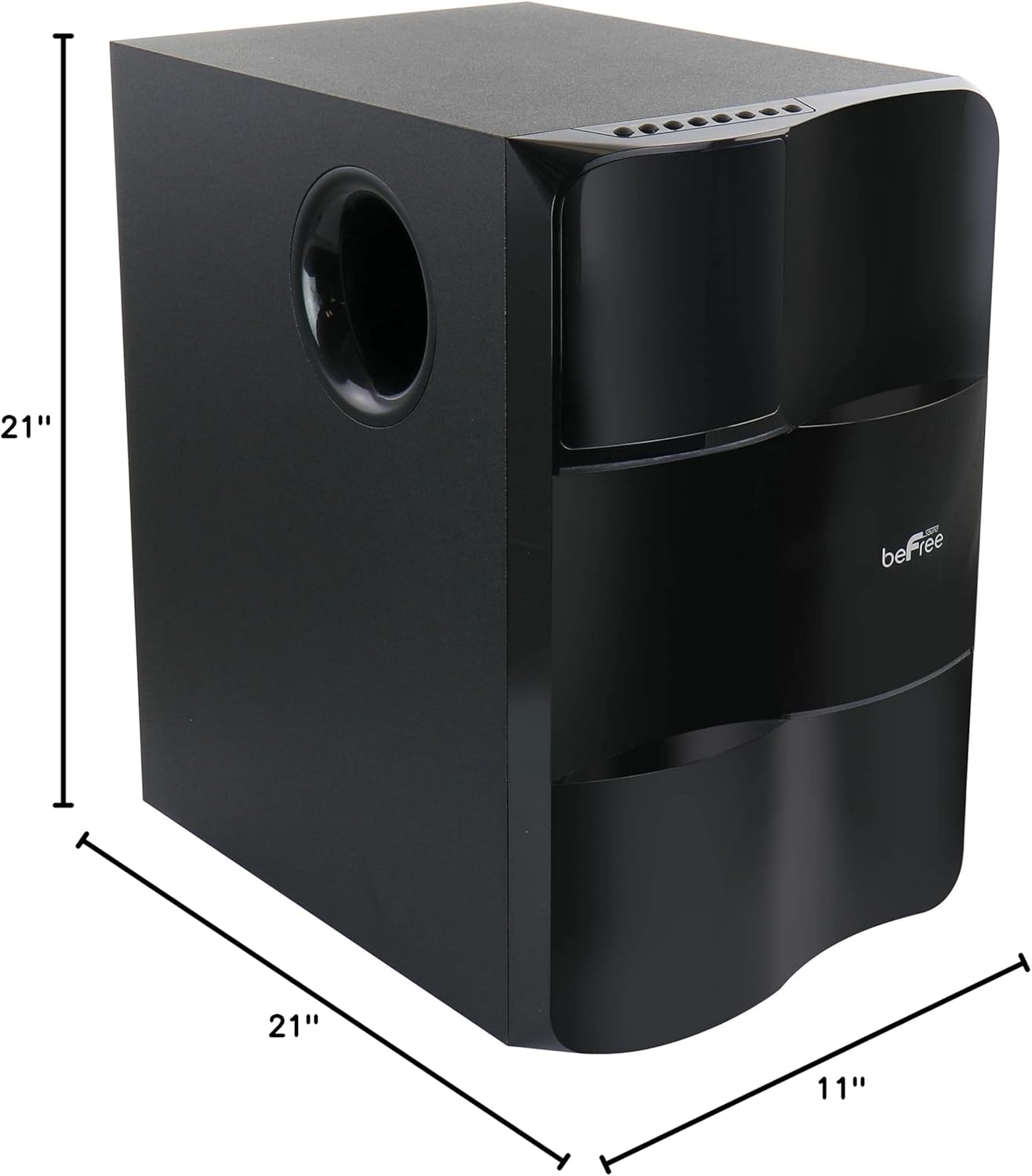
Image: Diagram illustrating the dimensions of the subwoofer unit (21"D x 11"W x 21"H).
10. Atilẹyin ọja ati Support
This product comes with a limited warranty. For specific details regarding warranty coverage and duration, please refer to the warranty card included in your package or contact your retailer. For technical support or service inquiries, please reach out to the point of purchase or the manufacturer's customer service channels.


