Ọrọ Iṣaaju
This manual provides comprehensive instructions for the setup, operation, and maintenance of your Logitech MX Master 3S Wireless Mouse. Please read this manual thoroughly to ensure proper use and to maximize the performance of your device.
The Logitech MX Master 3S is a high-performance wireless mouse designed for precision, comfort, and efficiency across multiple devices and operating systems. It features advanced tracking, quiet clicks, and ultra-fast scrolling capabilities.
Ọja Pariview
The Logitech MX Master 3S mouse is engineered for advanced users, offering a blend of ergonomic design and cutting-edge technology.
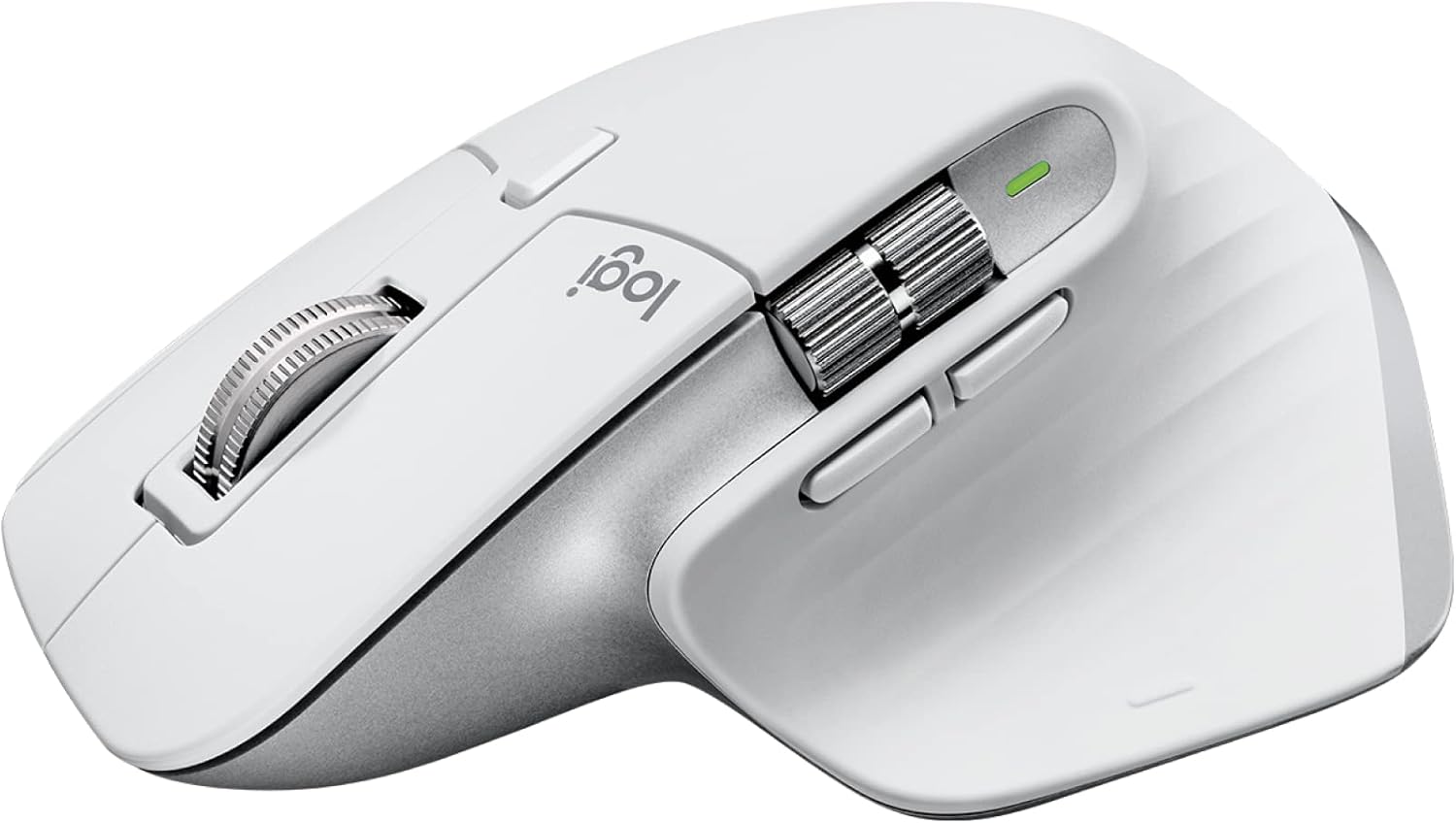
Image: Logitech MX Master 3S Wireless Mouse in Pale Grey, showcasing apẹrẹ ergonomic rẹ ati awọn bọtini pupọ.
Awọn ẹya pataki:
- 8K DPI Itọpa Ilẹ-Yikẹẹ: Precision tracking on virtually any surface, including glass.
- Awọn titẹ idakẹjẹ: Reduced click noise for a quieter work environment.
- Yi lọ MagSpeed: Ultra-fast and precise electromagnetic scrolling.
- Apẹrẹ Ergonomic: Sculpted shape for comfortable hand posture.
- Awọn bọtini isọdi: Seven programmable buttons for enhanced workflow.
- ṢAN Agbelebu Iṣakoso Kọmputa: Seamlessly switch between multiple computers and operating systems.
- Asopọmọra-ẹrọ pupọ: Connects via Logi Bolt USB receiver or Bluetooth.
- Batiri gbigba agbara: Long-lasting Li-Po battery (500 mAh) with USB-C charging.
Awọn akoonu idii:

Image: Contents of the MX Master 3S package, including the mouse, Logi Bolt USB receiver, and USB-C charging cable.
- Logitech MX Titunto 3S Asin Alailowaya
- Logi Bolt USB olugba
- Okun Ngba agbara USB-C (USB-A si USB-C)
Idanimọ eroja:

Image: Labeled diagram showing the key components of the MX Master 3S mouse, including the Quiet Click buttons, MagSpeed wheel, Thumb wheel, 8K track-anywhere sensor, customizable buttons, and Easy Switch buttons. Also indicates compatibility with Windows, macOS, Chrome OS, Linux, iPadOS, Android, and connectivity options (USB receiver, Bluetooth).
- Quiet Click (Left/Right-click)
- MagSpeed Wheel (Main scroll wheel)
- Thumb Wheel (Horizontal scroll)
- 8K Track-Anywhere Sensor
- Customizable Buttons (Forward/Back, App-Switch, Middle click)
- Easy Switch Buttons (Bottom of mouse for device switching)
Ṣeto
1. Gbigba agbara akọkọ
Before first use, it is recommended to fully charge your MX Master 3S mouse. Connect the included USB-C charging cable to the mouse's USB-C port and the other end to a USB-A port on your computer or a USB power adapter.
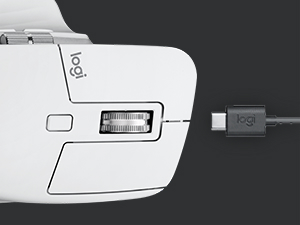
Image: Close-up of the MX Master 3S mouse with a USB-C cable connected for charging.
2. Nsopọ rẹ Asin
The MX Master 3S offers two primary connection methods: Logi Bolt USB Receiver or Bluetooth.
Nsopọ nipasẹ Logi Bolt USB Olugba:
- Insert the Logi Bolt USB receiver into an available USB-A port on your computer.
- Tan-an Asin nipa lilo agbara yipada ti o wa ni isalẹ.
- Asin yẹ ki o sopọ laifọwọyi si olugba. Atọka LED lori Asin yoo tan alawọ ewe to lagbara.
Nsopọ nipasẹ Bluetooth:
- Tan-an Asin nipa lilo agbara yipada ti o wa ni isalẹ.
- Press and hold one of the Easy-Switch buttons (1, 2, or 3) on the bottom of the mouse for three seconds until the LED indicator for that channel starts blinking rapidly. This indicates the mouse is in pairing mode.
- Lori kọmputa tabi ẹrọ rẹ, ṣii awọn eto Bluetooth.
- Select "MX Master 3S" from the list of available devices and follow the on-screen prompts to complete pairing.
- Once connected, the LED indicator will glow solid for 5 seconds.
3. Fifi Logi Aw+ Software (Ti ṣeduro)
To unlock the full potential of your MX Master 3S, including button customization, application-specific settings, and FLOW cross-computer control, download and install the free Logi Options+ software from the official Logitech webAaye (www.logitech.com/optionsplus).

Image: A computer screen displaying the Logi Options+ application interface, showing options for customizing mouse buttons and creating app-specific profiles.
Awọn ilana Iṣiṣẹ
Yi lọ itanna MagSpeed
The MX Master 3S features a MagSpeed electromagnetic scroll wheel that offers two modes:
- Ipo Ratcheted: Pese kongẹ, yi lọ laini-nipasẹ-ila, apẹrẹ fun iṣẹ ṣiṣe alaye.
- Ipo iyara-gaara: Yipada laifọwọyi si ipo alayipo ọfẹ fun yiyi ni iyara nipasẹ awọn iwe aṣẹ gigun tabi web pages. This mode can scroll 1,000 lines per second.

Aworan: A sunmọ-soke view of the MagSpeed scroll wheel on the MX Master 3S mouse, highlighting its metallic finish and precision engineering.
You can manually switch between modes by pressing the mode-shift button located behind the scroll wheel, or configure it to switch automatically based on scrolling speed via Logi Options+.
Awọn titẹ idakẹjẹ
The MX Master 3S is designed with Quiet Clicks, reducing audible click noise by 90% compared to previous models, providing a quieter user experience without compromising tactile feedback.

Image: A person working at a desk, using the MX Master 3S mouse, illustrating the quiet click feature in a typical office or home setting.
8K DPI Any-Surface Tracking
The advanced Darkfield High Precision sensor allows the MX Master 3S to track on virtually any surface, including glass (minimum 4mm thickness), with an 8000 DPI sensor for precise control.

Image: A hand operating the MX Master 3S mouse on a clear glass surface, demonstrating its ability to track on challenging materials.
Customizable Buttons and App-Specific Profiles
Utilize the Logi Options+ software to customize the seven programmable buttons (Left/Right-click, Back/Forward, App-Switch, Wheel mode-shift, Middle click) to perform specific actions or shortcuts. You can also create application-specific profiles, allowing the mouse buttons to behave differently depending on the active application.
FLOW Cross-Computer Control
Logitech FLOW enables seamless control of multiple computers with a single MX Master 3S mouse. You can move your cursor, text, and files between up to three computers, even across different operating systems (Windows and macOS), by simply moving your cursor to the edge of the screen. This feature requires Logi Options+ to be installed on all connected computers.

Image: A setup showing a laptop and a desktop monitor, with an arrow indicating the seamless transfer of cursor, text, and files between them using Logitech FLOW.
Olona-Device Yipada
The Easy-Switch buttons on the bottom of the mouse allow you to quickly switch between up to three paired devices (via Logi Bolt or Bluetooth) with a single press.
Itoju
Ninu rẹ Asin
To maintain optimal performance and hygiene, regularly clean your MX Master 3S mouse:
- Lo asọ asọ, ti ko ni lint die-die damptí a fi omi tàbí ohun ìfọmọ́ tí a fi ọtí ṣe (fún àpẹẹrẹ, ọtí isopropyl).
- Yago fun awọn kẹmika lile, awọn ohun elo abrasive, tabi ọrinrin pupọ.
- Gently wipe the surface of the mouse, paying attention to areas that come into frequent contact with your hand.
- For the optical sensor, use a dry cotton swab or compressed air to remove any dust or debris.
Itọju Batiri
The MX Master 3S uses a rechargeable Li-Po battery. Follow these guidelines for optimal battery life:
- Gba agbára sí eku nípa lílo okùn USB-C tí a pèsè.
- Yago fun awọn iwọn otutu to gaju, nitori wọn le ni ipa lori iṣẹ batiri.
- Ti o ba tọju Asin fun akoko ti o gbooro sii, gba agbara si iwọn 50% ṣaaju ibi ipamọ.
Laasigbotitusita
| Isoro | Owun to le Solusan |
|---|---|
| Mouse not responding or connecting. |
|
| Cursor movement is erratic or imprecise. |
|
| MagSpeed scrolling not working as expected. |
|
| Custom buttons not functioning. |
|
Awọn pato
| Ẹya ara ẹrọ | Ẹ̀kúnrẹ́rẹ́ |
|---|---|
| Nọmba awoṣe | 910-006558 |
| Awọn iwọn (LxWxH) | 4.9 x 3.3 x 2.0 inches (124.9 x 84.3 x 51 mm) |
| Iwọn | 4.97 iwon (141 g) |
| Ọna ẹrọ | Darkfield High konge |
| Iwọn DPI | 200 si 8000 DPI (atunṣe ni awọn afikun 50 DPI) |
| Awọn bọtini | Awọn bọtini 7 (Titẹ apa osi/Ọtun, Pada/Siwaju, Ohun elo-Yipada, Ipo kẹkẹ-iyipada, Aarin tẹ) |
| Yi lọ Wili | MagSpeed electromagnetic scroll wheel, Thumbwheel |
| Ijinna Ṣiṣẹ Alailowaya | Titi de 33ft (10 m) |
| Batiri Iru | Li-Po gbigba agbara (500 mAh) |
| Igbesi aye batiri | Títí dé ọjọ́ 70 lórí àgbáye kan ṣoṣo (ó lè yàtọ̀ síra ní ìbámu pẹ̀lú bí a ṣe lò ó) |
| Asopọmọra | Logi Bolt USB olugba, Bluetooth Low Energy Technology |
| Ibamu | Windows, macOS, Lainos, Chrome OS, iPadOS, Android |
| Tunlo Ṣiṣu akoonu | 27% certified post-consumer recycled plastic (Graphite and Black models) |
Atilẹyin ọja ati Support
Fun alaye atilẹyin ọja alaye ati atilẹyin imọ-ẹrọ, jọwọ tọka si atilẹyin Logitech osise webojula tabi kan si Logitech onibara iṣẹ taara.
Logitech Atilẹyin Webojula: support.logi.com
Jọwọ ṣe idaduro ẹri rira rẹ fun awọn iṣeduro atilẹyin ọja.


