1. Ọja Ipariview
The HP Envy x360 Convertible 13-bd0063dx is a versatile 2-in-1 laptop designed for adaptability and performance. Featuring a 13.3-inch IPS Touch Full HD (1920x1080) display, it seamlessly transitions between laptop and tablet modes. Powered by an Intel Core i5-1135G7 processor with Intel Iris Xe Graphics, 8GB of DDR4 RAM, and a 256GB PCIe SSD, this device is equipped for everyday tasks, creative work, and entertainment. It operates on Windows 10 Home, offering a familiar and efficient user experience.

Image 1: The HP Envy x360 Convertible laptop in a folded-back tablet configuration, showcasing re rọ oniru.
2. Eto Itọsọna
2.1 Agbara akọkọ-On ati iṣeto ni
- Yọ Ẹrọ naa kuro: Fi iṣọra yọ kọǹpútà alágbèéká ati gbogbo awọn ẹya ẹrọ kuro ninu apoti.
- So agbara: Plug the power adapter into the laptop's charging port and then into a wall outlet. Allow the battery to charge for at least 30 minutes before first use.
- Agbara Tan: Open the laptop lid and press the power button, usually located on the side or top-right of the keyboard.
- Tẹle Awọn igbesẹ loju-iboju: Windows 10 Home will guide you through the initial setup process, including language selection, network connection, account creation, and privacy settings.
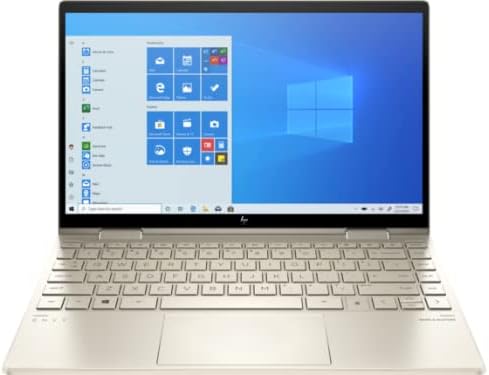
Image 2: The HP Envy x360 Convertible laptop fully open, showing the keyboard and the Windows 10 desktop interface on the screen.
3. Awọn ilana Iṣiṣẹ
3.1 Using Convertible Modes
- Ipo Kọǹpútà alágbèéká: Use the device as a traditional laptop for typing and productivity tasks.
- Ipo agọ: Fold the screen back to form an inverted "V" shape. Ideal for watching videos or presentations.
- Ipo Iduro: Fold the screen back further, resting the keyboard face down. This positions the screen upright for viewing.
- Ipo tabulẹti: Fold the screen completely back against the base, transforming the laptop into a tablet for touch-based interaction. The operating system will automatically prompt you to switch to tablet mode.
3.2 Touchscreen and Keyboard Usage
- Afi ika te: Interact directly with the display using your fingers for navigation, drawing, and app control.
- Keyboard ati Touchpad: Utilize the full-size keyboard for typing and the precision touchpad for cursor control and gestures.
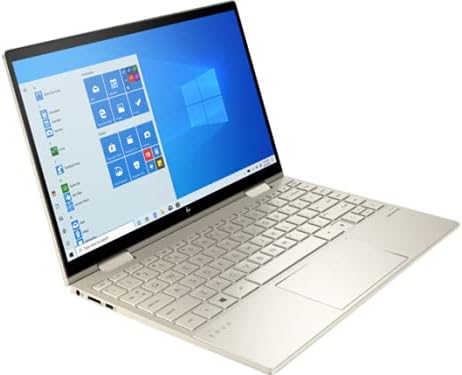
Image 3: The HP Envy x360 Convertible laptop in a partially folded stand mode, highlighting the touchscreen capabilities and flexible hinge.
4. Itọju ati Itọju
- Ninu iboju: Lo asọ asọ, ti ko ni lint die-die dampened pẹlu omi tabi a iboju regede. Yẹra fun awọn kẹmika lile.
- Ninu Keyboard naa: Use compressed air to remove dust and debris from between the keys. Wipe keys with a soft, damp asọ.
- Itọju Batiri: To maximize battery life (up to 21 hours), avoid extreme temperatures and fully discharging the battery frequently. Store the laptop with a partial charge if not used for extended periods.
- Awọn imudojuiwọn sọfitiwia: Regularly install Windows updates and HP driver updates to ensure optimal performance and security.
- Afẹfẹ: Rii daju pe awọn atẹgun kọǹpútà alágbèéká ko ni idinamọ lati ṣe idiwọ igbona pupọju.
5. Laasigbotitusita wọpọ oran
| Oro | Ojutu |
|---|---|
| Kọǹpútà alágbèéká ko ṣiṣẹ lori: | Ensure the power adapter is securely connected and the outlet is functional. Try a different outlet. If the battery is completely drained, it may take a few minutes to respond after plugging in. |
| Iboju ifọwọkan ko dahun: | Restart the laptop. Check for any pending Windows updates or driver updates for the touchscreen. Ensure the screen is clean and free of obstructions. |
| Iṣẹ ṣiṣe ti o lọra: | Close unnecessary applications. Check Task Manager for resource-intensive processes. Ensure sufficient free space on the SSD. Run a disk cleanup and defragmentation (for HDD, not typically needed for SSD). Update drivers and Windows. |
| Awọn oran Asopọmọra Wi-Fi: | Restart your router and modem. Restart the laptop. Check Wi-Fi settings and ensure the correct network is selected. Update Wi-Fi drivers. |
6. Awọn pato
| Ẹya ara ẹrọ | Ẹ̀kúnrẹ́rẹ́ |
|---|---|
| Orukọ awoṣe | HP Envy x360 Convertible 13-bd0063dx |
| Iwon iboju | 13.3 inches |
| Ipinnu iboju | 1920x1080 Pixels (Full HD IPS Touch) |
| isise | Intel Core i5-1135G7 (2.4 GHz) |
| Àgbo | 8 GB DDR4 (3200 MHz) |
| Dirafu lile | 256 GB PCIe NVMe SSD |
| Olupilẹṣẹ Graphics | Intel Iris Xe Graphics |
| Eto isesise | Windows 10 Ile |
| Apapọ batiri Life | Titi di awọn wakati 21 |
| Awọn ibudo | 2x SuperSpeed USB-A, 2x SuperSpeed USB-C, 1x HDMI 2.1 |
| Alailowaya Iru | 801.11ac (Wi-Fi 6E capable) |
| Iwọn Nkan | 2.86 iwon |
| Ọja Mefa | 12.05 x 8.35 x 0.58 inches |
| Àwọ̀ | Bia Gold |
7. Awọn fidio ọja osise
Below are official product videos from the seller, providing additional visual guidance and information about the HP Envy x360 Convertible laptop.
HP AI Business laptop for student and everyday use
Video Description: This video highlights the HP Envy x360 as an AI-powered business laptop suitable for students and daily use, showcasing its capabilities for various tasks.
8. Atilẹyin ọja ati Support
For detailed warranty information, please refer to the documentation included with your HP Envy x360 Convertible laptop or visit the official HP support website. HP offers various support resources, including online troubleshooting, driver downloads, and customer service contact options.
Atilẹyin Ayelujara: www.hp.com/support