1. Ifihan
This manual provides essential information for the proper use and maintenance of your Gateway 15.6-inch FHD Ultra Slim Laptop, Model GTW15G. This device is equipped with an AMD Ryzen 5 3450U Mobile Processor, 8GB of DDR4 RAM, and a 256GB Solid State Drive (SSD). It features a 15.6-inch Full HD (1920x1080) IPS display, a built-in fingerprint scanner, and runs on Windows 10, with an available free upgrade to Windows 11.
Please read this manual thoroughly before operating your laptop to ensure optimal performance and longevity.
2. Eto
2.1 Unpacking ati Ibẹrẹ ayewo
Carefully remove the laptop and all accessories from the packaging. Verify that all components are present and undamaged. The package should include the laptop, power adapter, and this user manual.
2.2 Nsopọ agbara Adapter
Before first use, connect the power adapter to the laptop's charging port and then to a power outlet. Allow the battery to charge for at least 30 minutes before powering on for the first time.

Figure 2.1: Gateway 15.6-inch Ultra Slim Laptop overview.
2.3 First Power On ati Windows Setup
Press the power button located on the keyboard. The laptop will boot up and guide you through the Windows 10 initial setup process. Follow the on-screen instructions to configure your region, language, network connection, and user account.
2.4 Fingerprint Scanner Setup (Windows Hello)
During or after the initial Windows setup, you can configure the built-in fingerprint scanner for secure login using Windows Hello. Navigate to Eto > Awọn iroyin > Awọn aṣayan iwọle and follow the prompts to set up your fingerprint.
3. Awọn ilana Iṣiṣẹ
3.1 Agbara Tan / Paa ati Ipo oorun
- Agbara Tan: Tẹ bọtini agbara.
- Paade: Tẹ awọn Bẹrẹ bọtini, lẹhinna Power > Shut down.
- Ipo orun: Close the lid or click the Bẹrẹ bọtini, lẹhinna Agbara > Orun.
3.2 Using the Precision Touchpad
The laptop features a precision touchpad for navigation. It supports multi-touch gestures for scrolling, zooming, and other functions. Refer to Windows settings for customizing touchpad gestures.
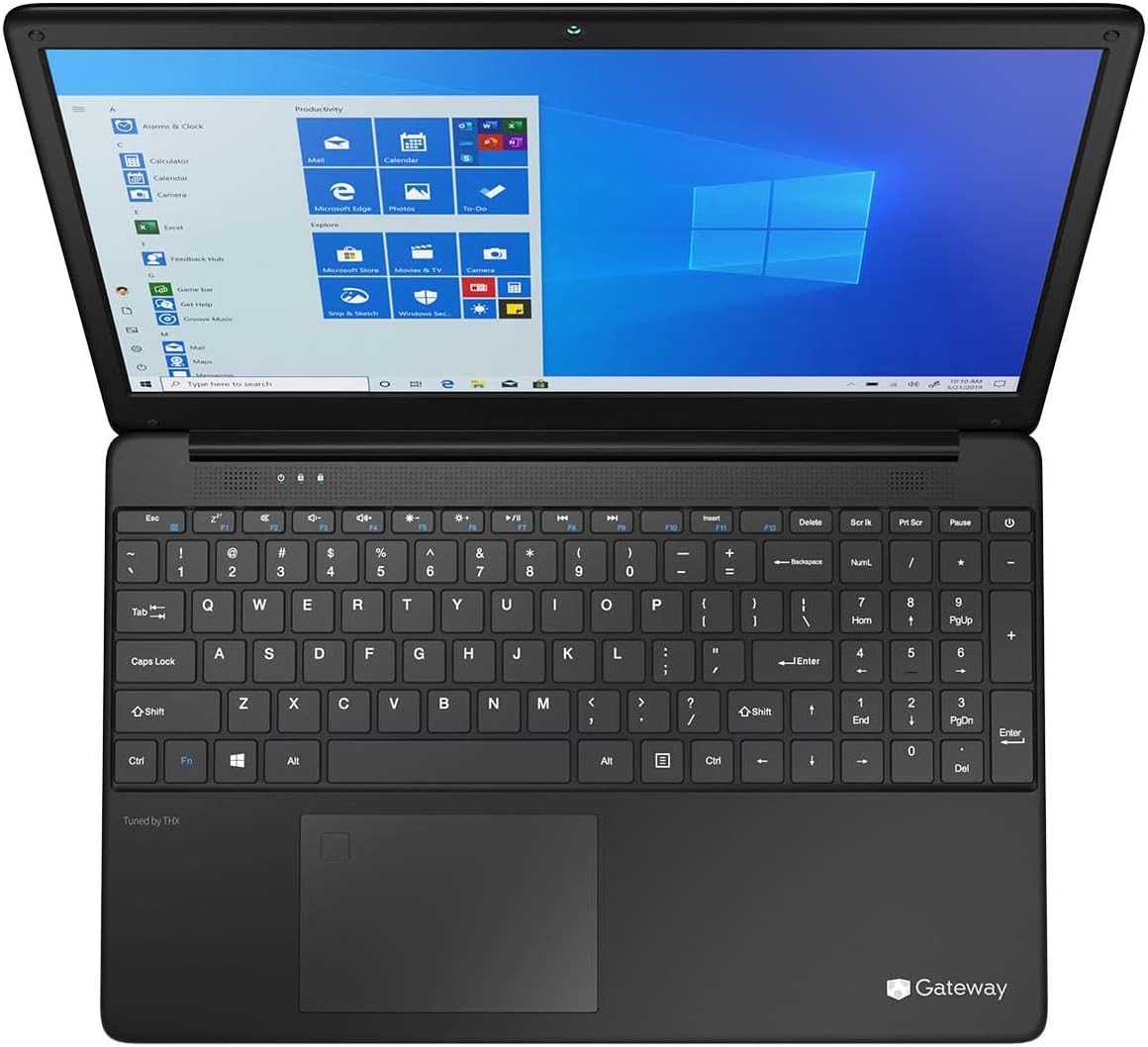
Figure 3.1: Keyboard and Precision Touchpad layout.
3.3 Nsopọ Awọn ẹrọ ita
Kọǹpútà alágbèéká n pese awọn ebute oko oju omi pupọ fun sisopọ awọn agbeegbe:
- Awọn ibudo USB 3.0 (x2): Fún sísopọ̀ àwọn ẹ̀rọ USB bíi àwọn dirafu lile tí ó wà níta, àwọn èkúté, tàbí àwọn kííbọ́ọ̀dì.
- Ibudo USB Iru-C (x1): Supports both charging and data transfer.
- HDMI Output (x1): Sopọ si atẹle ita tabi TV.
- Micro SD Slot (x1): Supports Micro SD cards up to 512 GB for expanded storage.
- Titiipa Kensington: Fun aabo ti ara.
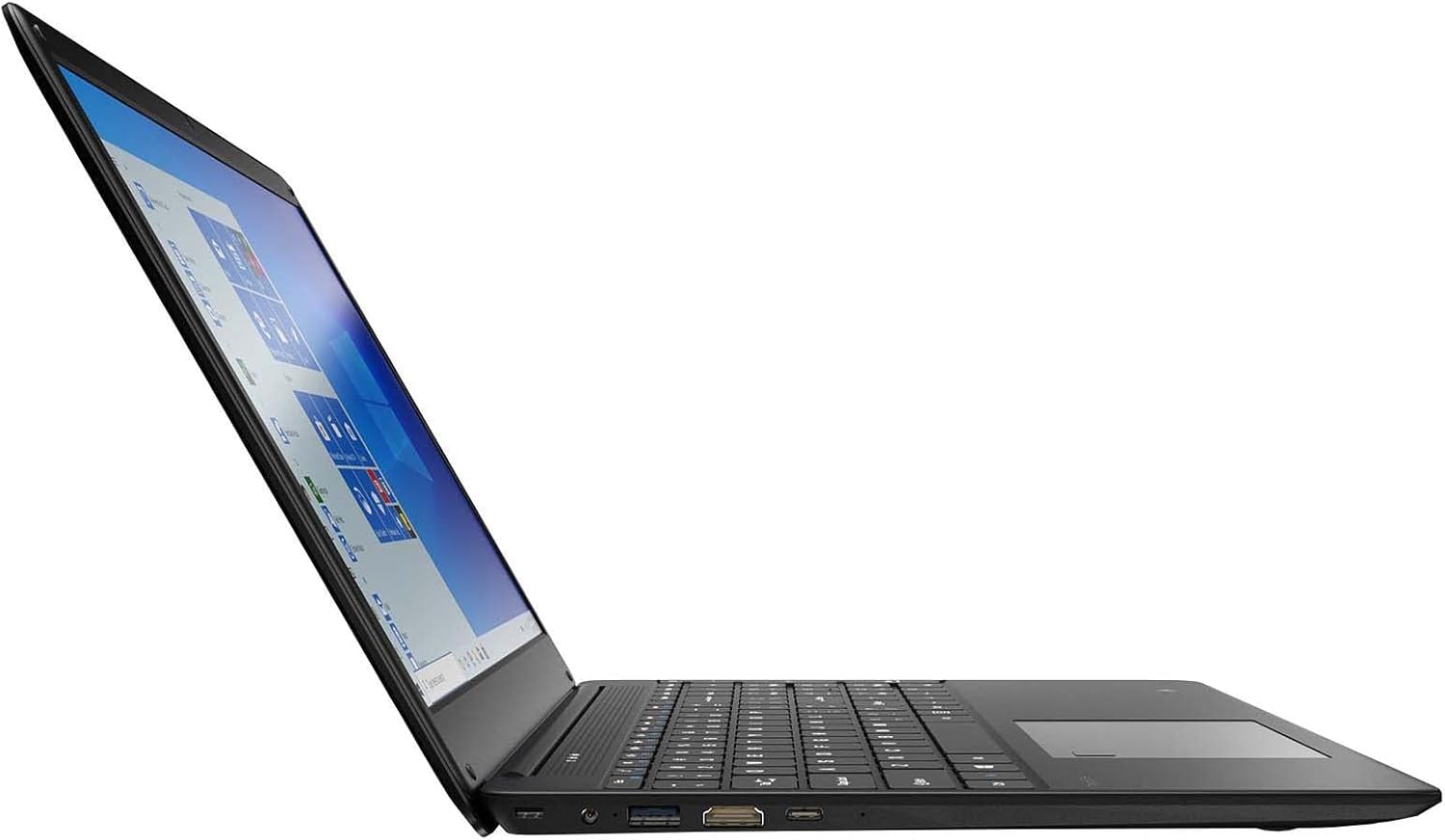
Figure 3.2: Left side ports (USB, HDMI, USB Type-C).
3.4 Asopọmọra Alailowaya
The laptop supports Wi-Fi and Bluetooth 5.1 for wireless connections. Access network settings via the Windows taskbar or Eto> Nẹtiwọọki & Intanẹẹti to connect to Wi-Fi networks or pair Bluetooth devices.
3.5 Audio Awọn ẹya ara ẹrọ
The built-in stereo speakers are tuned by THX Audio, providing enhanced sound quality. Adjust volume using the function keys on the keyboard or through Windows sound settings.
4. Itọju
4.1 Ninu Kọǹpútà alágbèéká
- Iboju: Lo asọ asọ, ti ko ni lint die-die dampened pẹlu omi tabi a iboju regede. Ma ṣe fun sokiri omi taara sori iboju.
- Ẹnjini ati Keyboard: Lo asọ asọ ti o gbẹ. Fun idoti alagidi, die-die damp asọ le ṣee lo. Yẹra fun awọn kẹmika lile.
- Awọn isanwo: Lokọọkan nu awọn šiši fentilesonu pẹlu afẹfẹ fisinuirindigbindigbin lati yago fun eruku ikole, eyi ti o le ni ipa itutu agbaiye.
4.2 batiri Itọju
Lati mu igbesi aye batiri pọ si ati igbesi aye gigun:
- Yago fun gbigba agbara batiri patapata nigbagbogbo.
- Má ṣe fi kọ̀ǹpútà alágbèéká náà sí ojú otútù tó le gan-an.
- Ti o ba tọju kọǹpútà alágbèéká fun akoko ti o gbooro sii, rii daju pe a ti gba agbara batiri si isunmọ 50-70%.
- Optimize power settings in Windows to conserve battery power.
4.3 Software imudojuiwọn
Regularly check for and install Windows updates to ensure your system has the latest security patches and performance improvements. Navigate to Eto> Imudojuiwọn & Aabo> Imudojuiwọn Windows.
4.4 Data Afẹyinti
Ṣe afẹyinti data pataki rẹ nigbagbogbo si kọnputa ita tabi ibi ipamọ awọsanma lati ṣe idiwọ pipadanu data.
5. Laasigbotitusita
Abala yii n ṣalaye awọn ọran ti o wọpọ ti o le ba pade pẹlu kọǹpútà alágbèéká rẹ.
5.1 Kọǹpútà alágbèéká Ko ni Agbara Lori
- Rii daju pe ohun ti nmu badọgba agbara ti sopọ ni aabo si kọǹpútà alágbèéká mejeeji ati iṣan agbara iṣẹ kan.
- Rii daju pe iṣan agbara n ṣiṣẹ nipa pilogi sinu ẹrọ miiran.
- Allow the laptop to charge for some time before attempting to power it on again.
5.2 Wi-Fi Asopọmọra Oran
- Ṣayẹwo boya Wi-Fi ti ṣiṣẹ ni awọn eto Windows.
- Tun olulana ati modẹmu bẹrẹ.
- Rii daju pe o wa laarin nẹtiwọki Wi-Fi ati pe o ti tẹ ọrọ igbaniwọle to tọ sii.
- Ṣiṣẹ Windows Network Troubleshooter (Settings > Network & Internet > Status > Network troubleshooter).
5.3 o lọra Performance
- Pa awọn ohun elo ti ko wulo ti nṣiṣẹ ni abẹlẹ.
- Ṣayẹwo fun ati fi sori ẹrọ eyikeyi awọn imudojuiwọn Windows ni isunmọtosi.
- Rí i dájú pé ààyè tó wà lórí SSD rẹ wà.
- Ṣayẹwo fun malware tabi awọn ọlọjẹ.
5.4 igbona
If the laptop feels excessively warm, ensure that the ventilation vents are not blocked. Operate the laptop on a hard, flat surface to allow for proper airflow. Avoid using it on soft surfaces like beds or couches that can obstruct vents.
5.5 Miiran oran
For issues not covered here, refer to the Windows help documentation or contact Gateway customer support.
6. Awọn pato
| Ẹya ara ẹrọ | Sipesifikesonu |
|---|---|
| Orukọ awoṣe | Gateway GWTN156 (GTW15G) |
| Iwọn Ifihan | 15.6 inches |
| Ipinnu iboju | 1920 x 1080 awọn piksẹli (FHD) |
| isise | AMD Ryzen 5 3450U (2.1 GHz, Up to 3.50 GHz) |
| Àgbo | 8 GB DDR4 |
| Ibi ipamọ | 256 GB SSD |
| Olupilẹṣẹ Graphics | AMD Radeon Vega 8 eya |
| Eto isesise | Windows 10 (Free Upgrade to Windows 11) |
| Alailowaya Iru | Wi-Fi, Bluetooth 5.1 |
| Awọn ibudo | 1x HDMI, 1x USB Type-C (Charge + Data), 2x USB 3.0, 1x Micro SD Slot (Up to 512 GB) |
| Pataki Awọn ẹya ara ẹrọ | Built-in Fingerprint Scanner (Windows Hello), Stereo Speakers Tuned by THX Audio, HD Webkamẹra |
| Iwọn Nkan | 5.5 iwon |
| Package Mefa | 16.65 x 11.73 x 2.8 inches |
7. Atilẹyin ọja ati Support
For warranty information and technical support, please refer to the official Gateway website or contact Gateway customer service directly. Keep your proof of purchase for warranty claims.
This product may be eligible for separate protection plans. Details regarding these plans are available from your retailer at the time of purchase.


