1. Ifihan
Thank you for choosing the Shinco WiFi Karaoke Machine. This portable system features a 15-inch touch screen, two wireless microphones, and multiple connectivity options including Wi-Fi and Bluetooth. This manual provides detailed instructions to help you get the most out of your device.
2. Ohun ti o wa ninu Apoti
Fi pẹ̀lẹ́pẹ̀lẹ́ tú gbogbo àwọn ohun èlò náà kí o sì rí i dájú pé o ti gba àwọn ohun èlò wọ̀nyí:
- Wifi Karaoke Machine with Touch Screen
- 2 UHF Alailowaya Microphones
- Isakoṣo latọna jijin
- Adapter agbara
- Okun RCA
- Afowoyi Olumulo (iwe-ipamọ yii)
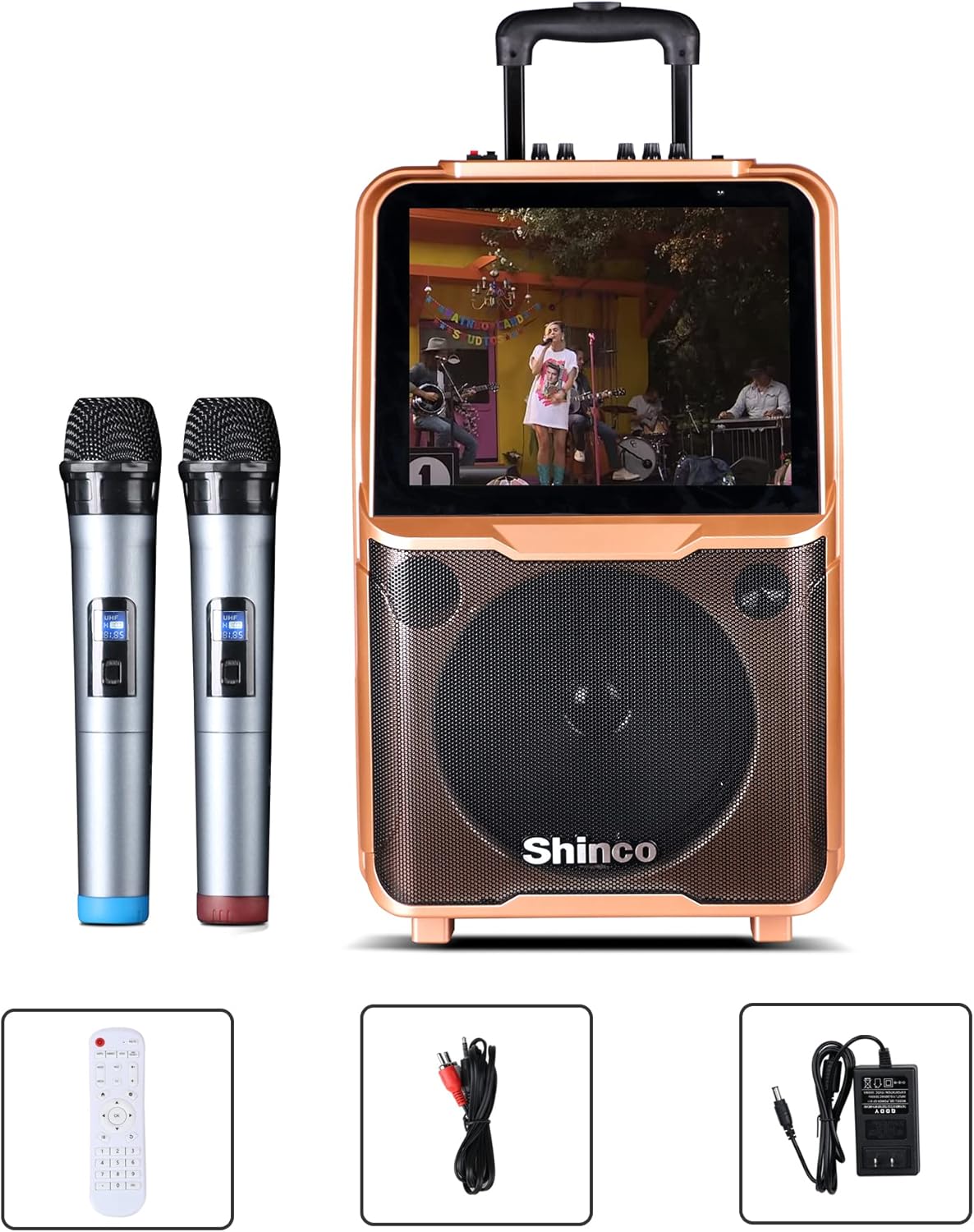
Image: Shinco Karaoke Machine with its accessories, including two wireless microphones, a remote control, an RCA cable, and a power adapter.
3. Awọn ẹya Ọja
- Iboju Fọwọkan 15-inch: Navigate menus and applications with ease.
- Wi-Fi Asopọmọra: Access online content and download apps from the Google Play Store.
- 2 Wireless Microphones: Enjoy untethered vocal performance.
- 50W RMS Agbara Ampolutọpa: Delivers clear audio through a 10-inch woofer.
- Ijade HDMI: Connect to an external TV for a larger display.
- Asopọmọra Bluetooth: Gba ohùn láilọ́wọ́ láti ọ̀dọ̀ àwọn ẹ̀rọ tó bá ara wọn mu.
- Išẹ Gbigbasilẹ: Record your vocal performances.
- Redio FM: Gbadun awọn ibudo redio ayanfẹ rẹ.
- USB/TF Card Compatible: Play media directly from storage devices.
- Apẹrẹ to gbe: Equipped with a trolley and retractable handle for easy transport.
- Batiri ti a ṣe sinu: Provides power for outdoor use.

Image: The Shinco Karaoke Machine highlighting its Android operating system, YouTube app compatibility, and Wi-Fi connectivity.
4. Eto
- Yọ Ẹrọ naa kuro: Remove the karaoke machine and all accessories from the packaging.
- Asopọ agbara: Connect the power adapter to the DC 15V input port on the back of the machine and plug it into a standard electrical outlet. The machine can operate on battery power, but it is recommended to charge it fully before first use.
- Agbara Tan: Press the Power button located on the control panel to turn on the machine. The 15-inch touch screen will illuminate.
- Igbaradi Gbohungbohun: Insert 2 AA batteries (not included) into each wireless microphone. Turn on the microphones using their respective power switches. The microphones are pre-paired with the machine.

Aworan: Ẹyin view of the Shinco Karaoke Machine, illustrating the storage compartments for the two wireless microphones.
5. Awọn ilana Iṣiṣẹ
5.1. Lilọ kiri Iboju Ifọwọkan
The 15-inch touch screen operates like a tablet. Swipe left or right to navigate between screens, tap icons to open applications, and use the on-screen keyboard for input.
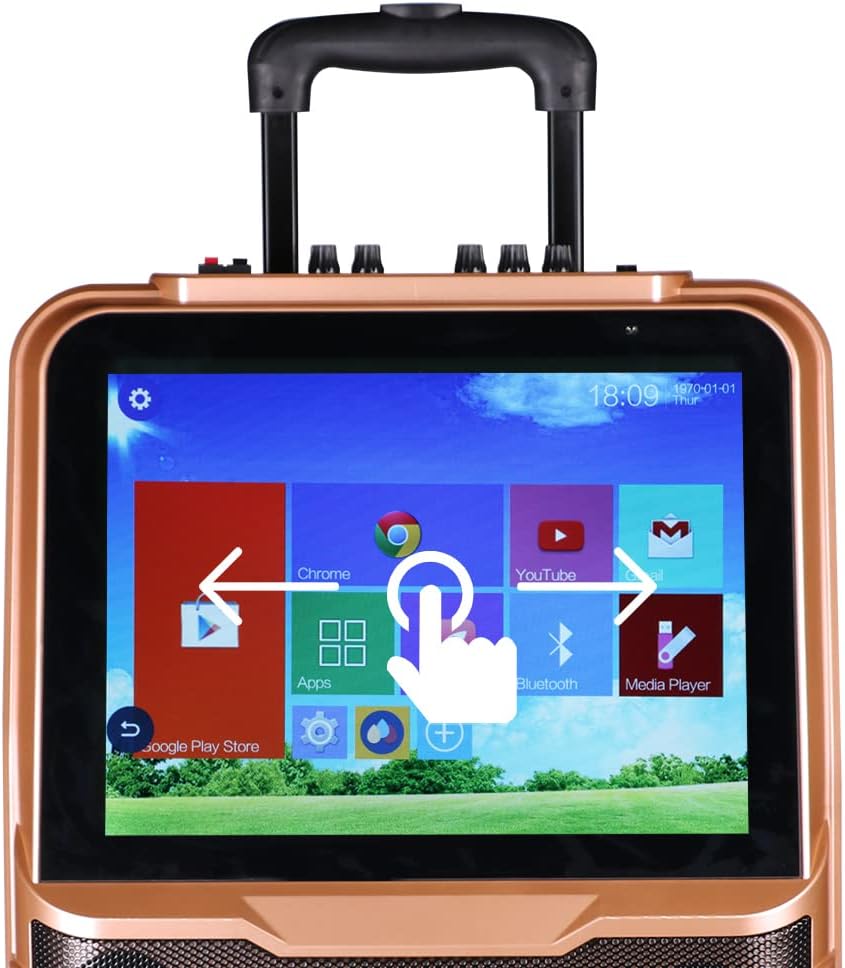
Image: A close-up of the Shinco Karaoke Machine's touch screen, displaying app icons and illustrating touch navigation with a hand gesture.
5.2. Asopọ Wi-Fi
- Láti ojú ìbojú àkọ́kọ́, tẹ àmì 'Ètò'.
- Yan 'Wi-Fi' ki o si tan-an.
- Yan nẹtiwọọki ti o fẹ lati inu akojọ naa ki o tẹ ọrọ igbaniwọle sii ti o ba beere fun ọ.
- Once connected, you can access online karaoke apps, YouTube, and other internet services.
5.3. Sisopọ Bluetooth
- Tap the 'Bluetooth' icon on the home screen or navigate through 'Settings'.
- Ensure Bluetooth is enabled on both the karaoke machine and your external device (e.g., smartphone, tablet).
- Select the karaoke machine's name from your device's Bluetooth list, or select your device from the machine's list to pair.
- Jẹrisi koodu sisopọ ti o ba ṣetan.
5.4. Lilo Awọn Gbohungbohun Alailowaya
The two UHF wireless microphones are designed for ease of use. Simply turn them on, and they will automatically connect to the karaoke machine. Adjust microphone volume using the dedicated knobs on the machine's control panel.
5.5. HDMI Output to TV
To display the karaoke machine's screen on a larger television:
- Connect one end of an HDMI cable (not included) to the HDMI OUT port on the karaoke machine.
- Connect the other end of the HDMI cable to an HDMI input port on your television.
- Select the corresponding HDMI input on your TV using your TV's remote control.

Image: The Shinco Karaoke Machine connected to a television via an HDMI cable, demonstrating how lyrics are displayed on both the machine's screen and the TV.
5.6. Sisisẹsẹhin Kaadi USB/TF
Insert a USB drive or TF card into the designated port. Use the 'Media Player' app on the touch screen to browse and play audio or video files ti o ti fipamọ lori ẹrọ.
5.7. Recording Voice
Utilize the recording function within compatible karaoke applications to capture your vocal performances. Refer to the specific app's instructions for detailed recording steps.
5.8. Redio FM
Access the FM Radio application from the touch screen. Use the on-screen controls to scan for stations and adjust the frequency.
5.9. Gbigbe
The machine is equipped with a retractable handle and wheels for easy transportation. Extend the handle and tilt the machine to roll it to your desired location.

Image: A person demonstrating the portability of the Shinco Karaoke Machine by pulling it with its retractable handle and wheels.
6. Itọju
- Ninu: Use a soft, dry cloth to clean the exterior of the machine. For the touch screen, use a microfiber cloth specifically designed for electronics. Avoid abrasive cleaners or solvents.
- Itọju Batiri: For optimal battery life, avoid completely draining the battery frequently. Charge the machine regularly, especially if it will be stored for an extended period.
- Ibi ipamọ: Store the karaoke machine in a cool, dry place away from direct sunlight and extreme temperatures.
- Itọju Gbohungbohun: Remove batteries from the wireless microphones if they will not be used for a long time to prevent leakage.
7. Laasigbotitusita
| Isoro | Owun to le Fa | Ojutu |
|---|---|---|
| Ẹrọ ko ni agbara lori. | No power, low battery, or power adapter issue. | Ensure power adapter is securely connected and plugged into a working outlet. Charge the battery. |
| Ko si ohun lati awọn agbohunsoke. | Volume too low, mute activated, or incorrect audio source. | Increase master volume. Check if mute is active. Verify correct audio input source is selected. |
| Wireless microphones not working. | Microphones off, low batteries, or pairing issue. | Ensure microphones are powered on. Replace batteries. If issues persist, refer to pairing instructions in the full manual (if applicable, otherwise assume pre-paired). |
| Wi-Fi connection unstable or failing. | Weak signal, incorrect password, or router issue. | Move closer to the Wi-Fi router. Re-enter Wi-Fi password. Restart your Wi-Fi router. |
| Touch screen unresponsive or slow. | Temporary software glitch or excessive background apps. | Restart the machine. Close unnecessary applications. Ensure screen is clean. |
8. Awọn pato
| Ẹya ara ẹrọ | Ẹ̀kúnrẹ́rẹ́ |
|---|---|
| Nọmba awoṣe | B09K73CG2P |
| Iwọn Nkan | 22.4 iwon |
| Package Mefa | 26.5 x 17 x 10.5 inches |
| Ifihan | 15-inch Fọwọkan iboju |
| Iwọn Agbọrọsọ | 1 (with 10-inch woofer) |
| Orisun agbara | Adapta Agbara Batiri / AC |
| Asopọmọra | Wi-Fi, Bluetooth, USB, TF Card, HDMI Out, RCA |
| Awọn gbohungbohun | 2 UHF Alailowaya Microphones |
| Pataki Ẹya | Wireless, Portable with Trolley and Retractable Handle |
9. Atilẹyin ọja ati Support
For warranty information and technical support, please refer to the warranty card included with your product or visit the official Shinco webojula. Tọju iwe-ẹri rira rẹ bi ẹri rira fun eyikeyi awọn ibeere atilẹyin ọja.


