Ọrọ Iṣaaju
This manual provides detailed instructions for the installation, operation, and maintenance of your Herdio 6.5-inch Bluetooth Ceiling Speakers with In-Wall Amplifier. This system is designed to deliver high-fidelity audio for various indoor environments, including home theaters, bathrooms, living rooms, kitchens, and offices. Please read this manual thoroughly before installation and use to ensure optimal performance and safety.
Package Awọn akoonu
Daju pe gbogbo awọn nkan ti a ṣe akojọ rẹ si isalẹ wa ninu package rẹ:
- 1x Wall Mount Bluetooth Ampitanna
- 1x AC Adapter
- 2x Skru
- 2x 6.5-inch In-Ceiling Speakers
- 2x Speaker Wires
- 2x User Manuals (one for amplifier, one for speakers)

Ṣeto
This section guides you through the physical installation and wiring of your Herdio ceiling speaker system.
1. AmpFifi sori ẹrọ lifier
Odi inu amplifier is designed for flush mounting in a standard wall plate size. Ensure you have appropriate wiring access before proceeding.
- Ṣetan Odi naa: Use the provided template (if applicable) to mark and cut an opening in the wall for the amplifier.
- So okun agbara pọ: Connect the 12V DC power cable to the designated two-pin connector on the back of the amplifier module.
- So okun Olohun so pọ: Connect the audio cable to the three-pin connector on the back of the amplifier module.
- Ni aabo Ampolutọpa: Fi sii amplifier module into the wall opening and secure it using the provided screws.
- So Apoti Iwari: Place the decorative faceplate over the installed amplifier and secure it.

2. Fifi sori Agbọrọsọ
The ceiling speakers are designed for flush mounting. Ensure you have appropriate ceiling space and wiring access.
- Àmì Géjáde: Use the provided cutout template to mark the desired location for each speaker in the ceiling.
- Ṣii silẹ: Carefully cut the circular opening in the ceiling according to the marked template. The cutout diameter is approximately 8.07 inches (20.5 cm).
- Yọ Grille: Gently remove the magnetic grille from the front of each speaker.
- So Awọn onirin Agbọrọsọ: Connect the speaker wires to the spring-loaded terminals on the back of each speaker. Ensure correct polarity: red wire to positive (+) terminal, black wire to negative (-) terminal.
- Fi Agbọrọsọ sii: Insert the speaker into the ceiling opening. The mounting clamps will automatically engage.
- Mu Clamps: Use a screwdriver to tighten the screws on the front baffle of the speaker. This will rotate the mounting clamps and secure the speaker firmly in place.
- Replace Grille: Reattach the magnetic grille to the speaker.


3. Aworan aworan
Connect the speaker wires from the ceiling speakers to the amplifier terminals. Ensure correct polarity for both speakers (red to +, black to -).

4. Asopọ agbara
Connect the AC adapter to a standard 120V power outlet and then plug the DC end into the amplifier's power input. The power LED on the amplifier will illuminate.
Video: This video demonstrates the unboxing, wiring, Bluetooth pairing, and installation process for the Herdio 6.5-inch Bluetooth Ceiling Speakers Set.
Awọn ilana Iṣiṣẹ
Learn how to use your Herdio ceiling speaker system.
1. Agbara Tan / Pa ati Iṣakoso iwọn didun
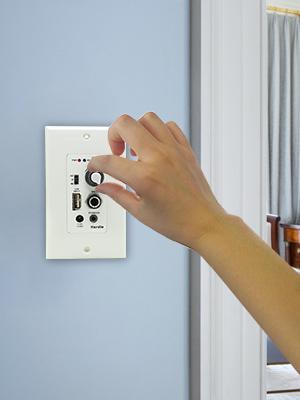
Turn the knob on the amplifier clockwise to power on the unit and increase the volume. Turn it counter-clockwise to decrease volume and power off. You will hear an audible drop sound when powering on.
2. Sisopọ Bluetooth
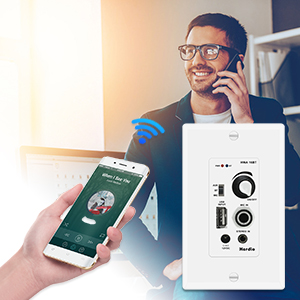
After powering on, the blue Bluetooth indicator light will flash, indicating it is in pairing mode. On your smart device (phone, tablet, etc.), search for available Bluetooth devices and select 'Herdio'. Once connected, the blue light will remain solid.
3. Aṣayan Input
Use the input selection switch on the amplifier to choose between Bluetooth (BT), Auxiliary (AUX), or Microphone (MIC) input modes.
4. Iṣẹ-ṣiṣe USB
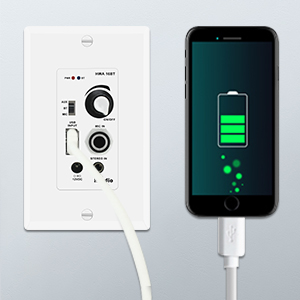
The USB port functions as a flash memory reader for media playback and also provides a charging port for your devices (5V/1A).
5. Gbohungbohun Input
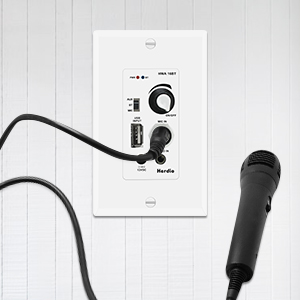
Connect a microphone to the 1/4-inch MIC IN jack for paging or voice applications.
Itoju
To ensure the longevity and optimal performance of your Herdio ceiling speakers and amplifier, tẹle awọn itọnisọna itọju wọnyi:
- Ninu: Lo asọ asọ ti o gbẹ lati sọ di mimọ amplifier faceplate and speaker grilles. Avoid using harsh chemicals, solvents, or abrasive cleaners, as these can damage the finish.
- Yiyọ eruku kuro: Periodically use a soft brush or a low-power vacuum with a brush attachment to gently remove dust from the speaker grilles.
- Awọn ipo Ayika: Ensure the speakers and amplifier are installed in environments free from excessive moisture, extreme temperatures, and direct sunlight. The product is not waterproof.
- Ayẹwo onirin: Máa ṣàyẹ̀wò gbogbo àwọn ìsopọ̀ wáyà láti rí i dájú pé wọ́n wà ní ààbò àti pé wọn kò ní ìbàjẹ́ tàbí ìbàjẹ́.
Laasigbotitusita
If you encounter issues with your Herdio ceiling speaker system, refer to the following common problems and solutions:
- Ko si Agbara:
- Ensure the AC adapter is securely plugged into a working power outlet and the amplifier's DC input.
- Check if the power knob on the amplifier is turned clockwise to the 'ON' position.
- Daju pe iṣan agbara n ṣiṣẹ nipa pilogi sinu ẹrọ miiran.
- Ko si ohun lati awọn Agbọrọsọ:
- Confirm that the speaker wires are correctly connected to both the speakers and the amplifier, observing proper polarity (+ to +, - to -).
- Ensure the volume knob on the amplifier ti wa ni titan soke.
- Check the input selection switch on the amplifier to ensure the correct source (BT, AUX, MIC) is selected.
- If using Bluetooth, ensure your device is paired and playing audio.
- If using AUX or MIC, ensure the external device is connected and functioning correctly.
- Awọn oran Asopọ Bluetooth:
- Rii daju pe amplifier is in Bluetooth pairing mode (blue light flashing).
- Make sure your Bluetooth device is within the 30+ feet wireless range.
- Forget the 'Herdio' device from your smart device's Bluetooth settings and attempt to re-pair.
- Tun awọn mejeeji bẹrẹ amplifier ati ẹrọ Bluetooth rẹ.
- Ohun Yiyi:
- Din iwọn didun dinku lori awọn mejeeji amplifier ati ẹrọ orisun ohun rẹ.
- Ṣàyẹ̀wò àwọn ìsopọ̀ wáyà agbọ́hùnsọ̀ fún àwọn okùn tí ó bàjẹ́ tàbí àwọn ìyípo kúkúrú.
- Ensure the audio source is not overdriven or producing distorted signals.
Awọn pato
| Brand | Herdio |
| Orukọ awoṣe | HCS 818 |
| Agbọrọsọ Iru | Woofer, Tweeter |
| Iwọn Agbọrọsọ | 6.5 inches |
| Agbọrọsọ Agbara Ijade ti o pọju | 320 Wattis |
| Ipalara | 8 ohms |
| Idahun Igbohunsafẹfẹ | 20 KHz (Note: This is likely the upper limit, typical range is broader) |
| Asopọmọra Technology | Iranlọwọ, Bluetooth, USB |
| Imọ-ẹrọ Ibaraẹnisọrọ Alailowaya | Bluetooth |
| Bluetooth Ibiti | 30 Ẹsẹ |
| Iṣagbewọle Voltage | 120 Volts |
| Orisun agbara | Okun Itanna |
| Iṣagbesori Iru | Flush Mount, Ceiling Mount |
| Iwọn Ọja (Ampalafin) | 9.25"D x 9.25"W x 4.13"H (Note: This dimension seems to be for the speaker, not the amplifier. Amplifier is typically smaller, as shown in images.) |
| Ohun elo | Acrylonitrile Butadiene Styrene (ABS) |
| Se mabomire | ERO (Kii ṣe Alatako Omi) |
| Iwọn Nkan | 9.08 pọ́ọ̀nù (Àpapọ̀ ìwọ̀n àpò) |
Alaye atilẹyin ọja
The Herdio 6.5-inch Bluetooth Ceiling Speakers with In-Wall Amplifier wa pẹlu kan Atilẹyin ọja to lopin. For specific details regarding warranty coverage, duration, and claims process, please refer to the warranty card included in your package or contact Herdio customer support directly.
Atilẹyin
For further assistance, technical support, or inquiries regarding your Herdio product, please visit the official Herdio website or contact their customer service department. Contact information can typically be found on the product packaging or on the Herdio webojula.


