1. Ifihan
Thank you for choosing the Mesqool CR1009Pro DAB/FM Portable Emergency Radio. This device is designed to provide reliable communication and essential features in various situations, from daily use to outdoor adventures and emergencies. It combines DAB+ and FM radio reception with multiple power sources, including a hand crank, solar panel, and a 5000mAh internal battery, which also functions as a power bank. Additional features include an LED flashlight, a reading lamp, and an SOS alarm.
Please read this manual thoroughly before operating the device to ensure proper use and to maximize its lifespan.
2. Alaye Aabo
- Ma ṣe fi ẹrọ naa han si awọn iwọn otutu to gaju, oorun taara fun awọn akoko gigun (kọja gbigba agbara), tabi ọriniinitutu giga.
- The device has an IPX4 water resistance rating, meaning it is protected against splashing water from any direction. Do not immerse the device in water.
- Jeki ẹrọ naa kuro ni awọn aaye oofa ti o lagbara.
- Ma ṣe gbiyanju lati tunto tabi yi ẹrọ naa pada. Eyi yoo sọ atilẹyin ọja di ofo ati pe o le fa ibajẹ tabi ipalara.
- Lo awọn okùn gbigba agbara pàtó kan ati awọn adapter agbara nikan.
- Jeki kuro ni arọwọto awọn ọmọde.
3. Ọja Ipariview
Familiarize yourself with the components and controls of your Mesqool CR1009Pro radio.

Nọmba 3.1: Iwaju view of the radio with display and controls.
Awọn iṣakoso ati awọn ibudo:
- Bọtini agbara: Yi redio si tan/pa.
- Bọtini MODE: Switches between DAB, FM, and other modes.
- Bọtini SCAN: Initiates automatic station scanning.
- Tẹ Bọtini: Jẹrisi awọn aṣayan.
- Bọtini MENU: Accesses settings menu.
- Bọtini Alaye: Displays station information (RDS/DAB data).
- PRESET/RECALL/STORE Buttons: Manages preset radio stations.
- Awọn bọtini iwọn didun (+/-): Ṣe atunṣe iwọn didun ohun.
- Àwọn bọ́tìnì Túnṣe (Sókè/Sàn): Manually tunes frequencies or navigates menus.
- Eriali telescopic: Fun imudara gbigba redio.
- Ina filaṣi LED: Be lori ẹgbẹ.
- Kika Lamp: Apo leamp located on top.
- Bọ́tìnì Ìkìlọ̀ SOS: Activates emergency alarm.
- Ibẹrẹ Ọwọ: Fun iṣelọpọ agbara afọwọṣe.
- Igbimọ oorun: Fun gbigba agbara oorun.
- Micro USB Input: Fun gbigba agbara ti abẹnu batiri.
- Ijade USB: Fun gbigba agbara awọn ẹrọ ita (iṣẹ banki agbara).
- Jack agbekọri 3.5mm: Fun ikọkọ gbigbọ.
- AAA Battery Compartment: For optional AAA battery power.
4. Eto
4.1 Gbigba agbara akọkọ
Before first use, fully charge the internal 5000mAh battery using the provided Micro USB cable and a 5V/2A power adapter (not included). The battery indicator on the display will show charging status.
4.2 Inserting AAA Batteries (Optional)
For an additional power source, open the battery compartment and insert 3 AAA batteries (not included), ensuring correct polarity. The radio can automatically switch to AAA battery power if the internal Li-ion battery is low.
4.3 Ìfàsẹ́yìn Antenna
For optimal radio reception, fully extend the telescopic antenna.
5. Awọn ilana Iṣiṣẹ
5.1 Agbara Tan / Pa
Tẹ awọn AGBARA bọtini lati tan redio tabi pa.
5.2 Iṣẹ́ Rédíò (DAB/FM)

Nọmba 5.1: Agbekọri Jack fun ikọkọ gbigbọ.
- Yan Ipo: Tẹ awọn MODE bọtini lati yipada laarin awọn ipo redio DAB ati FM.
- Ṣiṣayẹwo aifọwọyi: Ni DAB tabi FM mode, tẹ awọn SCAN button to automatically search for available stations. The radio will store them.
- Itọsọna Afowoyi: Lo awọn TẸ̀ SÍ I/SÍLẸ̀ awọn bọtini lati satunṣe igbohunsafẹfẹ pẹlu ọwọ.
- Fifipamọ awọn tito tẹlẹ: After finding a station, press the ṢẸ́TẸ́TÌ/ÌTỌ́JÚ button, select a preset number using the TẸ̀ SÍ I/SÍLẸ̀ awọn bọtini, ki o si tẹ WOLE to save. The radio supports up to 30 preset stations.
- ÌRallNT Pres Awọn tito tẹlẹ: Tẹ awọn ṢETẸ̀TẸ̀ TẸ̀LẸ̀/ÌRÁNTÍ bọtini ati ki o lo awọn TẸ̀ SÍ I/SÍLẸ̀ buttons to select a saved station.
- DRC Function (DAB): In DAB mode, access the menu to adjust the Dynamic Range Control (DRC) compression rate, which helps balance volume levels.
- RDS Function (FM): In FM mode, the RDS (Radio Data System) function displays station information on the screen, such as program name or song title.
- Agbekọri Lilo: So agbekọri 3.5mm sinu jaketi agbekọri fun gbigbọ ikọkọ.
5.3 Ngba agbara si Redio

Nọmba 5.2: Hand crank charging.

Nọmba 5.3: Five ways to charge the radio.
- Ngba agbara USB: Connect the Micro USB cable to the radio's input port and a power source.
- Gbigba agbara Oorun: Place the radio with the solar panel facing direct sunlight. This method is primarily for maintaining charge or slow charging.
- Gbigba agbara ọwọ ọwọ: Rotate the hand crank clockwise or counter-clockwise at a steady pace for manual power generation. A few minutes of cranking can provide power for basic functions.
- Awọn batiri AAA: If inserted, the radio can draw power from AAA batteries when the internal rechargeable battery is low.
5.4 Lilo bi Bank Power
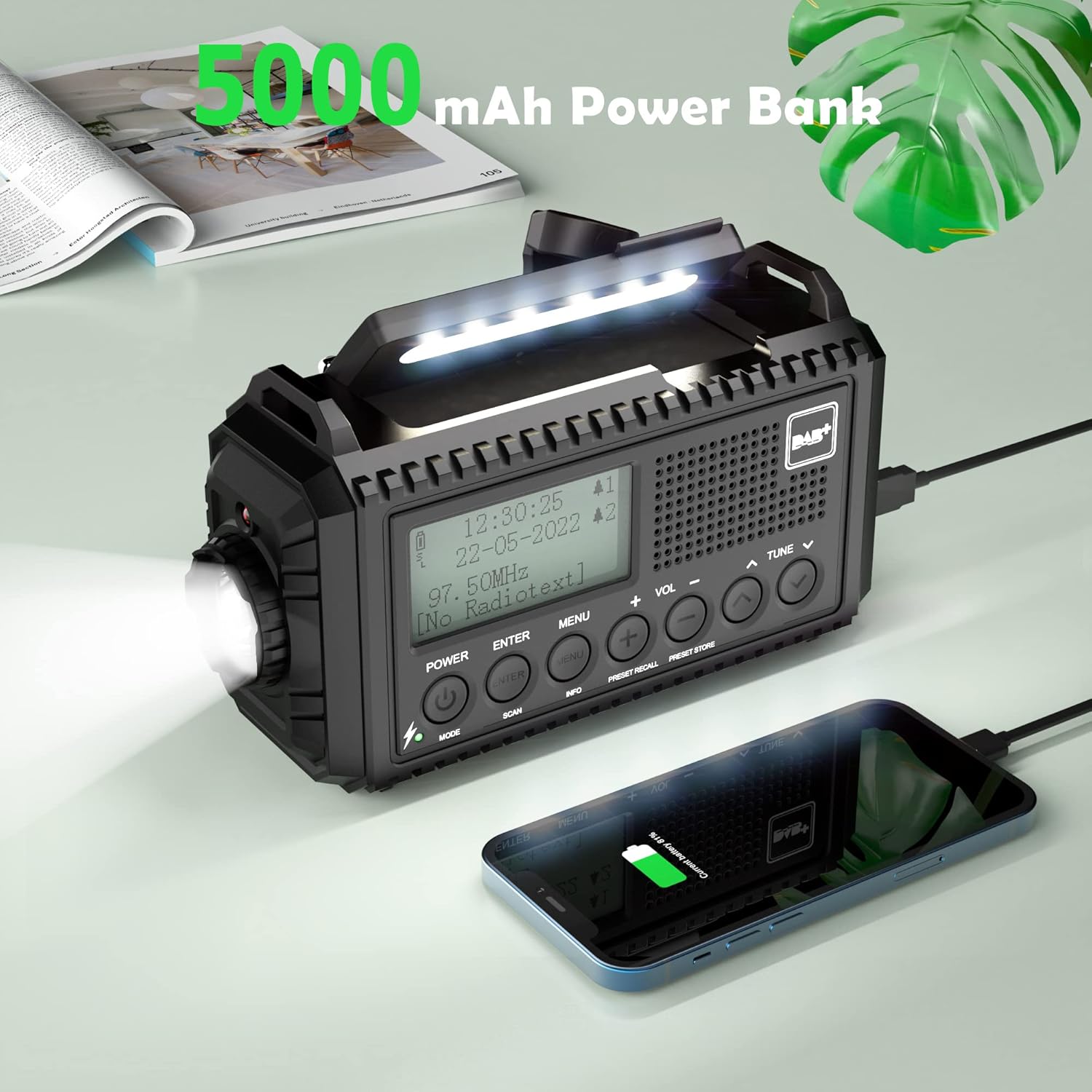
Nọmba 5.4: Charging a smartphone using the radio's power bank function.
Connect your smartphone or other USB-powered device to the radio's USB output port using a compatible charging cable. The radio's internal 5000mAh battery will begin charging the external device.
5.5 Awọn Iṣẹ́ Ìmọ́lẹ̀

Nọmba 5.5: Reading with the integrated lamp.

Nọmba 5.6: Using the flashlight for navigation.
- Imọlẹ ina: Press the dedicated flashlight button (usually on the side) to turn it on. Press again to cycle through brightness levels (High/Normal) or turn off.
- Kika Lamp: Tú ìwé kíkà náà síta lamp from the top of the radio. Press its button to turn it on and cycle through brightness levels (High/Normal) or turn off.
5.6 SOS Itaniji
Ní àkókò pàjáwìrì, tẹ kí o sì di mọ́lẹ̀ SOS button. The radio will emit a loud siren sound and flash a red light to attract attention. Press the SOS bọtini lẹẹkansi lati muu ṣiṣẹ.
5.7 Aago Itaniji ati Aago Orun
- Aago Itaniji meji: Access the menu to set up to two independent alarms. You can configure alarm duration (e.g., 15, 30, 45, 60, 90, 120 minutes) and volume.
- Akoko oorun: Access the menu to set a sleep timer (e.g., 15, 30, 45, 60, 90 minutes). The radio will automatically turn off after the set time.
5.8 Language and Backlight Settings
- Èdè: Navigate to the system settings in the menu to select your preferred language (English, Portuguese, French, Italian, German).
- Imọlẹ ẹhin: Adjust the display backlight brightness (High, Medium, Low) and duration (10s, 20s, 30s, 45s, 60s, 90s, 120s, 180s) via the menu settings.
6. Itọju

Nọmba 6.1: IPX4 water resistance for outdoor use.
- Ninu: Mu redio nu pẹlu asọ, damp asọ. Ma ṣe lo abrasive ose tabi epo.
- Itọju Batiri: For optimal battery life, fully charge the internal battery at least once every three months if not in regular use.
- Ibi ipamọ: Tọju redio ni itura, aye gbigbẹ kuro lati orun taara ati awọn iwọn otutu to gaju.
- Omi Resistance: While IPX4 rated, avoid prolonged exposure to heavy rain or submersion in water. Ensure all port covers are securely closed.
7. Laasigbotitusita
| Isoro | Owun to le Fa | Ojutu |
|---|---|---|
| Redio ko tan. | Batiri kekere tabi ko si orisun agbara. | Charge the internal battery via USB, solar, or hand crank. Check if AAA batteries are inserted correctly and have charge. |
| Gbigba redio ti ko dara. | Eriali ko gbooro sii, ifihan agbara ti ko lagbara, tabi kikọlu. | Fully extend the telescopic antenna. Try repositioning the radio. Perform an automatic scan for stations. |
| Kò le gba agbara si awọn ẹrọ ita. | Radio's internal battery is low or cable is incompatible. | Ensure the radio's internal battery is sufficiently charged. Use a compatible USB charging cable for your device. |
| SOS alarm activates accidentally. | SOS button is highly sensitive. | Be mindful of the SOS button's location when handling the radio. Avoid placing objects that might press it. |
| Lights (flashlight/reading lamp) do not work. | Low battery or light function not activated. | Charge the radio. Ensure you are pressing the correct button for the desired light function. |
8. Awọn pato
- Brand: Mesqool
- Awoṣe: CR1009Pro DAB
- Àwọ̀: Dudu
- Asopọmọra: USB
- Awọn ẹya pataki: SOS Alarm, Built-in Clock, Portable, Rechargeable, LED Flashlight, Reading Lamp
- Ohun elo: Ṣiṣu
- Awọn ibudo USB: 1 (Ijade)
- Awọn ẹrọ ibaramu: Headphones, Smartphone
- Awọn iwọn: 17.2L x 9.4W x 6.3H cm
- Imọ-ẹrọ Atunṣe: DAB+
- Orisun Agbara: Solar panel, Hand crank, Micro USB input, Internal 5000mAh rechargeable battery, 3 AAA batteries (not included)
- Awọn ẹgbẹ Redio ti o ni atilẹyin: FM, DAB+
- Omi Resistance: IPX4
9. Atilẹyin ọja ati Support
For warranty information or technical support, please refer to the warranty card included with your product or contact Mesqool customer service directly. You can often find support contact details on the official Mesqool webojula tabi nipasẹ rẹ alagbata.
Manufacturer: Mesqool E-commerce Co.Ltd


