1. Ifihan
This manual provides essential information for the safe and effective operation of your HOTO 3.6V Electric Screwdriver. Please read these instructions thoroughly before first use and retain for future reference.
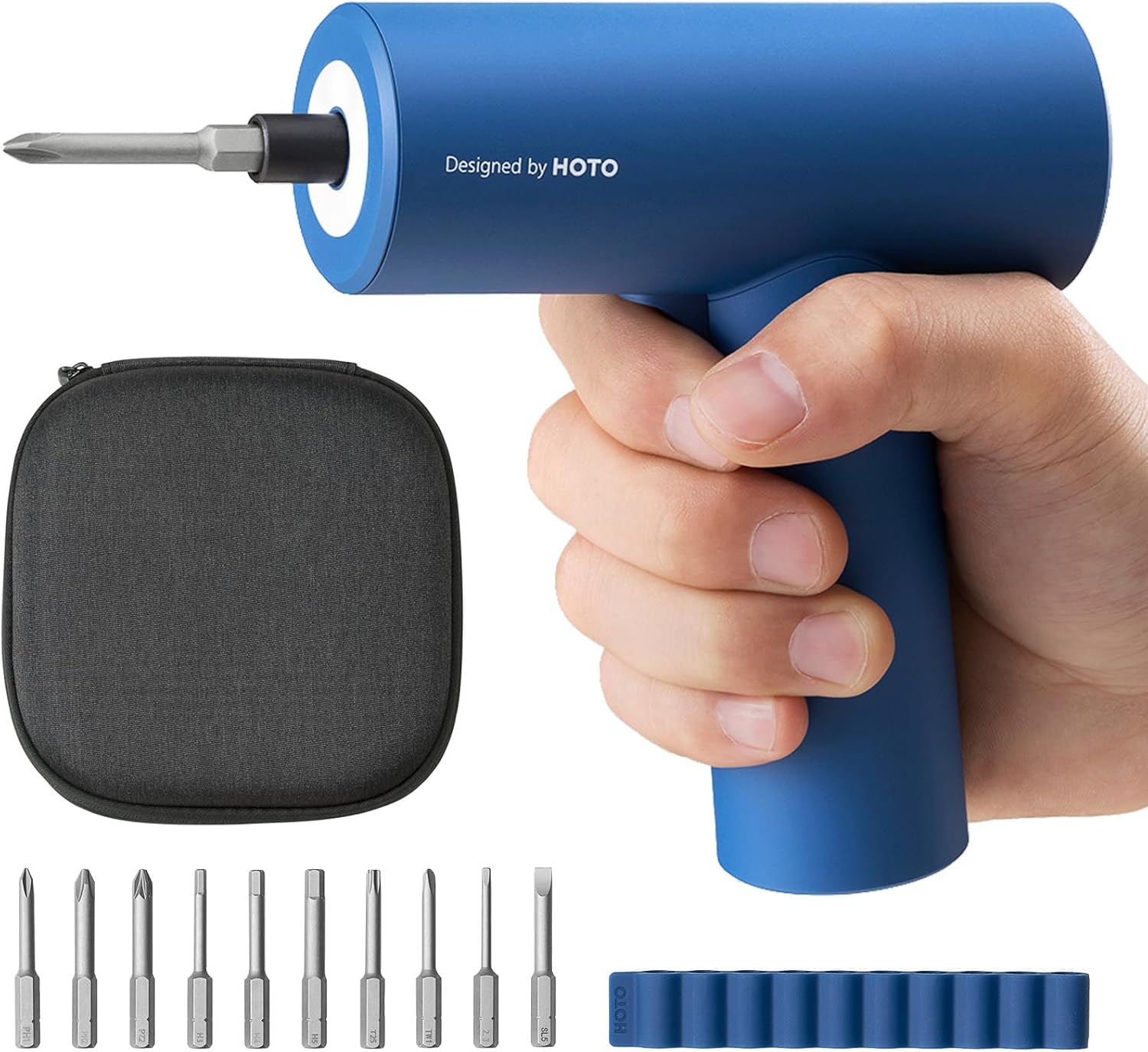
Image 1: HOTO 3.6V Electric Screwdriver with included accessories.
2. Package Awọn akoonu
Your HOTO Electric Screwdriver package includes the following items:
- 1 x 3.6V Cordless Electric Screwdriver
- 1 x Sturdy Canvas Storage Bag
- 1 x Okun Ngba agbara USB-C
- 1 x Itọsọna olumulo
- 10 x 50mm Screwdriver Bits (S2 Alloy Steel):
- Posidriv: PZ2
- Phillips: PH1, PH2
- Hex: H3, H4, H5
- Flathead: SL5
- Torx: T25
- Onigun mẹta: 2.3
- Tri-Wing: TW1

Image 2: The HOTO Electric Screwdriver and its durable canvas storage bag.
3. Awọn ẹya Ọja
- Iwapọ ati Apẹrẹ Ergonomic: The screwdriver features a sleek, one-piece design made from high-quality engineering plastic, ensuring comfortable one-handed use.
- Agbara iyipo: Delivers 5 N.m of torque, suitable for various tasks including furniture assembly, electrical appliance repair, and DIY projects.
- Batiri pipẹ: Equipped with a 2000mAh high-capacity lithium-ion battery, providing power for over 300 screws on a single full charge.
- Ngba agbara USB-C: Convenient USB-C charging port for compatibility with modern electronic devices.
- Imọlẹ LED ti a ṣepọ: A built-in ring LED light illuminates the work area, eliminating shadows and improving visibility in dark or confined spaces.
- Dimu Bit oofa: Features a magnetic quick-release chuck for easy and secure bit changes.
- Awọn Aabo Aabo: Pẹlu overcurrent, overvoltage, and overtemperature protections for safe charging and operation.

Image 3: The compact design of the HOTO Electric Screwdriver allows for easy control and maneuverability.

Image 4: The integrated ring LED light provides shadow-free illumination for precise work.

Image 5: Internal components highlighting the 2000mAh battery and 5 N.m torque capability.
4. Eto
4.1 Ngba agbara si screwdriver
- Locate the USB-C charging port at the bottom of the screwdriver handle.
- Connect the provided USB-C charging cable to the port and to a compatible USB power adapter (not included).
- The indicator light will illuminate red during charging. It will turn white once the battery is fully charged.
- Gbigba agbara ni kikun maa n gba to wakati mẹta.
4.2 Fifi screwdriver Bits
- Select the appropriate 50mm S2 alloy steel bit for your task.
- Insert the bit into the magnetic quick-release chuck at the front of the screwdriver. The magnetic holder will secure the bit in place.
- To remove a bit, simply pull it out from the magnetic chuck.
Video 1: Demonstrates the magnetic quick-release bit installation and USB-C charging port.
5. Awọn ilana Iṣiṣẹ
5.1 Agbara Titan / Pa ati Iṣakoso Itọsọna
The HOTO Electric Screwdriver features a two-way small disc knob for intuitive control:
- Screw In (Forward): Push the disc knob upwards (towards the arrow pointing up) to drive screws in.
- Screw Out (Reverse): Push the disc knob downwards (towards the arrow pointing down) to remove screws.
- Lock (Off): Position the disc knob in the middle (at the 'O' symbol) to lock the screwdriver and prevent accidental operation.
5.2 Lilo awọn LED Light
The built-in ring LED light automatically activates when the screwdriver is in operation, providing illumination to your work surface. This feature ensures clear visibility and reduces shadows, especially in dimly lit areas.
Fidio 2: Pariview of the HOTO Electric Screwdriver's design, showing the two-way control knob and LED light in action.
Video 3: Demonstrates the HOTO Electric Screwdriver's all-in-one design and ease of use for various tasks.
6. Itọju
- Ninu: Máa fi aṣọ rírọrùn àti gbígbẹ nu ara ẹ̀rọ ìfọṣọ náà déédéé láti mú eruku àti ìdọ̀tí kúrò. Má ṣe lo àwọn kẹ́míkà líle tàbí àwọn ohun ìfọṣọ ìfọṣọ.
- Ibi ipamọ: Store the screwdriver and its accessories in the provided canvas storage bag in a dry, cool place, away from direct sunlight and moisture.
- Itọju Batiri: To prolong battery life, avoid fully discharging the battery frequently. Charge the screwdriver regularly, even if not in constant use.
- Ayewo Bit: Periodically inspect the screwdriver bits for wear or damage. Replace worn bits to ensure optimal performance and prevent damage to screw heads.
7. Laasigbotitusita
If you encounter issues with your HOTO Electric Screwdriver, consider the following:
- Screwdriver kò tan: Ensure the battery is sufficiently charged. Connect the USB-C cable and charge until the indicator light turns white.
- Bit slipping or not engaging: Verify that the screwdriver bit is correctly inserted into the magnetic chuck and that it matches the screw head type and size.
- Agbara ti o dinku: The battery may be low. Recharge the screwdriver.
- Ariwo dani tabi gbigbọn: Dá lílò dúró lẹ́sẹ̀kẹsẹ̀ kí o sì kàn sí ìrànlọ́wọ́ oníbàárà.
8. Awọn pato
| Sipesifikesonu | Ẹ̀kúnrẹ́rẹ́ |
|---|---|
| Brand | FOTO |
| Orukọ awoṣe | QWLSD008 |
| Voltage | 3.6V |
| Torque | 5 Nm |
| Agbara Batiri | 2000mAh litiumu Iwon |
| Gbigba agbara Port | USB-C |
| Akoko gbigba agbara | Isunmọ. wakati meji 2 |
| Ko si fifuye Iyara | 200 RPM |
| Pataki Awọn ẹya ara ẹrọ | Interchangeable Bit, LED Light, Magnetic Tip |
| Ohun elo | Ṣiṣu |
| Iwọn Nkan | 1.68 iwon |
| Ọja Mefa | 5 x 5.15 x 1.65 inches |
9. Atilẹyin ọja ati Support
For warranty information, technical support, or service inquiries, please refer to the official HOTO webojula tabi kan si alagbata ti o ti ra ọja naa. Jeki ẹri rira rẹ fun eyikeyi awọn ibeere atilẹyin ọja.