Ọrọ Iṣaaju
Welcome to the user manual for your new ARMODD Squarz 9 Pro Smart Watch. This guide provides comprehensive instructions on how to set up, operate, and maintain your smartwatch, ensuring you get the most out of its advanced features. The ARMODD Squarz 9 Pro is designed for both men and women, featuring a vibrant 1.72-inch touch screen, IP68 waterproofing, and a wide array of health and fitness tracking capabilities.
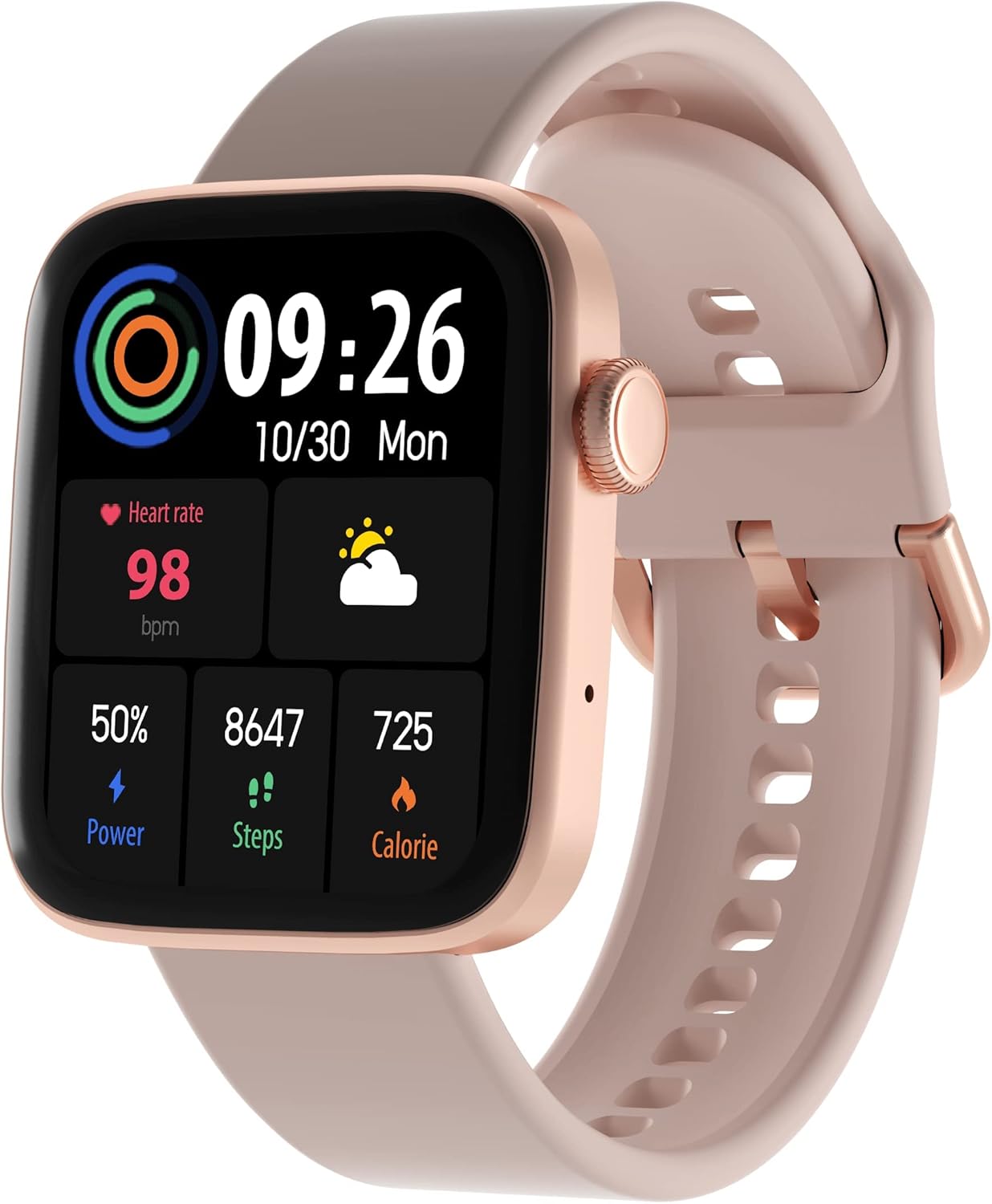
Figure 1: ARMODD Squarz 9 Pro Smart Watch with its main display showing various metrics.
Ṣeto
1. Ngba agbara si Smart Watch
Before first use, fully charge your ARMODD Squarz 9 Pro Smart Watch.
- So okùn gbigba agbara pọ mọ ibudo gbigba agbara ni ẹhin aago naa.
- Pulọọgi okun USB opin okun sinu ohun ti nmu badọgba agbara USB boṣewa (5V/1A niyanju) tabi ibudo USB ti kọnputa kan.
- The watch display will show a charging indicator. A full charge typically takes about 2 hours.
2. Sopọ pẹlu Foonuiyara Foonuiyara Rẹ
To unlock all features and synchronize data, pair your smartwatch with the dedicated mobile application.
- Ṣe igbasilẹ ohun elo naa: Wa fun the "WearPro" app (or the app specified in your watch's quick start guide) on the App Store (iOS) or Google Play Store (Android).
- Mu Bluetooth ṣiṣẹ: Rii daju pe Bluetooth ti ṣiṣẹ lori foonuiyara rẹ.
- Ṣii App naa: Launch the downloaded app and follow the on-screen instructions to create an account or log in.
- Fi ẹrọ kun: Nínú àpù náà, lọ sí apá "Ẹ̀rọ" tàbí "Fi Ẹ̀rọ kún". Àpù náà yóò wá àwọn ẹ̀rọ Bluetooth tó wà nítòsí.
- Yan Agogo Rẹ: Select "ARMODD Squarz 9 Pro" from the list of found devices.
- Jẹrisi Isopọpọ: A pairing request may appear on both your phone and watch. Confirm the pairing on both devices.
- Amuṣiṣẹpọ: Ni kete ti a ba so pọ, aago naa yoo mu akoko ṣiṣẹpọ ati data pẹlu foonu rẹ.

Olusin 2: Example of the mobile application interface for the ARMODD Squarz 9 Pro.
Awọn ilana Iṣiṣẹ
Ipilẹ Lilọ kiri
- Afi ika te: Rọ apa osi/ọtun, soke/isalẹ lati lọ kiri nipasẹ awọn akojọ aṣayan ati awọn ẹya ara ẹrọ. Tẹ lati yan.
- Bọtini ẹgbẹ/Ade: Press the side button to wake the screen, return to the home screen, or access the main menu. Rotate the crown to scroll through options or change watch faces.
Isọdi Awọn oju iṣọ
The ARMODD Squarz 9 Pro offers over 100 watch faces and the ability to upload your own photos.
- Lori Iṣọ: From the home screen, long-press the display to enter watch face selection mode. Swipe left/right to browse pre-installed faces and tap to select.
- Nipasẹ App: Open the mobile app, go to the "Watch Faces" or "Dial Market" section. Browse and download new watch faces, or select an image from your phone's gallery to set as a custom watch face.

Figure 3: The smartwatch displaying a customizable watch face.
Bluetooth Npe
Make and receive calls directly from your smartwatch when connected to your smartphone via Bluetooth.
- Ensure your watch is connected to your phone's Bluetooth.
- Access the "Phone" or "Dialer" function on your watch.
- You can dial numbers directly or access your phone's contacts/call history through the watch.
- Incoming calls will display on the watch, allowing you to answer or reject them.

Figure 4: The smartwatch displaying the Bluetooth calling function.
Abojuto Ilera
The watch monitors various health metrics to help you stay informed about your well-being.
- Oṣuwọn Ọkàn: Access the heart rate monitor function on the watch to measure your current heart rate. Continuous monitoring can be enabled via the app.
- Titele orun: Wear the watch to bed to automatically track your sleep patterns, including deep sleep, light sleep, and awake times. View alaye awọn iroyin ni app.
- Blood Pressure & Blood Oxygen (SpO2): The watch can estimate blood pressure and blood oxygen levels. For medical accuracy, consult professional medical devices.

Figure 5: Heart rate monitoring feature in action.
Awọn Ipo Ere-idaraya ati Itọpa Iṣẹ-ṣiṣe
Track your workouts and daily activity with multiple sports modes and a built-in pedometer.
- Pedometer: The watch automatically counts your steps, distance, and calories burned throughout the day.
- Awọn ọna Idaraya: Select from various sports modes (e.g., running, walking, cycling) to get real-time data during your activity.
- Amuṣiṣẹpọ data: All activity data is synchronized with the mobile app for detailed analysis and historical records.

Figure 6: Tracking sports activity with the smartwatch.
Awọn iwifunni
Gba awọn iwifunni lati inu foonu alagbeka rẹ taara lori aago rẹ.
- Enable app notifications in your phone's settings and within the smartwatch app.
- The watch will vibrate and display incoming calls, messages, and app alerts.
Itoju
Ninu rẹ Smart Watch
Mimọ deede ṣe iranlọwọ lati ṣetọju irisi aago ati iṣẹ ṣiṣe.
- Pa iboju aago ati ara rẹ nu pẹlu asọ ti ko ni lint.
- Fun awọn aaye agidi, die-die dampen aṣọ pẹlu omi. Yago fun lilo awọn kẹmika lile tabi awọn ohun elo abrasive.
- Nu awọn olubasọrọ gbigba agbara lorekore lati rii daju gbigba agbara to dara.
Atako omi (IP68)
The ARMODD Squarz 9 Pro is IP68 waterproof, meaning it is resistant to dust and can withstand immersion in water up to 1.5 meters for up to 30 minutes.
- It is suitable for daily use, such as hand washing, rain, and shallow swimming.
- Avoid hot water, steam, or prolonged immersion in deep water.
- Ma ṣe ṣiṣẹ awọn bọtini aago labẹ omi.
- After exposure to water, wipe the watch dry before charging.
Laasigbotitusita
| Isoro | Owun to le Fa / Solusan |
|---|---|
| Wiwo ko tan | Battery might be depleted. Charge the watch for at least 30 minutes. |
| Ko le ṣe alawẹ-meji pẹlu foonuiyara |
|
| Awọn alaye ilera ti ko pe |
|
| Awọn iwifunni ko gba |
|
| Aye batiri kukuru |
|
Awọn pato
| Ẹya ara ẹrọ | Ẹ̀kúnrẹ́rẹ́ |
|---|---|
| Orukọ awoṣe | Squarz 9 Pro Gold |
| Brand | ARMODD |
| Iwọn Ifihan | 1.72 inches |
| Asopọmọra Technology | Bluetooth |
| Omi Resistance | IP68 |
| Pataki Awọn ẹya ara ẹrọ | Time Display, Pedometer, Alarm Clock, Heart Rate Monitor, Sleep Monitor, Bluetooth Calling |
| Awọn ẹrọ ibaramu | Smartphone (iOS / Android) |
| Batiri | 1 Lithium-ion (pẹlu) |
Atilẹyin ọja ati Support
For warranty information and customer support, please refer to the documentation included with your purchase or visit the official ARMODD webojula.


