Ọja Pariview
The VENTY Portable Fan is a versatile, wireless, and battery-operated cooling solution designed for ultimate convenience. It features 4 adjustable speeds, a multi-level LED light, and comes with a remote control for easy operation. Its unique foldable and extendable design makes it highly portable, perfect for travel, outdoor adventures, RV use, or simply as a personal fan at home or work. Additionally, its powerful 16,000 mAh battery doubles as a power bank, allowing you to charge your mobile devices on the go.

Image: The VENTY Portable Fan shown in both its compact, folded state with its protective carry case, and fully extended, demonstrating its remote control and integrated LED light ring.
Kini To wa
Your VENTY Portable Fan package includes the following components:
- VENTY Portable Fan Unit
- Alailowaya isakoṣo latọna jijin
- Water Resistant Travel Case
- USB-C Ngba agbara Cable
- Iwe Itọnisọna
Eto Itọsọna
Unfolding and Extending the Fan
To unfold the fan, gently pull the fan head upwards from its base. The telescopic pole will extend, allowing you to adjust the fan to your desired height, up to over 3 feet. The fan head can also be tilted 180 degrees for optimal airflow direction. When not in use, the fan compactly folds down to just 3.5 inches, fitting perfectly into its included hard case.
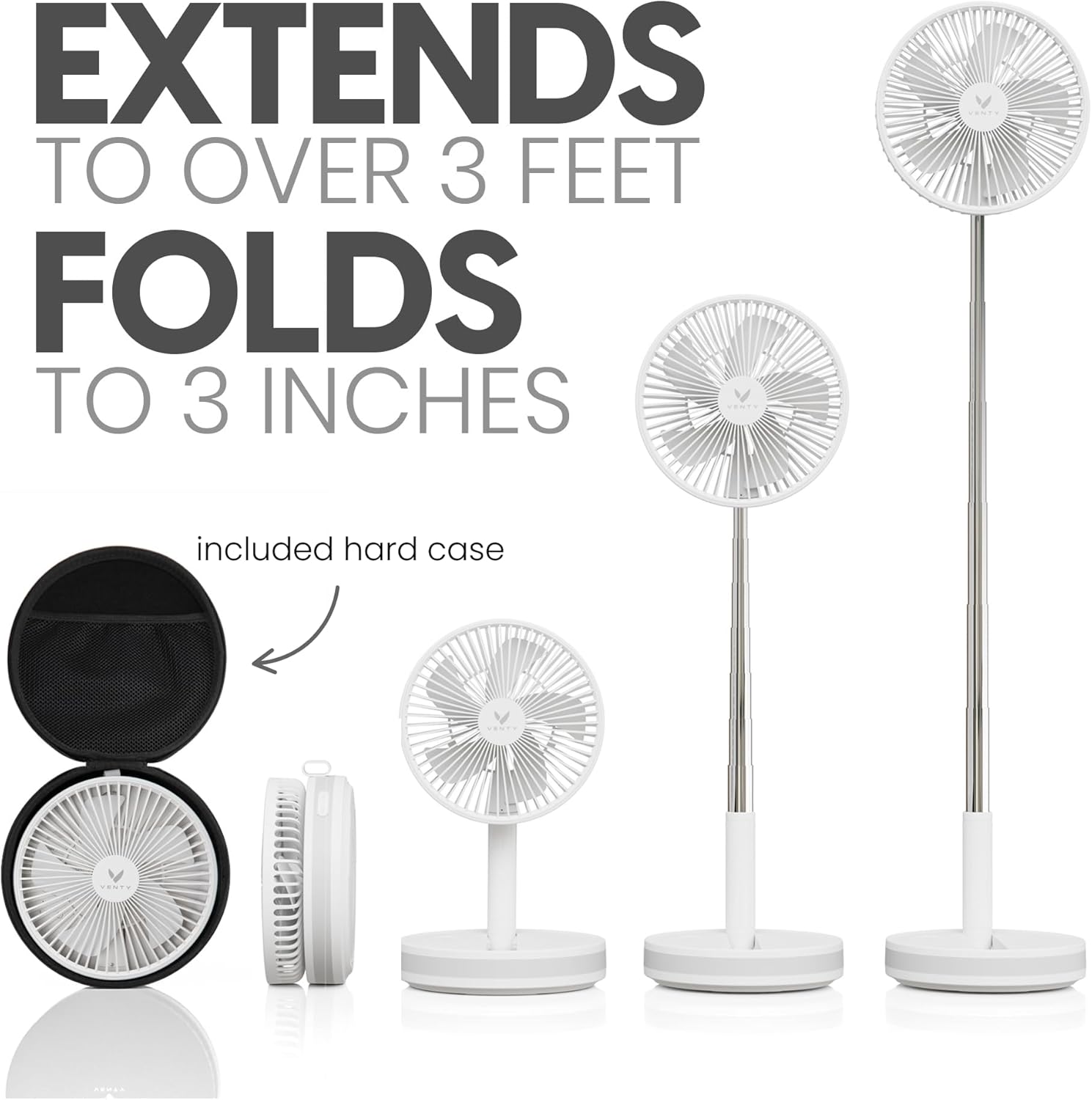
Image: Visual representation of the fan's extendable pole and compact folding mechanism, highlighting its portability with the included hard case.
Gbigba agbara Fan
Before first use, fully charge the fan. Connect the provided USB-C charging cable to the fan's USB-C port (located on the base) and plug the other end into a compatible USB power adapter (not included). The LED indicators on the base will show the charging status. A full charge provides up to 48 hours of cooling, depending on speed and oscillation settings.

Image: The fan's USB-C port being used to charge a smartphone, demonstrating its dual function as a power bank.
Awọn ilana Iṣiṣẹ
The VENTY fan can be operated using the touch controls on its base or the included wireless remote control.

Aworan: Alaye view of the fan's control panel on the base and the corresponding remote control, showing buttons for power, speed, oscillation, and light.
Powering On/Off and Adjusting Fan Speeds
Press the power button (☉) on the base or remote to turn the fan on or off. Cycle through the 4 fan speeds by pressing the fan speed buttons (☸ or ☹) on the remote or the corresponding touch controls on the base.

Image: Diagram showing the four distinct fan speeds (2.2m/s, 2.9m/s, 3.5m/s, 4.0m/s) and other features like 120° oscillation and 48-hour battery life.
Activating Oscillation
Press the oscillation button (☺) on the remote or base to activate the 120° oscillation feature, allowing the fan to sweep air across a wider area. Press again to stop oscillation.

Image: The fan oscillating 120 degrees, showing its range of motion for broader air circulation.
Using LED Lighting
The fan features a warm 3-level LED light ring on its base. Press the light button (☼) on the remote or base to cycle through the brightness levels (low, medium, high) or turn the light off.

Image: The fan's base emitting a warm ambient light, suitable for nighttime illumination.
Lilo bi Bank Power
With its 16,000 mAh battery, the VENTY fan can also serve as a power bank. Simply connect your device's USB-C charging cable to the fan's USB-C port to begin charging.
Itọju ati Itọju
Ninu Awọn ilana
To clean the fan, ensure it is powered off and unplugged. Use a soft, dry cloth to wipe down the exterior surfaces. For the fan blades, carefully wipe away dust. Do not use abrasive cleaners or immerse the fan in water.
Ibi ipamọ
When not in use, fold the fan back into its compact 3.5-inch form. Store it in the provided water-resistant travel case to protect it from dust and damage. Store in a cool, dry place away from direct sunlight.

Image: The fan neatly packed into its dedicated travel case, emphasizing its portability and ease of storage.
Laasigbotitusita
- Olufẹ Ko Tan-an: Ensure the fan is charged. Connect it to a power source using the USB-C cable.
- Latọna jijin Ko Dahun: Check if the remote's battery is depleted. Ensure there are no obstructions between the remote and the fan's base.
- Ilọ afẹfẹ ti ko lagbara: Increase the fan speed using the controls on the base or remote. Ensure the fan blades are clean and free from obstructions.
- Imọlẹ Ko ṣiṣẹ: Press the light button multiple times to cycle through brightness levels. If still unresponsive, ensure the fan has sufficient battery charge.
Imọ ni pato
| Ẹya ara ẹrọ | Sipesifikesonu |
|---|---|
| Orukọ awoṣe | Venty Fan (VT12024) |
| Brand | VENTY |
| Àwọ̀ | Funfun |
| Orisun agbara | Agbara Batiri (Batiri litiumu polima 1 to wa) |
| Agbara Batiri | 16,000 mAh |
| Igbesi aye batiri | Titi di wakati 48 |
| Awọn iyara Fan | 4 (Max 4 Meters per Second) |
| oscillation | 120° |
| Imọlẹ LED | 3-level warm white |
| Awọn iwọn Ọja (Ti ṣe pọ) | 7.87"D x 7.87"W x 3.5"H (isunmọ.) |
| Awọn iwọn Ọja (Ti o gbooro sii) | 7.87"D x 7.87"W x 35.83"H |
| Iwọn Nkan | 2.6 iwon |
| Ariwo Ipele | 30 dB |
| Asopọmọra Iru | USB Iru C (Igbewọle/Ijade) |
Atilẹyin ọja ati Support
The VENTY Portable Fan comes with a manufacturer's warranty covering defects in materials and workmanship. For specific warranty terms and conditions, please refer to the detailed warranty information provided with your purchase or contact VENTY customer support.
For additional information, detailed diagrams, or further assistance, please refer to the official User Manual PDF:


