1. Ifihan
This user manual provides detailed instructions for the installation, operation, and maintenance of your ESCAM WNK710 3MP Wireless WiFi IP Camera. This smart home indoor camera is designed for monitoring various indoor environments such as nurseries, pet areas, garages, or yards, offering features like 3MP high-definition video, two-way audio, motion detection, and night vision capabilities. Please read this manual thoroughly before using the product to ensure proper and safe operation.

Figure 1: ESCAM WNK710 3MP Wireless WiFi IP Camera, front view.
2. Alaye Aabo
- Use only the power adapter provided with the camera. Using unauthorized power sources may damage the device and void the warranty.
- Do not expose the camera to extreme temperatures, humidity, or direct sunlight. This product is designed for indoor use.
- Yẹra fún gbígbé kámẹ́rà sí ẹ̀gbẹ́ àwọn pápá mànàmáná tó lágbára tàbí àwọn orísun ìdènà.
- Ma ṣe gbiyanju lati tu tabi yi kamẹra pada. Tọkasi gbogbo iṣẹ si oṣiṣẹ oṣiṣẹ.
- Keep the camera and its accessories out of reach of children and pets.
- Rí i dájú pé a gbé kámẹ́rà náà sí ibi tí ó yẹ kí ó wà kí ó má baà ṣubú láìròtẹ́lẹ̀.
3. Ohun ti o wa ninu Apoti
Daju pe gbogbo awọn paati wa ninu package ṣaaju ki o to tẹsiwaju pẹlu fifi sori ẹrọ.
- ESCAM WNK710 WiFi IP Camera (x1)
- 12V 2A Power Adapter (x1)
- Screw Pack (x1)
- Itọsọna Ibẹrẹ ni kiakia (x1)
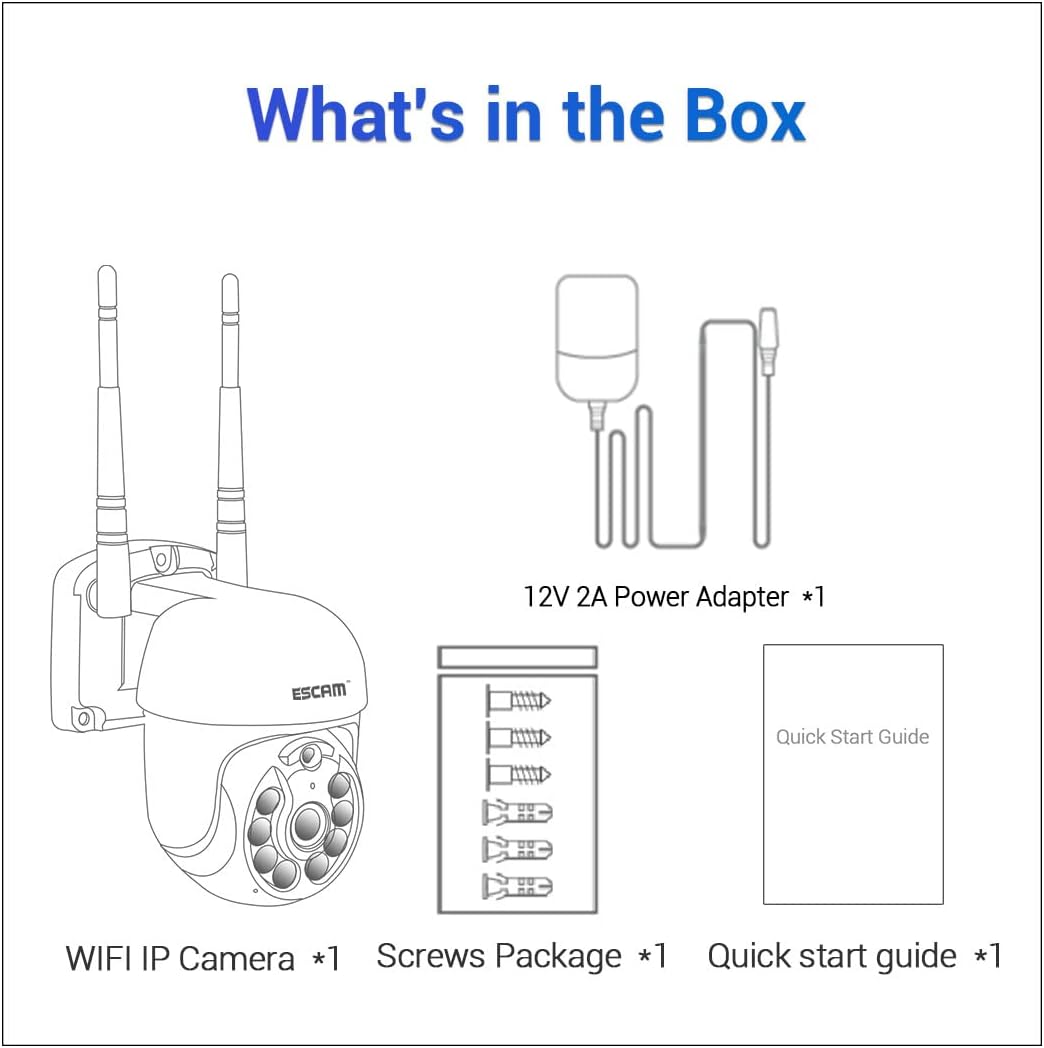
Figure 2: Package contents including the camera, power adapter, screws, and quick start guide.
4. Ọja Ipariview
Familiarize yourself with the various parts and interfaces of the ESCAM WNK710 camera.
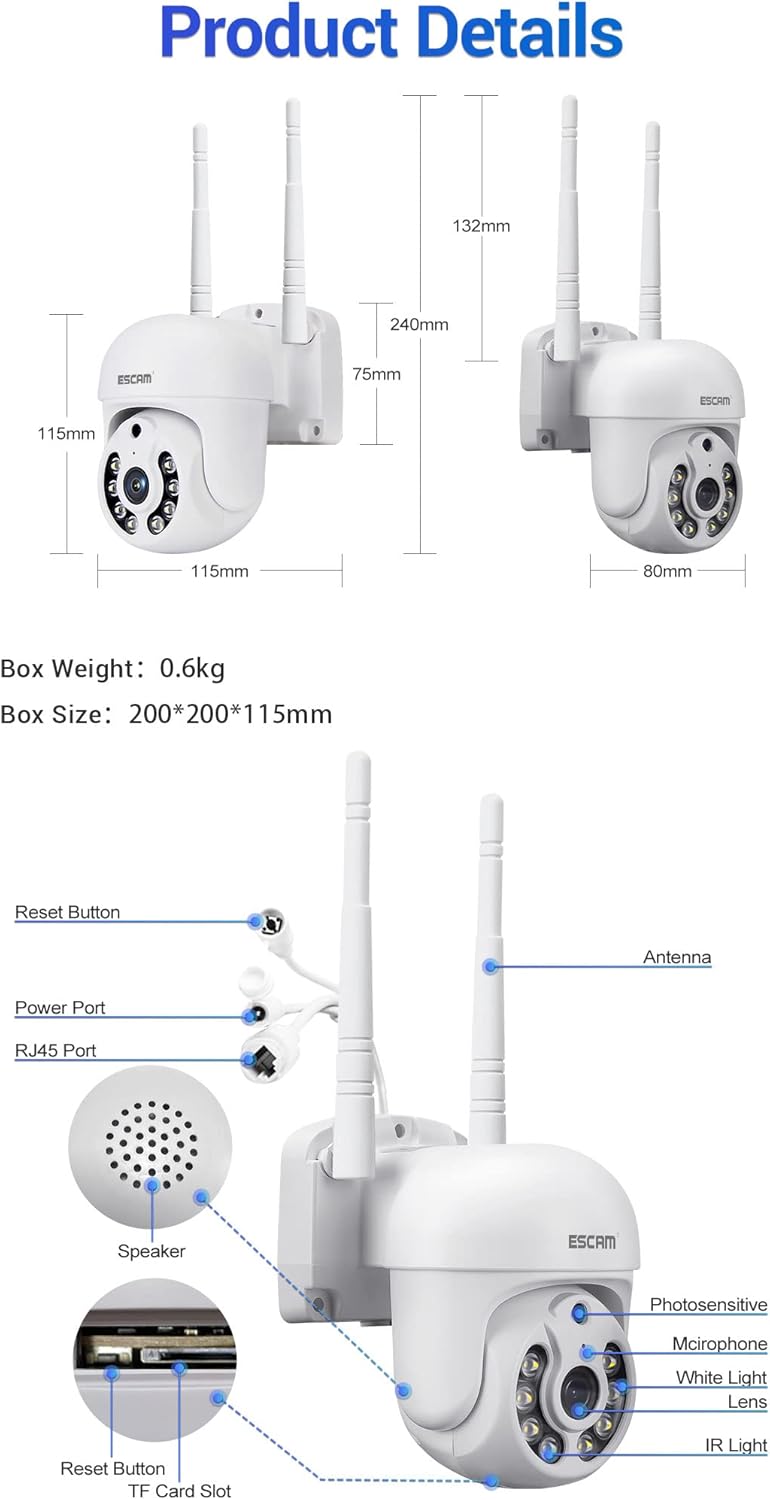
Nọmba 3: Alaye view of the camera showing dimensions, reset button, power port, RJ45 port, speaker, photosensitive sensor, microphone, white light LEDs, lens, IR light LEDs, and TF card slot.
- Lẹnsi: Ya fidio footage.
- IR Light LEDs: Provide infrared illumination for night vision.
- Àwọn LED ìmọ́lẹ̀ funfun: Provide white light illumination for full-color night vision and deterrence.
- Sensọ tó ń ṣe àkíyèsí fọ́tò: Detects ambient light levels to switch between day and night modes.
- Gbohungbohun: Captures audio for two-way communication and recording.
- Agbọrọsọ: Awọn abajade ohun afetigbọ fun ibaraẹnisọrọ ọna meji.
- Eriali: For wireless (WiFi) connectivity.
- Ibudo Agbara: Connects to the 12V 2A power adapter.
- Ibudo RJ45: Fun asopọ Ethernet ti a fi waya ṣe.
- Bọtini atunto: Ti a lo lati tun kamẹra pada si awọn eto ile-iṣẹ.
- Iho Kaadi TF: Ṣe atilẹyin to 128GB Micro SD kaadi fun ibi ipamọ agbegbe.
5. Eto
5.1 Fifi sori ti ara
The camera can be wall-mounted or placed on a flat surface. For wall mounting, use the provided screw pack.
- Yan ipo ti o dara fun kamẹra, ni idaniloju pe o ni kedere view of the area you wish to monitor and is within range of your WiFi network (if using wireless).
- Mark the drilling points on the wall using the camera's base as a template.
- Lu awọn ihò ki o si fi awọn ìdákọ̀ró ogiri sinu wọn (ti o ba jẹ dandan).
- Secure the camera to the wall using the provided screws.
5.2 Asopọ agbara
Connect the provided 12V 2A power adapter to the camera's power port and then plug it into a power outlet. The camera will power on and initiate its self-test sequence.
5.3 Asopọ Nẹtiwọọki
The ESCAM WNK710 supports both WiFi and wired Ethernet connections.

Figure 4: Connection methods for the camera, including direct AP connection to a phone and WiFi connection via a router.
5.3.1 WiFi Asopọ
- Gba awọn EseeCloud àpù láti inú ilé ìtajà àpù ẹ̀rọ alágbèéká rẹ (iOS App Store tàbí Google Play Store).
- Forukọsilẹ iroyin ati ki o wọle.
- Fọwọ ba aami "+" ninu ohun elo naa lati ṣafikun ẹrọ tuntun kan.
- Select "WiFi Camera" and follow the on-screen instructions to connect the camera to your home WiFi network. This typically involves scanning a QR code on the camera or entering your WiFi credentials.
- Once connected, the camera's status indicator will change, and you will see the camera added to your device list in the app.
5.3.2 Wired Ethernet Connection
For a stable connection, you can use the RJ45 Ethernet port.
- So opin kan ti okun Ethernet pọ si ibudo RJ45 kamẹra.
- So opin miiran ti okun Ethernet pọ si ibudo LAN ti o wa lori olulana rẹ tabi yipada nẹtiwọki.
- Kamẹra naa yoo gba adirẹsi IP laifọwọyi nipasẹ DHCP.
- Ṣii awọn EseeCloud app, tap "+" to add a device, and select "Wired Camera" or "Wa fun devices on LAN" to discover and add the camera.
6. Awọn ilana Iṣiṣẹ
6.1 Live View
After successfully adding the camera to the EseeCloud app, tap on the camera's name in the device list to access the live video feed. You can view foo akoko giditage from your camera anytime, anywhere.
6.2 Ìṣàkóso Pan/Títì
The ESCAM WNK710 features pan and tilt functionality, allowing you to remotely adjust the camera's viewigun igun.
- Ninu aye view interface of the EseeCloud app, use the directional controls (usually an on-screen joystick or arrows) to pan the camera horizontally (350°) and tilt it vertically (90°).
6.3 Meji-Ona Audio
The camera is equipped with a built-in microphone and speaker for two-way audio communication.
- To speak through the camera, tap the microphone icon in the live view interface of the app. Hold the button to speak, and release to listen.
- Ensure your phone's microphone is enabled for the EseeCloud app.
6.4 Išipopada erin ati titaniji
The camera can detect motion and send alerts to your mobile device.
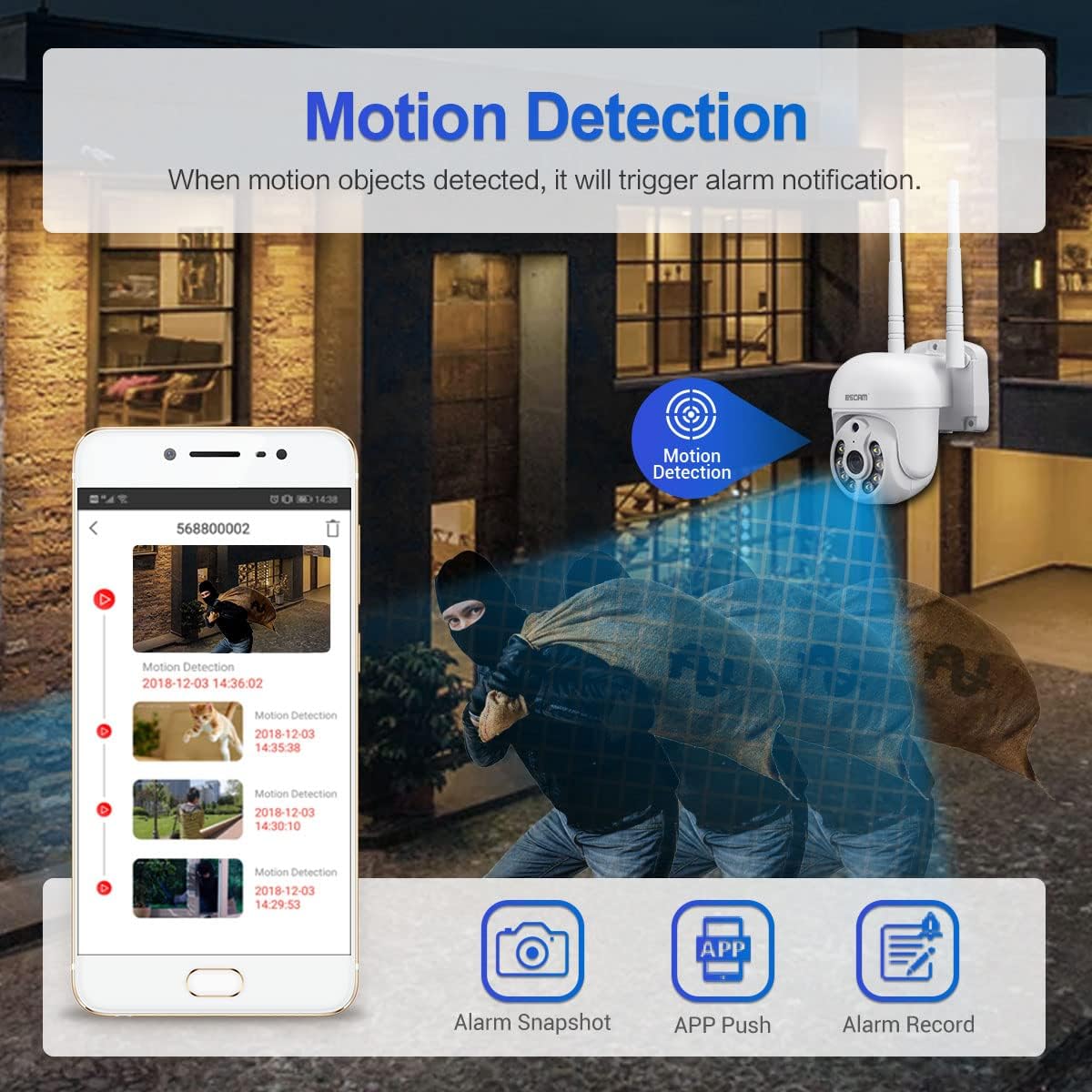
Figure 5: Illustration of motion detection triggering an alarm notification on a mobile phone, with options for alarm snapshot, app push, and alarm record.
- Navigate to the camera settings in the EseeCloud app.
- Mu "Iwari Iṣipopada" ṣiṣẹ ki o si ṣatunṣe awọn ipele ifamọ bi o ṣe nilo.
- You can also set up specific detection zones and schedules.
- When motion is detected, the camera will trigger an alarm notification, send a push alert to your phone, and can record video clips.
- The camera features intelligent humanoid detection to reduce false positives.
6.5 Night Iran Awọn ọna
The ESCAM WNK710 offers three intelligent night vision modes for clear monitoring in low-light conditions.
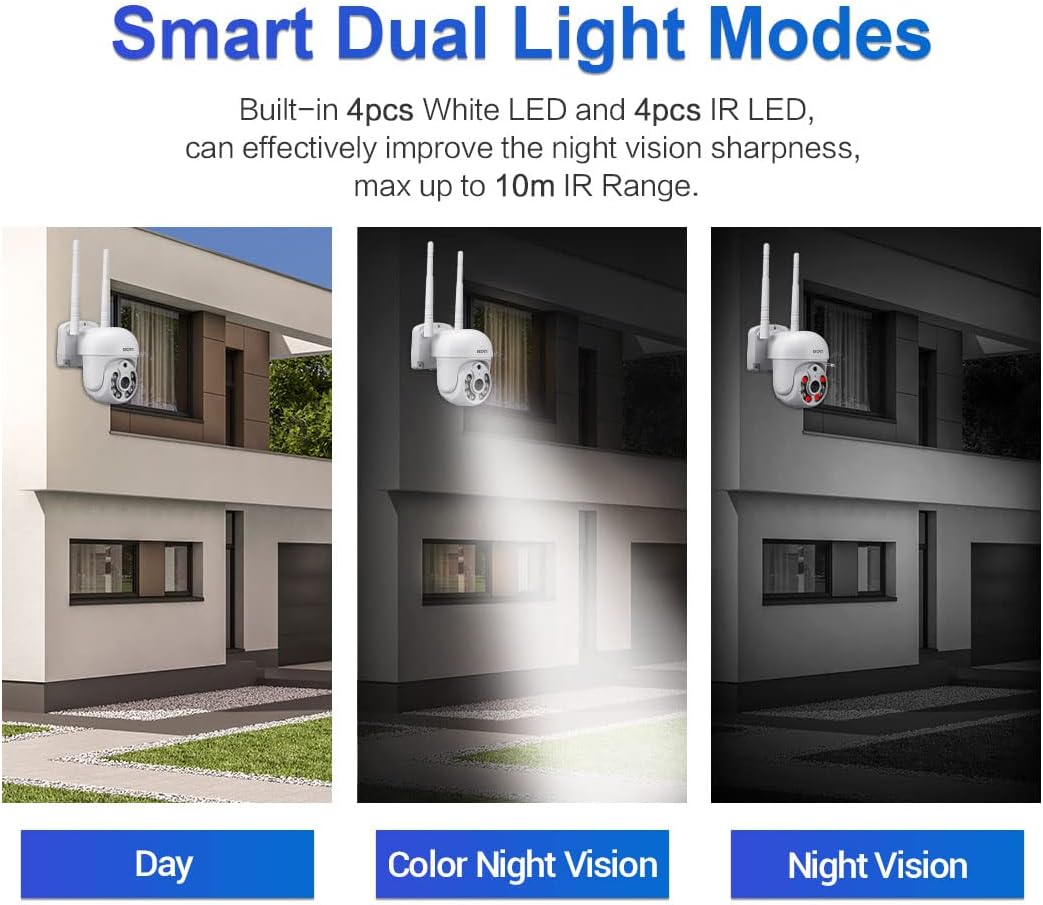
Figure 6: Comparison of Day mode, Color Night Vision mode (using white LEDs), and Night Vision mode (using IR LEDs).
- Infrared Mode (Black/White Night Vision): Uses IR LEDs for clear black and white images in complete darkness, up to 10m range.
- Full-Color Mode (Color Night Vision): Activates the built-in white light LEDs to provide full-color video even in low light. This mode can also act as a deterrent.
- Ipo Smart: The camera automatically switches between IR and white light based on detected motion or specific settings, providing full-color video when activity is detected.
- You can select your preferred night vision mode in the EseeCloud app settings.
6.6 Gbigbasilẹ ati Sisisẹsẹhin
The camera supports continuous recording, motion-triggered recording, and scheduled recording to a Micro SD card (up to 128GB, not included) or cloud storage (subscription may be required).
- Fifi kaadi Micro SD sori ẹrọ: Insert a Micro SD card into the TF card slot on the camera. Ensure the camera is powered off before inserting or removing the card.
- Sisisẹsẹhin: In the EseeCloud app, navigate to the playback section to view foo ti o ti gbasilẹtage. You can filter by date and time.
7. Itọju
- Ninu: Use a soft, dry cloth to clean the camera lens and body. Do not use liquid cleaners or abrasive materials.
- Awọn imudojuiwọn famuwia: Regularly check for firmware updates through the EseeCloud app. Updates can improve performance, add new features, and enhance security. Follow the app's instructions carefully during updates.
- Iṣakoso Kaadi SD: If using an SD card, periodically check its status in the app. Format the card occasionally to maintain optimal recording performance.
8. Laasigbotitusita
| Isoro | Owun to le Fa / Solusan |
|---|---|
| Kamẹra offline ni app. |
|
| Kò le sopọ̀ mọ́ WiFi. |
|
| No sound from camera or app. |
|
| A ko gba awọn itaniji wiwa išipopada. |
|
| Káàdì SD kò gba sílẹ̀. |
|
9. Awọn pato
| Ẹya ara ẹrọ | Ẹ̀kúnrẹ́rẹ́ |
|---|---|
| Awoṣe | WNK710 |
| Pixel | 3 Million Pixels (2304*1296) |
| Sensọ | 1/2.7 "Sensọ CMOS |
| Ṣiṣẹ fidio | H.264/H.265 video encoding, support dual stream |
| Iwọn fireemu | 15 fps |
| Ọjọ ati Alẹ Ipo | IR-CUT infrared filter, supports infrared / full color / smart modes |
| Ṣiṣẹ ohun afetigbọ | G.711 codec standard, support audio and video synchronization |
| Ibudo Audio | 1 input (MIC/pickup), 1 output (speaker) |
| Ti firanṣẹ Network | 1 RJ45 Ethernet interface, 10/100M adaptive |
| Alailowaya Network | 802.11b/g/n (2.4GHz WiFi) |
| Ibi ipamọ | Support 128G Micro SD card (not included) |
| Alẹ Iranran | 4 infrared LEDs + 4 white light LEDs |
| Pan/Tit | 350° Pán / 90° Tẹ̀ |
| Ibi ti ina elekitiriki ti nwa | 12V 2A (Power adapter included) |
| Awọn iwọn (L x W x H) | 7.87 x 7.87 x 4.72 inches (200 x 200 x 115 mm) |
| Iwọn Nkan | 1.76 poun (0.8 kg) |
| inu ile / ita gbangba Lilo | Ninu ile |
10. Atilẹyin ọja ati Support
For technical support, troubleshooting assistance, or warranty inquiries, please contact visiPower customer service. Refer to the contact information provided in the Quick Start Guide or on the official visiPower webojula.
Please note that protection plans are available for purchase separately to extend coverage beyond the standard manufacturer's warranty. These plans are offered by third-party providers and details can be found where the product was purchased.
