Ọrọ Iṣaaju
The Muzen Cyber Cube-Pro Bluetooth Speaker is a portable audio device designed for versatile use. It features Bluetooth 5.0 technology for seamless connectivity, an RGB LED light with cyberpunk themes that syncs with music, and a built-in fidget spinner for stress relief. Constructed with a rugged metal housing, it offers IPX5 waterproof and dustproof protection, making it suitable for both indoor and outdoor environments. The speaker includes a built-in 1000mAh high-capacity battery for extended playtime and charges via a Type-C cable.
Package Awọn akoonu
Jọwọ rii daju pe gbogbo awọn nkan ti a ṣe akojọ rẹ si isalẹ wa ninu package rẹ:
- Muzen Cyber Cube-Pro Bluetooth Speaker
- USB Iru-C Ngba agbara USB
- Itọsọna olumulo
- (Optional) Lanyard (may need to be purchased separately)

Image: The Muzen Cyber Cube-Pro speaker shown with its packaging, highlighting the compact design.
Ọja Pariview ati Awọn iṣakoso
Familiarize yourself with the various parts and controls of your Muzen Cyber Cube-Pro speaker.

Image: A detailed diagram illustrating the various control points on the Muzen Cyber Cube-Pro speaker, including the volume knob, light effects control, power switch/reset Bluetooth, track switch, Type-C charging port, and fidget spinner.
- Bọtini Iwọn didun: Yiyi lati ṣatunṣe iwọn didun ohun.
- Iṣakoso Awọn Ipa Ina: Button to cycle through RGB LED light themes.
- Power Switch/Reset Bluetooth: Toggle switch for power on/off. Press and hold to reset Bluetooth connection.
- Tọpa Yipada: Rotate to skip tracks. Press to play/pause.
- Ibudo Ngba agbara Iru-C: Located under a protective cover for charging the device.
- Fidget Spinner: Integrated into the speaker grille for tactile interaction.
Ṣeto
Gbigba agbara si Agbọrọsọ
Before initial use, fully charge your speaker. Use the provided USB Type-C cable to connect the speaker to a compatible USB power source (e.g., wall adapter, computer USB port).
- Open the protective cover on the side of the speaker to reveal the Type-C charging port.
- Insert the USB Type-C cable into the speaker's port and the other end into a power source.
- The LED indicator will show charging status (e.g., flashing red for charging, solid green for fully charged).
- Gbigba agbara ni kikun maa n gba to awọn wakati 1-2.
Asopọ Bluetooth
Follow these steps to pair your speaker with a Bluetooth-enabled device:
- Rii daju pe a ti gba agbara ati agbara si pipa.
- Rotate the power switch to the "ON" position. The speaker will emit an audible tone, and the Bluetooth indicator light will flash rapidly, indicating it's in pairing mode.
- On your mobile device, navigate to the Bluetooth settings and enable Bluetooth.
- Wa fun available devices. "Muzen Wild Mini" should appear in the list.
- Select "Muzen Wild Mini" to connect. Once successfully paired, the speaker will emit another tone, and the Bluetooth indicator light will become solid.
- If pairing fails, turn off the speaker, disable Bluetooth on your device, and repeat the steps.

Image: The Muzen Cyber Cube-Pro speaker wirelessly connected to a smartphone, demonstrating its Bluetooth 5.0 compatibility for fast and easy connection.
Awọn ilana Iṣiṣẹ
Titan / Paa
- Agbara Tan: Rotate the power switch clockwise to the "ON" position.
- Agbara Pa: Rotate the power switch counter-clockwise to the "OFF" position.
Iṣakoso iwọn didun
- Mu iwọn didun pọ si: Rotate the volume knob clockwise.
- Din iwọn didun silẹ: Rotate the volume knob counter-clockwise.
Iṣakoso Track
- Orin t’okan: Rotate the track switch clockwise.
- Tẹlẹ Orin: Rotate the track switch counter-clockwise.
- Ṣiṣẹ/Daduro: Short press the track switch.
RGB LED Light Control
The RGB LED light features cyberpunk themes that pulse and shine to the beat of your music. Use the dedicated light effects control button to cycle through different color-changing themes.

Image: The Muzen Cyber Cube-Pro speaker displaying its vibrant RGB LED lights, which change colors and pulse with the music, enhancing the atmosphere.
Isẹ filaṣi
The speaker includes a built-in flashlight with multiple modes:
- Tan/Pa: Long press the power switch to activate or deactivate the flashlight.
- Awọn ọna Yipo: Short press the power switch to cycle between Strong, Weak, and SOS modes.
Awọn ẹya ara ẹrọ
- RGB LED Light: Cyberpunk-themed RGB LED light that pulses and shines to the beat of your music, offering different color-changing themes.
- Fidget Spinner: Designed from a spacecraft idea, it helps release nervous energy and reduce anxiety.
- Ibamu giga: Bluetooth 5.0 technology for wireless connection to all Bluetooth-enabled devices with fast connection and a range of up to 32 feet.
- Rugged Portable Speaker: IPX5 waterproof and dustproof with a built-in flashlight. Its rugged metal housing protects it during outdoor adventures.
- Àkókò eré gígùn: Built-in 1000mAh high-capacity battery provides extended music playtime on a single charge.

Image: The Muzen Cyber Cube-Pro speaker featuring its unique fidget spinner design, which can be used for stress relief.
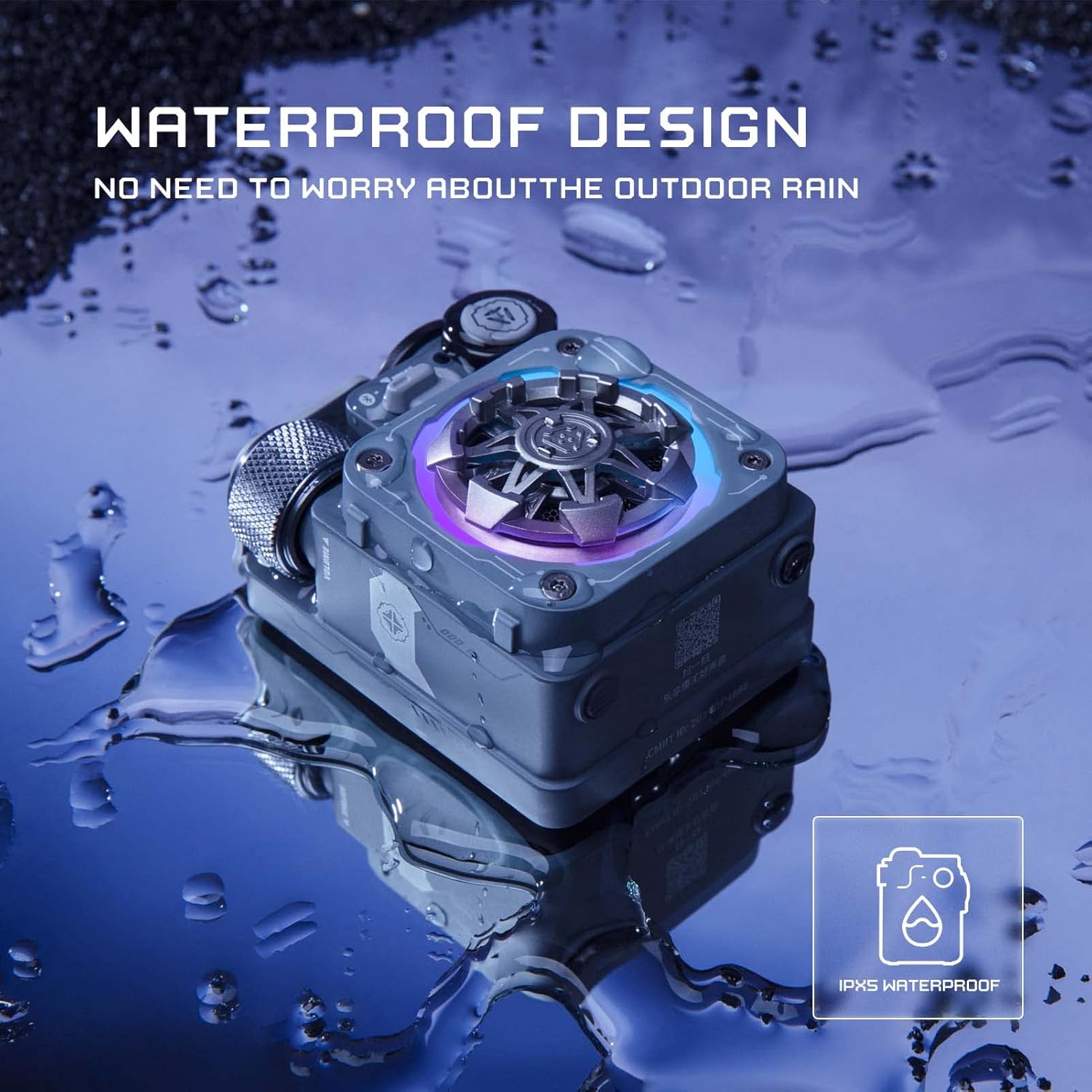
Image: The Muzen Cyber Cube-Pro speaker submerged in water, illustrating its IPX5 waterproof design, suitable for outdoor use without worry about rain or splashes.
Itoju
To ensure the longevity and optimal performance of your Muzen Cyber Cube-Pro speaker, follow these maintenance guidelines:
- Ninu: Use a soft, dry cloth to clean the speaker. Avoid using harsh chemicals or abrasive materials.
- Ibi ipamọ: Tọju agbohunsoke ni itura, aye gbigbẹ kuro lati orun taara ati awọn iwọn otutu to gaju.
- Omi Resistance: Ensure the Type-C charging port cover is securely closed to maintain IPX5 water resistance. Do not submerge the speaker for extended periods or expose it to high-pressure water jets.
- Itọju Batiri: For optimal battery life, avoid fully discharging the battery frequently. Charge the speaker regularly, even if not in use for long periods.
Laasigbotitusita
If you encounter any issues with your Muzen Cyber Cube-Pro speaker, refer to the following common troubleshooting steps:
- Agbọrọsọ ko tan: Rii daju pe batiri ti gba agbara. So agbohunsoke pọ si orisun agbara nipa lilo okun Iru-C.
- Ko le so pọ nipasẹ Bluetooth:
- Make sure the speaker is in pairing mode (rapidly flashing Bluetooth indicator).
- Ensure Bluetooth is enabled on your device and it's within 32 feet of the speaker.
- Try resetting the speaker's Bluetooth by pressing and holding the power switch.
- Gbagbe ẹrọ naa lati inu atokọ Bluetooth ti foonu rẹ ki o gbiyanju lati so pọ lẹẹkansii.
- Ko si ohun tabi iwọn kekere:
- Ṣayẹwo ipele iwọn didun lori mejeeji agbọrọsọ ati ẹrọ ti o sopọ.
- Rii daju pe agbọrọsọ ti so pọ daradara ati sopọ.
- Ina filaṣi ko ṣiṣẹ: Ensure the speaker is powered on and the battery is not critically low.
Awọn pato
| Ẹya ara ẹrọ | Ẹ̀kúnrẹ́rẹ́ |
|---|---|
| Orukọ awoṣe | Cyber Cube-Pro |
| Nọmba Awoṣe Nkan | MW-PVXLI |
| Ohun elo | Irin |
| Asopọmọra Technology | Bluetooth 5.0 |
| Imọ-ẹrọ Ibaraẹnisọrọ Alailowaya | Bluetooth |
| Ibiti o pọju | 32 Ẹsẹ (Mita 9.75) |
| Agbọrọsọ Agbara Ijade ti o pọju | 5 Wattis |
| Agbara Batiri | 1000mAh litiumu Iwon |
| Iwọn Nkan | 10.6 iwon (300 Giramu) |
| Omi Resistance Ipele | IPX5 mabomire |
| Ọna Iṣakoso | Tactile Buttons/Knobs |
| Ara | Cyberpunk |

Image: The Muzen Cyber Cube-Pro speaker with its dimensions labeled: H: 2.40 inches, W: 1.65 inches, L: 3.03 inches.
Atilẹyin ọja ati Support
The Muzen Cyber Cube-Pro Bluetooth Speaker comes with a Limited Warranty. For detailed information regarding warranty coverage, terms, and conditions, please refer to the warranty card included in your product packaging or contact Muzen customer support.
- Iru atilẹyin ọja: Lopin
- Olupese: Muzen


