1. Ọja Ipariview
The Intelbras iM3 C Smart Indoor Camera is designed to provide comprehensive surveillance for your home and family, even when you are away. This camera offers full control directly from your smartphone, enabling easy installation, recording management, and real-time notification reception.

Aworan: Iwaju view of the Intelbras iM3 C Smart Indoor Camera, showcasing its compact white design with a black camera lens.
Awọn ẹya pataki:
- Full HD 1080p Video O ga
- Wi-Fi Asopọmọra
- Night Vision up to 10 meters
- Remote Access via Smartphone
- Motion Detection Notifications
- Ibaraẹnisọrọ Audio-Ona Meji
- 131 ° aaye ti View
- Compatible with Amazon Alexa and OK Google
- Magnetic Base for Easy Installation
- Electronic Baby Monitor Function
- Supports MicroSD Card up to 256GB (sold separately)

Image: The Intelbras iM3 C camera, shown mounted on a wall, providing security for a family in their living room. This image highlights the camera's discreet design and its magnetic, articulated base.
2. Package Awọn akoonu
Jẹrisi pe gbogbo awọn ohun kan wa ninu package:
- Intelbras iM3 C Smart Indoor Camera
- Okun agbara
- Bivolt Power Supply
- Fifi sori Itọsọna
- Installation Kit (screws and wall plugs)

Aworan: Ẹyin view of the iM3 C camera, displaying the USB power input, reset button, and a QR code for easy setup.
3. Eto
Follow these steps to set up your Intelbras iM3 C camera:
- Asopọ agbara: Connect the power cable to the camera's USB port and plug the power supply into an electrical outlet. The camera will power on and its status LED will indicate readiness for setup.
- Download the Mibo Cam App: Wa fun "Mibo Cam" in your smartphone's app store (Google Play Store for Android or Apple App Store for iOS) and download the application.
- Ṣẹda akọọlẹ kan: Open the Mibo Cam app and follow the on-screen instructions to create a new user account or log in if you already have one.
- Fi ẹrọ kun: In the app, tap the "+" icon to add a new device. Select the iM3 C camera model.
- Iṣeto Wi-Fi: Follow the app's prompts to connect the camera to your home Wi-Fi network. Ensure your smartphone is connected to the 2.4 GHz Wi-Fi band, as the camera only supports this frequency. You may need to scan a QR code displayed on your phone screen with the camera lens.
- Ibi: Place the camera in your desired indoor location. The magnetic base allows for flexible placement on metallic surfaces or easy mounting with the included installation kit.

Image: A smartphone displaying the Mibo Cam app, showing a live view from the camera and various control options, including joystick, photo, bidirectional audio, record, and inactive mode. This illustrates how users can monitor their home and pets.
4. Ṣiṣẹ kamẹra
Once set up, you can utilize the camera's features through the Mibo Cam app:
- Gbe View: Open the Mibo Cam app to access the live video feed from your camera anytime, anywhere.
- Gbigbasilẹ:
- Kaadi MicroSD: Insert a MicroSD card (up to 256GB, sold separately) into the camera's slot for local storage of recordings. The camera supports continuous recording or event-triggered recording.
- Ibi ipamọ awọsanma: Optional cloud storage services are available through the Mibo Cam app for secure off-site storage of your video footage.
- Iwari išipopada: Enable motion detection in the app to receive instant notifications on your smartphone when movement is detected in the camera's field of view. You can adjust sensitivity settings.
- Audio Ọna Meji: Use the microphone and speaker functions in the app to listen to what's happening near the camera and speak through the camera to communicate with people or pets.
- Iran Alẹ: The camera automatically switches to infrared night vision in low-light conditions, providing clear black-and-white video up to 10 meters.
- Electronic Baby Monitor: Utilize the camera's features, including live view, two-way audio, and motion detection, to monitor your baby in real-time.
- Iṣọkan Ile Smart: Connect your iM3 C camera with Amazon Alexa or OK Google for voice control and integration into your smart home ecosystem. Refer to the respective smart assistant's app for pairing instructions.
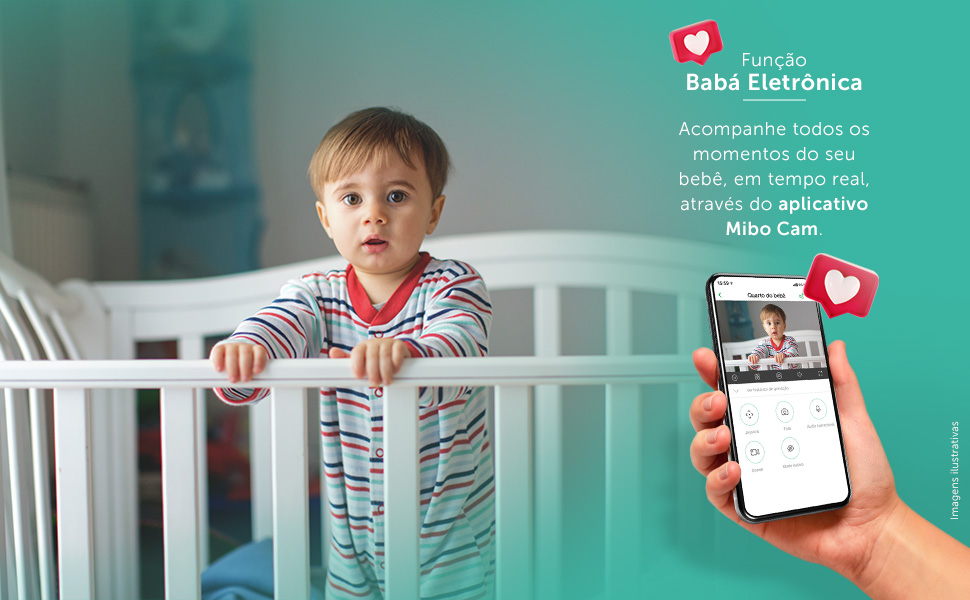
Image: This visual demonstrates the "Electronic Baby Monitor" function, showing a baby in a crib and a smartphone displaying the Mibo Cam app with a live feed of the baby, emphasizing real-time monitoring.
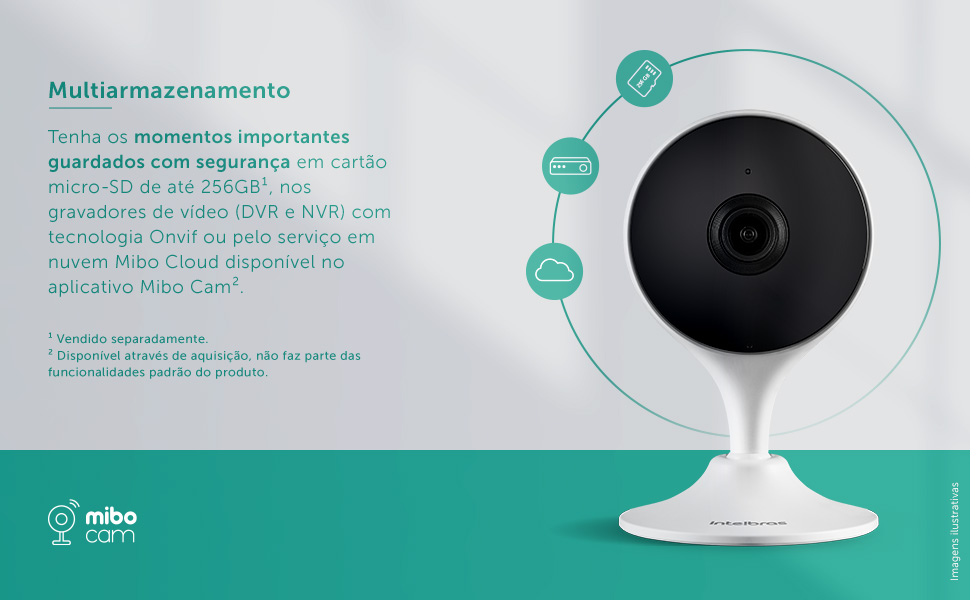
Image: A diagram illustrating the multi-storage capabilities of the iM3 C camera, showing options for saving important moments securely on a micro-SD card (up to 256GB), DVR/NVR recorders with Onvif technology, or through the Mibo Cloud service available in the Mibo Cam app.
5. Itọju
- Ninu: Gently wipe the camera lens and body with a soft, dry cloth. Do not use liquid cleaners or aerosols.
- Awọn imudojuiwọn sọfitiwia: Regularly check the Mibo Cam app for firmware updates. Keeping your camera's software up-to-date ensures optimal performance and security.
- Yiyipo Agbara: Tí kámẹ́rà bá ní ìṣòro, gbìyànjú láti yọ ọ́ kúrò nínú orísun agbára fún ìṣẹ́jú díẹ̀, lẹ́yìn náà, kí o tún so ó pọ̀ mọ́ ara rẹ̀.
6. Laasigbotitusita
| Isoro | Owun to le Fa | Ojutu |
|---|---|---|
| Kamẹra ko sopọ mọ Wi-Fi. | Ọrọ igbaniwọle Wi-Fi ti ko tọ, kamẹra ti o jinna si olulana, nẹtiwọki Wi-Fi 5GHz. | Ensure correct password. Move camera closer to router. Connect to a 2.4 GHz Wi-Fi network. |
| Didara aworan ti ko dara. | Dirty lens, low bandwidth, insufficient lighting. | Clean the camera lens. Check your internet connection speed. Ensure adequate lighting or verify night vision is active. |
| No motion detection notifications. | Motion detection disabled, sensitivity too low, app notifications blocked. | Enable motion detection in the Mibo Cam app. Increase sensitivity. Check phone notification settings for the Mibo Cam app. |
| Ohùn ọ̀nà méjì kò ṣiṣẹ́. | Microphone/speaker permissions not granted, volume too low. | Check app permissions for microphone. Adjust volume settings in the app and on your phone. |
7. Awọn pato
| Ẹya ara ẹrọ | Ẹ̀kúnrẹ́rẹ́ |
|---|---|
| Awoṣe | IM3 C |
| Àwọ̀ | Funfun |
| Indoor/Outdoor Environment | Agbegbe inu ile |
| Awọn ẹrọ ibaramu | Foonuiyara |
| Orisun agbara | Ti firanṣẹ Electric |
| Ilana Asopọmọra | Wi-Fi (2.4 GHz) |
| Adarí Iru | Amazon Alexa |
| Iṣagbesori Iru | Fixed (Magnetic Base) |
| Ipinnu Yaworan fidio | 1080p ni kikun HD |
| Nọmba ti Awọn nkan | 1 |
| Awọn irinše to wa | Power cable, Camera, Bivolt power supply, Installation guide, Installation kit |
| Imọ-ẹrọ Ibaraẹnisọrọ Alailowaya | Wi-Fi |
| Fọọmù ifosiwewe | Apoti |
| Iru fifi sori ẹrọ | Ti bajẹ |
| Ibiti Iran Night | 10 Mita |
| Ohun elo | Ṣiṣu |
| Voltage | 110 Volts |
| Agbara | 3.1 watt |
| Awọn Iwọn Nkan (L x W x H) | 3.3 x 6.6 x 10.9 cm |
| Omi Resistance Ipele | Ko omi sooro |
| Ijẹrisi | 12641-21-10749 |
| Olupese | Intelbras |
| Iwọn Ọja | 322 g |
8. Atilẹyin ọja ati Support
Atilẹyin ọja: The Intelbras iM3 C Smart Indoor Camera comes with a 1-year warranty from the manufacturer, covering defects in materials and workmanship under normal use.
Oluranlowo lati tun nkan se: For technical assistance, troubleshooting, or warranty claims, please contact Intelbras customer support. You can find contact information on the official Intelbras website or within the Mibo Cam application.
Awọn orisun Ayelujara: Visit the official Intelbras website for additional resources, FAQs, and updated product information: www.intelbras.com.br


