1. Ọja Ipariview
The STABILA LD220 is a compact and easy-to-use laser distance measuring tool designed for quick and accurate measurements. It features an impact-resistant housing with a shock-absorbent STABILA soft grip casing, ensuring durability in various working conditions. The large digits on the display facilitate easy reading of measurements.
Awọn ẹya pataki:
- Compact, easy-to-use laser.
- 4 basic measuring functions: length, area, volume, and continuous measurement.
- Calculates measuring results quickly.
- Large digits for easy readability.
- Impact-resistant housing with shock-absorbent STABILA soft grip casing.
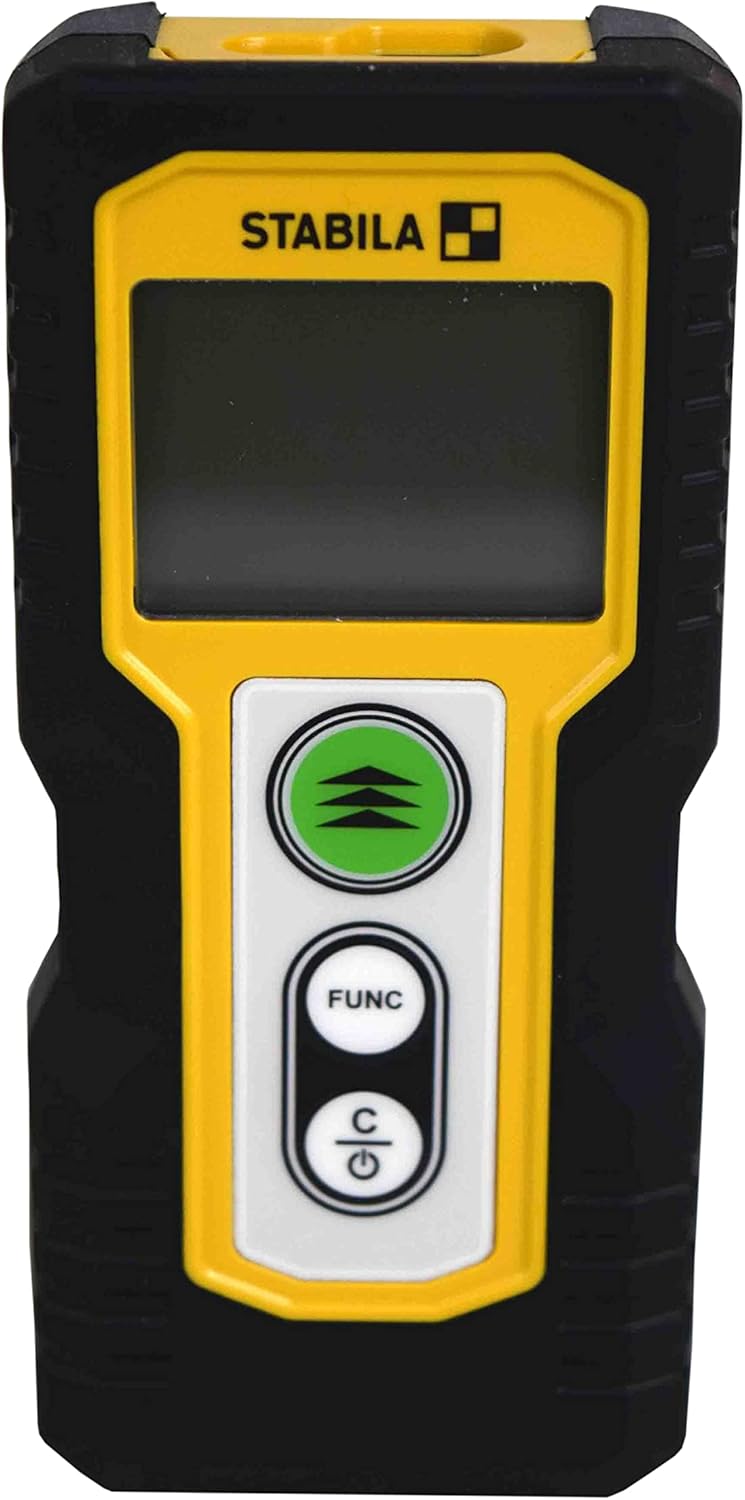
olusin 1.1: Iwaju view of the STABILA LD220 laser distance measuring tool, showcasing apẹrẹ ati ifihan rẹ ti o kere ju.
2. Bibẹrẹ
2.1 Package Awọn akoonu
Rii daju pe gbogbo awọn eroja wa:
- STABILA LD220 Laser Distance Measuring Tool
- Batteries (Alkaline, LR03/AAA type)
2.2 Fifi sori batiri
The STABILA LD220 requires two AAA alkaline batteries for operation. Follow these steps to install them:
- Wa ideri iyẹwu batiri ni ẹhin ẹrọ naa.
- Gbe ideri si isalẹ tabi ni itọsọna ti itọka nipasẹ itọka lati ṣii.
- Insert two AAA alkaline batteries, ensuring the correct polarity (+ and -) as marked inside the compartment.
- Pa ideri iyẹwu batiri naa nipa gbigbe pada si aaye titi yoo fi tẹ ni aabo.

Figure 2.1: The STABILA LD220 device shown alongside two AAA batteries, indicating the power source.

olusin 2.2: A sunmọ-soke view of the two AAA alkaline batteries, which power the device.
2.3 Titan / Pa a
Lati fi agbara sori ẹrọ, tẹ bọtini naa Power/Clear (C) bọtini. Lati fi agbara si pipa, tẹ mọlẹ Power/Clear (C) button for a few seconds, or the device will automatically shut off after a period of inactivity to conserve battery life.
3. Awọn ilana Iṣiṣẹ
The STABILA LD220 offers four primary measuring functions. Familiarize yourself with the buttons:
- Measurement Button (Green, with three arrows): Initiates a measurement or activates continuous measurement.
- Function Button (FUNC): Cycles through different measurement modes (Length, Area, Volume, Continuous).
- Power/Clear Button (C): Powers the device on/off, clears the last measurement, or exits a function.

olusin 3.1: A alaye view of the STABILA LD220's control panel, highlighting the measurement, function, and power/clear buttons.
3.1 Gigun Iwọn
This is the default mode for single distance measurements.
- Rii daju pe ẹrọ ti wa ni titan.
- Tọka ina lesa ni aaye ibi-afẹde.
- Tẹ awọn Bọtini wiwọn once. The measured distance will appear on the display.
3.2 Wiwọn Tesiwaju (Titọpa)
This mode allows for dynamic measurement, displaying real-time distance as you move the device.
- Tẹ awọn FUNC button until the continuous measurement icon (often a series of horizontal lines or a tracking symbol) appears on the display.
- Tẹ awọn Bọtini wiwọn lati bẹrẹ wiwọn lemọlemọfún.
- Move the device slowly towards or away from the target. The display will update the distance continuously.
- Tẹ awọn Bọtini wiwọn lẹẹkansi tabi awọn C button to stop continuous measurement.
3.3 Agbegbe wiwọn
To calculate the area of a rectangular space (Length x Width).
- Tẹ awọn FUNC button until the area measurement icon (a square or rectangle) appears.
- Measure the first side (e.g., length) by pointing the laser and pressing the Bọtini wiwọn.
- Measure the second side (e.g., width) by pointing the laser and pressing the Bọtini wiwọn lẹẹkansi.
- Ẹrọ naa yoo ṣe iṣiro laifọwọyi ati ṣafihan agbegbe naa.
3.4 Iwọn Iwọn didun
To calculate the volume of a rectangular space (Length x Width x Height).
- Tẹ awọn FUNC button until the volume measurement icon (a cube or rectangular prism) appears.
- Measure the first side (e.g., length) by pointing the laser and pressing the Bọtini wiwọn.
- Measure the second side (e.g., width) by pointing the laser and pressing the Bọtini wiwọn.
- Measure the third side (e.g., height) by pointing the laser and pressing the Bọtini wiwọn.
- Ẹrọ naa yoo ṣe iṣiro laifọwọyi ati fi iwọn didun han.

Figure 3.2: The product packaging illustrating the various measuring functions, including length, area, volume, and tracking.
4. Itọju ati Itọju
Proper care and maintenance will extend the life of your STABILA LD220.
- Ninu: Lo asọ, damp cloth to clean the device. Do not use harsh chemicals, abrasive cleaners, or solvents. Ensure the laser lens and display are kept clean for accurate readings.
- Ibi ipamọ: Store the device in a dry, cool place, away from direct sunlight and extreme temperatures. If storing for an extended period, remove the batteries to prevent leakage.
- Mimu: Although the device has an impact-resistant housing, avoid dropping it or subjecting it to severe shocks.
- Itọju Batiri: Rọpo awọn batiri nigbati ifihan batiri kekere ba han lori iboju naa. Pa awọn batiri ti a ti lo mọ gẹgẹbi ofin agbegbe.
5. Laasigbotitusita
If you encounter issues with your STABILA LD220, refer to the following common problems and solutions:
| Isoro | Owun to le Fa | Ojutu |
|---|---|---|
| Ẹrọ naa ko ṣiṣẹ. | Awọn batiri ti o ku tabi ti ko tọ ti fi sori ẹrọ. | Check battery polarity. Replace with new AAA alkaline batteries. |
| Awọn wiwọn ti ko pe. | Laser lens is dirty; target surface is too reflective/absorbent; device is unstable during measurement. | Clean the laser lens with a soft cloth. Use a target plate for difficult surfaces. Ensure the device is held steady. |
| Ifihan naa fihan ifiranṣẹ aṣiṣe kan. | Wíwọ̀n tí kò sí ní ìwọ̀n; àṣìṣe inú. | Ensure target is within the 100ft (30m) range. Power off and restart the device. If the error persists, contact support. |
| A ko le ri ina lesa. | Imọlẹ ibaramu imọlẹ; lesa ko mu ṣiṣẹ. | Use in lower light conditions or use a laser target plate. Press the measurement button to activate the laser. |
6. Imọ ni pato
Detailed specifications for the STABILA LD220 Laser Distance Measuring Tool:
| Sipesifikesonu | Iye |
|---|---|
| Nọmba awoṣe | Stabila - 06220 |
| Iwọn Iwọn | Titi de 100ft (30 m) |
| Awọn iṣẹ wiwọn | Length, Area, Volume, Continuous Measurement |
| Àwọ̀ | Dudu |
| Ohun elo | Ṣiṣu |
| Awọn Iwọn Nkan (L x W x H) | 8 x 5 x 2 inches |
| Iwọn Nkan | 8 iwon |
| Awọn batiri ti a beere | No (Included Components: Stabila - 06220, but requires 2x AAA Alkaline batteries for operation) |
| Batiri Iru | Alkaline (AAA) |
| Olupese | Stabila |
| Ọjọ Akọkọ Wa | Oṣu Kẹta Ọjọ 17, Ọdun 2022 |

olusin 6.1: Ẹyìn view of the STABILA LD220, displaying the product label with model number, power requirements, and laser class information.
7. Atilẹyin ọja ati Support
For information regarding product warranty, returns, or technical support, please refer to the documentation included with your purchase or visit the official Stabila webAaye naa. Awọn ofin ati ipo atilẹyin ọja kan pato le yatọ nipasẹ agbegbe ati oniṣowo.


