1. Ifihan
This manual provides essential instructions for the safe installation, operation, and maintenance of your APC by Schneider Electric Back-UPS 400VA (Model BV400XU). This Uninterruptible Power Supply (UPS) is designed to provide power protection for electronic equipment, safeguarding against power outages, surges, and spikes. Please read this manual thoroughly before installation and retain it for future reference.
2. Awọn ilana aabo
EWU: EWU mọnamọna itanna, bugbamu, TABI FLASH ARC
- Batteries may cause chemical hazard, electrical shock, and energy hazard. Refer to user manual for details of the maintenance, handling, and disposal requirements for batteries.
- Ikuna lati tẹle awọn ilana wọnyi yoo ja si iku tabi ipalara nla.
NOTICE: EQUIPMENT OPERATION HAZARD
- The output of this device is not purely sinusoidal. It has a nominal total voltage harmonic distortion of 45 percent, with the nominal value of the largest single voltage harmonic of 35 percent.
- Ikuna lati tẹle awọn ilana wọnyi le ja si ibajẹ ohun elo.
Always adhere to local and national electrical codes. This UPS is for indoor use only. Do not operate the UPS in direct sunlight, in contact with fluids, or where there is excessive dust or humidity.
3. Package Awọn akoonu
Jẹrisi pe package rẹ ni awọn nkan wọnyi ninu:
- APC Back-UPS 400VA Unit (Model BV400XU)
- Itọsọna olumulo ati Alaye Aabo
If any items are missing or damaged, please contact your dealer or APC by Schneider Electric customer support.
4. Ọja Ipariview
The APC Back-UPS 400VA provides reliable power backup and surge protection in a compact, low-profile design suitable for various environments, including industrial settings. It features flexible mounting options.
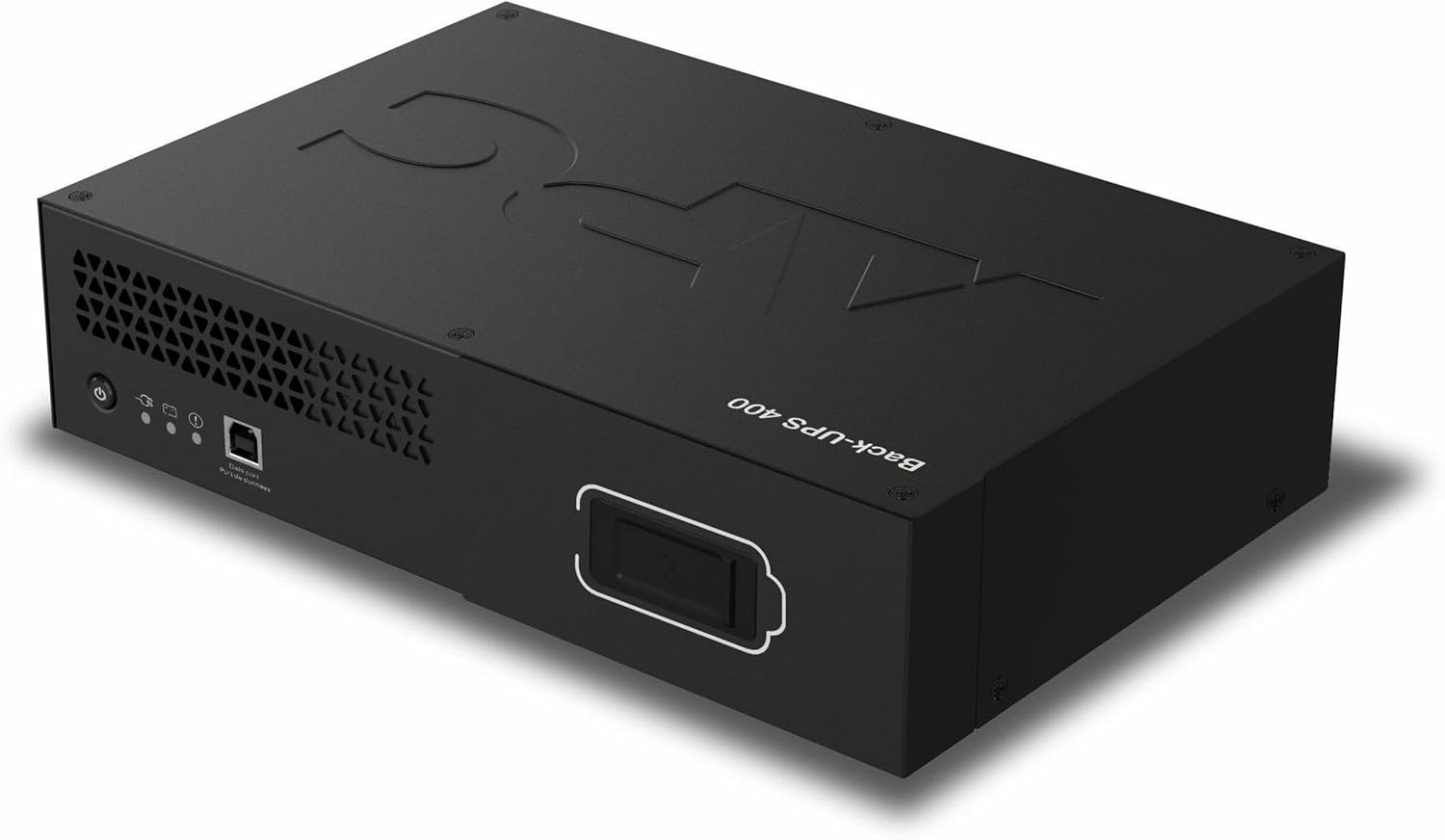
Nọmba 1: Iwaju ati oke view of the APC Back-UPS 400VA unit. This image displays the compact, black casing of the UPS, highlighting its low-profile design. The APC logo is visible on the top surface, and the 'Back-UPS 400' model designation is printed on the side. Indicator lights and a USB port are visible on the front panel.

Nọmba 2: Rear panel of the APC Back-UPS 400VA. This image shows the input power cord, the circuit breaker button, and the battery backup + surge protection outlets. Labels for customer service and regulatory compliance are also visible.

Nọmba 3: Example of the APC Back-UPS 400VA mounted to a monitor arm. This image demonstrates the flexible mounting capability of the UPS, showing it attached to the back of a computer monitor via a VESA mount or similar bracket, illustrating its space-saving potential.
5. Eto
5.1 Initial Battery Connection
Before initial use, the internal battery must be connected. Carefully open the battery compartment, typically located on the underside or side of the unit. Connect the battery terminals as indicated by the labels. Ensure connections are secure. If you encounter any rattling or loose components during this step, inspect for any manufacturing anomalies and contact support if necessary.
5.2 Ibi
Place the UPS in a location that is clean, dry, and away from heat sources. The low-profile design allows for flexible placement, including under desks, on shelves, or mounted to compatible surfaces (refer to Figure 3 for mounting example). Ensure adequate ventilation around the unit.
5.3 Ohun elo Nsopọ
- Plug your computer, monitor, and other critical electronic devices into the 'BATTERY BACKUP + SURGE PROTECTION' outlets on the rear of the UPS (refer to Figure 2).
- Do not plug laser printers or other high-current devices into the battery backup outlets, as this may overload the unit.
5.4 Asopọ agbara
Plug the UPS power cord directly into a grounded two-pole, three-wire wall receptacle. Avoid using extension cords or surge strips with the UPS input. Allow the UPS to charge for at least 8 hours before connecting equipment to ensure full battery capacity.
6. Ṣiṣẹ awọn Soke
6.1 Agbara Tan / Pa
- To turn ON the UPS: Press the power button located on the front panel. The unit will emit a short beep, and the power indicator light will illuminate.
- To turn OFF the UPS: Press and hold the power button until the unit beeps and the power indicator light turns off.
6.2 Awọn itọkasi
The front panel features LED indicators that provide status information:
- Alawọ ewe ri to: UPS is operating normally, providing utility power to connected equipment.
- Flashing Green (with audible alarm): UPS n ṣiṣẹ lori agbara batiri.
- Solid Red (with audible alarm): Battery low or fault condition.
6.3 Iṣẹ́ Àfikún Bátírì
Nigba agbara otage tabi significant voltage fluctuation, the UPS will automatically switch to battery power, providing temporary power to connected devices. An audible alarm will sound, and the battery indicator will flash. This allows you time to save work and properly shut down equipment.
6.4 gbaradi Idaabobo
The UPS also provides surge protection for all connected outlets, safeguarding your equipment from damaging power surges and spikes.
7. Itọju
7.1 Batiri Rirọpo
The battery in your UPS is a sealed lead-acid battery and is not user-serviceable for replacement. Battery life is typically 3-5 years, depending on usage and environmental conditions. When the battery needs replacement, the UPS will indicate this via an alarm or indicator light. Contact APC by Schneider Electric customer support for authorized battery replacement services.
7.2 Ninu
To clean the exterior of the UPS, use a soft, dry cloth. Do not use liquid or aerosol cleaners. Ensure the unit is powered off and unplugged from the wall outlet before cleaning.
7.3 Ibi ipamọ
If storing the UPS for an extended period, ensure the battery is fully charged. Store the unit in a cool, dry location with the battery disconnected. Recharge the battery every three months to prevent permanent damage.
8. Laasigbotitusita
If the UPS is not operating correctly, consult the following table for common issues and solutions:
| Isoro | Owun to le Fa | Ojutu |
|---|---|---|
| UPS ko ni tan | Battery not connected; No utility power; UPS fault | Ensure battery is connected; Check wall outlet; Contact support |
| UPS beeps nigbagbogbo | On battery power; Overload; Low battery | Save work and shut down; Reduce connected load; Allow battery to charge |
| UPS ko pese akoko iṣiṣẹ ti a reti | Battery not fully charged; Battery nearing end of life; Overload | Allow 8 hours for initial charge; Consider battery replacement; Reduce connected load |
| Circuit fifọ tripped | Overload on outlets | Reduce connected load; Press the circuit breaker button on the rear panel to reset (refer to Figure 2) |
For issues not listed here or if problems persist, please contact APC by Schneider Electric customer support.
9. Awọn pato
| Ẹya ara ẹrọ | Sipesifikesonu |
|---|---|
| Awoṣe | BV400XU |
| Agbara | 400VA / 255W |
| Iṣagbewọle Voltage | 120V AC |
| O wujade Voltage | 120V AC |
| Batiri Iru | Olori Acid |
| Awọn iwọn Ọja (D x W x H) | 4.69 x 10.24 x 4.69 inches |
| Iwọn Nkan | 11.99 iwon |
| Àwọ̀ | Dudu |
10. Atilẹyin ọja ati Support
APC by Schneider Electric products are backed by a limited warranty. For detailed warranty information, please refer to the warranty card included with your product or visit the official APC website. For technical support, troubleshooting assistance, or service inquiries, please visit www.apc.com or contact your local APC customer service representative.


