1. Ọja Ipariview
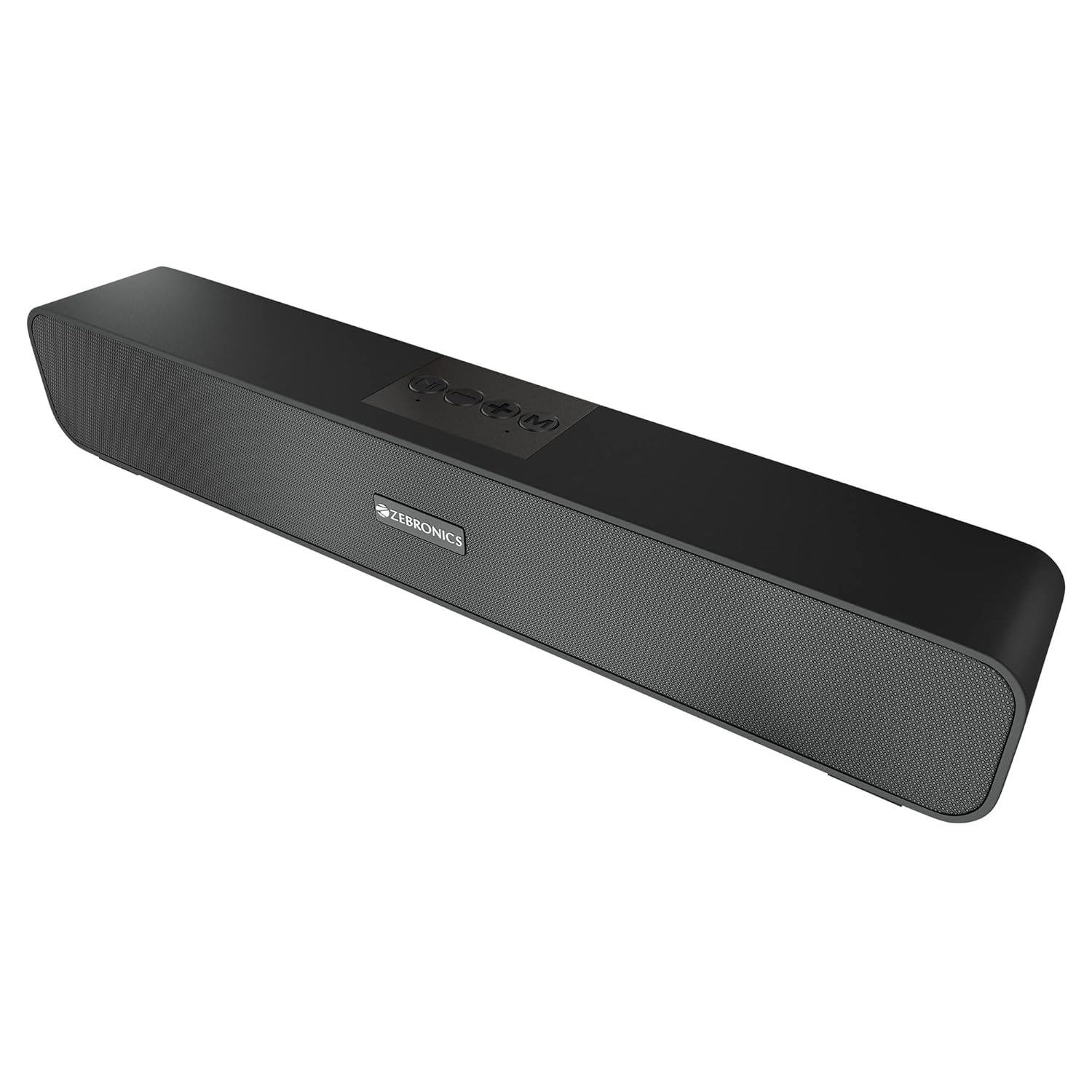
The ZEBRONICS Zeb-Astra 20 is a versatile and portable wireless Bluetooth speaker designed to deliver clear audio with enhanced bass. Its compact and lightweight design makes it ideal for on-the-go use, while multiple connectivity options ensure compatibility with a wide range of devices. This manual provides detailed instructions for setup, operation, and maintenance to help you get the most out of your speaker.
2. Ohun ti o wa ninu Apoti
Jọwọ ṣayẹwo awọn akoonu package lati rii daju pe gbogbo awọn ohun kan wa:
- 1 unit - ZEBRONICS Zeb-Astra 20 Speaker
- 1 unit - Charging Cable
- 1 unit - User Manual
- 1 unit - Input Cable (AUX)

3. Key Awọn ẹya ara ẹrọ
- Asopọ TWS: Connect two Zeb-Astra 20 speakers wirelessly for a stereo sound experience.
- Asopọmọra Wapọ: Supports Bluetooth v5.0, AUX, mSD card, and USB input.
- Rédíò FM tí a ṣe sínú rẹ̀: Enjoy your favorite radio stations on the go.
- Iṣẹ Ipe: Integrated microphone allows for hands-free calling when connected via Bluetooth.
- Igbesi aye batiri gigun: Built-in rechargeable battery provides up to 10 hours of playback (at 50% volume).
- Ohùn Alagbara: 10W RMS (5+5) output with dual 52mm drivers and dual passive radiators for deep bass.
- Awọn iṣakoso ogbon: Media and volume control buttons located on the speaker for easy operation.
- Apẹrẹ ti o tọ: Features a matte finish body with a front metallic grill.


Ọja Video Loriview
Yi fidio pese a okeerẹ loriview of the ZEBRONICS Zeb-Astra 20 Wireless BT v5.0 Portable Speaker, highlighting its 10W RMS output, TWS capability, and 10-hour battery backup.
4. Eto Itọsọna
4.1 Gbigba agbara si Agbọrọsọ
- So okùn gbigba agbara ti a pese mọ ibudo DC5V lori agbọrọsọ naa.
- So opin keji okun gbigba agbara pọ mọ adapter agbara USB (ko si ninu rẹ) tabi ibudo USB kọmputa kan.
- Ìmọ́lẹ̀ àfihàn agbára yóò tàn. Nígbà tí ó bá ti gba agbára tán pátápátá (tó tó wákàtí méjì), ìmọ́lẹ̀ náà yóò yípadà tàbí kí ó pa.
4.2 Titan / Pa a
- To power on, slide the ON/OFF switch to the 'ON' position.
- To power off, slide the ON/OFF switch to the 'OFF' position.
4.3 Sisopọ Bluetooth
- Ensure the speaker is powered on and in Bluetooth mode (indicated by a flashing LED). If not, press the 'Mode' button to switch to Bluetooth mode.
- Enable Bluetooth on your smartphone, laptop, or other compatible device.
- Wa fun available Bluetooth devices and select "ZEB-ASTRA 20" from the list.
- Nígbà tí a bá so wọ́n pọ̀, agbọ́hùnsọ̀ náà yóò fi hàn pé ìsopọ̀ náà ti yọrí sí rere, LED náà yóò sì dáwọ́ dúró.

5. Awọn ilana Iṣiṣẹ
5.1 bọtini Awọn iṣẹ
- Bọtini Ipo (M): Press to cycle through input modes: Bluetooth, AUX, mSD, USB, FM Radio.
- Bọ́tìnì Play/Dúró (►▮▮): Press to play or pause audio. In call mode, press to answer/end a call. Press and hold to reject a call.
- Iwọn didun isalẹ / Orin ti tẹlẹ (-): Tẹ kukuru fun orin ti o ti kọja. Tẹ gun lati dinku iwọn didun.
- Iwọn didun Up / Orin atẹle (+): Tẹ kukuru fun orin ti o tẹle. Tẹ gun lati mu iwọn didun pọ si.
5.2 Using Different Modes
- Ipo AUX: Connect an audio device using the 3.5mm AUX cable to the AUX port. The speaker will automatically switch to AUX mode.
- mSD Card Mode: Insert a micro SD card into the mSD slot. The speaker will automatically play audio files lati kaadi.
- Ipo USB: Fi kọnputa filasi USB sii sinu ibudo USB. Agbọrọsọ yoo mu ohun ṣiṣẹ laifọwọyi files lati wakọ.
- Ipo Redio FM: Press the 'Mode' button to switch to FM radio. Press the Play/Pause button to auto-scan and save available stations. Use the +/- buttons to switch between saved stations.
5.3 TWS (Otitọ Alailowaya Sitẹrio) iṣẹ
To connect two Zeb-Astra 20 speakers for a stereo experience:
- Rii daju pe awọn agbohunsoke mejeeji wa ni titan ati pe ko sopọ si eyikeyi ẹrọ Bluetooth.
- On one speaker, long press the 'Mode' button until you hear a prompt indicating TWS pairing mode.
- Awọn agbohunsoke meji yoo sopọ laifọwọyi si ara wọn. Ni kete ti o ti sopọ, iwọ yoo gbọ ohun ìmúdájú kan.
- Now, connect your device to one of the speakers via Bluetooth as described in section 4.3. Both speakers will play audio in stereo.
6. Itọju
- Sọ agbọrọsọ mọ pẹlu asọ asọ ti o gbẹ. Ma ṣe lo abrasive ose tabi epo.
- Yago fun ṣiṣafihan agbọrọsọ si awọn iwọn otutu to gaju, ọriniinitutu, tabi oorun taara.
- Ma ṣe tu agbohunsoke. Eyi yoo sọ atilẹyin ọja di ofo ati pe o le fa ibajẹ.
- Gba agbara si agbọrọsọ nigbagbogbo, paapaa ti ko ba si ni lilo, lati ṣetọju ilera batiri.
7. Laasigbotitusita
| Isoro | Owun to le Fa | Ojutu |
|---|---|---|
| Agbọrọsọ ko ni agbara lori. | Batiri kekere tabi ko gba agbara. | Gba agbara si agbọrọsọ ni kikun. |
| Ko si ohun. | Iwọn didun kere ju, ipo ti ko tọ, tabi ẹrọ ko sopọ mọ. | Increase volume, check mode, ensure proper connection. |
| Asopọ Bluetooth kuna. | Agbọrọsọ kò sí ní ipo ìsopọ̀, ẹ̀rọ náà jìnnà jù, tàbí ìdènà. | Ensure speaker is in BT mode, move closer, restart both devices. |
| Redio FM ko ṣiṣẹ. | Weak signal or no stations scanned. | Move to an open area, perform auto-scan for stations. |
| Asopọ TWS kuna. | Speakers already paired to a device or not in TWS pairing mode. | Ensure both speakers are disconnected from other devices and initiate TWS pairing correctly. |
8. Awọn pato
| Ẹya ara ẹrọ | Ẹ̀kúnrẹ́rẹ́ |
|---|---|
| Orukọ awoṣe | ZEB-ASTRA 20 |
| Agbọrọsọ Iru | Agbọrọsọ Alailowaya |
| Agbara Ijade | 10W RMS (5+5) |
| Awakọ Iwon | Meji 52mm Awakọ |
| Asopọmọra | Bluetooth v5.0, AUX, mSD, USB, FM Radio |
| Igbesi aye batiri | Titi di Awọn wakati 10 (ni iwọn 50%) |
| Akoko gbigba agbara | O fẹrẹ to awọn wakati 10 |
| Awọn iwọn Ọja (D x W x H) | 5.7D x 35.4W x 6.5H |
| Iwọn Nkan | 654 giramu |
| Ohun elo | Matte finish body with front metallic grill |
| Adarí Iru | Bọtini |
| Ipalara | 3 ohm |
| Idahun Igbohunsafẹfẹ | 20 kHz |

9. Atilẹyin ọja ati Support
This ZEBRONICS Zeb-Astra 20 speaker comes with a standard brand warranty. For specific warranty terms, conditions, and to register your product, please refer to the warranty card included in your package or visit the official ZEBRONICS webojula.
For technical support, service, or any inquiries regarding your product, please contact ZEBRONICS customer service through their official channels. Keep your purchase receipt and product serial number handy for faster assistance.


