
1. Ifihan ati Loriview
The ZEBRONICS Cozy is a 6-button vertical USB gaming mouse designed for comfort and high-precision gaming. It features a maximum DPI of 3200, a durable 1.8m braided cable, vibrant LED lights, a high-resolution sensor, and a smooth rubber finish. Its ergonomic design promotes natural hand posture, reducing strain during extended use. This plug-and-play device is ready for immediate use with your computer or laptop.
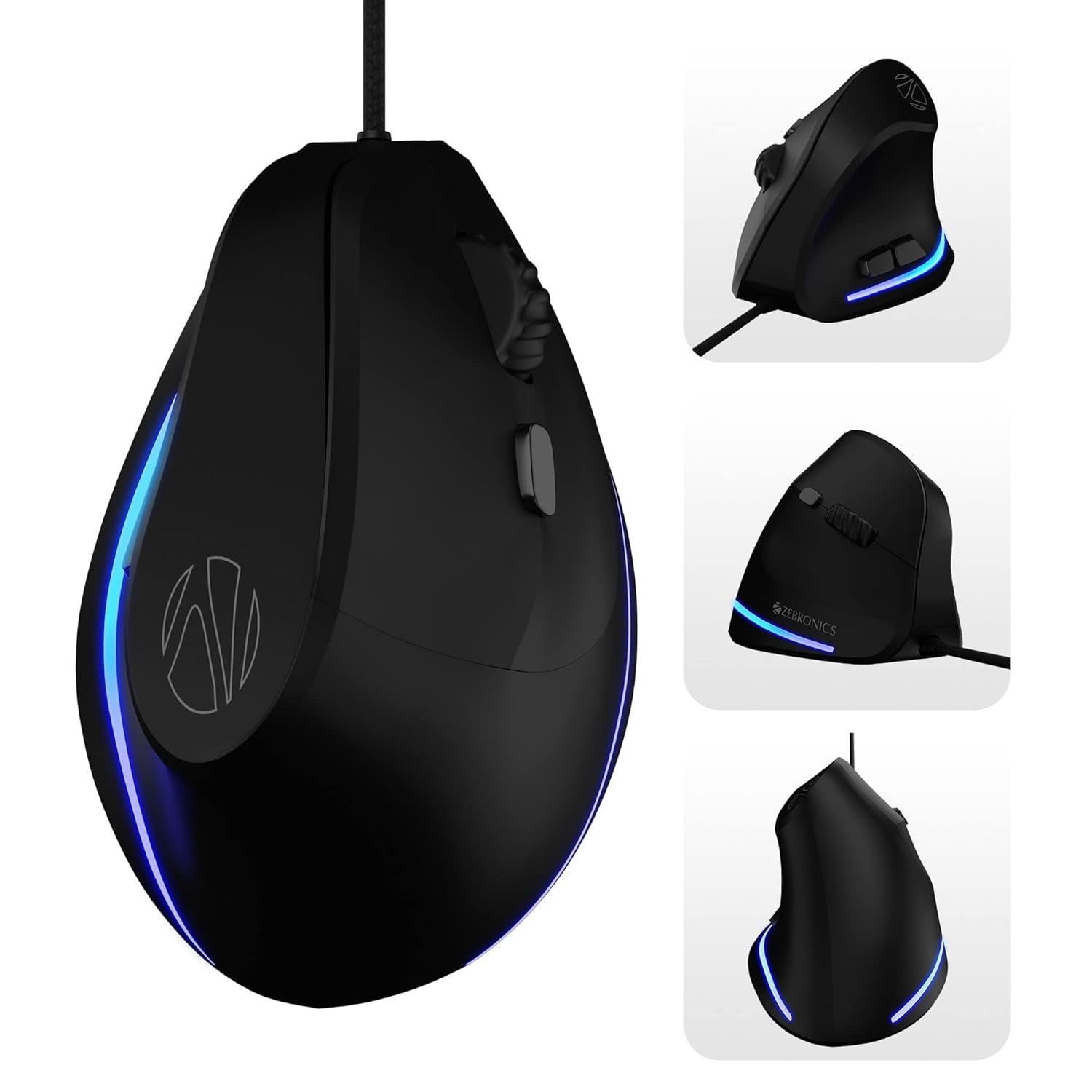
Image: Various angles of the ZEBRONICS Cozy mouse, highlighting its unique vertical shape.
2. Key Awọn ẹya ara ẹrọ
- Apẹrẹ Inaro Ergonomic: Redefines comfort with a high-precision gaming-grade sensor, promoting a natural handshake grip to reduce wrist strain.
- DPI ti o le ṣatunṣe: Supports up to 3600 DPI, with four preset levels (1200 / 1600 / 2400 / 3200 DPI) for customizable sensitivity.
- Awọn bọtini eto 6: Includes dedicated buttons for forward, backward, and DPI adjustment, offering versatile control.
- Kọ ti o tọ: Designed for hardcore gaming with a 5 million click cycle lifespan.
- Okùn ìfàmọ́ra: Features a 1.8-meter high-quality braided cable with a USB connector for reliable, uninterrupted gaming.
- Rubber Finish: A smooth rubber finish ensures easy handling and comfort during long hours of use.
- Awọn imọlẹ LED: Stunning LED lights enhance your gaming station's aesthetics.
- Pulọọgi ati Ṣiṣẹ: Simple USB connection for immediate use with computers and laptops.

Image: Visual representation of the mouse's ergonomic design, DPI settings, USB interface, LED lights, braided cable, button count, high-resolution sensor, DPI switch, and rubber finish.

Image: A comparison illustrating the ergonomic benefits of a vertical mouse over a standard mouse, showing natural wrist alignment.

Aworan: Isunmọ view of the ZEB-COZY mouse highlighting its vibrant LED lighting.
3. Eto
Awọn ibeere eto:
- Compatible with most computers and laptops.
- USB port available.
Nsopọ Asin:
- Wa ibudo USB ti o wa lori kọnputa tabi kọǹpútà alágbèéká rẹ.
- Insert the USB connector of the ZEB-COZY mouse firmly into the USB port.
- Asin naa ni a fi sori ẹrọ ati mu ṣiṣẹ, eyi ti o tumọ si pe eto iṣẹ rẹ yẹ ki o da a mọ laifọwọyi laisi fifi sori ẹrọ awakọ afikun.
- The LED lights on the mouse will illuminate upon successful connection.

Image: Illustration of the USB interface, indicating simple plug-and-play connectivity.

Image: The ZEB-COZY mouse positioned between a Mac and Windows computer, signifying broad compatibility.
4. Awọn ilana Iṣiṣẹ
Lilo ipilẹ:
Once connected, the ZEB-COZY mouse functions like a standard mouse. Move the mouse to control the cursor on your screen. Use the left and right click buttons for primary and secondary actions, respectively. The scroll wheel allows for vertical scrolling through documents and web awọn oju-iwe.
Atunse DPI:
The ZEB-COZY mouse features a dedicated DPI button, typically located near the scroll wheel. Press this button to cycle through the four available DPI settings:
- 1200 DPI (aiyipada)
- 1600 DPI
- 2400 DPI
- 3200 DPI (Àṣejù jùlọ)
Adjusting the DPI changes the cursor speed and sensitivity, allowing you to optimize performance for different tasks, from precise graphic design to fast-paced gaming.

Image: Close-up of the mouse indicating its maximum 3200 DPI capability.
Awọn iṣẹ bọtini:
In addition to the standard left, right, and scroll wheel click, the ZEB-COZY mouse includes dedicated forward and backward buttons, usually located on the side for thumb access. These buttons are commonly used for navigation in web burausa ati file oluwadi.
5. Itọju
To ensure the longevity and optimal performance of your ZEB-COZY mouse, follow these simple maintenance guidelines:
- Ninu: Nigbagbogbo mu ese awọn dada Asin pẹlu asọ, gbẹ, lint-free asọ. Fun idoti alagidi, die-die dampen awọn asọ pẹlu omi tabi kan ìwọnba ninu ojutu. Yago fun awọn kemikali lile tabi awọn ohun elo abrasive.
- Itọju Sensọ: Jeki sensọ opiti ti o wa ni isalẹ ti Asin mọ ati ni ominira lati eruku tabi idoti. Lo owu swab tabi afẹfẹ fisinuirindigbindigbin ti o ba wulo.
- Iṣakoso USB: Avoid sharp bends or excessive pulling on the braided cable to prevent internal damage. Store the cable neatly when not in use.
- Ibi ipamọ: Tọju Asin ni itura, aye gbigbẹ kuro lati orun taara ati awọn iwọn otutu to gaju.
6. Laasigbotitusita
If you encounter any issues with your ZEB-COZY mouse, please refer to the following common problems and their solutions:
| Isoro | Owun to le Fa | Ojutu |
|---|---|---|
| Asin kò dáhùn / Akọsọ kò ṣí. | Asopọ USB alaimuṣinṣin, ibudo USB ti ko tọ, ọran awakọ. | Rí i dájú pé okùn USB náà wà ní ààbò. Gbìyànjú ibudo USB mìíràn. Tun kọmputa rẹ bẹ̀rẹ̀. |
| Iyika kọsọ ti ko ṣiṣẹ tabi fo. | Sensọ opitika idọti, oju ilẹ ti ko yẹ, idamu sọfitiwia. | Clean the optical sensor on the bottom of the mouse. Use the mouse on a clean, non-reflective surface or a mouse pad. Check for conflicting software. |
| Bọ́tìnì DPI kò yí ìfàmọ́ra padà. | Software conflict, temporary glitch. | Ensure no other mouse software is interfering. Restart your computer. |
| Awọn imọlẹ LED ko ṣiṣẹ. | Iṣoro agbara, aṣiṣe inu. | Check USB connection. Try a different USB port. If the mouse functions otherwise, this might be a minor cosmetic issue. |
Tí ìṣòro náà bá ń bá a lọ lẹ́yìn tí a bá ti gbìyànjú àwọn ìdáhùn wọ̀nyí, jọ̀wọ́ kan sí ìrànlọ́wọ́ oníbàárà ZEBRONICS fún ìrànlọ́wọ́ síwájú sí i.
7. Awọn pato
| Ẹya ara ẹrọ | Ẹ̀kúnrẹ́rẹ́ |
|---|---|
| Brand | SEBRRONNÌSÌ |
| Orukọ awoṣe | ZEB-COZY |
| Àwọ̀ | Dudu |
| Asopọmọra Technology | USB (Ti firanṣẹ) |
| Imọ-ẹrọ Iwari išipopada | Opitika |
| Awọn ipele DPI | 1200 / 1600 / 2400 / 3200 DPI (Max) |
| Nọmba ti Awọn bọtini | 6 |
| USB Ipari | 1.8 meters (Braided) |
| Awọn iwọn Nkan (LxWxH) | 7.5 x 12 x 9 cm |
| Iwọn Nkan | 157 g |
| Awọn irinše to wa | Mouse - 1 unit |
| Ibamu System isẹ | Computers, Laptops (Mac and Windows compatible) |
| Pataki Awọn ẹya ara ẹrọ | Dedicated buttons for DPI, Forward & Backward, Works on most surfaces, Rubber finish, High Precision, LED Lights, Comfortable and Ergonomic design. |
8. Atilẹyin ọja ati Support
The ZEBRONICS Cozy 6 Button Vertical USB Gaming Mouse comes with a 1 Odun atilẹyin ọja lati ọjọ ti o ra. Jọwọ ṣe idaduro iwe rira rẹ fun awọn iṣeduro atilẹyin ọja.
For technical support, warranty claims, or any product-related inquiries, please contact ZEBRONICS customer service. Refer to the official ZEBRONICS website or product packaging for the most up-to-date contact information.
Manufacturer: Zebronics India Private Limited, 13/7, Smith Road, Royapettah CHENNAI-600002
9. Ọja Video Loriview
Fidio: Oṣiṣẹ kan ti pariview of the ZEBRONICS Cozy 6 Button Vertical USB Gaming Mouse, highlighting its features and design.


