Ọrọ Iṣaaju
This manual provides essential information for the safe and efficient operation, maintenance, and troubleshooting of your Fafrees F26-PRO Electric Bicycle. Please read this manual thoroughly before your first ride and retain it for future reference.
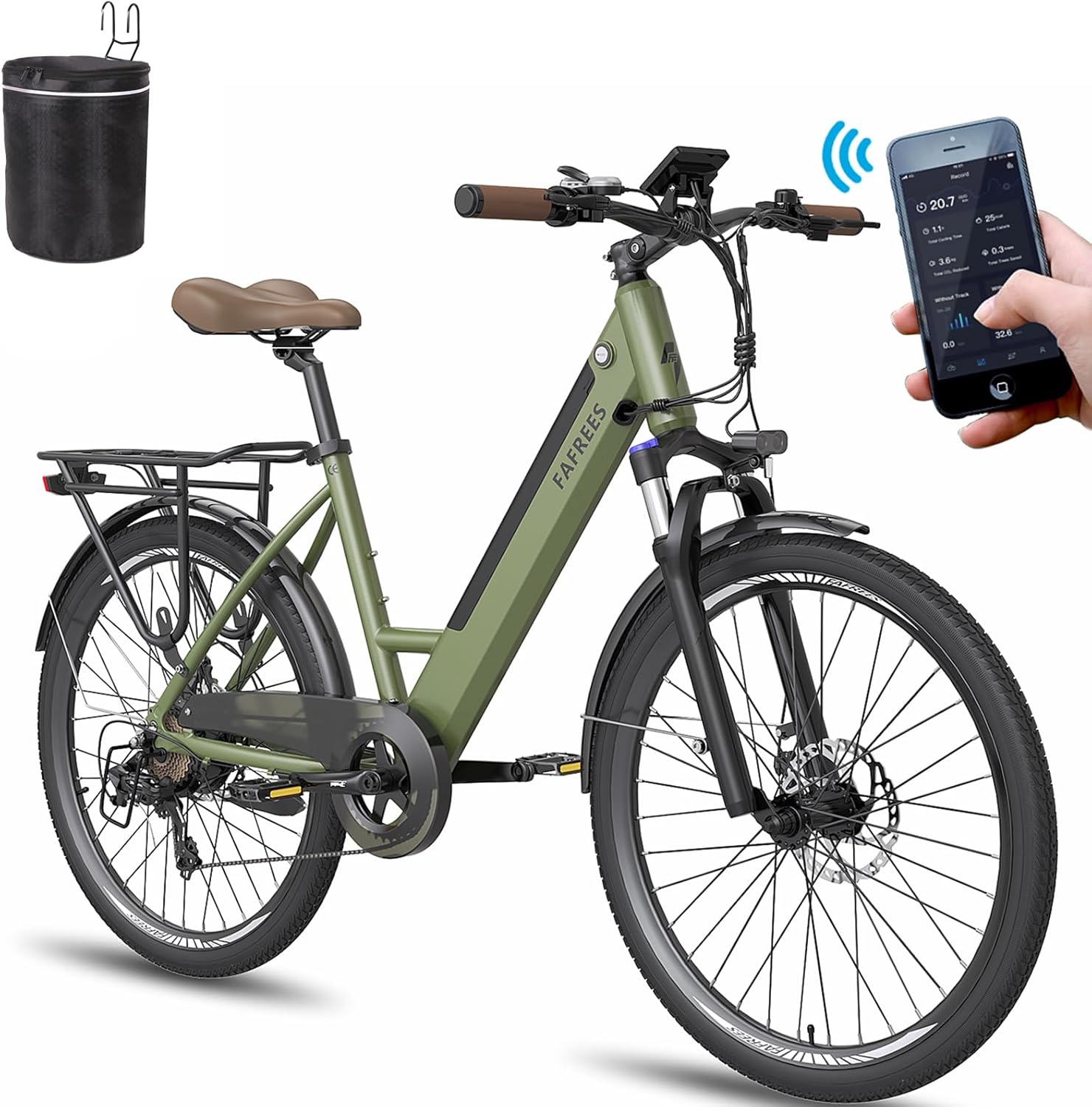
Figure 1: Fafrees F26-PRO Electric Bicycle. This image shows the complete bicycle with its step-through frame, front suspension, rear rack, and integrated battery design.
1. Ṣíṣeto àti Ìtòjọpọ̀ Àkọ́kọ́
Your Fafrees F26-PRO Electric Bicycle comes partially assembled. Follow these steps to complete the setup:
- Unboxing: Ni ifarabalẹ yọ gbogbo awọn paati kuro ninu apoti. Ṣayẹwo fun eyikeyi bibajẹ sowo.
- Fifi sori ẹrọ amudani: Attach the handlebar to the stem, ensuring all bolts are securely tightened. Adjust the handlebar height for comfortable riding.
- Àfikún Pẹdalì: Identify the left (L) and right (R) pedals. The left pedal tightens counter-clockwise, and the right pedal tightens clockwise. Ensure they are fully threaded and tightened.
- Àtúnṣe Ipò Ìjókòó: Insert the seat post into the frame and adjust the seat height to allow for a slight bend in your knee when the pedal is at its lowest point. Secure the quick-release lever or bolt.
- Ngba agbara batiri: Before first use, fully charge the 36V 14.5Ah lithium-ion battery. The charging time is approximately 6-8 hours. The battery can be removed for convenient charging indoors.
- Tire Tire: Inflate the CST 26 x 1.75 inch tires to the recommended pressure indicated on the tire sidewall.
- Ṣiṣayẹwo Bireki: Test both front and rear mechanical disc brakes to ensure they engage properly and stop the bicycle effectively.
A toolkit and a multi-language manual are included to assist with assembly.
2. Awọn ilana Iṣiṣẹ
The Fafrees F26-PRO offers three riding modes: Electric Mode, Pedal-Assist System (PAS) Mode, and Fitness Mode (manual pedaling).
2.1 Smart Color LCD Display and Mobile App
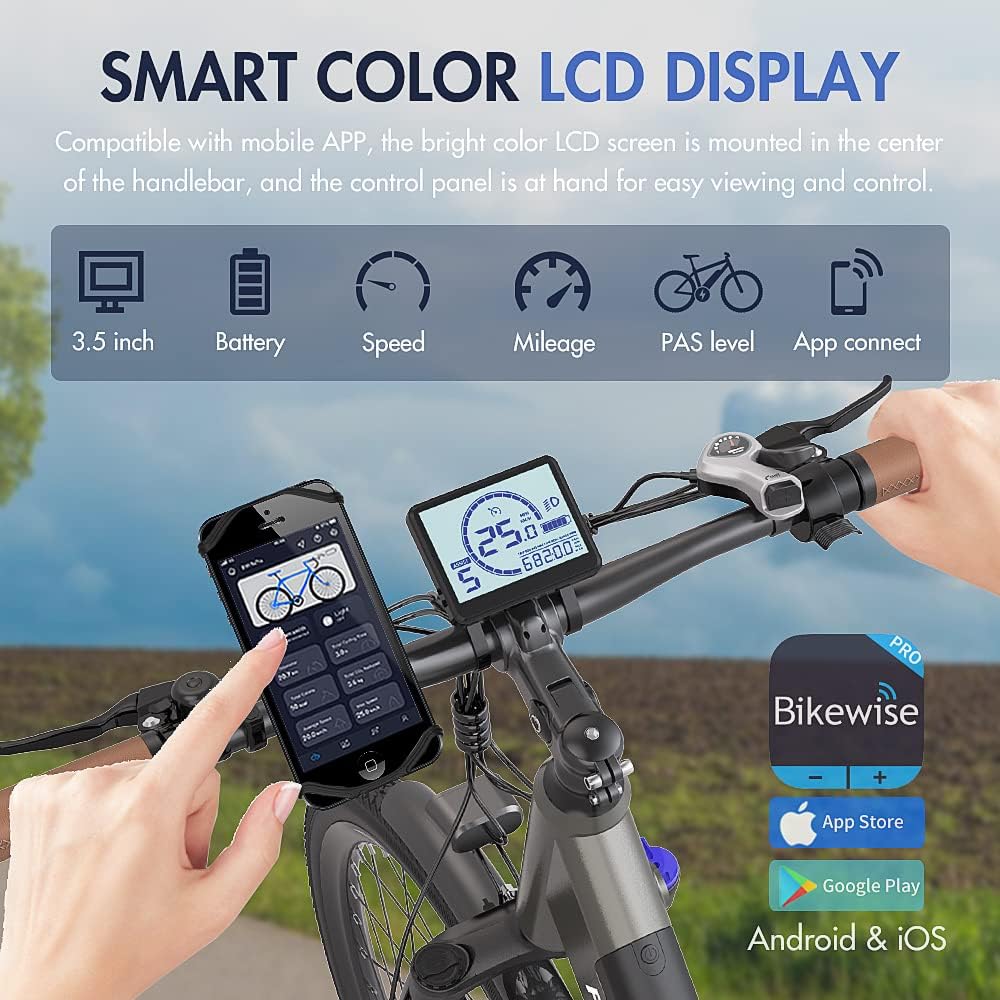
Figure 2: The 3.5-inch Smart Color LCD Display and mobile app connectivity. The display shows battery level, speed, mileage, PAS level, and allows app connection for ride data.
The 3.5-inch color LCD screen is centrally mounted on the handlebar for easy viewing. It displays key information such as speed, battery level, mileage, and PAS level. The bicycle is compatible with a mobile app, allowing you to monitor your ride data and settings via your smartphone.
- Titan/Apapa: Press and hold the power button on the display to turn the system on or off.
- Àtúnṣe Ìpele PAS: Use the '+' and '-' buttons on the control panel to select one of the 5 Pedal-Assist levels. Higher levels provide more motor assistance.
- 6 km/h Reverse Assist Mode: This feature provides low-speed assistance for maneuvering the bicycle.
- Iṣakoso oko oju omi: Engage cruise control for maintaining a constant speed (refer to the detailed manual for activation steps).
2.2 Riding Awọn ọna
- Ipo itanna: The motor provides power without pedaling. Use the throttle (if equipped and legal in your region) or select a high PAS level.
- Pedal-Assist System (PAS) Mode: The motor assists your pedaling effort. Choose from 5 PAS levels to control the amount of assistance. This mode offers a range of up to 110 km per charge.
- Ipo Amọdaju: Ride the bicycle like a traditional bike, using only your pedaling power. The motor provides no assistance in this mode.
2.3 Gear Shifting and Braking
The F26-PRO features a 7-speed Shimano transmission for smooth gear changes. Use the shifters on the handlebar to select appropriate gears for different terrains and speeds. The mechanical 160mm disc brakes, combined with power-off brake levers, ensure effective and quick stopping power.
3. Itọju
Regular maintenance ensures the longevity and safe operation of your Fafrees F26-PRO Electric Bicycle.
3.1 batiri Itọju
- Gba agbara batiri naa patapata lẹhin gbogbo irin-ajo, paapaa ti a ba fi pamọ fun igba pipẹ.
- Yago fun fifa batiri naa patapata.
- Tọju batiri naa ni itura, aaye gbigbẹ, kuro lati orun taara ati awọn iwọn otutu to gaju.
- The battery is a 36V 14.5Ah lithium-ion type.
3.2 General Bicycle Maintenance
- Taya: Regularly check tire pressure (CST 26 x 1.75 slim city tires) and inspect for wear or damage. Maintain proper inflation for optimal performance and safety.
- Awọn idaduro: Periodically check brake pads for wear and ensure brake levers operate smoothly. Adjust brake cable tension as needed.
- Pẹpẹ ati awakọ: Keep the chain clean and lubricated. Inspect the 7-speed Shimano gears for proper function and alignment. The chain cover helps protect clothing from the chain.
- Fọ́kì Ìdádúró: The 26-inch front suspension fork has 80mm travel and a lockout function. Keep it clean and check for smooth operation.
- Awọn ohun mimu: Periodically check all bolts and nuts for tightness, especially on the handlebars, seat post, wheels, and frame.
- Ninu: Fọ kẹ̀kẹ́ náà déédéé pẹ̀lú ìpolówóamp cloth. Avoid using high-pressure washers directly on electrical components. The IP54 waterproof rating provides protection against splashes.
- Eto onirin: The plug-and-play wiring system simplifies maintenance and replacement of electrical parts. Ensure all connections are secure.
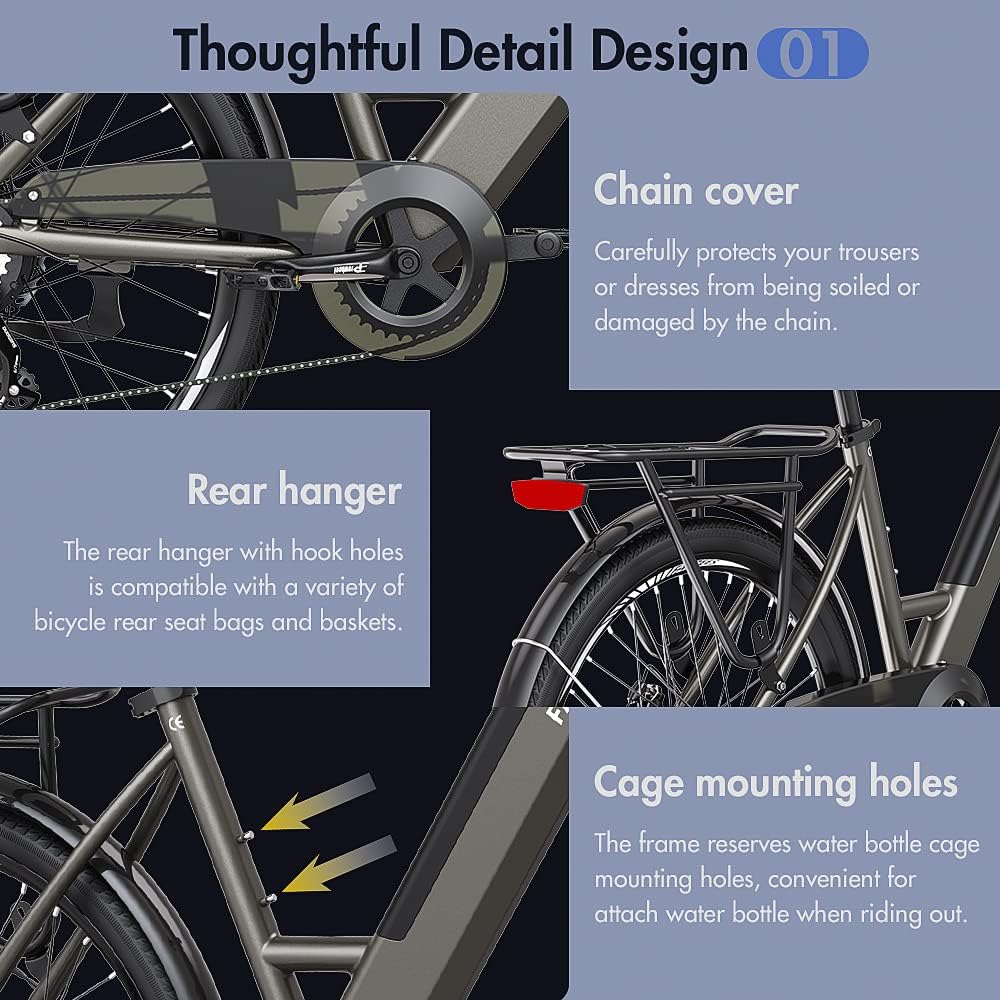
Figure 3: Details of CST slim city tires, adjustable handlebar, and the plug-and-play wiring system, highlighting components important for maintenance.
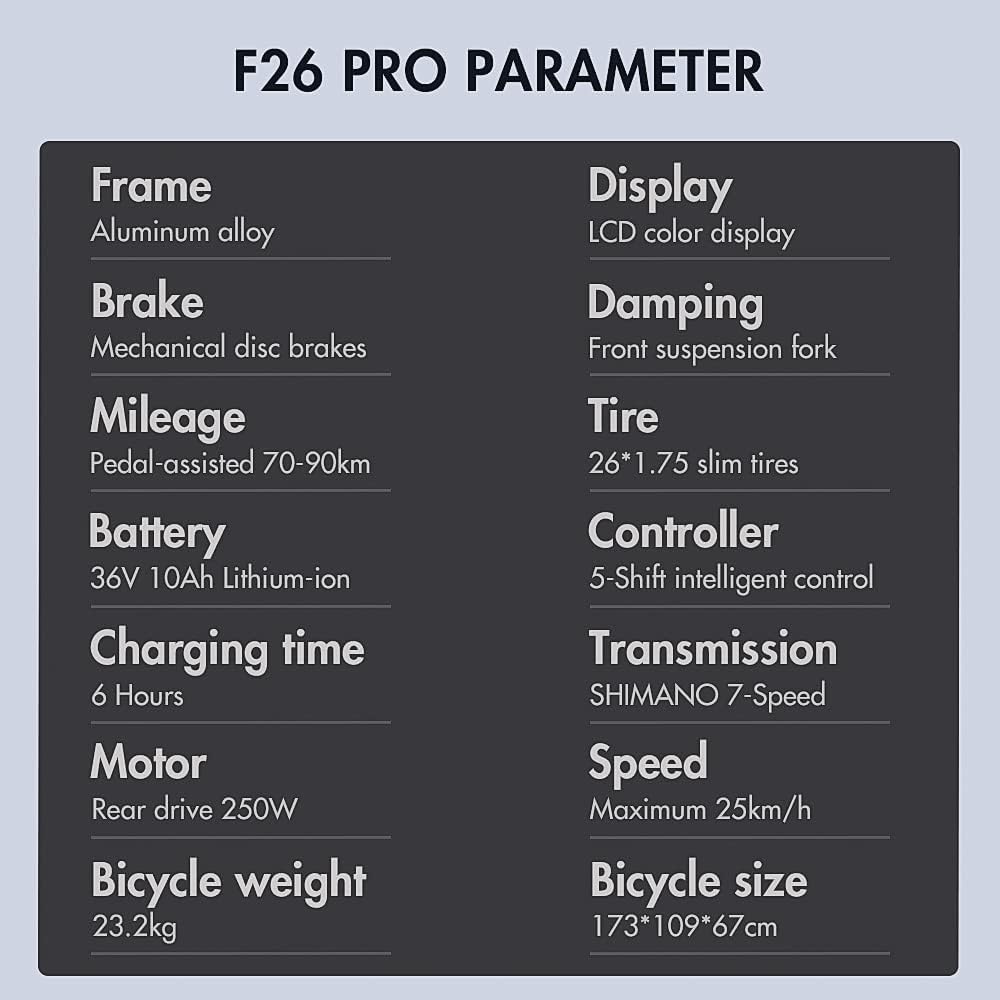
Figure 4: Close-up of the chain cover, rear hanger with hook holes for accessories, and water bottle cage mounting holes, all contributing to the bike's design and potential maintenance points.
4. Laasigbotitusita
If you encounter an issue with your Fafrees F26-PRO Electric Bicycle, consider the following general troubleshooting steps:
- Ko si Agbara:
- Ensure the battery is fully charged and properly seated in its compartment.
- Check all electrical connections, especially the main power cable from the battery to the controller.
- Verify the display is securely connected and powered on.
- Kò sí ìrànlọ́wọ́ mọ́tò:
- Check the PAS level on the display; ensure it's set to a level greater than 0.
- Confirm the brake levers are not engaged, as they typically cut motor power.
- Inspect the motor cable connection for any disconnections or damage.
- Brakes Not Effective:
- Check brake pad wear; replace if necessary.
- Ṣatunṣe ẹdọfu okun USB.
- Ensure brake calipers are properly aligned with the disc rotors.
- Awọn Ariwo Alailẹgbẹ:
- Inspect the chain and gears for debris or misalignment.
- Check for loose components or spokes.
- Lubricate the chain if it sounds dry.
For more complex issues, or if the problem persists, please contact customer support with a detailed description, including any photos or videos, for effective assistance.
5. Awọn pato
Below are the detailed specifications for the Fafrees F26-PRO Electric Bicycle:
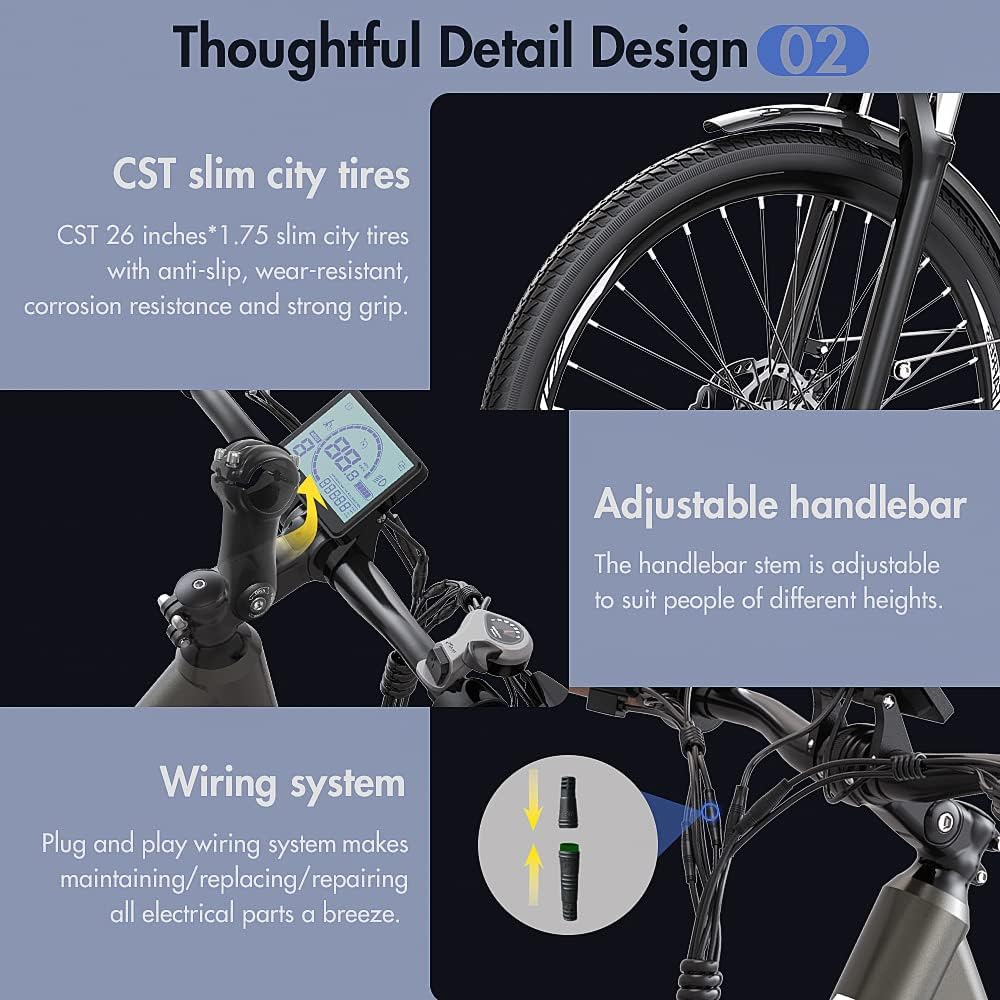
Figure 5: Key parameters of the Fafrees F26-PRO, including frame material, motor, battery, and dimensions.
| Awoṣe | F26-PRO |
| Ohun elo fireemu | 6061 Aluminiomu Alloy |
| Bicycle Type | E-bike, City Bike, Urban Mountainbike |
| Àwọ̀ | Gold (goudkleurig) |
| Apapọ iwuwo | 24.7 kg |
| O pọju fifuye Agbara | 120 kg |
| Mabomire Rating | IP54 |
| Niyanju Rider Giga | 160-198 cm |
| Mọto | 36V 250W Brushless Rear Hub Motor |
| Max Maxi | 42 Nm |
| Batiri Iru | 18650 litiumu-dẹlẹ |
| Agbara Batiri | 36V 14.5Ah (522Wh) |
| Akoko gbigba agbara | 6-8 wakati |
| Iyara ti o pọju | 25 km / h |
| Max Range (PAS Mode) | 90-110 km |
| Max Range (Pure Electric) | 55-65 km |
| Ifihan | 3.5-inch Smart Color LCD |
| Awọn ipele PAS | 0-5 |
| Awọn idaduro | Mechanical Disc Brakes (Front & Rear) |
| Gbigbe | Shimano 7-iyara |
| Orita iwaju | Suspension Fork (80mm travel, with lockout) |
| Taya | CST 26 x 1.75 inch Slim City Tires |
| Gàárì, | SR SELLE ROYAL Silicone Saddle |
| Awọn imọlẹ | Bright LED Headlight, Rear Brake Light |
| Unfolded Mefa | 173 x 109 x 67 cm (Ipari x Giga x Iwọn) |
| Adijositabulu Handlebar Giga | 100-112 cm |
| Adijositabulu Ijoko Iga | 85-103 cm |
| Pedal-to-Ground Distance | 10 cm |
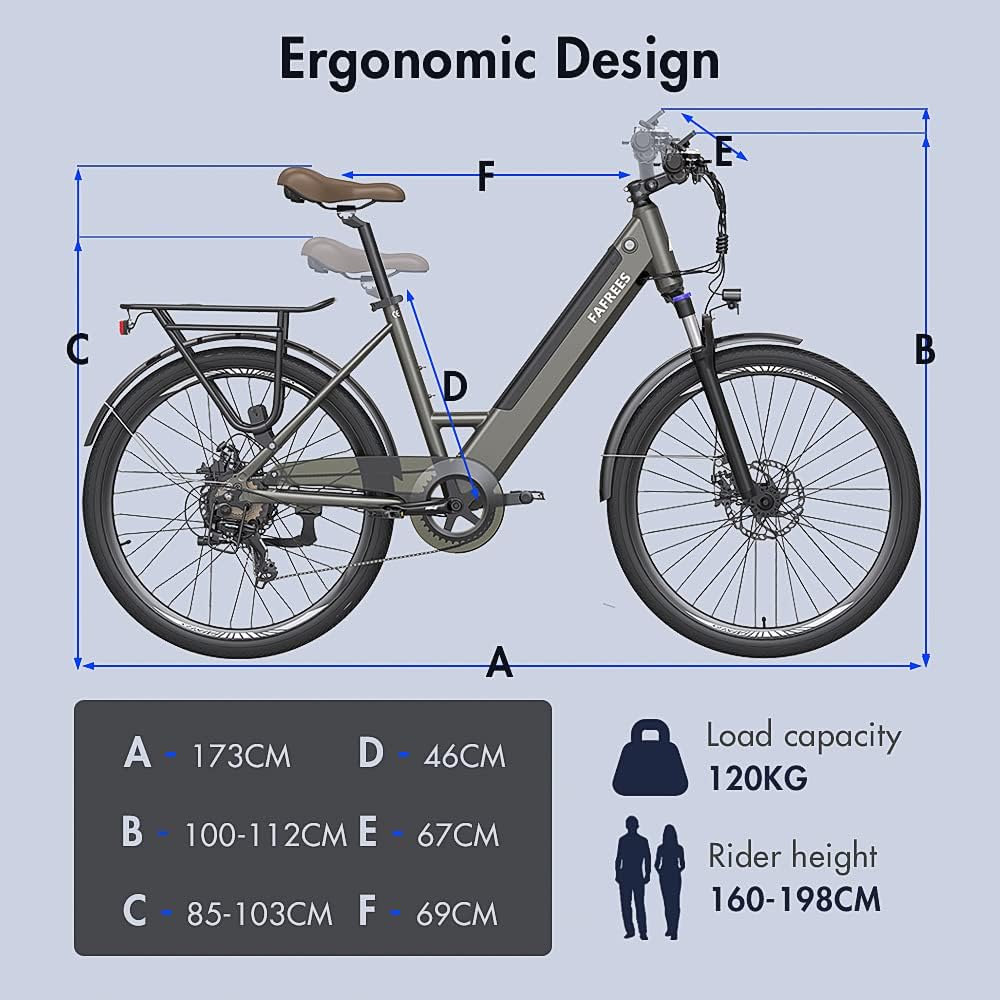
Figure 6: Ergonomic design and key dimensions of the Fafrees F26-PRO, illustrating the adjustable components and overall size.
6. atilẹyin ọja Information
Specific warranty details are typically provided with your purchase documentation. Please refer to the warranty card or contact Fafrees customer support for comprehensive warranty terms and conditions.
7. Onibara Support
For any questions, technical assistance, or issues not covered in this manual, please contact Fafrees customer service. Professional customer service is available to provide a response within 24 hours.
When contacting support, please provide:
- Your product model (Fafrees F26-PRO)
- Ọjọ rira
- A alaye apejuwe ti oro
- Any relevant photos or videos that can help diagnose the problem.


