Ọrọ Iṣaaju
Thank you for choosing the HTC Neckband Headphones. These headphones are designed to provide a superior audio experience with advanced features such as Bluetooth 5.0 connectivity, Active Noise Cancellation (ANC), and Environmental Noise Cancellation (ENC) for clear calls. With an IPX5 waterproof rating and up to 16 hours of playtime, they are suitable for various activities, from daily commutes to intense workouts.

Image: The HTC Neckband Headphones in red, showcasing their ergonomic design and in-ear earbuds.
Alaye Aabo
- Yago fun gbigbọ gigun ni iwọn giga lati ṣe idiwọ ibajẹ igbọran.
- Má ṣe lo àwọn agbekọri ní àwọn ipò tí àìlègbọ́ ohùn àyíká lè léwu (fún àpẹẹrẹ, wíwakọ̀, gígun kẹ̀kẹ́, rírìn nínú ọkọ̀ ojú irin).
- Keep the headphones dry. Do not expose them to extreme temperatures or humidity.
- Lo okun gbigba agbara ti a pese nikan tabi iwe-ẹri deede.
- Sọ ọja naa ni ifojusọna ni ibamu si awọn ilana agbegbe.
Package Awọn akoonu
- HTC Neckband Headphones
- USB Iru-C Ngba agbara USB
- Ọpọ titobi ti Eti Italolobo
- Itọsọna olumulo
Ọja Pariview
The HTC Neckband Headphones feature a flexible neckband design with integrated controls and magnetic earbuds for secure storage. The earbuds are designed for comfortable in-ear fit, and the neckband rests lightly around your neck.
Awọn iṣakoso ati Awọn Atọka

Aworan: Alaye view of the control panel on the neckband, indicating buttons for On/Off, Volume +, Volume -, ANC Noise Reduction, Type-C charging port, and LED indicator.
- Bọtini Tan/Pa: Ṣe agbara awọn agbekọri si tan tabi pa.
- Iwọn didun + Bọtini: Increases volume, next track (long press).
- Bọ́tìnì - Ìwọ̀n: Decreases volume, previous track (long press).
- Bọtini ANC: Activates or deactivates Active Noise Cancellation.
- Ibudo Ngba agbara Iru-C: Fun gbigba agbara ẹrọ.
- Atọka LED: Shows power status, charging status, and pairing mode.
Ṣeto
1. Ngba agbara si awọn Agbekọri
Before first use, fully charge your headphones. Connect the provided USB Type-C charging cable to the charging port on the neckband and the other end to a USB power source. The LED indicator will show charging status. A full charge takes approximately 1 hour and 50 minutes, providing up to 16 hours of playtime.
2. Sisopọ Bluetooth
- Rii daju pe awọn agbekọri ti wa ni pipa.
- Press and hold the On/Off button until the LED indicator flashes rapidly (usually blue and red), indicating pairing mode.
- Lori ẹrọ rẹ (foonuiyara, tabulẹti, ati bẹbẹ lọ), mu Bluetooth ṣiṣẹ ki o wa awọn ẹrọ to wa.
- Select "HTC Neckband Headphones" from the list of devices.
- Ni kete ti a ti sopọ, Atọka LED yoo ṣafihan ina bulu ti o lagbara tabi filasi laiyara.
Awọn ilana Iṣiṣẹ
Titan / Paa
- Lati Fi agbara: Press and hold the On/Off button for approximately 3 seconds until the LED indicator lights up.
- Lati Paarẹ: Press and hold the On/Off button for approximately 5 seconds until the LED indicator turns off.
Sisisẹsẹhin Orin
- Ṣiṣẹ/Daduro: Tẹ bọtini Titan/Pa lẹẹkan.
- Iwọn didun Up: Tẹ bọtini iwọn didun +.
- Iwọn didun isalẹ: Tẹ bọtini Iwọn didun.
- Orin t’okan: Tẹ bọtini Iwọn didun + fun igba pipẹ.
- Tẹlẹ Orin: Tẹ bọtini Iwọn didun fun igba pipẹ.
Isakoso Ipe
- Idahun/Ipe Ipari: Tẹ bọtini Titan/Pa lẹẹkan.
- Kọ Ipe: Long press the On/Off button.
- Nọmba Ikẹhin Tun Tun: Double-press the On/Off button.
Fagilee Ariwo Ti nṣiṣe lọwọ (ANC)
The ANC feature reduces ambient noise, allowing for a more immersive audio experience. The headphones also feature Environmental Noise Cancellation (ENC) for clearer voice calls.

Image: HTC Neckband Headphones with visual representation of sound waves, highlighting the ANC + ENC Noise Reduction feature for pure music enjoyment.
- Mu ṣiṣẹ/mu maṣiṣẹ ANC: Press the ANC button once. The LED indicator may change to confirm activation/deactivation.
Wọ Awọn Agbekọri
For optimal comfort and sound quality, ensure the earbuds fit snugly in your ears. The neckband is designed to rest comfortably around your neck. The magnetic design of the earbuds allows them to securely attach to each other when not in use, preventing tangling and ensuring they stay in place around your neck.

Image: A woman wearing the red HTC Neckband Headphones comfortably around her neck and in her ears while exercising, demonstrating the secure fit.

Image: A man and a woman wearing HTC Neckband Headphones, illustrating the comfortable and secure fit. Inset shows different ear tip sizes (L and S) for customization.
Itọju ati Itọju
- Ninu: Gently wipe the headphones with a soft, damp asọ. Maṣe lo awọn kẹmika lile tabi awọn ohun elo abrasive.
- Ibi ipamọ: When not in use, store the headphones in a cool, dry place, away from direct sunlight and extreme temperatures. The magnetic earbuds help keep them tidy.
- Omi Resistance: The headphones are IPX5 waterproof, meaning they are resistant to sweat and light splashes of water. Do not submerge them in water or expose them to heavy rain.

Image: A man exercising, wearing the HTC Neckband Headphones, with an overlay indicating IPX5 Waterproof Design, suitable for sweat and light rain.
Laasigbotitusita
- Awọn agbekọri ko ṣiṣẹ lori: Rii daju pe awọn agbekọri ti gba agbara ni kikun.
- Ko si ohun: Check if the headphones are paired correctly and the volume is turned up on both the headphones and your device.
- Awọn ọrọ sisọ pọ: Make sure the headphones are in pairing mode (flashing LED). Turn off Bluetooth on other nearby devices to avoid interference. Try unpairing and re-pairing.
- Didara ipe ti ko dara: Rii daju pe gbohungbohun ko ni idinamọ. Ṣayẹwo fun ifihan agbara Bluetooth to lagbara.
Awọn pato
| Ẹya ara ẹrọ | Sipesifikesonu |
|---|---|
| Brand | Eshitisii |
| Orukọ awoṣe | Neckband Headphones Bluetooth 5.0 ANC |
| Imọ-ẹrọ Ibaraẹnisọrọ Alailowaya | Bluetooth |
| Omi Resistance Ipele | IPX5 (Mabomire) |
| Agbara Batiri | 130mAh (approximate, inferred from image) |
| Akoko Idaraya Orin | Up to 16 hours (inferred from product title and image) |
| Call Duration Time | Up to 10 hours (inferred from image) |
| Akoko Iduro | Up to 180 days (inferred from image) |
| Akoko gbigba agbara | Approx. 1 hour 50 minutes (inferred from video) |
| Ohun elo | Rubber, Silicone |
| Iwọn Nkan | 9.1 iwon |
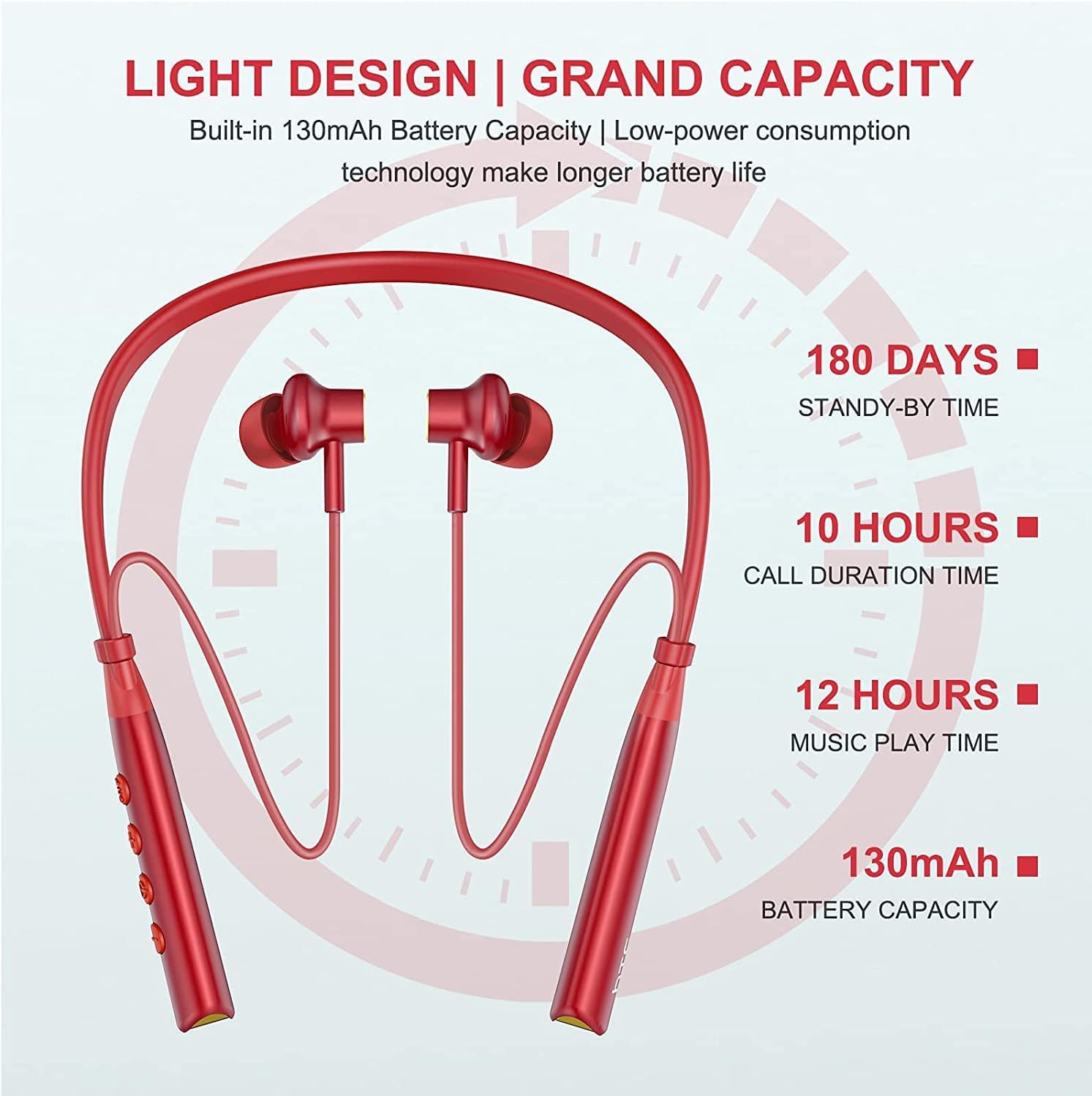
Image: Visual representation of battery specifications, including 180 days standby, 10 hours call duration, 12 hours music playtime, and 130mAh battery capacity.
Atilẹyin ọja ati Support
HTC products are manufactured to the highest quality standards. For warranty information or technical support, please refer to the official HTC website or contact your local customer service representative. Keep your purchase receipt for warranty claims.
Product Video Guide
Video: An official product video demonstrating the features and usage of the HTC Wireless Neckband Bluetooth Headphones, including pairing, controls, and comfort.


