1. Ifihan
This manual provides essential information for the safe and efficient operation of your Powertech MB3904 8 Step Intelligent Lead Acid and Lithium Battery Charger. Please read this manual thoroughly before use and retain it for future reference.
2. Alaye Aabo
Nigbagbogbo ṣe akiyesi awọn iṣọra aabo wọnyi:
- Rí i dájú pé a ti ge ẹ̀rọ amúṣẹ́ náà kúrò nínú agbára kí a tó ṣe tàbí kí a já àwọn ìsopọ̀ mọ́ bátírì náà.
- Lo ṣaja nikan ni awọn agbegbe ti o ni afẹfẹ daradara.
- Yago fun gbigba agbara awọn batiri tutunini.
- Ma ṣe fi ṣaja han si ojo tabi ọrinrin pupọ.
- Jeki kuro ni arọwọto awọn ọmọde.
- This charger is designed for 6V or 12V Lead Acid or LiFePO4 batteries only. Do not use with other battery types.
3. Package Awọn akoonu
Jẹrisi pe gbogbo awọn ohun kan wa ninu package:
- Powertech MB3904 8 Step Intelligent Battery Charger Unit
- Batiri Clamp Connectors (Red and Black)
- Ring Terminal Connectors
- AC Agbara okun
- Afowoyi Olumulo (iwe-ipamọ yii)
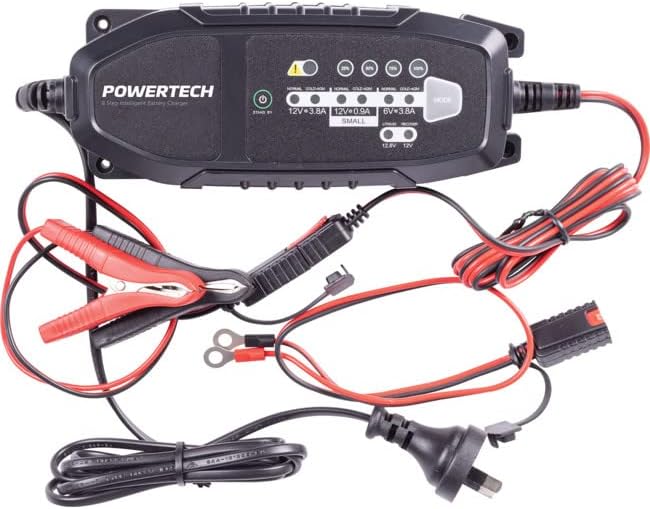
Image: The Powertech MB3904 battery charger unit shown with its various included accessories, including battery clamps, ring terminals, and the AC power cord.
4. Awọn ẹya Ọja
The Powertech MB3904 charger offers advanced features for optimal battery maintenance:
- 8-Step Charging Process: Ensures thorough and efficient charging for various battery types.
- Olona-Voltage ibamu: Suitable for both 6V and 12V lead acid and LiFePO4 batteries.
- Aabo ti o ni kikun: Includes overload, short circuit, reverse polarity, safety timer, and wrong battery protection.
- Awọn itọkasi LED ogbon inu: Clearly display charge status and selected mode.
- Bọtini Aṣayan Ipo: Allows easy switching between charging modes.
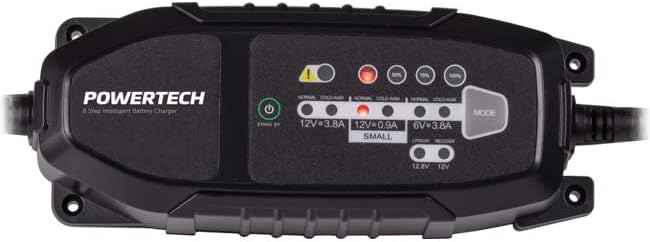
Aworan: A oke-isalẹ view of the Powertech MB3904 charger, highlighting the LED indicators for charge status and the 'MODE' button for selecting charging programs.
5. Eto
- Ibi: Place the charger on a stable, flat surface in a well-ventilated area, away from direct sunlight or heat sources.
- Asopọ batiri: Ensure the battery terminals are clean. Connect the red (+) clamp/ring terminal to the positive (+) battery terminal and the black (-) clamp/ring terminal to the negative (-) battery terminal. Ensure a secure connection.
- Asopọ agbara: Plug the AC power cord into a suitable wall outlet. The charger will enter standby mode.
6. Awọn ilana Iṣiṣẹ
6.1. Yíyan Ipo Gbigba agbara
After connecting the battery and power, press the MODE button to cycle through the available charging programs. The corresponding LED will illuminate to indicate the selected mode:
- 12V 3.8A (Normal): Standard charging for 12V lead acid batteries.
- 12V 3.8A (Cold/AGM): For charging 12V lead acid batteries in cold conditions or AGM batteries.
- 12V 0.9A (Small): For charging smaller 12V lead acid batteries.
- 6V 3.8A: For charging 6V lead acid batteries.
- Lithium (12.8V/12V): For charging 12V LiFePO4 batteries.
- Tunṣe: A special mode for desulfation of deeply discharged lead acid batteries.
6.2. Ilana gbigba agbara
Once a mode is selected, the charger will automatically begin the 8-step charging process. The progress LEDs (25%, 50%, 75%, 100%) will illuminate sequentially to indicate the battery's charge level. When the 100% LED is solid, the battery is fully charged.
6.3. Jíjápọ̀ ẹ̀rọ amúṣẹ́jáde náà
- Yọọ okun agbara AC kuro ni iṣan ogiri.
- Ge asopọ dudu (-) clamp/ring terminal from the negative (-) battery terminal.
- Ge asopọ pupa (+) clamp/ring terminal from the positive (+) battery terminal.
7. Itọju
- Ninu: Nu ṣaja naa mọ casinpẹ̀lú aṣọ rírọ̀ tí ó gbẹ. Má ṣe lo àwọn ohun ìfọṣọ tàbí àwọn ohun èlò ìfọṣọ.
- Ibi ipamọ: Tọju ṣaja ni itura, ibi gbigbẹ nigbati ko si ni lilo.
- Ayẹwo USB: Periodically inspect the power cord and battery cables for any signs of damage. Do not use the charger if cables are damaged.
8. Laasigbotitusita
| Isoro | Owun to le Fa | Ojutu |
|---|---|---|
| Ṣaja ko tan. | Kò sí agbára láti inú ìjáde; ìsopọ̀ tí ó dẹ́kun. | Ṣàyẹ̀wò ibi tí agbára ń jáde; rí i dájú pé okùn agbára náà wà ní ààbò. |
| Error LED illuminated. | Reverse polarity; short circuit; wrong battery type. | Check battery connections for correct polarity; inspect cables for shorts; ensure battery type matches selected mode. |
| Batiri ko ngba agbara. | Battery deeply discharged/damaged; incorrect mode selected. | Try "Repair" mode for lead acid batteries; test battery with a multimeter; ensure correct charging mode is selected. |
9. Awọn pato
- Awoṣe: MB3904
- Iṣagbewọle Voltage: 220-240V AC, 50/60Hz
- O wujade Voltage: 6V / 12V DC
- Gbigba agbara lọwọlọwọ: 0.9A / 3.8A
- Awọn oriṣi Batiri: Lead Acid (WET, MF, CA, EFB, GEL, AGM), LiFePO4
- Idaabobo: Overload, Short Circuit, Reverse Polarity, Safety Timer, Wrong Battery
- Awọn iwọn: Isunmọ 20.4 x 7.4 x 4.8 cm
- Ìwúwo: O fẹrẹ to 534 g
- Ibamu: CE
10. Atilẹyin ọja ati Support
This Powertech product is covered by a standard manufacturer's warranty. For specific warranty terms and conditions, please refer to the warranty card included with your purchase or contact your retailer.
For technical support or service inquiries, please contact Jaycar Electronics customer service or visit their official webojula. Jeki ẹri rira rẹ fun awọn iṣeduro atilẹyin ọja.
Jaycar Electronics Webojula: www.jaycar.com.au


