1. Ifihan
Thank you for choosing the Cherub WST-905Li Rechargeable Clip-on Guitar Tuner. This manual provides detailed instructions on how to set up, operate, and maintain your tuner to ensure optimal performance. Please read this manual thoroughly before using the device.
2. Ọja Ipariview
2.1 Awọn ẹya ara ẹrọ ọja
- USB Rechargeable Chromatic Tuner for Guitar, Bass, Ukulele, and Baritone.
- Features 4 display modes, including 2 Strobo modes and 2 Arrow modes.
- High degree of accuracy at ±1 cent.
- Offers 5 tuning modes for various instruments.
- Equipped with a durable stainless steel clamp.
2.2 Package Awọn akoonu
- Cherub WST-905Li Clip-on Tuner
- USB-C Charging Cable (not explicitly listed but implied by USB rechargeable)
- Irin alagbara, irin clamp (integrated)
- Afowoyi Olumulo (iwe-ipamọ yii)
2.3 Idanimọ paati

Nọmba 1: Iwaju view of the tuner with its vibrant display.
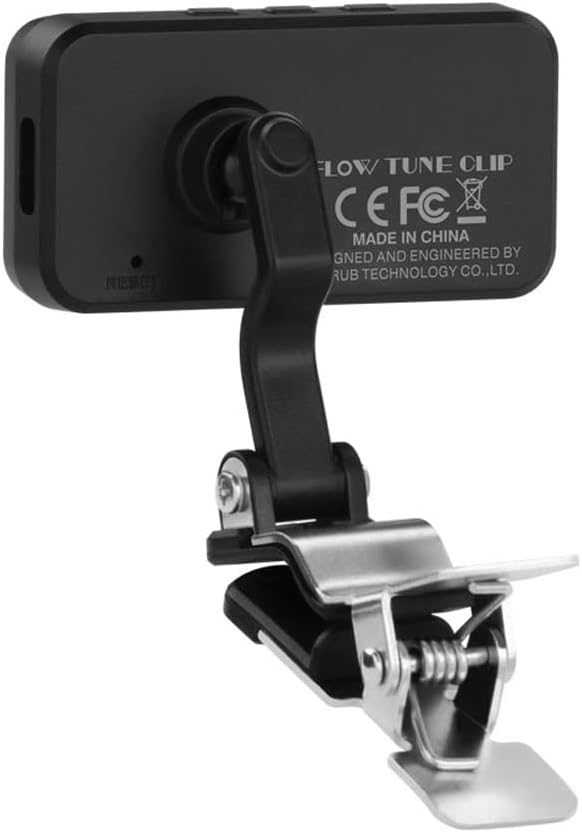
Nọmba 2: Ẹyìn view of the tuner, displaying the 'FLOW TUNE CLIP' model name and regulatory information.

Nọmba 3: Apa view illustrating the tuner's control buttons for mode selection and display options.
The Cherub WST-905Li features a clear LCD display, control buttons on the side (Power/Mode, A4/Flat, Display), and a durable stainless steel clip for attachment to your instrument's headstock. The USB-C charging port is located on the side.
3. Eto
3.1 Ngba agbara si Tuner
The WST-905Li tuner is equipped with a built-in Lithium Ion rechargeable battery. Before first use, or when the battery indicator on the display shows low power, charge the tuner using the provided USB-C cable.
- Connect the USB-C end of the cable to the charging port on the side of the tuner.
- Connect the USB-A end of the cable to a standard USB power adapter (e.g., phone charger, computer USB port).
- Àfihàn náà yóò fi ipò agbára hàn. Agbára gbígbà gbogbo máa ń gba wákàtí díẹ̀.

Nọmba 4: Illustration of connecting the USB-C cable for charging the tuner.
3.2 Síso Atúnṣe pọ̀ mọ́ra
The clip-on design allows for easy attachment to the headstock of your instrument, where it can detect vibrations directly for accurate tuning.
- Gently open the stainless steel clamp.
- Attach the tuner securely to the headstock of your guitar, bass, ukulele, or baritone. Ensure the display is facing you and is easily visible.
- Adjust the angle of the display for optimal viewing using the flexible joint.

Nọmba 5: The tuner securely clipped onto a guitar headstock, ready for use.

Nọmba 6: Demonstrates the tuner's compact size and discreet placement on the instrument.
4. Isẹ
4.1 Agbara Tan / Pa
Press and hold the Power/Mode button (usually marked with ⌀/M) on the side of the tuner to turn it on or off.
4.2 Yiyan Tuning Awọn ipo
The WST-905Li offers 5 tuning modes to accommodate various instruments. Press the Power/Mode button briefly to cycle through the available modes:
- Kírómátíkì (C): For all instruments, displays the note name.
- Gítà (G): Optimized for guitar tuning.
- Báàsì (B): Optimized for bass guitar tuning.
- Ukulele (U): Optimized for ukulele tuning.
- Baritone (Bar): Optimized for baritone ukulele tuning.
4.3 Understanding Display Modes
The tuner features 4 distinct display modes, including two Strobo modes and two Arrow modes, providing visual feedback for precise tuning. Press the 'DISP' button to cycle through these display options.

Nọmba 7: Examples of the four available display modes, including Strobo and Arrow indicators.
4.4 Tuning Process
Once the tuner is attached and powered on, pluck a single string on your instrument. The display will show the note name and indicate whether the note is sharp, flat, or in tune.
- If the note is flat, the indicator will show below the center, and the display might be blue or red depending on the mode. Tighten the string.
- If the note is sharp, the indicator will show above the center, and the display might be blue or red depending on the mode. Loosen the string.
- When the note is in tune, the indicator will be centered, and the display will typically turn green or show a stable pattern.
4.5 Compensated Tuning
The WST-905Li features a compensated tuning method, particularly useful for guitars, to achieve a more harmonized sound across the fretboard. This mode adjusts the target pitch slightly for each string to account for intonation imperfections inherent in stringed instruments.

Nọmba 8: Compensation tuning values for standard guitar strings. These values represent the offset in cents from perfect pitch for optimal intonation.
To use compensated tuning, select the appropriate mode (e.g., Guitar mode) and follow the on-screen instructions or refer to the specific compensation values provided in the manual or on the product's support page. This feature allows for a more precise and musically pleasing tuning experience.
4.6 Fidio Ifihan ọja
Watch this official video for a visual guide on the features and operation of the Cherub WST-905Li tuner.
Fidio 1: Cherub WST-905Li Guitar Tuner overview, demonstrating its rechargeable nature, flexibility, compensated tuning, display modes, and accuracy. (Duration: 0:16)
5. Itọju
5.1 Ninu
To clean the tuner, gently wipe the display and body with a soft, dry cloth. Do not use abrasive cleaners, solvents, or immerse the device in water.
5.2 Ibi ipamọ
Store the tuner in a cool, dry place away from direct sunlight and extreme temperatures. When not in use for extended periods, ensure the battery is partially charged (around 50%) to prolong its lifespan.
5.3 batiri Itọju
The Lithium Ion battery is designed for long life. To maximize battery longevity:
- Yago fun gbigba agbara si batiri ni kikun nigbagbogbo.
- Avoid leaving the tuner plugged in for extended periods after it is fully charged.
- Recharge the tuner regularly, even if not used frequently, to prevent deep discharge.
6. Laasigbotitusita
6.1 Tuner does not power on.
- Ṣayẹwo Batiri: The battery may be depleted. Connect the tuner to a USB power source and allow it to charge for at least 30 minutes before attempting to power on again.
- Tun: Locate the small reset button (if present, often a pinhole) and gently press it with a paperclip.
6.2 Inaccurate tuning readings.
- Asomọ to ni aabo: Ensure the tuner is firmly clipped to the instrument's headstock. Loose attachment can affect vibration detection.
- Ariwo Ayika: Tune in a quiet environment to minimize interference from external sounds.
- Ipo titọ: Verify that the correct tuning mode (e.g., Guitar, Bass, Chromatic) is selected for your instrument.
- String Plucking: Pluck strings clearly and individually. Avoid muting or touching other strings.
6.3 Display is dim or flickering.
- Ipele Batiri: The battery may be low. Recharge the tuner.
- Awọn ipo Ayika: Extreme temperatures can affect LCD performance. Move the tuner to a moderate temperature environment.
7. Awọn pato
7.1 Imọ ni pato
| Ẹya ara ẹrọ | Sipesifikesonu |
|---|---|
| Orukọ awoṣe | WST-905Li (Flow Tune Clip) |
| Awọn ipo Tuning | Chromatic, Guitar, Bass, Ukulele, Baritone |
| Yiye | Cent 1 senti |
| Awọn ipo ifihan | 2 Strobo, 2 Arrow |
| Orisun agbara | Batiri Litiumu Ion ti o gba agbara (pẹlu) |
| Gbigba agbara Port | USB-C |
| Ohun elo ara | Irin ti ko njepata |
| Iwọn Nkan | 0.67 iwon (19 Giramu) |
| Awọn iwọn Ọja (L x W x H) | 2.95 x 2.36 x 7.05 inches |
| Olupese | Cherub Technology Co., Ltd |
| UPC | 885947104666 |
8. Atilẹyin ọja ati Support
Cherub Technology Co.,Ltd provides a manufacturer's warranty for this product. For specific warranty terms, registration, or technical support, please refer to the warranty card included with your product or visit the official Cherub webojula. Jọwọ ṣe idaduro ẹri rira rẹ fun awọn iṣeduro atilẹyin ọja.
For further assistance, you may contact Cherub Technology Co.,Ltd directly through their official support channels.


