1. Ọja Ipariview
The Sinotimer TM618N-2 is a versatile 7-day weekly digital programmable timer designed for automated control of electrical equipment. It allows users to set specific daily or weekly schedules for turning devices on and off, ensuring efficient energy management and convenience. This timer is suitable for a wide range of applications, including controlling lighting, heating, ventilation, and other electrical appliances.

olusin 1: Iwaju view of the Sinotimer TM618N-2 Digital Timer, showing the display and control buttons.
2. Key Awọn ẹya ara ẹrọ
- Eto Osẹ-ọsẹ: Allows up to 16 ON/OFF programs per day or week.
- Olona-iṣẹ: Includes Clock display, Timer, Countdown, Automatic weekly time deviation correction, and Sleep mode.
- Agbara giga: Awọn atilẹyin 16 Amp / 220 Volt AC loads.
- Jakejado Voltage ibamu: Operates with 220V, 230V, 240V AC.
- Batiri ti a ṣe sinu: Daduro eto nigba agbara utages (Lithium battery type).
- Awọn ohun elo to pọ: Ideal for controlling dryers, defrosting equipment, swimming pool pumps, gates, lighting, and more.
3. Awọn pato
| Ẹya ara ẹrọ | Ẹ̀kúnrẹ́rẹ́ |
|---|---|
| Awoṣe | TM618N-2 |
| Brand | Sinotimer |
| Voltage | 220V / 230V / 240V AC |
| Ti isiyi Rating | 16 Amp |
| Nọmba ti Awọn eto | 16 ON/OFF programs |
| Ohun elo | Ṣiṣu |
| Batiri Iru | Lithium (internal, non-replaceable by user) |
| Àwọ̀ | Multi-color (typically white/grey) |
4. fifi sori
Akiyesi Aabo pataki: Installation should only be performed by a qualified electrician. Ensure power is disconnected before attempting any wiring.
- Iṣagbesori: The TM618N-2 is designed for DIN rail mounting or screw mounting. Secure the timer in a suitable electrical enclosure.
- Asopọmọra: Refer to the wiring diagram on the back of the unit.
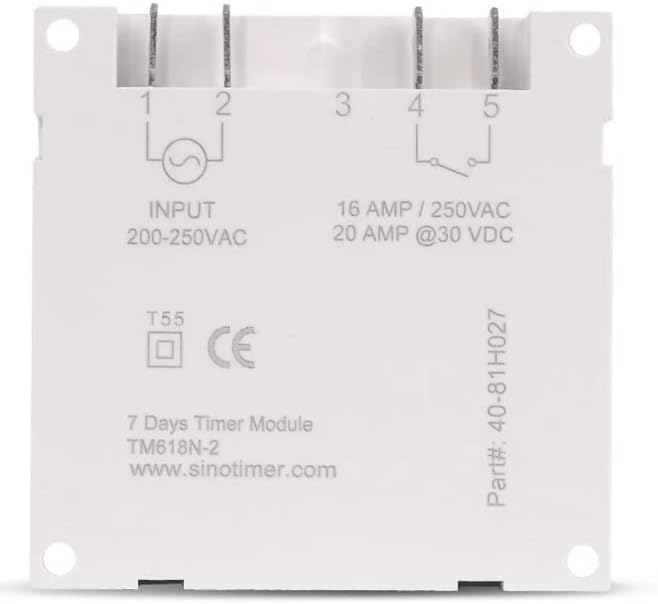
olusin 2: Pada view of the Sinotimer TM618N-2, showing input/output terminals and wiring diagram.
- Input (Terminals 1 & 2): Connect your 200-250VAC power supply to these terminals.
- Output (Terminals 3, 4, & 5):
- Terminal 3: Common (COM)
- Terminal 4: Normally Open (NO) - Connect your load here for switched power.
- Terminal 5: Normally Closed (NC) - (Less commonly used for timer applications, but available).
- Agbara Tan: Once wiring is complete and secure, restore power to the circuit. The timer display should illuminate.

Figure 3: Technical drawing showing the dimensions of the Sinotimer TM618N-2 timer.
5. Awọn ilana Iṣiṣẹ
5.1. Awọn iṣẹ bọtini
- Aago: A lo lati ṣeto akoko ati ọjọ lọwọlọwọ.
- OGUN: Enters/exits programming mode for ON/OFF schedules.
- OSE: Selects the day(s) of the week during time or program setting.
- WAKATI: Adjusts the hour during time or program setting.
- MIN: Adjusts the minute during time or program setting.
- ÌRÁNTÍ: Recalls or cancels a program setting.
- Afọwọṣe: Manually overrides the timer's current state (ON/AUTO/OFF).
- R (Reset): Small button (requires a pointed object) to reset the timer to factory defaults.
5.2. Ṣiṣeto Akoko ati Ọjọ lọwọlọwọ
- Tẹ mọlẹ Aago bọtini.
- Nigba dani Aago, tẹ OSE to set the current day (MO, TU, WE, TH, FR, SA, SU).
- Nigba dani Aago, tẹ WAKATI lati ṣeto awọn ti isiyi wakati.
- Nigba dani Aago, tẹ MIN lati ṣeto awọn ti isiyi iseju.
- Tu silẹ Aago bọtini lati fi awọn eto pamọ.
5.3. Ṣíṣeto/Ṣíṣeto Awọn Eto TÍTÁN/Ṣípa
The timer supports up to 16 ON and 16 OFF programs. Each program can be set for a specific day or group of days.
- Tẹ awọn PROG bọ́tìnì kan lẹ́ẹ̀kan. Ìfihàn náà yóò fi "1 ON" hàn.
- Tẹ OSE repeatedly to select the desired day(s) for this program (e.g., MO, TU, WE, TH, FR, SA, SU; MO-FR; SA-SU; MO-SA; etc.).
- Tẹ WAKATI láti ṣètò wákàtí ON tí a fẹ́.
- Tẹ MIN láti ṣètò ìṣẹ́jú ON tí a fẹ́.
- Tẹ PROG lẹ́ẹ̀kan sí i. Ìfihàn náà yóò fi "PA 1" hàn.
- Repeat steps 2-4 to set the desired OFF time for the first program.
- Tẹ PROG to move to the next program ("2 ON", "2 OFF", etc.) and repeat the process for up to 16 programs.
- To exit programming mode and save settings, press the Aago bọtini.
5.4. Yiyọ Afowoyi
Tẹ awọn Afọwọṣe button to cycle through the output modes:
- LATI: Ìjáde náà ń ṣiṣẹ́ lórí àwọn ètò nígbà gbogbo, láìka àwọn ètò sí.
- LATIO: Output follows the programmed schedules.
- PA: Ìjáde náà ń pa nígbà gbogbo, láìka àwọn ètò sí.
Rí i dájú pé aago aago náà wà nílẹ̀ AUTO mode for programmed operation.
5.5. Ṣíṣe àtúnṣe aago náà
To clear all settings and return the timer to its factory default state, insert a pointed object (like a paperclip) into the small R (Reset) hole and press gently.
6. Itọju
The Sinotimer TM618N-2 requires minimal maintenance.
- Jeki ẹrọ naa di mimọ ati ofe kuro ninu eruku. Lo asọ asọ ti o gbẹ fun mimọ.
- Ma ṣe lo abrasive ose tabi epo.
- Ensure the timer is installed in a dry environment, away from direct moisture or extreme temperatures.
- The internal battery is designed for long life and is not user-replaceable. If the display goes blank or settings are not retained after a power outage, the battery may need professional service.
7. Laasigbotitusita
| Isoro | Owun to le Fa | Ojutu |
|---|---|---|
| Ifihan jẹ òfo. | Kò sí ìpèsè agbára; bátìrì inú ti dínkù. | Check power connections. If power is present, the internal battery may need charging (leave connected to power for several hours) or replacement (professional service required). |
| Àkókò aago kò máa yípadà/pa gẹ́gẹ́ bí a ti ṣètò rẹ̀. | Timer is not in AUTO mode; incorrect program settings; wiring issue. | Tẹ Afọwọṣe títí tí a ó fi fi "AUTO" hàn.view and correct program settings. Verify wiring connections. |
| Awọn eto ti sọnu lẹhin agbara outage. | Batiri inu ti pari tabi bajẹ. | Leave the timer connected to power for at least 4 hours to charge the internal battery. If the problem persists, the battery may need replacement (professional service recommended). |
| Awọn bọtini ko dahun. | Temporary software glitch; unit needs reset. | Perform a full reset using the R button. If the issue continues, contact support. |
8. Atilẹyin ọja ati Support
Fún àlàyé nípa àtìlẹ́yìn àti ìrànlọ́wọ́ ìmọ̀ ẹ̀rọ, jọ̀wọ́ wo àwọn ìwé tí a pèsè pẹ̀lú ohun tí o rà tàbí kí o kan sí olùtajà rẹ. Pa ẹ̀rí ìràwọ́ rẹ mọ́ fún àwọn ẹ̀tọ́ àtìlẹ́yìn.
Manufacturer: Sinotimer


