Ọrọ Iṣaaju
Thank you for choosing the Varmilo MA Series V2 Summit R2 Mechanical Keyboard. This manual provides essential information for setting up, operating, maintaining, and troubleshooting your new keyboard. Please read this manual thoroughly to ensure optimal performance and longevity of your device.
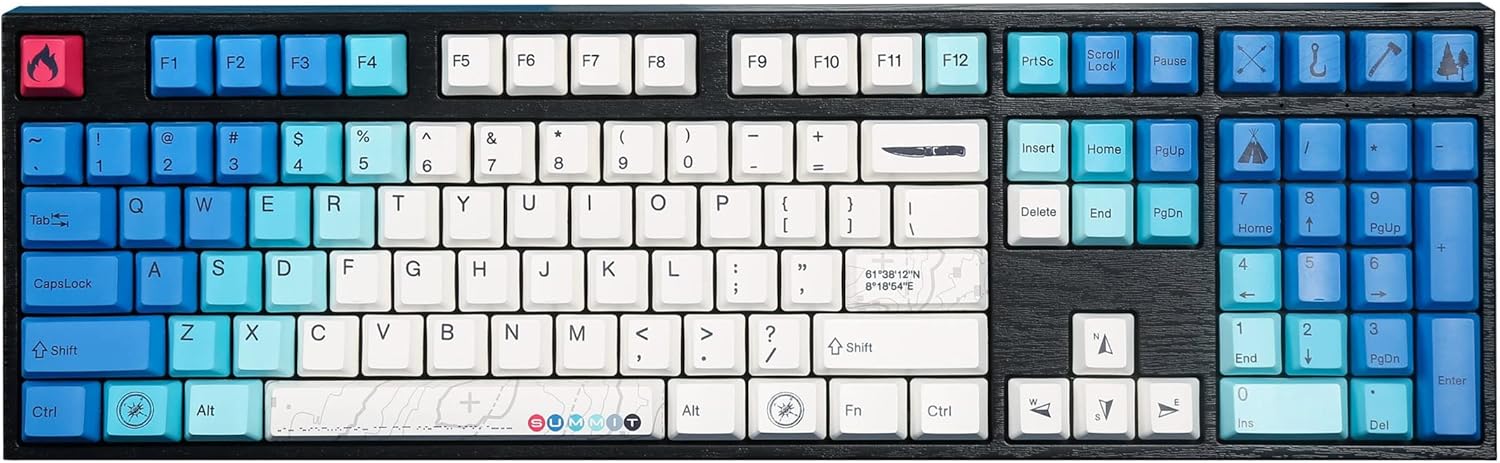
Image: The Varmilo MA Series V2 Summit R2 Mechanical Keyboard, showcasing its full layout and unique keycap design.
Ṣeto
1. Ṣii silẹ
Fi pẹ̀lẹ́pẹ̀lẹ́ yọ kọ̀ǹpútà àti gbogbo àwọn ohun èlò míì kúrò nínú àpótí náà. Rí i dájú pé àwọn nǹkan wọ̀nyí wà níbẹ̀:
- Varmilo MA Series V2 Summit R2 Mechanical Keyboard
- Okun USB-C
- Tita bọtini bọtini (ti o ba wa)
- Afowoyi Olumulo (iwe-ipamọ yii)
2. Nsopọ Keyboard
- Wa ibudo USB-C ni ẹhin keyboard naa.
- So opin kan ti okun USB-C ti a pese mọ keyboard naa.
- So opin miiran ti okun USB-C si ibudo USB ti o wa lori kọnputa rẹ.
- Káàbọ́ọ̀dù náà jẹ́ plug-and-play, ó sì yẹ kí ó jẹ́ kí ètò ìṣiṣẹ́ rẹ dá a mọ̀ láìfọwọ́sí.
3. Siṣàtúnṣe Keyboard igun
The Varmilo MA Series V2 features a double-section kickstand, allowing for two different typing angles. Gently flip out the desired sections of the kickstand located on the underside of the keyboard to adjust its height and angle for ergonomic comfort.

Aworan: Ẹgbẹ profile of the Varmilo keyboard, illustrating the adjustable kickstand in an extended position.
Awọn ilana Iṣiṣẹ
1. Ipilẹ Key Awọn iṣẹ
The keyboard features a standard full-size (104-key) layout. All alphanumeric and standard function keys operate as expected. The Varmilo EC Ivy V2 switches provide a smooth and responsive typing experience.
2. Function (Fn) Key Combinations
The Fn key (typically located near the right Alt key) allows access to secondary functions printed on certain keycaps. Hold down the Fn key and press the desired function key simultaneously.
- Fn + F1-F12: Multimedia controls (e.g., volume, play/pause, stop).
- Fn + Awọn bọtini itọka: LED brightness or effect control (refer to specific keycap legends).
- Fn + Gba: Titiipa/Ṣii bọtini Windows.

Aworan: A sunmọ-soke view of the right side of the Varmilo keyboard, highlighting the special function keys and their legends.
3. LED Backlighting Control
The keyboard features White LED backlighting. Use the Fn key combinations to adjust the brightness and switch between various lighting effects. Specific key legends will indicate the corresponding functions for LED control.
Itoju
1. Ninu Keyboard
Lati ṣetọju irisi keyboard ati iṣẹ ṣiṣe:
- Ge asopọ keyboard kuro lati kọnputa rẹ ṣaaju ṣiṣe mimọ.
- Lo asọ asọ, ti ko ni lint die-die dampti a fi omi kun tabi ojutu mimọ kekere lati nu awọn bọtini bọtini ati casing.
- Fun eruku ati idoti laarin awọn bọtini bọtini, lo afẹfẹ fisinuirindigbindigbin.
- Avoid using harsh chemicals, abrasives, or solvents, as these can damage the PBT keycaps and finish.
2. Yíyọ àti Rírọ́pò ìdènà kọ́kọ́rọ́
The keyboard features durable Dye Sub PBT keycaps. If you need to remove keycaps for deep cleaning or customization:
- Use the provided keycap puller (if applicable) or a similar tool.
- Gently attach the keycap puller to the keycap and pull straight up to remove it. Avoid twisting or excessive force.
- To replace, align the keycap with the switch stem and press down firmly until it clicks into place.

Image: A collection of individual Varmilo keycaps, including special design keycaps, demonstrating their PBT material and dye-sublimated legends.
Laasigbotitusita
If you encounter issues with your Varmilo keyboard, please refer to the following common solutions:
- Keyboard Ko Dahun:
- Rii daju pe okun USB-C ti sopọ ni aabo si keyboard mejeeji ati kọnputa naa.
- Gbiyanju lati so keyboard pọ mọ ibudo USB ti o yatọ lori kọnputa rẹ.
- Ṣe idanwo keyboard lori kọnputa miiran lati ṣe akoso awọn ọran kan pato eto.
- Tun kọmputa rẹ bẹrẹ.
- LEDs Not Working or Incorrect:
- Ensure the LED brightness is not set to the lowest level using Fn key combinations.
- Check if any specific lighting modes are active that might turn off certain LEDs.
- Awọn bọtini Ko Iforukọsilẹ:
- Remove the keycap and inspect the switch for any obstructions.
- Clean around the switch stem with compressed air.
Atunto ile-iṣẹ
If issues persist, a factory reset may resolve them. Consult the Varmilo official website or support for specific reset procedures for your model, as these can vary.
Awọn pato
The following are the technical specifications for the Varmilo MA Series V2 Summit R2 Mechanical Keyboard:
| Ẹya ara ẹrọ | Ẹ̀kúnrẹ́rẹ́ |
|---|---|
| Brand | Varmilo |
| Awoṣe | MA Series V2 Summit R2 |
| Ìfilélẹ | Full-size (104 + 4 keys) |
| Yipada Iru | Varmilo EC Ivy V2 Mechanical Switches |
| Ohun elo Keycap | Dye Sub PBT |
| Asopọmọra | USB-C |
| Imọlẹ afẹyinti | LED funfun |
| Ohun elo | Polybutylene Terephthalate, Silicone |
| Orisun agbara | Agbara USB |
| Awọn ẹrọ ibaramu | Kọmputa (nipasẹ USB-C) |
Atilẹyin ọja ati Support
Varmilo products are manufactured to high-quality standards. For information regarding warranty coverage, technical support, or service inquiries, please visit the official Varmilo webaaye tabi kan si atilẹyin alabara wọn taara. Tọju iwe-ẹri rira rẹ bi ẹri rira fun awọn iṣeduro atilẹyin ọja.
Official Varmilo Store: Varmilo Store on Amazon


