Ọrọ Iṣaaju
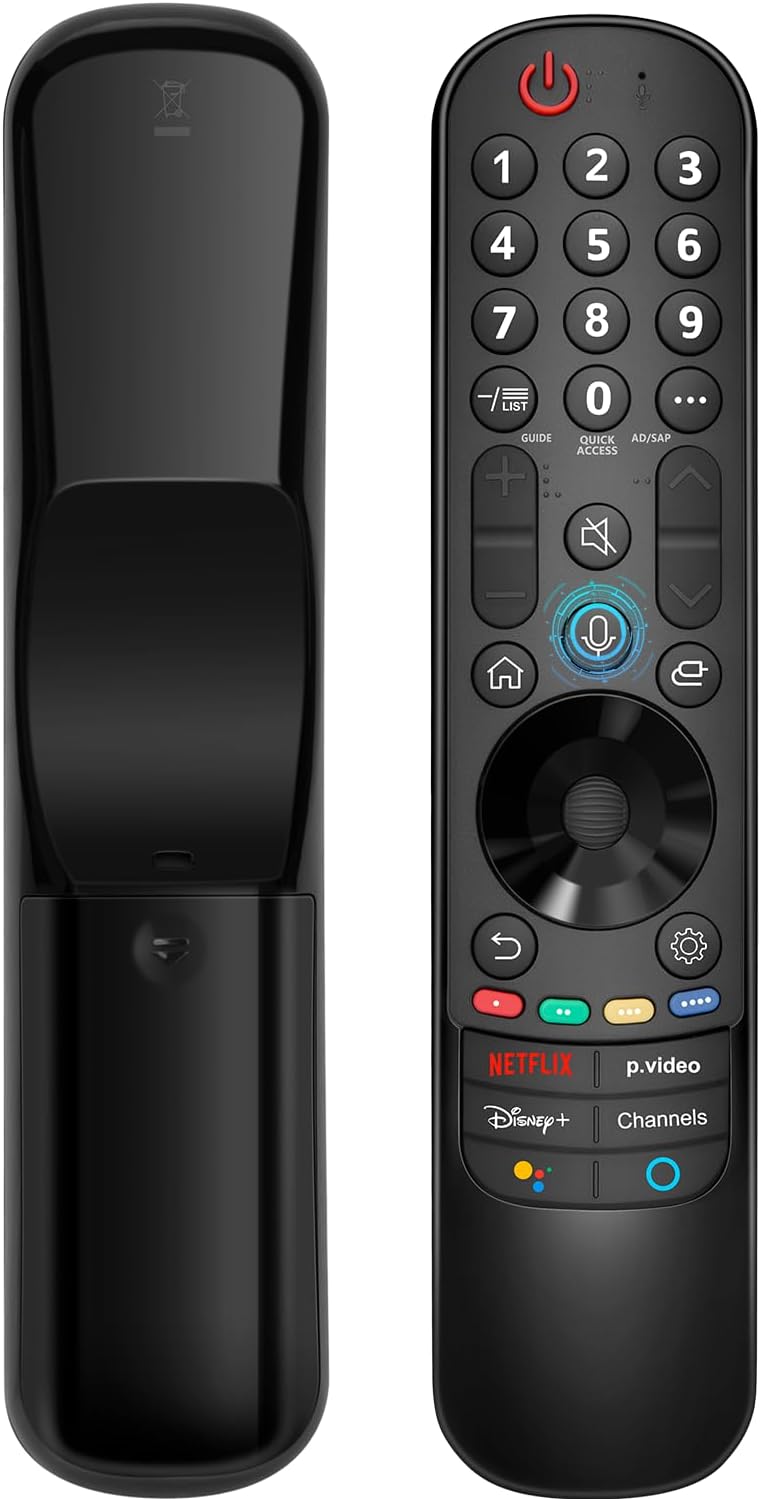
This manual provides instructions for the Angrox AN-MR21GA Magic Remote Control, designed as a replacement for compatible LG Smart TVs. This remote features pointer functionality, voice control, and dedicated shortcut buttons for enhanced navigation and user experience.
The remote is compatible with LG 2021, 2022, 2023, and 2024 OLED, QNED Mini-LED, NanoCell, and UHD TV series. It offers an ergonomic design with soft plastic buttons for comfortable use.
Ibamu
The Angrox AN-MR21GA Magic Remote Control is compatible with the following LG Smart TV series from 2021, 2022, 2023, and 2024:
- OLED TV Series: G1, G2, G3, G4, C1, C2, C3, C4, A1, A2, A3, A4 series.
- QNED Mini-LED TV Series: QNED99, QNED90 series.
- NanoCell TV Series: NANO99, NANO90, NANO85, NANO80, NANO75 series.
- UHD TV Series: UP80, UP75 series.
Specific compatible model numbers include, but are not limited to: 43NANO75UPA, 43UP7100ZUF, 43UP7560AUD, 43UP7700PUB, 43UP8000PUA, 50NANO75UPA, 50NANO77ZPA, 50NANO80UPA, 50NANO85APA, 50UP7100ZUF, 50UP7560AUD, 50UP7700PUB, 50UP8000PUA, 55NANO75UPA, 55NANO77ZPA, 55NANO80UPA, 55NANO85APA, 55NANO90UPA, 55UP7100ZUF, 55UP7560AUD, 55UP7700PUB, 55UP8000PUA, 60UP7700PUB, 60UP8000PUA, 65NANO75UPA, 65NANO77ZPA, 65NANO80UPA, 65NANO85APA, 65NANO90UPA, 65UP7100ZUF, 65UP7560AUD, 65UP7700PUA, 65UP7700PUB, 65UP8000PUA, 70UP7170ZUC, 70UP7570AUD, 70UP7770PUB, 70UP8070PUA, 75NANO75UPA, 75NANO80UPA, 75NANO85APA, 75NANO90UPA, 75QNED90UPA, 75QNED99UPA, 75UP7170ZUC, 75UP7570AUE, 75UP7770PUB, 75UP8070PUA, 82UP8770PUA, 86NANO75UPA, 86NANO85APA, 86NANO90UPA, 86NANO99UPA, 86QNED90UPA, 86QNED99UPA, 86UP8770PUA, BEJMR21GA, OLED48A1AUA, OLED48A1PUA, OLED48C1AUB, OLED48C1PUB, OLED55A1AUA, OLED55A1PUA, OLED55B1PUA, OLED55C1AUB, OLED55C1PUA, OLED55C1PUB, OLED55G1PUA, OLED65A1AUA, OLED65A1PUA, OLED65B1PUA, OLED65C1AUA, OLED65C1AUB, OLED65C1PUB, OLED65G1PUA, OLED77A1AUA, OLED77A1PUA, OLED77B1PUA, OLED77C1AUA, OLED77C1AUB, OLED77C1PUB, OLED77G1PUA, OLED83C1AUA, OLED83C1PUA, RCLLGEMR21GA, R-C-LLGEMR21GA, 43UP7670PUC, 43UP8000PUR, 50NANO75PUA, 50NANO80P, 50UP7670PUC, 50UP8000PUR, 55NANO80P, 55NANO90P, 55UP7670PUC, 55UP8000PUR, 60UP7670PUB, 60UP8000PUR.

Eto ati Sisopọ
The Angrox AN-MR21GA remote control is designed for easy setup without complex programming.
1. Fifi sori batiri
Insert two (2) AA batteries into the remote control. Ensure correct polarity (+/-) as indicated inside the battery compartment. Batteries are not included with the remote.
2. Sisopọ pẹlu TV rẹ
There are two methods for pairing the remote with your LG Smart TV:
- Method 1 (Automatic Pairing):
- Tan LG Smart TV rẹ.
- Insert 2*AA batteries into the remote.
- After approximately 20 seconds, point the remote control towards the TV.
- Tẹ awọn Kẹkẹ (O DARA) bọtini.
- The remote control should register automatically, and a "Pairing Complete" message will appear on the TV screen.
- Method 2 (Manual Pairing):
- Tan LG Smart TV rẹ.
- Insert 2*AA batteries into the remote.
- Tẹ mọlẹ Ile (
 ) ati Pada () awọn bọtini ni nigbakannaa fun 5 aaya.
 - Lẹhinna, tẹ bọtini naa Kẹkẹ (O DARA) bọtini.
- A "Pairing Complete" message should appear on the TV screen.

Awọn ilana Iṣiṣẹ
Basic Navigation and Pointer Function
The remote features a pointer function that allows you to navigate the TV screen by moving the remote. The Wheel (OK) button acts as a click function, and scrolling is also supported.
Iṣakoso ohun
The remote includes a voice function for issuing commands to your TV. Press and hold the voice button (microphone icon) while speaking your command. Examples include "Go back home," "Open P.Video," or "Play some music."

Awọn bọtini ọna abuja
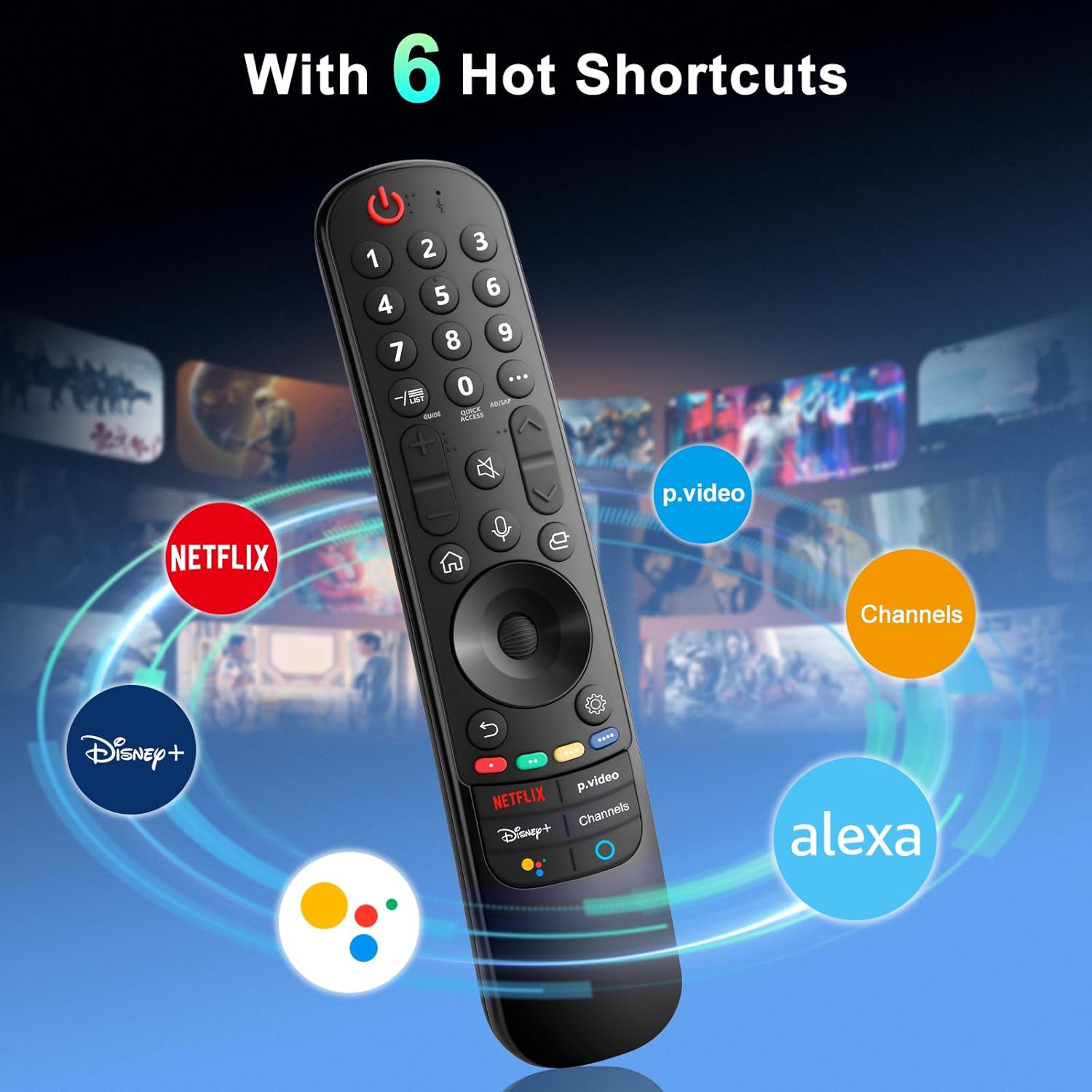
The remote provides dedicated shortcut buttons for quick access to popular streaming services and functions:
- NEFLIX: Ṣe ifilọlẹ ohun elo Netflix.
- P.Video: Launches the Prime Video application.
- Disney+: Ṣe ifilọlẹ ohun elo Disney+.
- Awọn ikanni: Accesses TV channels.
- Oluranlọwọ Google: Ó ń mú kí Google Assistant ṣiṣẹ́ fún àwọn àṣẹ ohùn àti àwọn àwárí.
- Alexa: Activates Amazon Alexa for voice commands and searches.

Detailed Button Functions
For buttons marked with a circle symbol (©), a long press (more than one second) may activate additional functions:
- 9©: Launch Quick Help.
- - / LIST©: Checking saved channels.
- GUIDE©: Launch Guide.
- 0©: Iboju satunkọ Wiwọle ni iyara yoo han.
- ...©: Display additional buttons on the remote control.
- AD/SAP©: Configures SAP.
- Volume Up/Down©: Ṣatunṣe ipele iwọn didun.
- Channel Up/Down©: O le yi ikanni pada.
- Mute©: Select to turn off the sound from the TV.
- Accessibility©: Enter the Accessibility menu.
- Search©: Check out recommended contents. (Recommendation service may not be available depending on the countries you are in.)
- Voice Button (Microphone)©: Push and hold the button while speaking to use the voice recognition function.
- Home Button©: Ṣe afihan akojọ aṣayan ile.
- Input Button©: Yan orisun titẹ sii.
- Settings Button©: Entering into the Home Dashboard.
- Back Button©: Lọ si igbesẹ ti tẹlẹ.
- Exit Button©: Tilekun akojọ aṣayan.
- Quick Settings Button©: Tẹ Akojọ Awọn Eto Yara sii.
- All Settings Button©: Enters the All Settings menu.
- Launch Record Button©: Launch Record. (Some models may not be supported.)
Laasigbotitusita
- Latọna jijin Ko Dahun:
- Ensure batteries are correctly inserted and have sufficient charge. Replace with new AA batteries if necessary.
- Re-attempt the pairing process (see "Setup and Pairing" section).
- Ensure there are no obstructions between the remote and the TV's infrared receiver. This remote primarily operates via line-of-sight.
- Pointer Function Not Working:
- Rii daju pe isakoṣo latọna jijin ti so pọ daradara.
- Try re-pairing the remote using Method 2 (holding Home and Back buttons).
- Iṣakoso ohun Ko Ṣiṣẹ:
- Ensure the remote is properly paired and the TV supports voice control.
- Confirm that the voice button is being pressed and held while speaking.
- Check TV settings to ensure voice recognition is enabled.
- Buttons Feel Flimsy or Stick:
- This may indicate a manufacturing defect. Contact customer support for assistance.
Awọn pato
| Brand | Angrox |
| Nọmba awoṣe | AN-MR21GA |
| Ọja Mefa | 7.48 x 1.18 x 1.18 inches (18.54 x 4.06 x 1.77 cm) |
| Iwọn Nkan | 3.2 iwon |
| Awọn batiri ti a beere | Awọn batiri AA 2 (kii ṣe pẹlu) |
| Pataki Awọn ẹya ara ẹrọ | Ergonomic design, No Programming Required, Universal compatibility (for specified LG models), Voice Search, Pointer Function |
| Nọmba ti o pọju Awọn ẹrọ Atilẹyin | 1 |
| Awọn ẹrọ ibaramu | LG Smart Televisions (2021-2024 UHD, OLED, QNED, NanoCell series) |
Itoju
- Ninu: Lo aṣọ rírọrùn tí ó gbẹ láti nu iṣakoso latọna jijin. Má ṣe lo àwọn ohun èlò ìfọmọ́ omi tàbí àwọn ohun èlò ìpara.
- Rirọpo Batiri: Replace batteries when the remote's performance degrades. Remove batteries if the remote will not be used for an extended period to prevent leakage.
- Ibi ipamọ: Tọju isakoṣo latọna jijin ni itura, aye gbigbẹ kuro lati orun taara ati awọn iwọn otutu to gaju.
- Mimu: Yẹra fún fífi remote sílẹ̀ tàbí kí o fi agbára mú un, nítorí pé èyí lè ba àwọn ẹ̀yà ara inú jẹ́.
Atilẹyin ọja ati Support
For warranty information or technical support, please contact the manufacturer, Angrox, directly through their official channels or the retailer where the product was purchased. Please retain your proof of purchase for warranty claims.
Manufacturer: Angror
Fun iranlọwọ siwaju sii, o le ṣabẹwo si Angrox Store on Amazon.