1. Ifihan
This manual provides essential information for setting up, operating, and maintaining your realme C30 smartphone. Please read it carefully to ensure optimal performance and longevity of your device.

Image: realme C30 smartphone in Lake Blue, showcasing its rear design and camera.
2. Ohun ti o wa ninu Apoti
Rii daju pe gbogbo awọn nkan wa ninu package:
- realme C30 Foonuiyara
- Adapter
- Okun USB
- SIM Atẹ ejector
- Ṣaja ọkọ ayọkẹlẹ Yara
3. Ẹrọ Loriview
Awọn abuda ti ara
- Awọn iwọn: 1.97 x 3.31 x 6.65 inches
- Ìwọ̀n Nkan: 6 iwon
- Àwọ̀: Lake Blue
Key Awọn ẹya ara ẹrọ
- Ifihan: 6.5" HD+ Fullscreen with 88.7% Screen-to-body Ratio, 120Hz Touch Sampling Rate, 16.7M Screen Colors
- Olupilẹṣẹ: Unisoc T612 Octa-core, 12nm, up to 1.82GHz, ARM Mali-G57 GPU
- Ramu: 2 GB (Note: Some variants may have 4GB RAM)
- Ibi ipamọ: 32 GB
- Kamẹra Tẹhin: 8MP AI Camera with f/2.0 aperture, 4P lens
- Kamẹra iwaju: 5MP
- Batiri: 5000mAh (Typical) Massive Battery, 4890mAh (Minimum)
- Eto isesise: realme UI R Edition Based on Android 11
Ifilelẹ ẹrọ
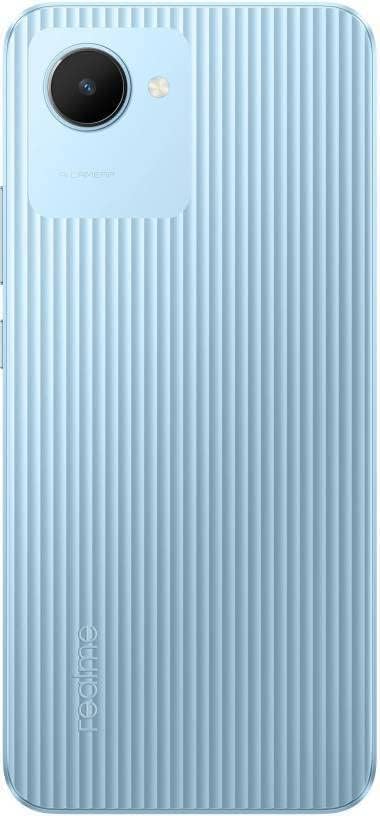
Aworan: Ẹyin view of the realme C30, highlighting the single camera and textured back panel.

Image: Top and bottom edges of the realme C30, showing the 3.5mm headset jack, Micro USB port, and speaker grille.

Aworan: Apa views of the realme C30, illustrating the power button, volume rockers, and SIM tray slot.
4. Eto
4.1. SIM Card and Micro SD Installation
- Locate the SIM tray slot on the side of your device.
- Fi SIM atẹ ejector ọpa sinu kekere iho tókàn si awọn atẹ.
- Rọra Titari titi ti atẹ naa yoo jade.
- Place your Nano SIM cards (supports Dual SIM) and Micro SD card into the designated slots on the tray.
- Fi iṣọra tun fi atẹ naa sinu ẹrọ naa.
4.2. Agbara akọkọ Lori ati iṣeto ni
- Tẹ bọtini agbara ki o si dimu titi aami realme yoo fi han.
- Tẹ̀lé àwọn ìtọ́ni tó wà lójú ìbòjú láti yan èdè àti agbègbè tí o fẹ́.
- Sopọ si nẹtiwọki Wi-Fi lati tẹsiwaju pẹlu iṣeto ati ṣe igbasilẹ awọn imudojuiwọn pataki.
- Review ati gba Adehun Iwe-aṣẹ Olumulo Ipari ati Ilana Aṣiri.
- Wọle pẹlu akọọlẹ Google rẹ tabi ṣẹda tuntun kan.
- Set up your preferred screen lock method (PIN, Password, Pattern, Face recognition, or Fingerprints).
- Choose your display mode (Light or Dark).
- Complete the remaining setup steps to access your device's home screen.
5. Ṣiṣẹ ẹrọ rẹ
5.1. Ipilẹ Lilọ kiri
Navigate your device using intuitive touch gestures. Swipe up, down, left, or right to move between screens and menus. Tap to select items, and long-press for additional options.
5.2. Iṣakoso batiri
Your realme C30 is equipped with a 5000mAh massive battery for extended usage. To optimize battery life:
- Mu ṣiṣẹ Ultra Saving Mode from the Quick Settings panel for prolonged standby time at low power levels.
- Ṣatunṣe imọlẹ iboju ati awọn eto akoko ipari iboju.
- Close background applications when not in use.
5.3. Lilo kamẹra
Launch the Camera app to capture photos and videos. The 8MP AI rear camera and 5MP front camera offer various modes and features.
- Fọwọ ba bọtini titiipa lati ya fọto kan.
- Yipada laarin fọto ati awọn ipo fidio.
- Utilize AI features for enhanced image quality.
5.4. Asopọmọra
Ẹrọ rẹ ṣe atilẹyin fun ọpọlọpọ awọn aṣayan asopọ:
- 4G LTE: Enjoy fast mobile data speeds. (Note: Not for USA Market. Supports Latin Europe bands.)
- Wi-Fi: Sopọ si awọn nẹtiwọki alailowaya fun iraye si intanẹẹti.
- Bluetooth: Pair with compatible accessories like headphones or speakers.
- GPS/GLONASS/GALILEO: For accurate location services.
- Micro USB: Fun gbigba agbara ati gbigbe data.
- Jack agbekọri 3.5mm: For wired audio accessories.
6. Itọju
6.1. Gbigba agbara
Use the provided 10W charging adapter and USB cable to charge your device. Connect the Micro USB end to your phone and the adapter to a power outlet.
6.2. Software imudojuiwọn
Keep your device's software up to date to ensure optimal performance and security. Go to Settings > About phone > realme UI version lati ṣayẹwo ati fi awọn imudojuiwọn sori ẹrọ.
6.3. Ninu
Gently wipe your device with a soft, lint-free cloth. Avoid using harsh chemicals or abrasive materials that could damage the screen or body.
7. Laasigbotitusita
7.1. Ẹrọ Ko Nṣiṣẹ Tan-an
- Rii daju pe batiri ti gba agbara. So ẹrọ pọ mọ ṣaja fun o kere iṣẹju 15 ṣaaju ki o to pinnu lati tan-an.
- Tẹ mọlẹ bọtini agbara fun awọn aaya 10-15 lati tun fi agbara mu bẹrẹ.
7.2. Apps Freezing or Crashing
- Ti ohun elo iṣoro naa pa ki o tun ṣii rẹ.
- Pa cache ati data ti app naa mọ nipasẹ Eto> Awọn ohun elo> [Orukọ Ohun elo]> Ibi ipamọ.
- Ensure your device's software and all apps are updated to their latest versions.
7.3. Igbesi aye batiri talaka
- Dín ìmọ́lẹ̀ ojú ìbojú kù kí o sì ṣètò àkókò ìjáde ojú ìbojú kúkúrú.
- Mu Wi-Fi, Bluetooth, ati GPS ṣiṣẹ nigbati o ko ba wa ni lilo.
- Identify and close power-consuming background apps.
- Enable Ultra Saving Mode for critical situations.
8. Awọn pato
| Ẹya ara ẹrọ | Sipesifikesonu |
|---|---|
| Orukọ awoṣe | RMX3511 |
| Ọja Mefa | 1.97 x 3.31 x 6.65 inches |
| Iwọn Nkan | 6 iwon |
| Eto isesise | realme UI R Edition Based on Android 11 |
| Sipiyu Iyara | 1820 MHz (1.82GHz) |
| Àgbo | 2 GB (Note: Some variants may have 4GB) |
| Agbara Ibi ipamọ Iranti | 32 GB |
| Iwon iboju | 6.5 inches |
| Ipinnu | 1280 x 720 (HD+) |
| Agbara Batiri | 5000 Milionuampwakati ere (mAh) |
| Foonu Ọrọ Time | Awọn wakati 45.3 |
| Kamẹra ẹhin | 8MP AI kamẹra |
| Kamẹra iwaju | 5MP |
| Pataki Awọn ẹya ara ẹrọ | 4K Video Recording, Dual SIM, Fast Charging Support |
| Awọn ọna ẹrọ Asopọmọra | USB, Cellular (LTE) |
| Jack ohun | 3.5 mm |
9. Atilẹyin ọja ati Support
For warranty information and customer support, please refer to the documentation included with your product or visit the official realme webojula. O tun le ṣàbẹwò awọn Ile itaja realme lori Amazon fun awọn alaye afikun ọja ati awọn orisun atilẹyin.


