Ọrọ Iṣaaju
This manual provides detailed instructions for setting up, operating, and maintaining your litokam 2K Indoor Pan/Tilt Home Security Camera. Please read this guide thoroughly before use to ensure proper functionality and safety.

Figure 1: litokam 2K Indoor Pan/Tilt Security Cameras
Ohun ti o wa ninu Apoti
- litokam 2K Indoor Pan/Tilt Camera (2 units)
- Power Adapter (2 units)
- USB Cable (2 units)
- Awọn ẹya ẹrọ iṣagbesori (awọn skru, awọn pilogi ogiri)
- Itọsọna olumulo
Ọja Pariview
The litokam 2K Indoor Camera offers advanced surveillance features for home security, pet monitoring, and baby monitoring. Key features include:
- Ipinnu HD 2K: Provides clear and detailed video.
- 360° Pan/Tilt: Offers comprehensive coverage with remote control via the app.
- Iwari išipopada & Titele: Alerts you to movement and tracks subjects automatically.
- Imudara Iranran Alẹ: Ko o viewing up to 33 feet in low light conditions.
- Audio Ọna Meji: Allows for real-time communication.
- Ibi ipamọ & Awọsanma: Supports Micro SD card (up to 128GB, not included) and cloud storage options.
- Alexa Integration: Compatible with Amazon Alexa for voice control.
Awọn ilana iṣeto
- Asopọ agbara: So kamẹra pọ mọ orisun agbara nipa lilo okun USB ti a pese ati adapter agbara. Kamẹra naa yoo tan ina laifọwọyi.
- Igbasilẹ ohun elo: Download the 'little elf smart' app from your smartphone's app store (iOS or Android).
- Iforukọsilẹ akọọlẹ: Ṣii app naa ki o tẹle awọn ilana loju iboju lati forukọsilẹ iroyin titun tabi wọle ti o ba ti ni ọkan tẹlẹ.
- Fi ẹrọ kun: Tap the '+' icon in the app to add a new device. Select your camera model and follow the in-app prompts to connect it to your 2.4GHz Wi-Fi network. Àkíyèsí: Kámẹ́rà yìí lè lo 2.4GHz Wi-Fi nìkan.
- Gbigbe (Aṣayan): If wall mounting, use the provided mounting accessories. Ensure the camera is securely fastened and has a clear field of view.
Awọn ilana Iṣiṣẹ
1. Gbe View and Pan/Tilt/Zoom
Once connected, access the live feed through the 'little elf smart' app. Use the on-screen controls to pan (horizontal rotation), tilt (vertical movement), and digitally zoom the camera to adjust your viewigun igun.

Figure 2: 360° Panoramic Navigation via App
2. Motion Detection & Tracking
The camera utilizes Smart Perceive Technology for motion detection. When motion is detected, you will receive an alert notification on your phone. You can adjust the motion detection sensitivity within the app settings. Enable auto movement tracking to have the camera follow detected objects.

Figure 3: Motion Detection Alerts
3. Audio-Ona Meji
Use the built-in microphone and speaker to communicate with individuals or pets near the camera. Tap the microphone icon in the app to speak, and listen through the app's speaker.

olusin 4: Meji-Ona Audio Communication
4. Night Iran
The camera automatically switches to night vision mode in low light conditions using its intelligent IR-Cut switch. It provides clear black and white video up to 33 feet in complete darkness.

Figure 5: Enhanced Night Vision in operation
5. Ìpamọ́ Fídíò
Recordings can be saved in two ways:
- Kaadi SD Micro: Fi kaadi Micro SD sii (to 128GB, ko si) sinu iho kamẹra fun ibi ipamọ agbegbe.
- Ibi ipamọ awọsanma: Subscribe to the optional cloud storage service through the app for secure, remote video backup.

Figure 6: Micro SD Card Slot for Storage
6. Multi-User & Multiple View
Share camera access with family and friends through the app. The 'little elf smart' app supports viewing up to 16 live video feeds on one screen from multiple cameras.
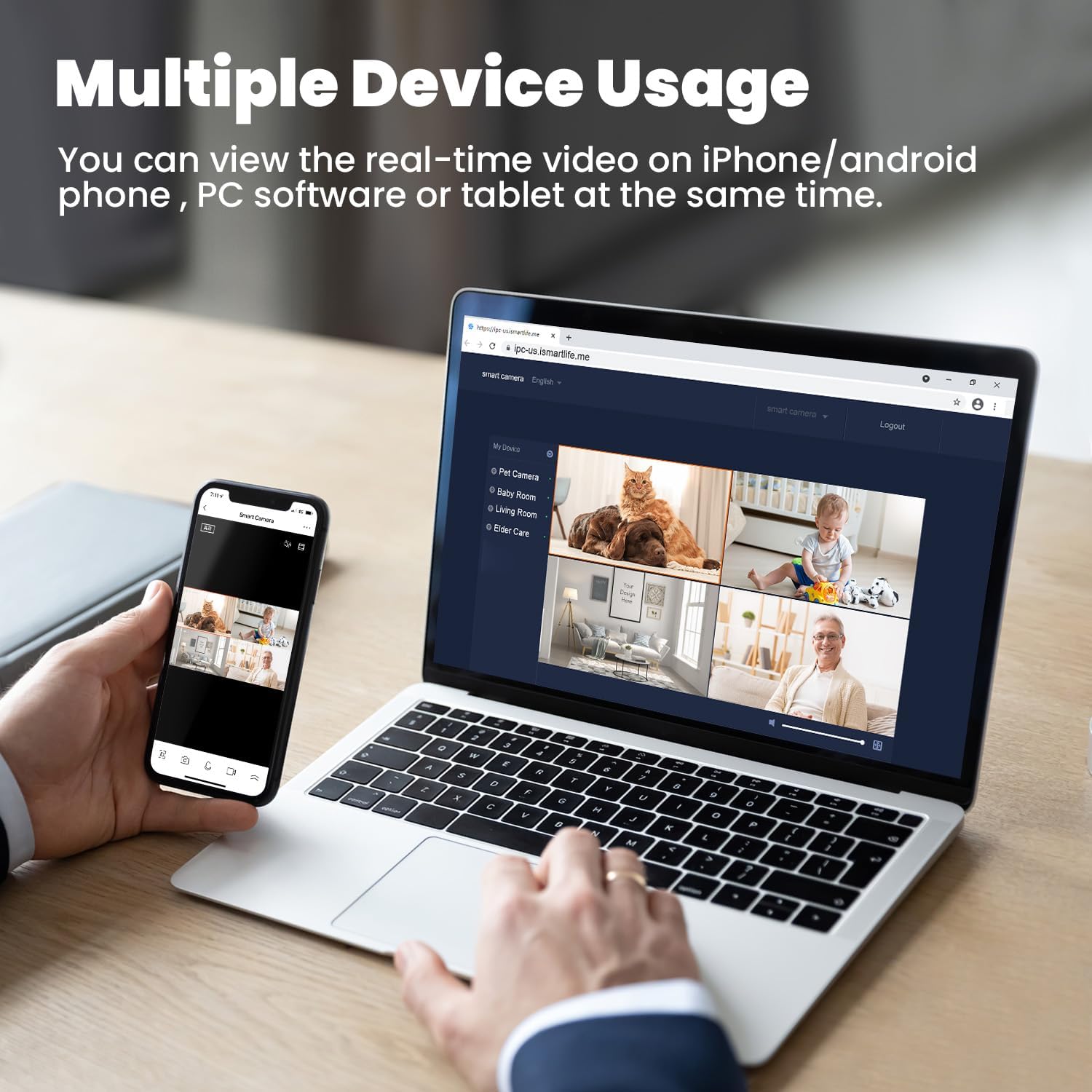
Figure 7: Multiple Device Viewing
7. Alexa Integration
The litokam camera is compatible with Amazon Alexa. You can use voice commands to view your camera feed on compatible Alexa-enabled devices.

Àwòrán 8: Ìṣọ̀kan Alexa
8. Kigbe erin
The camera can detect baby crying and send notifications to your phone. This feature can be configured in the app settings, offering two options for crying or sound detection.

Figure 9: Baby Cry Detection Notification
Itoju
- Ninu: Lo aṣọ rírọrùn tí ó gbẹ láti nu lẹ́ńsì kámẹ́rà àti ara rẹ̀. Yẹra fún lílo àwọn kẹ́míkà líle tàbí àwọn ohun èlò ìpalára.
- Awọn imudojuiwọn sọfitiwia: Regularly check the 'little elf smart' app for firmware updates to ensure optimal performance and security.
- Ibi: Rí i dájú pé a gbé kámẹ́rà náà sí ibi tí ó dúró ṣinṣin, tí ó jìnnà sí oòrùn tààrà, àwọn orísun ooru, àti ọrinrin.
Laasigbotitusita
- Kamẹra Ko Sopọ mọ Wi-Fi:
- Rí i dájú pé nẹ́tíwọ́ọ̀kì Wi-Fi rẹ jẹ́ 2.4GHz. Kámẹ́rà náà kò lè lo 5GHz Wi-Fi.
- Ṣayẹwo ọrọ igbaniwọle Wi-Fi rẹ fun deede.
- Gbe kamẹra naa sunmọ olutọpa Wi-Fi rẹ.
- Tun kamẹra ati olulana rẹ bẹrẹ.
- Frequent Motion Detection Alerts:
- Adjust the motion detection sensitivity in the app settings to a lower level.
- Ensure the camera is not pointed at areas with constant, non-critical movement (e.g., curtains near a window, tree branches).
- Didara Aworan Ko dara:
- Rii daju pe lẹnsi kamẹra jẹ mimọ.
- Check your internet connection speed. A stable connection is required for optimal 2K streaming.
- Awọn ọran ohun Ona Meji:
- Ensure your phone's microphone and speaker are enabled and not muted.
- Check the volume settings in the app.
Awọn pato
| Ẹya ara ẹrọ | Sipesifikesonu |
|---|---|
| Nọmba awoṣe | LF-P1t |
| Ipinnu Yaworan fidio | 2K (Effective Still Resolution 2 MP) |
| Ilana Asopọmọra | Wi-Fi (2.4GHz nikan) |
| Pan/Tilt Field of View | Awọn iwọn 360 (Ipetele) |
| Digital Sisun | 3x |
| Ibiti Iran Night | Titi di awọn ẹsẹ 33 |
| Awọn aṣayan ipamọ | Micro SD Kaadi (Max 128GB), Awọsanma Ibi ipamọ |
| Ona Meji Audio | Bẹẹni |
| Adarí Iru | Amazon Alexa |
| Orisun agbara | Ina mọnamọna ti o ni okun (10 Volts, 10 Watts) |
| Awọn Iwọn Nkan (L x W x H) | 3.54 x 3.54 x 4.33 inches |
| Iwọn Nkan | 1.54 iwon |
| inu ile / ita gbangba Lilo | Ninu ile |
Atilẹyin ọja ati Support
Your litokam 2K Indoor Pan/Tilt Home Security Camera comes with a 2-odun atilẹyin ọjaA tun n funni ni 30-Day Owo-Back Guarantee fún àlàáfíà ọkàn rẹ.
For technical assistance or any inquiries, please contact our customer support team:
- 24/7 Live Service: Available for immediate assistance.
- Iwiregbe Live: Access through the 'little elf smart' app or our official webojula.
- Ile-iṣẹ Ipe: Contact us by phone for direct support.
- Online Email: Send your queries via email for detailed responses.
Please refer to the contact information provided in the product packaging or on the official litokam website for specific support channels.
Alaye Aabo
- Ma ṣe fi kamẹra han si awọn iwọn otutu to gaju, ọriniinitutu, tabi omi taara.
- Lo adapter agbara ti a pese nikan lati dena ibajẹ.
- Keep the camera and its accessories out of reach of children and pets.
- Do not attempt to disassemble or repair the camera yourself. Contact support for service.
- Ensure proper ventilation around the camera to prevent overheating.


