1. Ifihan
Thank you for choosing the SEVERIN KA 4850 FILKA Coffee Maker. This manual provides essential information for the safe and efficient operation, maintenance, and troubleshooting of your appliance. Please read these instructions carefully before first use and keep them for future reference.
2. Awọn ilana aabo
- Always connect the appliance to a properly installed and grounded power outlet.
- Maṣe fi ohun elo, okun agbara, tabi pulọọgi sinu omi tabi awọn olomi miiran.
- Pa ohun elo naa kuro ni arọwọto awọn ọmọde.
- Unplug the appliance from the power outlet when not in use, before cleaning, and during assembly or disassembly.
- Do not operate the appliance if the power cord or plug is damaged, or if the appliance malfunctions or has been damaged in any way. Contact authorized service personnel.
- Lo ohun elo nikan fun idi ipinnu ti kọfi mimu.
- Yago fun olubasọrọ pẹlu gbona roboto. Lo awọn ọwọ tabi awọn koko.
- Ensure the water tank is filled only with fresh, cold water.
- Never open the filter holder or water tank lid during the brewing cycle.
3. Ọja Ipariview
Familiarize yourself with the components of your SEVERIN KA 4850 FILKA coffee maker.
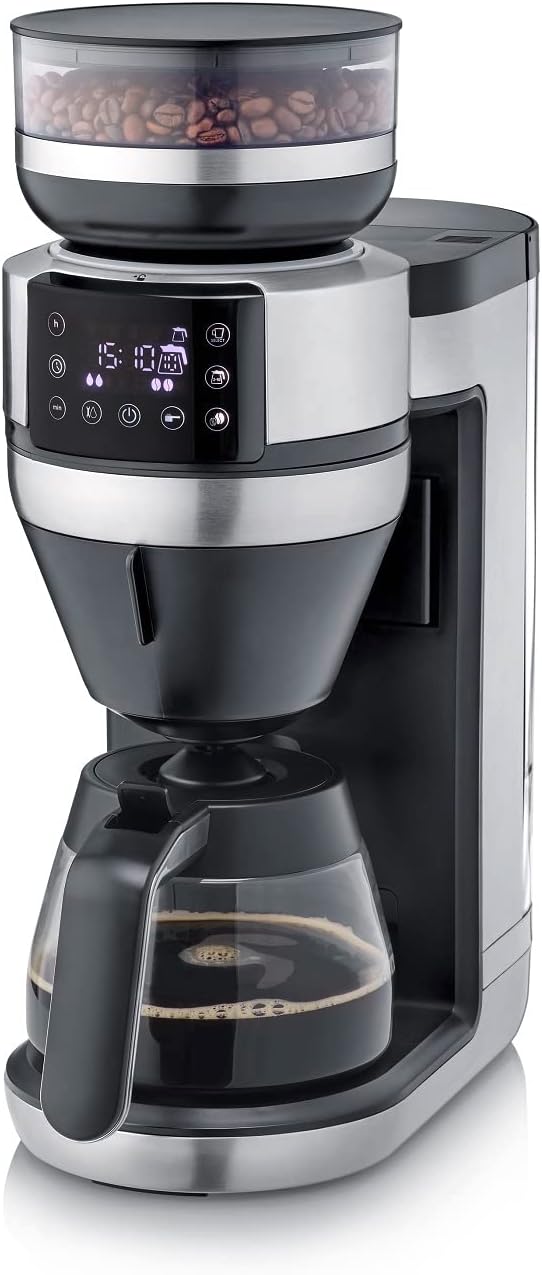
olusin 1: Iwaju view of the SEVERIN KA 4850 FILKA Coffee Maker with glass carafe.

Àwòrán 2: Ẹ̀rọ ìṣẹ̀ǹbáyé kọfí tí a gbé ka orí tábìlì ìdáná, tí ó ti ṣetán fún lílò.

Figure 3: Detachable water tank being removed from the side of the coffee maker for easy filling and cleaning.

Figure 4: The transparent container for whole coffee beans, located at the top of the appliance.

Figure 5: Close-up of the digital control panel with various function buttons and a display showing time and settings.

Figure 6: The filter holder with a disposable paper filter and ground coffee inside.

Figure 7: The reusable gold-tone permanent filter placed in the filter holder, containing ground coffee.

Figure 8: The coffee maker displayed with its included accessories: glass carafe, gold-tone filter, and adjustable cup stand.
4. Eto
4.1 Unpacking ati Ni ibẹrẹ Cleaning
- Yọ gbogbo awọn ohun elo iṣakojọpọ ati awọn ohun ilẹmọ kuro.
- Clean the glass carafe, filter holder, and water tank with warm soapy water. Rinse thoroughly and dry.
- Mu ese ita ti ẹrọ naa pẹlu ipolowoamp asọ.
4.2 Lilo akọkọ (Ayika Rinsing)
- Kun omi ojò pẹlu alabapade, omi tutu titi de ipele ti o pọju.
- Place the empty glass carafe with its lid on the warming plate.
- Insert the empty filter holder (without coffee or filter paper).
- Pulọọgi ẹrọ naa sinu iṣan agbara kan.
- Run a full brewing cycle without coffee to rinse the internal components. Discard the water.
- Repeat this process once or twice to ensure thorough cleaning.
5. Awọn ilana Iṣiṣẹ
5.1 Kikun Omi Omi
- Rii daju pe ohun elo naa ti yọọ kuro.
- Remove the detachable water tank (Figure 3).
- Fill the tank with the desired amount of fresh, cold water. The appliance features "Cup Control" which automatically draws the necessary water for your selected coffee quantity (100-350ml for single cups).
- Tún fi ojò omi náà sí i dáadáa.
5.2 Adding Coffee Beans or Ground Coffee
- Fun Gbogbo Ewa: Open the lid of the bean container (Figure 4) and fill with whole coffee beans. Close the lid firmly.
- Fun Kofi Ilẹ-tẹlẹ: Open the filter holder. Insert either a paper filter (Figure 6) or the reusable gold-tone filter (Figure 7). Add the desired amount of pre-ground coffee. Close the filter holder.
5.3 Brewing Coffee (Carafe)
- Gbe awọn carafe gilasi pẹlu ideri rẹ lori awo imorusi.
- Select the desired number of cups on the control panel (Figure 5).
- Adjust coffee strength if available.
- Press the start button to begin brewing. The appliance will grind the beans (if selected) and brew the coffee.
5.4 Brewing Coffee (Single Cup / To-Go Mug)
The 5-in-1 compatibility allows brewing directly into small cups, large cups, or to-go mugs.
- Adjust the cup stand to the appropriate height for your chosen cup or mug (Figure 8).
- Place your cup or mug on the stand.
- Select the single-cup brewing option and desired volume (100-350ml) on the control panel.
- Press the start button. The appliance will automatically dispense the correct amount of water and brew your coffee.
5.5 Àwọn Ẹ̀yà Ara Tí A Lè Ṣètò
Refer to the control panel (Figure 5) for setting the timer and other programmable functions. This allows you to set a specific time for your coffee to start brewing automatically.
6. Itọju ati Cleaning
6.1 Daily Cleaning
- Yọọ ohun elo nigbagbogbo ṣaaju ṣiṣe mimọ.
- Wash the glass carafe, filter holder, and reusable gold-tone filter with warm soapy water after each use. These parts are often dishwasher-safe; refer to specific product markings.
- Mu ese ita ohun elo naa pẹlu asọ, damp asọ. Ma ṣe lo awọn afọmọ abrasive tabi awọn paadi iyẹfun.
- Empty and clean the water tank regularly.
6.2 Cleaning the Bean Container and Grinder
- Ensure the bean container is empty.
- Carefully remove the bean container. Clean it with a dry brush or cloth.
- Use a small brush to clean any residual coffee grounds from the grinder mechanism. Do not use water directly on the grinder.
6.3 Nipasẹ
Regular descaling is crucial for optimal performance and longevity of your coffee maker, especially in areas with hard water. The frequency depends on water hardness and usage.
- Use a commercially available descaling solution suitable for coffee makers, or a mixture of white vinegar and water (1:2 ratio).
- Fill the water tank with the descaling solution according to the manufacturer's instructions.
- Gbe awọn sofo carafe lori imorusi awo.
- Run a brewing cycle. Stop the cycle halfway through and let the solution sit for about 15-30 minutes.
- Resume and complete the brewing cycle.
- After descaling, run at least two full cycles with fresh, clean water to rinse out any descaling residue.
7. Laasigbotitusita
| Isoro | Owun to le Fa | Ojutu |
|---|---|---|
| Kofi ti wa ni ko Pipọnti. | Ko si omi ninu ojò; ohun elo ti a ko fi sii; agbara otage; filter holder not correctly placed. | Fill water tank; check power connection; ensure filter holder is properly seated. |
| Kofi dun alailagbara. | Too little coffee; coffee too coarsely ground; appliance needs descaling. | Fi diẹ sii kofi; satunṣe grinder to finer eto; descale awọn ohun elo. |
| Coffee tastes bitter or has sediment. | Coffee too finely ground; too much coffee; appliance needs cleaning. | Adjust grinder to coarser setting; use less coffee; clean the filter and filter holder thoroughly. |
| Ohun elo wa ni pipa lairotẹlẹ. | Incorrect operation; safety feature activated. | Unplug, wait a few minutes, then plug back in and restart. Ensure all components are correctly assembled and settings are valid. |
| Grinder jẹ alariwo tabi ko lilọ. | Bean container empty; foreign object in grinder; grinder clogged. | Refill beans; check for and remove any foreign objects; clean the grinder. |
8. Awọn pato
| Ẹya ara ẹrọ | Ẹ̀kúnrẹ́rẹ́ |
|---|---|
| Brand | OWO |
| Nọmba awoṣe | KA 4850 |
| Àwọ̀ | Brushed, matte, black, silver |
| Awọn iwọn (L x W x H) | 46 x 17 x 38.2 cm |
| Agbara | 350 Milliliters (for single cup, carafe capacity not specified but typically larger) |
| Voltage | 230 Volts |
| Ohun elo | Irin ti ko njepata |
| Pataki Awọn ẹya ara ẹrọ | Permanent filter, Programmable, Integrated grinder, 5-in-1 compatibility, Cup Control |
| Iru ẹrọ kọfi | Electric Filter kofi Ẹlẹda |
9. Atilẹyin ọja ati Support
This SEVERIN appliance comes with a manufacturer's warranty. Please refer to the warranty card included with your product for specific terms and conditions. For technical support, spare parts, or service inquiries, please contact SEVERIN customer service or visit the official SEVERIN webojula.
Tọju iwe-ẹri rira rẹ bi ẹri rira fun awọn iṣeduro atilẹyin ọja.