Ọrọ Iṣaaju
This instruction manual provides detailed information on the safe and efficient operation, maintenance, and troubleshooting of your Severin KA 4851 FILKA filter coffee machine with integrated grinder. Please read this manual thoroughly before first use and keep it for future reference.
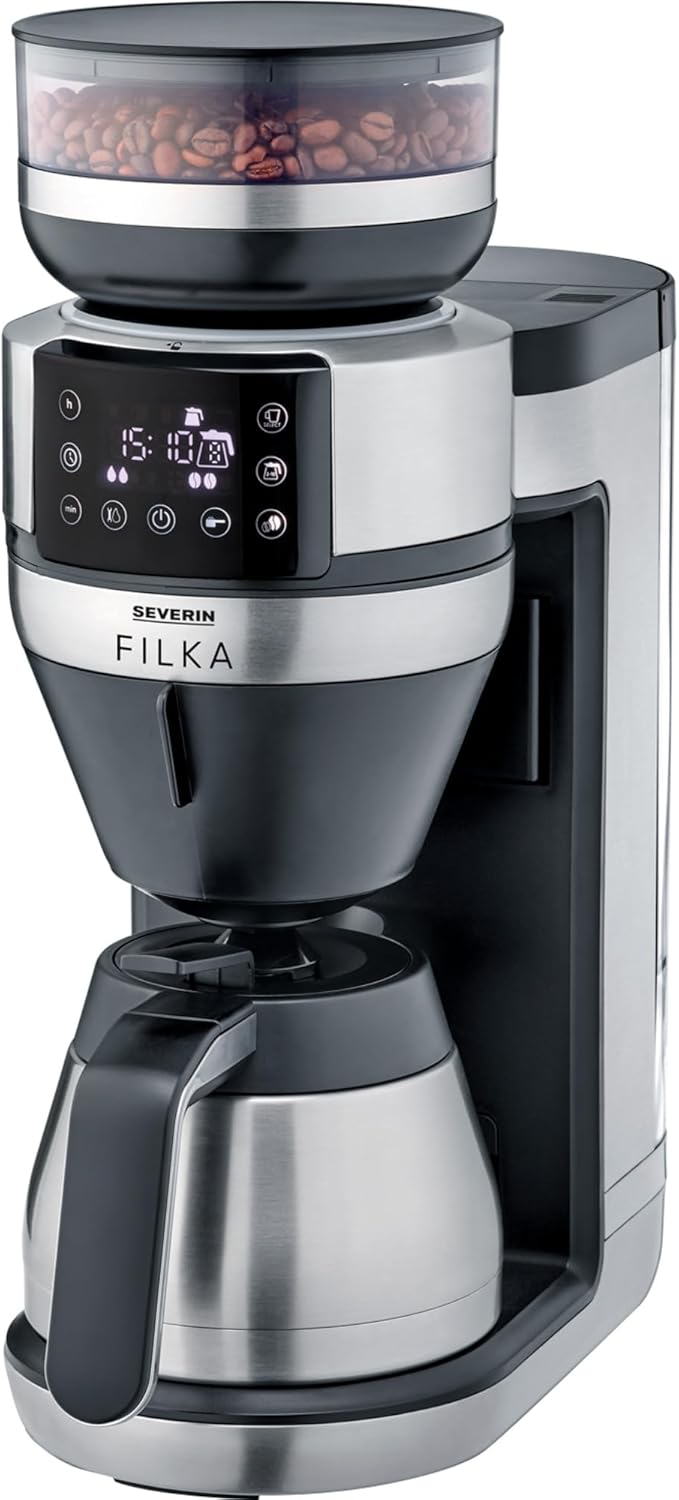
Image: The Severin KA 4851 FILKA coffee machine, featuring a sleek silver and black design with a bean hopper on top, a digital display, and a thermal carafe at the base.
Alaye Aabo
Nigbagbogbo ṣe akiyesi awọn iṣọra ailewu atẹle lati yago fun ipalara tabi ibajẹ si ohun elo:
- Rii daju voltage tí a fi hàn lórí àwo ìdíyelé bá ohun èlò ìpèsè rẹ mu.
- Maṣe fi ohun elo, okun, tabi pulọọgi sinu omi tabi awọn olomi miiran.
- Pa ohun elo naa kuro ni arọwọto awọn ọmọde.
- Unplug the appliance from the mains socket when not in use, before cleaning, or in case of malfunction.
- Ma ṣe ṣiṣẹ ohun elo pẹlu okun ti o bajẹ tabi plug.
- Lo awọn ẹya ẹrọ atilẹba nikan ati awọn ẹya apoju.
- Do not open the housing of the appliance. Repairs should only be carried out by authorized personnel.
- Ohun elo naa jẹ ipinnu fun lilo ile nikan.
- Avoid contact with hot surfaces, especially the brewing unit and hot water/coffee.
Ọja Pariview
Familiarize yourself with the components of your Severin KA 4851 FILKA coffee machine:
- 1. Bean Hopper: For storing whole coffee beans.
- 2. Grinder: Integrated conical burr grinder for fresh grinding.
- 3. Omi omi: Àpò omi tí a lè yọ kúrò fún kíkún omi tuntun.
- 4. Igbimọ Iṣakoso: Digital display and buttons for settings and operation.
- 5. Brewing Unit: Where coffee is brewed.
- 6. Permanent Gold Tone Filter: Àlẹ̀mọ́ tí a lè tún lò fún kọfí tí a lọ̀.
- 7. Drip Stop: Prevents dripping when the carafe is removed.
- 8. Thermal Carafe: Insulated carafe to keep coffee warm.
- 9. Cup Control Platform: Adjustable platform for various cup and carafe sizes.

Image: A user's hand interacting with the Severin KA 4851 FILKA coffee machine, highlighting its slim design and the thermal jug. The image also points out features like "Easy Clean" and "Super Silent".
Ṣeto
- Ṣii silẹ: Carefully remove all packaging materials and check for any damage. Keep packaging for future transport if needed.
- Ìfọ̀mọ́ àkọ́kọ́: Before first use, clean all removable parts (water tank, bean hopper, permanent filter, thermal carafe) with warm water and a mild detergent. Wipe the main unit with a damp asọ.
- Ipo: Place the appliance on a stable, level, and heat-resistant surface, away from heat sources and direct sunlight. Ensure adequate ventilation.
- First Use (Rinsing Cycle):
- Fill the water tank with fresh cold water up to the MAX mark.
- Place the empty thermal carafe with its lid closed on the warming plate.
- Run a full brewing cycle without coffee beans or ground coffee to rinse the internal components. Discard the water. Repeat this process 2-3 times.
Awọn ilana Iṣiṣẹ
Brewing Coffee from Whole Beans
- Kun Omi Omi: Fill the water tank with fresh, cold water according to the desired number of cups. The "Cup Control" feature automatically draws the necessary amount of water.
- Fi awọn ewa kofi kun: Open the lid of the bean hopper and fill it with whole coffee beans. Close the lid securely.
- Fi Ajọ sii: Ensure the permanent gold tone filter is correctly inserted into the brewing unit. You may also use a traditional paper filter if preferred.
- Place Carafe/Cup: Place the thermal carafe on the warming plate for multiple cups, or adjust the Cup Control platform and place your single cup/travel mug for individual servings.
- Yan Eto: Use the control panel to select the desired coffee strength and number of cups. The machine offers flexible options for various container sizes.
- Bẹrẹ Pipọnti: Press the start button. The machine will grind the beans, brew the coffee, and dispense it into your chosen container.
Pipọnti Kofi lati Ilẹ Kofi
- Kun Omi Omi: Kun omi ojò pẹlu alabapade, tutu omi.
- Ṣafikun Kofi Ilẹ: Open the brewing unit and add the desired amount of pre-ground coffee into the permanent gold tone filter (or paper filter).
- Place Carafe/Cup: Place the thermal carafe or your single cup/travel mug.
- Yan Eto: Use the control panel to select the ground coffee mode and desired strength/cups.
- Bẹrẹ Pipọnti: Tẹ bọtini ibere.
Awọn ẹya ti eto
The Severin KA 4851 FILKA features a programmable timer. Refer to the control panel instructions on the display to set the desired brewing time for automatic start.

Image: An illustration highlighting key features of the Severin KA 4851 FILKA, including "Cup Control" for automatic water measurement, "Flexible & Individual" 5-in-1 compatibility for various containers, "Hot & Strong" brewing temperature up to 96°C, and the "Gold Tone Filter" as a reusable alternative to paper filters.
Itọju ati Cleaning
Ṣiṣe deedee ati itọju ṣe idaniloju iṣẹ ṣiṣe ti o dara julọ ati igba pipẹ ti ẹrọ kofi rẹ.
Daily Cleaning
- Lẹhin lilo kọọkan, yọọ ohun elo naa ki o jẹ ki o tutu.
- Remove and empty the permanent gold tone filter. Rinse it thoroughly under running water. It is dishwasher-safe.
- Empty and rinse the thermal carafe and its lid.
- Mu ese ita ti ẹrọ naa pẹlu ipolowoamp asọ. Maṣe lo awọn afọmọ abrasive.
- Clean the drip tray and Cup Control platform.
Epa
Depending on water hardness and frequency of use, descaling is necessary to prevent limescale buildup. The machine may indicate when descaling is required. Use a commercially available descaling agent suitable for coffee machines and follow the manufacturer's instructions. Always rinse the machine thoroughly with several cycles of fresh water after descaling.
Ninu awọn grinder
Periodically clean the grinder to remove coffee oil residue and old grounds. Refer to the specific instructions in the appliance's digital display or a more detailed manual for grinder cleaning, as this may involve removing specific parts.
Laasigbotitusita
| Isoro | Owun to le Fa | Ojutu |
|---|---|---|
| Coffee does not brew or flows slowly. | Water tank empty; filter clogged; limescale buildup; carafe not correctly placed. | Fill water tank; clean filter; descale the machine; ensure carafe is properly seated. |
| Kofi dun alailagbara tabi lagbara ju. | Incorrect coffee-to-water ratio; grind setting too coarse/fine; old coffee beans. | Adjust coffee quantity; adjust grind setting; use fresh coffee beans. |
| Grinder jẹ alariwo tabi ko lilọ. | Bean hopper empty; foreign object in grinder; grinder clogged. | Fill bean hopper; check for and remove foreign objects; clean grinder. |
| Omi n jo lati inu ẹrọ naa. | Water tank not properly seated; internal component issue. | Ensure water tank is securely in place. If leaking persists, contact customer support. |
Awọn pato
- Brand: OWO
- Nọmba awoṣe: KA 4851
- Àwọ̀: Brushed, matte, black, silver-colored
- Awọn iwọn (L x W x H): 17 x 38 x 46 cm
- Ìwúwo: 8.2 kilo
- Agbara: 350 Milliliters (Note: This capacity seems low for a coffee machine, likely refers to a specific component or is a typo in source data. Typically coffee machines measure capacity in liters or cups for the carafe.)
- Voltage: 230 Volts
- Ohun elo: Irin ti ko njepata
- Awọn ẹya pataki: Permanent filter, Programmable
- Iru: Electric Filter Coffee Machine
Atilẹyin ọja ati Support
For warranty information, technical support, or spare parts, please contact SEVERIN customer service directly. Refer to the official SEVERIN webAaye tabi iwe rira rẹ fun awọn alaye olubasọrọ ati awọn ofin atilẹyin ọja kan pato ti o kan agbegbe rẹ.
You can visit the official SEVERIN store on Amazon for more information: Ile itaja SEVERIN


