1. Ifihan
Thank you for choosing the Gembird USB-C Gigabit Network Adapter with 3-Port USB 3.1 Hub. This device is designed to expand the connectivity of your USB-C enabled laptop, tablet, or computer, providing both high-speed Gigabit Ethernet and additional USB 3.1 ports. This manual provides essential information for setting up, operating, and maintaining your device.
2. Awọn ẹya Ọja
- USB-C Asopọmọra: Connects to your host device via a reversible USB-C port.
- Ibudo Ethernet Gigabit: Provides a stable and fast wired network connection up to 1000 Mbps.
- 3-Port USB 3.1 Hub: Adds three USB 3.1 ports for connecting peripherals such as external hard drives, flash drives, keyboards, and mice.
- Gbigbe Data Iyara Giga: USB 3.1 ports support data transfer rates up to 5 Gbps.
- Pulọọgi ati Ṣiṣẹ: No driver installation required for most modern operating systems.
3. Package Awọn akoonu
Please ensure the following items are included in your package:
- Gembird USB-C Gigabit Network Adapter with 3-Port USB 3.1 Hub (Model A-CMU3-LAN-01)
4. Ọja Ipariview
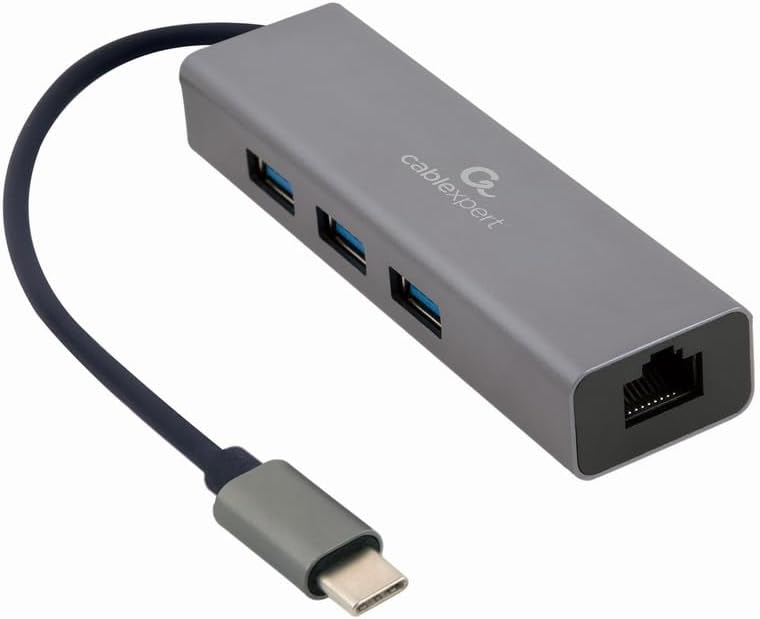
Nọmba 1: Iwaju view of the Gembird USB-C Gigabit Network Adapter, showing the USB-C cable, three USB 3.1 ports, and the RJ45 Gigabit Ethernet port.

Nọmba 2: Retail packaging for the Gembird USB-C Gigabit Network Adapter, highlighting key features like USB Type-C, USB 3.1 x 3, RJ45, Gigabit, 1000 Mbps, and Plug & Play.
5. Eto
Follow these steps to set up your Gembird USB-C Gigabit Network Adapter:
- Sopọ si Ẹrọ Gbalejo: Plug the USB-C connector of the adapter into an available USB-C port on your laptop, tablet, or computer.
- Sopọ si Nẹtiwọọki: Insert an Ethernet cable (RJ45) from your router or modem into the Gigabit Ethernet port on the adapter.
- So Awọn Agbeegbe USB pọ: Plug your USB devices (e.g., flash drives, external hard drives, mouse, keyboard) into the three available USB 3.1 ports on the adapter.
- Fifi sori Awakọ: The adapter is typically plug-and-play. Your operating system (Windows, macOS, Linux, Chrome OS) should automatically detect and install the necessary drivers. If prompted, allow the system to install drivers.
6. Awọn ilana Iṣiṣẹ
Ni kete ti o ba ti sopọ mọ, ohun ti nmu badọgba naa n ṣiṣẹ laifọwọyi:
- Wiwọle Nẹtiwọọki: Your host device should now have a wired network connection. You can verify this in your operating system's network settings.
- USB Device Access: Connected USB peripherals will be recognized by your host device and function as if directly connected.
7. Laasigbotitusita
Ti o ba pade awọn ọran, tọka si awọn iṣoro ti o wọpọ ati awọn ojutu wọnyi:
- Ko si Isopọ Nẹtiwọọki:
- Rí i dájú pé okùn Ethernet so mọ́ adapter àti router/modẹmu rẹ láìléwu.
- Ṣayẹwo olulana/modẹmu rẹ fun iṣẹ to peye.
- Ṣe àyẹ̀wò àwọn ètò nẹ́tíwọ́ọ̀kì lórí ẹ̀rọ olùgbàlejò rẹ.
- Try connecting the adapter to a different USB-C port on your host device.
- Awọn ẹrọ USB ko mọ:
- Ensure USB devices are properly plugged into the adapter's USB 3.1 ports.
- Try connecting the USB device directly to your host computer to confirm it is functional.
- Some high-power USB devices may require an external power source if your host device's USB-C port does not provide sufficient power (this adapter does not have a dedicated power input).
- Iyara Nẹtiwọọki o lọra:
- Ensure your Ethernet cable is rated for Gigabit speeds (Cat5e or higher).
- Verify your internet service provider's speed and your router's capabilities.
- Ensure your host device's USB-C port supports USB 3.0/3.1 speeds.
8. Awọn pato
| Nọmba awoṣe | A-CMU3-LAN-01 |
| Ni wiwo Hardware | USB-C (Host), USB 3.1 (Hub), RJ45 (Ethernet) |
| Lapapọ Awọn ibudo USB | 3 (USB 3.1) |
| Àjọlò Ports | 1 (Gigabit RJ45) |
| Data Transfer Rate (USB) | Títí dé 5 Gbps (USB 3.1) |
| Data Transfer Rate (Ethernet) | 10/100/1000 Mbps |
| Ọja Mefa | 10 x 2 x 2.7 inches |
| Iwọn Nkan | 2.46 iwon |
9. Itọju
Lati rii daju igbesi aye gigun ati iṣẹ aipe ti ohun ti nmu badọgba rẹ:
- Ninu: Lo aṣọ rírọrùn tí ó gbẹ láti nu ìta ẹ̀rọ náà. Yẹra fún àwọn ohun èlò ìfọmọ́ omi tàbí àwọn ohun èlò ìfọ́mọ́.
- Ibi ipamọ: Tọ́jú ohun tí a fi ń ṣe àtúnṣe náà sí ibi gbígbẹ tí ó tutù, tí ó jìnnà sí oòrùn tààrà àti àwọn igbóná tí ó le koko nígbà tí a kò bá lò ó.
- Mimu: Avoid dropping or subjecting the device to strong impacts. Do not attempt to disassemble the adapter.
10. Atilẹyin ọja ati Support
This Gembird product comes with a atilẹyin ọja ọdun meji lodi si awọn abawọn ile-iṣẹ. Jọwọ ṣe idaduro ẹri rira rẹ fun awọn iṣeduro atilẹyin ọja.
For technical support or warranty inquiries, please contact your retailer or visit the official Gembird webojula fun alaye olubasọrọ.


