1. Ifihan
This manual provides detailed instructions for the safe operation, maintenance, and troubleshooting of your Tolsen Non-Contact AC Voltage Detector, Model 38110. Please read this manual thoroughly before using the device to ensure proper function and safety.
Ọja Pariview
The Tolsen 38110 is a CE certified non-contact AC voltage detector designed for quick and safe identification of live AC voltage. It is manufactured according to CAT III (1000V) safety standards, making it suitable for a wide range of electrical applications. The device features a standard AC voltage detection range of 12V to 1000V at a frequency of 50-60Hz.
Awọn ẹya pataki pẹlu:
- Audible and visual alarm modes (sound and light flash).
- Integrated white LED probe light for illumination in dark areas.
- Išẹ pipa-agbara aifọwọyi lati tọju igbesi aye batiri.
- Atọka batiri kekere.
- Non-Olubasọrọ Voltage (NCV) sensing with automatic selection of 3 sensitivity levels (high, medium, and low).
- Three types of frequency, sound, and LED alarm indications.
2. Alaye Aabo
Always adhere to local safety regulations and guidelines when working with electrical systems. This device is designed to assist in detecting AC voltage, but it should not be used as the sole method for determining the presence of voltage. Always verify with a known live source before testing and a known de-energized source after testing.
- IKILO: Risk of electric shock. Do not use if the device appears damaged or is not functioning correctly.
- Ma ṣe gbiyanju lati wiwọn voltage beyond the specified range (1000V AC).
- Ensure batteries are correctly installed and replaced when the low battery indicator appears.
- Jeki ẹrọ naa gbẹ ati mimọ.
- This device is for non-contact detection only. Do not touch live conductors with the probe tip.
3. Ọja irinše
Familiarize yourself with the different parts of your Tolsen Non-Contact AC Voltage Awari:

olusin 3.1: Iwaju view of the Tolsen 38110 Voltage Detector, showing the probe tip, LED indicators, and control buttons.
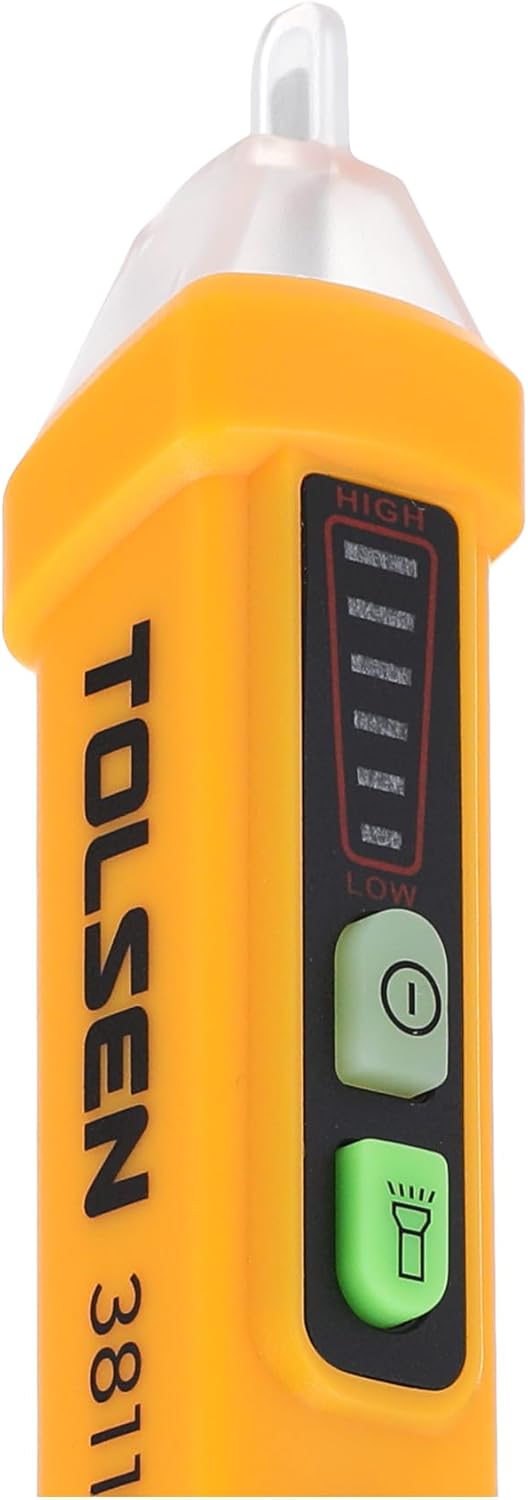
olusin 3.2: Isunmọ view highlighting the NCV sensitivity indicators (High, Medium, Low) and the power and flashlight buttons.
- Imọran Iwadii: Ṣe awari AC voltage lai olubasọrọ.
- Awọn itọkasi LED: Visual indication of voltage presence and sensitivity level.
- Bọtini agbara: Yi ẹrọ TAN/PA.
- Bọtini ina filaṣi: Activates/deactivates the white LED probe light.
- Abala Batiri: Located at the bottom, for 2x AAA batteries.
4. Eto ati Batiri sori
Fifi sori batiri
- Twist and pull off the battery cap at the bottom of the detector.
- Fi awọn batiri AAA meji (2) 1.5V AAA sii, ki o rii daju pe polarity ti o tọ (+/-).
- Replace the battery cap, twisting it securely until it clicks into place.
The device will automatically perform a self-test upon power-on. If the low battery indicator illuminates, replace the batteries immediately for accurate readings.
5. Awọn ilana Iṣiṣẹ
Titan / Pipa agbara
- Tẹ awọn Bọtini agbara (usually marked with 'I' or a power symbol) to turn the detector ON.
- The device will emit a short beep and the LED indicators will flash briefly.
- To turn OFF, press and hold the Bọtini agbara until the device powers down, or it will automatically shut off after a period of inactivity.
Lilo Imọlẹ Ina
- Tẹ awọn Bọtini ina filaṣi (usually marked with a light bulb symbol) to turn the white LED probe light ON.
- Press the button again to turn the flashlight OFF.
Non-Olubasọrọ Voltage (NCV) erin
- Ensure the detector is powered ON.
- Place the probe tip near the wire, outlet, or electrical component you wish to test.
- The detector will automatically select the appropriate sensitivity level (High, Medium, or Low) based on the detected voltagagbára e.
- Ti AC voltage is detected, the device will emit an audible beep and the LED indicators will flash. The frequency of the beeps and flashes will increase with higher voltage or closer proximity to the source.
- The LED indicators will also show the detected voltage ipele:
- Kekere: Indicates a weaker signal or lower voltage.
- Alabọde: Indicates a moderate signal or voltage.
- Ga: Indicates a strong signal or higher voltage.
Always test the detector on a known live circuit before and after use to confirm its proper operation.
6. Imọ ni pato
| Ẹya ara ẹrọ | Sipesifikesonu |
|---|---|
| Brand | Tolsen |
| Nọmba awoṣe | TLSN-38110 |
| AC Voltage Ibiti | 12V - 1000V |
| Igbohunsafẹfẹ | 50-60Hz |
| Aabo Rating | CAT III 1000V, CE Certified |
| Ipo itaniji | Sound and Light Flash |
| Ina filaṣi | White LED Probe Light |
| NCV Sensing | Automatic selection (High, Medium, Low) |
| Batiri Iru | 2 x 1.5V AAA Awọn batiri |
| Tiipa aifọwọyi | Bẹẹni |
| Atọka Batiri Kekere | Bẹẹni |
| Ọja Mefa | 15 x 4.5 x 18 cm (approx. 6.2 inches long) |
| Iwọn Nkan | 150 giramu |

Figure 6.1: Approximate dimensions of the Tolsen 38110 Voltage Oluwari.
7. Itọju
Ninu
Wipe the device with a dry, clean cloth. Do not use abrasive cleaners or solvents. Ensure no moisture enters the device.
Batiri Rirọpo
When the low battery indicator illuminates, replace the batteries as described in the "Setup and Battery Installation" section. Remove batteries if the device will not be used for an extended period to prevent leakage.
Ibi ipamọ
Store the detector in a cool, dry place, away from direct sunlight and extreme temperatures.
8. Laasigbotitusita
| Isoro | Owun to le Fa | Ojutu |
|---|---|---|
| Ẹrọ naa ko ṣiṣẹ. | Awọn batiri ti o ku tabi ti ko tọ ti fi sori ẹrọ. | Ropo awọn batiri, aridaju ti o tọ polarity. |
| No detection when voltage wa. | Low battery; device too far from source; interference. | Replace batteries; move closer to the source; test in a less noisy electrical environment. |
| False positives (detects voltage when none is present). | Strong electromagnetic fields nearby; static electricity. | Move away from strong fields; ensure proper grounding of the circuit being tested. |
| Ina filaṣi ko ṣiṣẹ. | Low battery; faulty LED. | Rọpo awọn batiri. Ti iṣoro naa ba n tẹsiwaju, kan si atilẹyin alabara. |
9. Atilẹyin ọja ati Support
Tolsen products are manufactured to high-quality standards. For warranty information or technical support, please refer to the warranty card included with your purchase or visit the official Tolsen webojula. Tọju iwe-ẹri rira rẹ bi ẹri rira fun eyikeyi awọn ibeere atilẹyin ọja.
For further assistance, please contact Tolsen customer service.


