1. Ifihan
This manual provides essential information for the safe and correct operation of your Vonyx VMM100 4-Channel DJ Mixer. Please read this manual thoroughly before using the device to ensure optimal performance and to prevent damage. Keep this manual for future reference.
2. Awọn ilana aabo
- Rii daju pe ipese agbara voltage ibaamu awọn ibeere pàtó kan fun ẹrọ.
- Do not expose the device to rain or moisture to avoid electric shock.
- Yago fun gbigbe ẹrọ naa si nitosi awọn orisun ooru tabi ni imọlẹ orun taara.
- Maṣe ṣii casing; ko si awọn ẹya olumulo-iṣẹ inu. Tọkasi gbogbo iṣẹ si oṣiṣẹ oṣiṣẹ.
- Disconnect the power adapter during thunderstorms or when not in use for extended periods.
- Pa ẹrọ kuro lati awọn ọmọde.
3. Awọn ẹya Ọja
- Compact 4-channel analog mixer.
- Asopọmọra Bluetooth fun sisanwọle ohun alailowaya.
- Integrated USB MP3 player with digital display.
- Adjustable delay effect with dedicated volume control.
- Effect send/return on channels 1 and 2.
- High and low tone controls for each channel.
- USB power supply (5V) for mobile use, compatible with power banks.
- Channels 1 and 2 feature +48V phantom power for condenser microphones.
- LED VU meter and peak indicators for signal monitoring.
- Includes USB power adapter and USB cable.
4. Package Awọn akoonu
Jọwọ ṣayẹwo pe gbogbo awọn ohun kan wa nigbati o ba n ṣii wọn:
- Vonyx VMM100 4-Channel DJ Mixer
- Ohun ti nmu badọgba Agbara USB
- Okun USB
- Afowoyi Olumulo (iwe-ipamọ yii)
5. Awọn iṣakoso ati Awọn iṣẹ
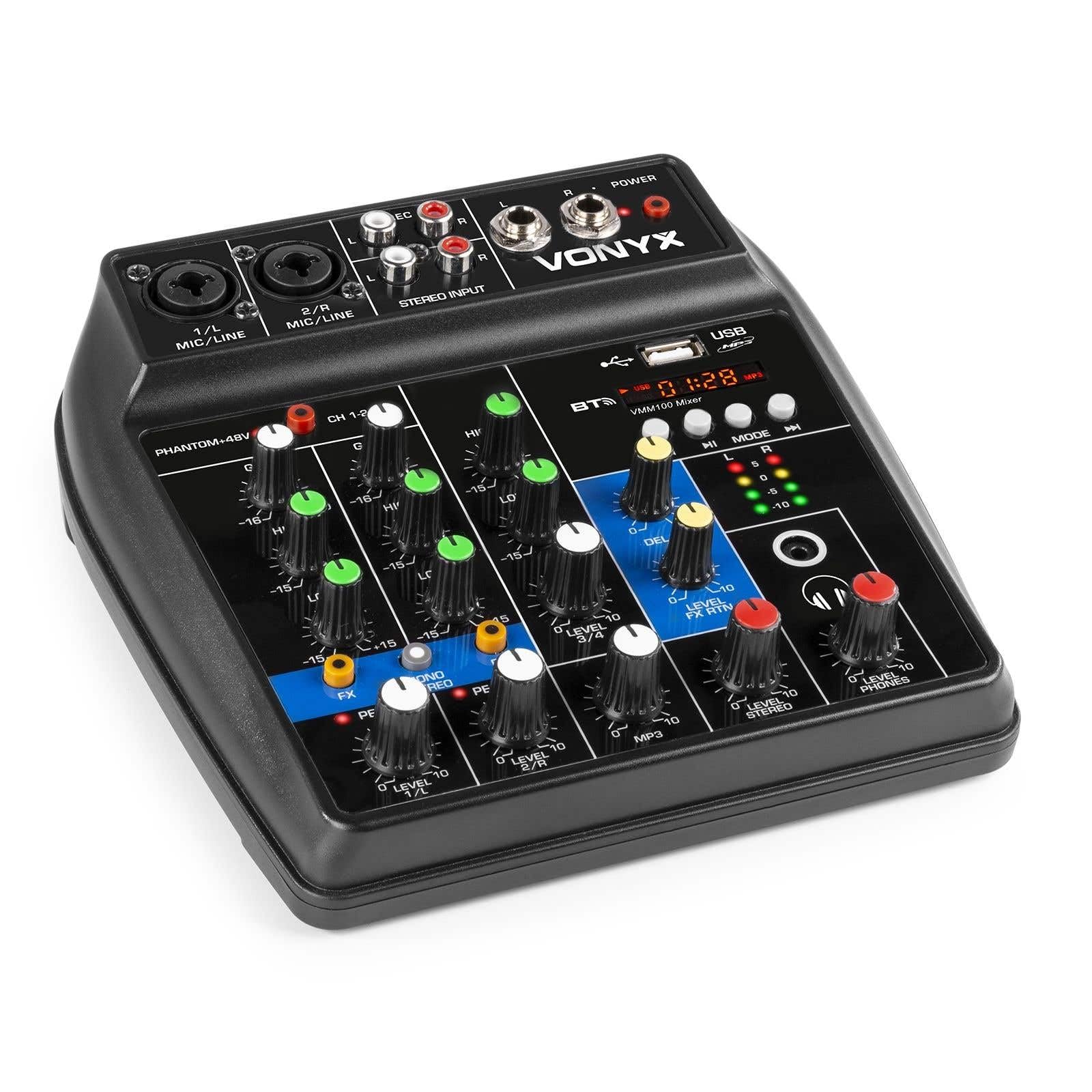
Nọmba 1: Lapapọ view of the Vonyx VMM100 mixer, highlighting the layout of all controls, inputs, and outputs.

Nọmba 2: Close-up of the mixer's control panel, showing individual channel controls, EQ, gain, and effect knobs.
5.1 Input Channels (1 & 2)
- Combi XLR / 6.3mm Jack: Connect microphones (XLR) or line-level instruments (6.3mm jack).
- Phantom +48V Yipada: Activates phantom power for condenser microphones on channels 1 and 2.
- KỌRỌ NIPA: Ó ń ṣàtúnṣe ìfàmọ́ra ìtẹ̀síwájú fún ẹ̀rọ tí a so pọ̀.
- Kọ́nì Gíga: Adjusts the high-frequency (treble) level for the channel.
- Kọ́ńdì KÌLỌ̀: Adjusts the low-frequency (bass) level for the channel.
- Knob FX: Controls the amount of delay effect applied to the channel.
- PEAK LED: Illuminates when the input signal is too high, indicating potential clipping. Adjust GAIN to prevent this.
- Ipele koko: Adjusts the overall output level of the channel.
5.2 Stereo Input (Channel 3)
- Àwọn Ìtẹ̀wọlé RCA (L/R): Connect external stereo audio sources such as CD players or other line-level devices.
- Ipele koko: Adjusts the output level of the stereo input.
5.3 MP3/Bluetooth Channel (Channel 4)

Nọmba 3: USB port with a USB drive, demonstrating media playback capability.

Nọmba 4: Bluetooth and USB player section, showing the display and control buttons.
- Ibudo USB: Fi awakọ filasi USB sii fun ṣiṣiṣẹsẹhin MP3.
- Ifihan: Shows track information, playback time, and mode.
- Control Buttons (Play/Pause, Skip, Mode): Navigate tracks and switch between USB and Bluetooth modes.
- Bluetooth (BT) Indicator: A máa ń tàn yòò nígbà tí Bluetooth bá ń ṣiṣẹ́ tí a sì so pọ̀ mọ́ra.
- Ipele koko: Adjusts the output level of the MP3/Bluetooth channel.
5.4 Apá Àkọ́kọ́
- Kọ́nì ìdádúró: Adjusts the overall intensity of the delay effect.
- Ipele FX RTN Knob: Controls the return level of the delay effect.
- Kọ́nì Sitẹrio Ipele: Master volume control for the main stereo output.
- Kọ́nì Fóònù Ìpele: Ṣe atunṣe iwọn didun fun iṣẹjade agbekọri.
- VU Meter (LED): Displays the main output level.
- Main Output (6.3mm Jack L/R): Sopọ si amplifiers tabi agbara agbohunsoke.
- Record Output (RCA L/R): Connects to recording devices.
- Headphone Output (6.3mm Jack): Connects stereo headphones.
- AGBARA LED: Indicates when the mixer is powered on.
5.5 Gbigba agbara

Nọmba 5: Apa view of the mixer, illustrating the 5V DC USB power input port.
- 5V DC USB Input: Connect the provided USB power adapter or a compatible USB power source (e.g., power bank) to power the mixer.
6. Eto
6.1 Asopọ agbara
- Connect the supplied USB cable to the 5V DC USB input on the mixer.
- Connect the other end of the USB cable to the provided USB power adapter.
- Plug the USB power adapter into a suitable wall outlet. The POWER LED on the mixer will illuminate.
6.2 Nsopọ Awọn orisun ohun
- Microphones/Line Instruments: Connect microphones via XLR or line-level instruments via 6.3mm jack to channels 1 and 2. If using condenser microphones, activate the +48V phantom power switch.
- Stereo Line Devices: Connect devices like CD players to the RCA inputs of channel 3.
- Awakọ USB: Fi kọnputa filasi USB ti o ni MP3 sii files into the USB port on channel 4.
6.3 Nsopọ Awọn abajade
- Ifilelẹ akọkọ: Connect the 6.3mm jack main outputs (L/R) to your amplifier, àwọn agbọ́hùnsọ tí a fi agbára ṣe, tàbí ètò PA.
- Agbekọri: Connect your headphones to the 6.3mm headphone jack.
- Ẹrọ Gbigbasilẹ: Connect the RCA record outputs (L/R) to an external recording device if desired.
7. Awọn ilana Iṣiṣẹ
7.1 Ipilẹ dapọ
- Ensure all LEVEL and GAIN knobs are set to their minimum positions before powering on.
- Power on the mixer and any connected audio equipment.
- Gradually increase the GAIN knob for each active input channel until the PEAK LED flashes only occasionally during the loudest parts of the signal.
- Adjust the HIGH and LOW EQ knobs for each channel to shape the tone as desired.
- Use the individual LEVEL knobs to balance the volume of each channel.
- Adjust the main STEREO LEVEL knob to control the overall output volume. Monitor the VU meter to avoid clipping.
- Adjust the PHONES LEVEL knob for comfortable headphone monitoring.
7.2 Bluetooth Isẹ
- Press the MODE button on the MP3/Bluetooth channel until the display shows "BT" or the Bluetooth indicator flashes.
- On your smartphone, tablet, or PC, search for Bluetooth devices and select "Vonyx VMM100".
- Once paired, the Bluetooth indicator will glow steadily. You can now stream audio wirelessly to the mixer.
- Use the playback controls on the mixer or your device to manage audio.
7.3 Sisisẹsẹhin USB MP3
- Fi kọnputa filasi USB ti o ni MP3 sii files sinu USB ibudo.
- Press the MODE button on the MP3/Bluetooth channel until the display shows track information.
- Use the playback controls (Play/Pause, Skip) to navigate and play tracks.
7.4 Using Effects
- Turn the FX knob on channels 1 and 2 to send a portion of that channel's signal to the internal delay effect.
- Adjust the main DELAY knob to control the overall intensity and characteristics of the delay.
- Use the LEVEL FX RTN knob to control how much of the processed effect signal is mixed back into the main output.
8. Gbigbasilẹ
The VMM100 mixer allows for easy recording of your mix. Connect the RCA record outputs (L/R) to the input of a suitable recording device (e.g., computer audio interface, dedicated recorder). Ensure your recording software or device is configured to receive audio from the connected inputs. The signal sent to the record output is a stereo mix of all active channels, post-fader.
9. Itọju
- Ninu: Lo asọ asọ ti o gbẹ lati nu ode ti alapọpo. Ma ṣe lo abrasive ose tabi epo.
- Ibi ipamọ: Tọju alapọpo ni itura, aye gbigbẹ kuro lati orun taara ati awọn iwọn otutu to gaju.
- Mimu: Yago fun sisọ silẹ tabi tẹriba alapọpọ si awọn ipa to lagbara.
10. Laasigbotitusita
| Isoro | Owun to le Fa | Ojutu |
|---|---|---|
| Ko si agbara | Adaparọ agbara ko sopọ tabi aṣiṣe. | Check power connections. Try a different USB port or adapter. |
| Ko si ohun jade | Incorrect cable connections; volume knobs too low; incorrect input selection. | Verify all audio cables are securely connected. Increase channel LEVEL and STEREO LEVEL knobs. Ensure correct input mode (e.g., USB/BT). |
| Ohun ti o daru | Input GAIN too high; output level too high. | Reduce GAIN for the affected channel until the PEAK LED stops flashing excessively. Lower STEREO LEVEL. |
| Bluetooth ko so pọ | Mixer not in Bluetooth mode; device too far; previously paired device connected. | Ensure mixer is in BT mode. Move device closer. Disconnect from other Bluetooth devices. |
| Sisisẹsẹhin USB ko ṣiṣẹ | A kò ṣe àtúnṣe ìwakọ̀ USB dáadáa; a kò ṣe àtìlẹ́yìn rẹ̀ file type; mixer not in USB mode. | Rí i dájú pé a ṣe àgbékalẹ̀ ìwakọ̀ USB FAT32 àti pé MP3 ló ní files. Press MODE to select USB. |
11. Awọn pato
- Awọn igbewọle:
- Channels 1 & 2: Combi XLR / 6.3mm Jack (Line or Microphone)
- Channel 3: RCA (Stereo)
- Channel 4: Bluetooth or USB MP3 Player
- Awọn abajade:
- Main: 6.3mm Jack (Stereo)
- Record: RCA (Stereo)
- Headphone: 6.3mm Jack
- Iwọn Igbohunsafẹfẹ: 20 Hz - 20,000 Hz
- Agbẹgbẹ: 2-band (High, Low) per channel
- Agbara Phantom: + 48V (Awọn ikanni 1 & 2)
- Asopọmọra Voltage: 5V DC (nipasẹ USB)
- Awọn iwọn (L x W x H): 18 x 19.5 x 5.8 cm (7.09 x 7.68 x 2.28 inches)
- Ìwúwo: 0.5 kg (1.1 lbs)
- Ohun elo: Ọra
12. Atilẹyin ọja ati Support
Vonyx products are designed and manufactured to the highest quality standards. In the unlikely event of a problem with your product, please contact your retailer for warranty service. Please retain your proof of purchase. For technical support or further inquiries, refer to the official Vonyx webojula tabi kan si wọn onibara iṣẹ Eka.


