Ọrọ Iṣaaju
This user manual provides essential information for the safe and efficient operation, maintenance, and troubleshooting of your DUCATI Corse Pro-III R Electric Scooter. Please read this manual thoroughly before using the scooter to ensure proper handling and to maximize its lifespan.

Figure 1: DUCATI Corse Pro-III R Electric Scooter, showcasing apẹrẹ didan ati ikole ti o lagbara.
Alaye Aabo
Your safety is paramount. Always adhere to local regulations and traffic laws when operating the scooter. Wear appropriate safety gear, including a helmet, knee pads, and elbow pads. Ensure the scooter is in good working condition before each ride.
- Do not ride in heavy rain or through puddles deeper than 2 cm.
- Yẹra fun gigun lori awọn aaye isokuso, awọn oke giga, tabi ilẹ ti ko ni deede.
- Ṣetọju ijinna ailewu lati awọn ọkọ ayọkẹlẹ miiran ati awọn ẹlẹsẹ.
- Maṣe ṣe awọn adaṣe tabi awọn adaṣe lojiji.
- Ensure all screws and components are securely fastened before riding.
- The maximum weight capacity for this scooter is 100 kg.
- In Italy, the maximum authorized speed is 20 km/h. Always check local regulations.
Ṣeto
1. Unboxing ati Ibẹrẹ Ayẹwo
Carefully remove all components from the packaging. Check for any signs of damage during transit. The package should include the scooter, a multilingual manual, and a charger.
2. Apejọ
The DUCATI Corse Pro-III R Electric Scooter comes largely pre-assembled. You will primarily need to secure the handlebar. Follow these steps:
- Lift the steering column until it locks into place.
- Attach the handlebar to the steering column, ensuring the cables are not pinched. Secure it with the provided screws.
- Verify that the brake levers and display are correctly positioned and functional.
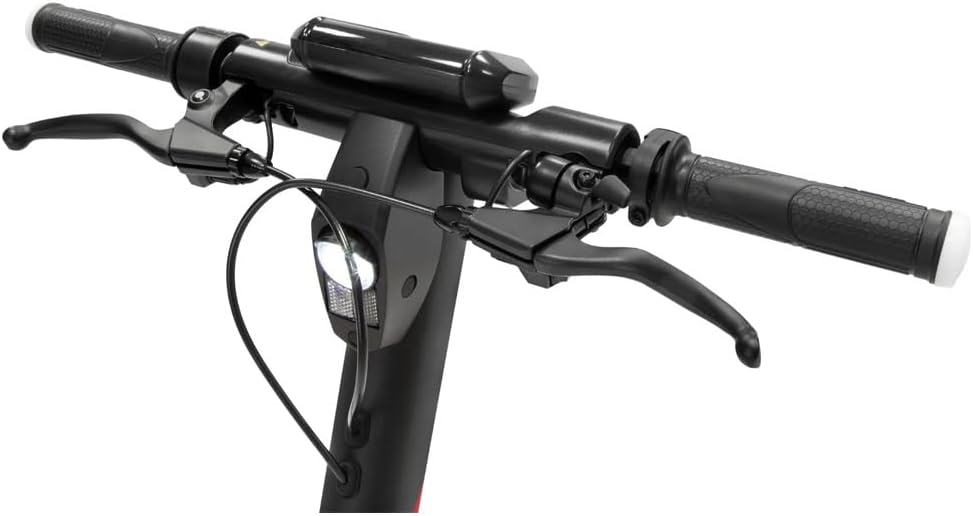
Figure 2: Detail of the handlebar assembly, showing brake levers and integrated controls.
3. Gbigba agbara akọkọ
Before first use, fully charge the scooter's battery. The battery capacity is 468Wh. Locate the charging port, typically near the base of the steering column or on the deck. Connect the charger and plug it into a power outlet. The charging indicator on the display or charger will show the charging status. Disconnect the charger once fully charged.

Nọmba 3: View of the battery compartment, indicating the location for charging.
4. Fifi sori App ati Sisopọ
For enhanced features and control, download the official Ducati Urban e-Mobility app from your smartphone's app store. Follow the in-app instructions to pair your scooter via Bluetooth. The app allows for motor activation, mode selection, and monitoring of ride statistics.

Figure 4: Download the official app from your device's app store for full functionality.
Awọn ilana Iṣiṣẹ
1. Agbara Tan / Paa
Press and hold the power button on the display to turn the scooter on or off. The digital display will illuminate, showing battery level, speed, and odometer readings.

Figure 5: The scooter's digital display provides real-time information and includes a USB charging port.
2. Awọn ọna gigun
The DUCATI Corse Pro-III R features multiple riding modes to suit different conditions and preferences. Switch between modes using the dedicated button on the display or via the mobile app. Modes typically include:
- Ipo Eco: Fún ìwọ̀n tó pọ̀ jùlọ àti agbára tó ń ṣiṣẹ́ dáadáa, pẹ̀lú iyàrá òkè tó kéré síi.
- Ipò eré: For higher performance and acceleration, utilizing the 500W motor's full potential.
3. Gigun Scooter
To start riding, place one foot on the deck and push off with the other foot. Once you gain a little momentum, gently press the accelerator lever. The scooter will engage its motor. Use the handlebars for steering and balance.
4. Braking
The scooter is equipped with a dual disc brake system (front and rear) for effective stopping power. Gently squeeze the brake levers on the handlebar to slow down or stop. Apply both brakes simultaneously for optimal braking performance and stability.

Figure 6: The robust front disc brake system ensures reliable stopping power.
5. Yipada Awọn ifihan agbara
The scooter features integrated turn signals. Activate them using the controls on the handlebar to indicate your turning intentions to others. Ensure they are visible, especially during daylight hours.
6. kika Mechanism
For easy storage and transport, the DUCATI Corse Pro-III R can be folded. Locate the folding latch mechanism on the steering column. Release the latch and carefully fold the steering column down until it clicks into place, securing it to the rear fender.

Figure 7: The scooter easily folds for convenient storage and portability.
Itoju
Itọju deedee n ṣe idaniloju igba pipẹ ati iṣẹ ṣiṣe ti o dara julọ ti ẹlẹsẹ rẹ.
1. Tire Itoju
The scooter is equipped with 10-inch Pirelli Street tires. Regularly check tire pressure and inflate to the recommended PSI (refer to the tire sidewall or scooter specifications). Inspect tires for wear, punctures, or damage. Proper tire pressure improves ride quality and extends tire life.
2. Ìtọ́jú Ètò Bérékì
Periodically inspect the disc brakes for wear on the pads and rotors. Ensure the brake cables are taut and the levers provide firm resistance. If you notice reduced braking performance or unusual noises, have the brakes inspected by a qualified technician.
3. Itọju batiri
- Gba agbara batiri naa patapata ṣaaju ki o to fi pamọ fun igba pipẹ.
- Yago fun gbigbe batiri patapata ṣaaju gbigba agbara.
- Tọju ẹlẹsẹ naa ni itura, aye gbigbẹ kuro lati orun taara ati awọn iwọn otutu to gaju.
- Lo ṣaja atilẹba nikan ti a pese pẹlu ẹlẹsẹ.
4. Ninu
Wẹ ẹlẹsẹ pẹlu ipolowoamp cloth. Do not use high-pressure water jets or corrosive cleaning agents. Ensure the charging port cover is securely closed to prevent water ingress.
5. Gbogbogbo Ayẹwo
Regularly check all bolts and screws for tightness, especially on the steering column and folding mechanism. Lubricate moving parts as recommended by the manufacturer.
Laasigbotitusita
| Isoro | Owun to le Fa | Ojutu |
|---|---|---|
| Scooter ko ni agbara lori. | Batiri kekere; awọn asopọ ti o daku; aṣiṣe bọtini agbara. | Charge the battery; check all cable connections; contact support if issue persists. |
| Reduced range/autonomy. | Under-inflated tires; riding in Sport mode; heavy load; cold weather; aging battery. | Check tire pressure; use Eco mode; reduce load; battery performance may decrease in cold. |
| Awọn idaduro ni rilara ailera tabi ariwo. | Worn brake pads; misaligned calipers; air in hydraulic system (if applicable); loose cables. | Inspect brake pads and rotors; adjust calipers; have a technician bleed brakes or tighten cables. |
| Steering column feels loose. | Loose screws in the folding mechanism or handlebar assembly. | Tighten all visible screws on the steering column and handlebar. If persistent, seek professional inspection. |
| App Asopọmọra oran. | Bluetooth ti pa; app ti atijo; scooter ko si ni ipo isopo. | Ensure Bluetooth is enabled; update the app; restart scooter and phone; try re-pairing. |
Awọn pato
| Ẹya ara ẹrọ | Ẹ̀kúnrẹ́rẹ́ |
|---|---|
| Orukọ awoṣe | DUCATI Corse Pro-III R |
| Nọmba awoṣe | DU-MO-220003 |
| Agbara mọto | 500W |
| Agbara Batiri | 468Wh (Lithium-ion) |
| Iwọn giga | Titi de 50 km (31 miles) |
| Tire Iwon | 10 inches (Pirelli Street tires) |
| Brake System | Dual Mechanical Disc Brakes (Front & Rear) |
| Ohun elo fireemu | Magnesium / Aluminum |
| Iwọn | 17.6 kilogram (38.8 lbs) |
| O pọju fifuye Agbara | 100 kilogram (220 lbs) |
| Pataki Awọn ẹya ara ẹrọ | Foldable design, Integrated Turn Signals, KERS technology |
| Awọn irinše to wa | Scooter, Multilingual Manual, Charger |
Atilẹyin ọja ati Support
For warranty information and technical support, please refer to the warranty card included with your product or visit the official Ducati Urban e-Mobility webojula. Jeki ẹri rira rẹ fun eyikeyi awọn ibeere atilẹyin ọja.
If you encounter issues not covered in the troubleshooting section, or require professional assistance, please contact Ducati customer service or an authorized service center.


