Ọrọ Iṣaaju
The Amazon Echo Show 8 (3rd Gen) is a smart display designed to enhance your daily life with its HD touchscreen, spatial audio, and integrated smart home hub. This manual provides essential information for setting up, operating, maintaining, and troubleshooting your device.
Awọn ẹya pataki pẹlu:
- Immersive entertainment with spatial audio and an 8" HD touchscreen.
- Enhanced video calling with a 13 MP camera and noise reduction.
- Built-in smart home hub supporting Zigbee, Matter, and Thread.
- Adaptive Content for glanceable information and personalized experiences.
- Amazon Photos integration for a digital photo frame.
Ṣeto
Kini To wa
- Echo Show 8 device
- Power adapter (30W) with cable (4.9 ft.)
- Itọsọna ibere ni kiakia
System Awọn ibeere
The Echo Show 8 requires a WiFi connection. The Alexa app is compatible with Fire OS, Android, and iOS devices, and is also accessible via a web browser. Certain skills and services may require subscriptions or additional fees.
Eto Ibẹrẹ
- Connect the power adapter to your Echo Show 8 and plug it into a power outlet.
- Follow the on-screen instructions to connect to your WiFi network.
- Log in with your Amazon account.
- Complete the setup process, including language selection and personal preferences.
The device supports Amazon WiFi simple setup for easy connection to your network.
Ṣiṣẹ Ifihan Echo rẹ 8
Iṣakoso ohun pẹlu Alexa
Your Echo Show 8 is primarily controlled using your voice with Alexa. Simply say "Alexa" followed by your command or question. Alexa speaks English and Spanish.

Nọmba 1: The Echo Show 8 displaying a music interface, indicating voice control capabilities. Users can control music, shows, and other functions using voice commands.
Entertainment and Media
Enjoy content from Prime Video, Netflix, Fire TV Channels, Amazon Music, Apple Music, and Spotify on the 8" HD display with spatial audio. Say "Alexa, play [content]" or "Alexa, stream [music service]."

Nọmba 2: The Echo Show 8 showcasing a music playlist, highlighting its compatibility with various streaming services like Amazon Music, Spotify, Apple Music, Prime Video, Netflix, and Fire TV Channels.
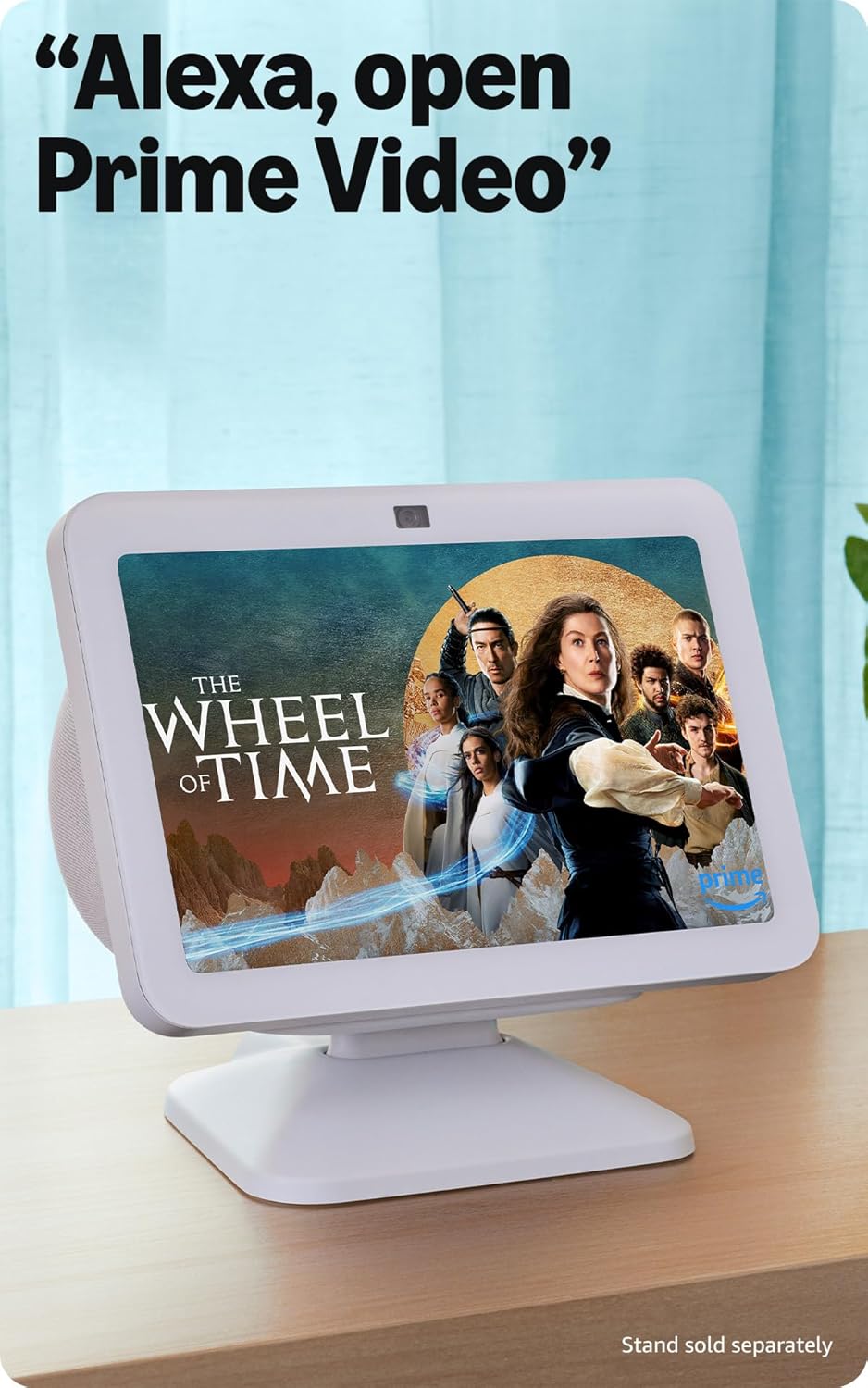
Nọmba 3: The Echo Show 8 displaying a video from Prime Video, demonstrating its capability to stream content from various platforms.
Smart Home Iṣakoso
The Echo Show 8 features a built-in smart home hub compatible with Zigbee, Matter, and Thread devices. You can pair and control smart cameras, lights, thermostats, and more using the display or your voice. Activate routines via motion detection.

Nọmba 4: The Echo Show 8 showing a smart home control interface, allowing users to manage connected devices like thermostats and lights directly from the screen.
Video Calling and Communication
Make hands-free video calls using your voice. The 13 MP camera features auto-framing and noise reduction for clearer conversations. Use the Top Connections widget for quick calls.
Fọto Ifihan
Turn your Echo Show 8 into a digital photo frame with Amazon Photos. Adaptive color technology ensures your photos look great in any lighting condition. You can also invite family and friends to share photos to your device.
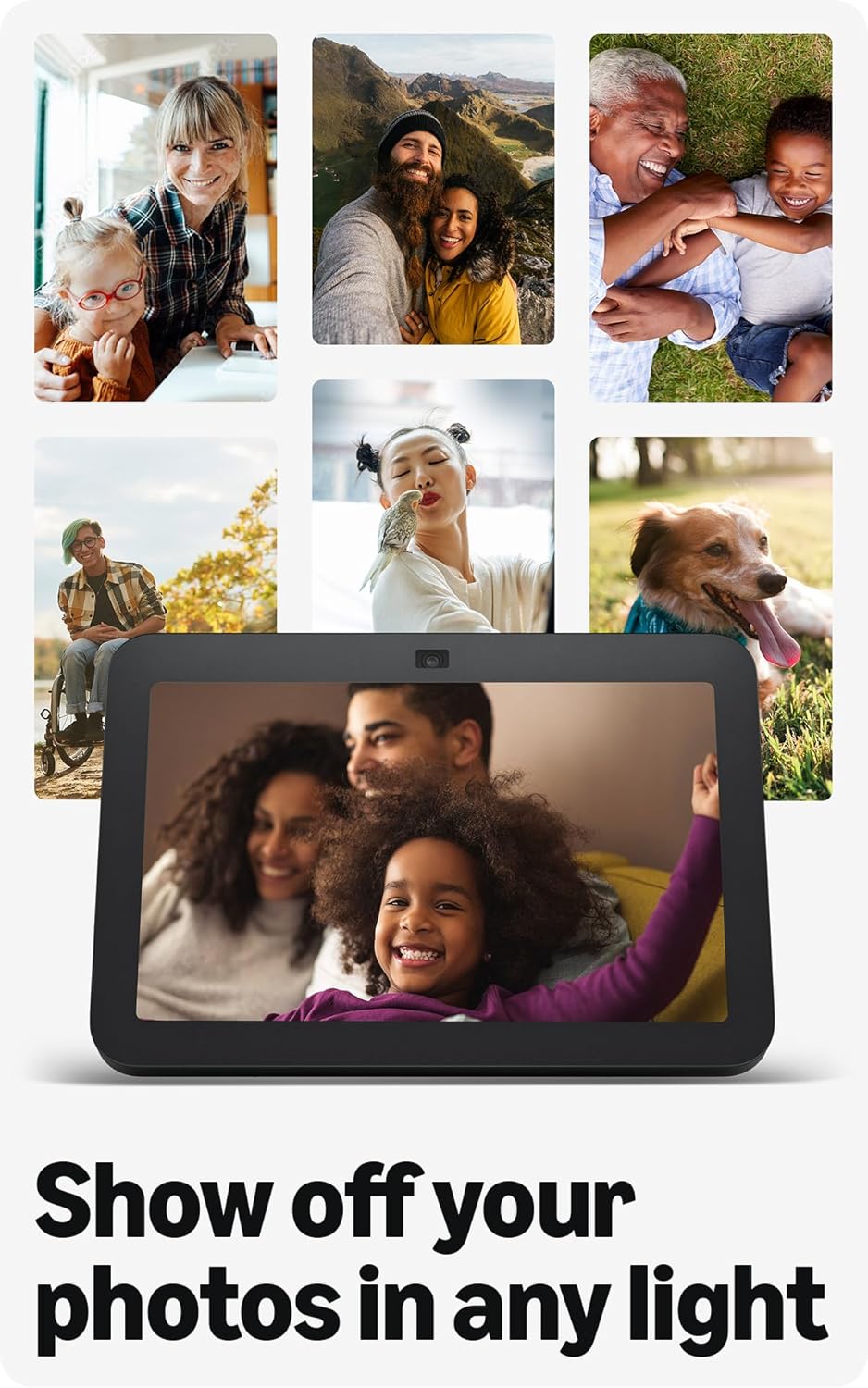
Nọmba 5: The Echo Show 8 displaying a collection of personal photos, demonstrating its use as a digital photo frame with adaptive color technology.
Akoonu Amugbamugba
Adaptive Content allows you to view glanceable information like calendars or reminders from a distance, and more detailed content when you are closer to the device. Shortcut icons on the home screen provide quick access to frequently used widgets.
Itoju
Láti rí i dájú pé iṣẹ́ tó dára jùlọ àti pé Echo Show 8 rẹ yóò pẹ́ tó:
- Ninu: Lo aṣọ rirọ, ti ko ni awọ lati nu iboju ati ita ẹrọ naa. Yẹra fun awọn afọmọ tabi awọn fifa omi.
- Ibi: Gbe ẹrọ naa sori iduro, dada alapin kuro lati orun taara, awọn orisun ooru, ati ọrinrin.
- Awọn imudojuiwọn sọfitiwia: Ensure your device receives regular software security updates. These are typically automatic when connected to Wi-Fi.
Laasigbotitusita
If you encounter issues with your Echo Show 8, consider the following common solutions:
- Ko si Agbara: Rii daju pe ohun ti nmu badọgba agbara ti sopọ ni aabo si ẹrọ mejeeji ati iṣan agbara ṣiṣẹ.
- Awọn ọran Asopọmọra Wi-Fi: Check your router and internet connection. Try restarting both your router and the Echo Show 8. Ensure the device is within range of your Wi-Fi network.
- Alexa Ko Dahun: Verify that the microphone is not muted (check the microphone/camera off button). Speak clearly and ensure you are within hearing range of the device.
- Iboju Ko dahun: Gbìyànjú láti tún ẹ̀rọ náà bẹ̀rẹ̀ nípa yíyọ ọ́pọ̀lọpọ̀ rẹ̀ fún ìṣẹ́jú díẹ̀ kí o sì tún fi kún un.
- Awọn oran kamẹra: Ensure the built-in camera shutter is open.

Nọmba 6: A sunmọ-soke view of the Echo Show 8's top edge, illustrating the camera lens and the physical camera shutter for privacy control.
For more detailed troubleshooting or persistent issues, refer to the Amazon Alexa app help section or the official Amazon support webojula.
Awọn pato
| Iwọn | 7.9" x 5.5" x 4.2" (200mm x 139mm x 106mm) |
| Iwọn | 36.6 iwon (1034 giramu) |
| Ifihan | Iboju ifọwọkan HD 8.0” |
| Kamẹra | Kámẹ́rà tí ó wà ní àárín gbùngbùn 13 MP pẹ̀lú ìbòrí tí a ṣe sínú rẹ̀ |
| WiFi Asopọmọra | Dual-band WiFi (802.11a/b/g/n/ac) |
| Smart Home Ipele | Zigbee + Ohun pàtàkì + Olùdarí Ààlà Ìlà Okùn |
| Bluetooth Asopọmọra | A2DP support for audio streaming, AVRCP for voice control of mobile devices |
| Ohun | Àwọn awakọ̀ neodymium onípele 2 x 2” pẹ̀lú radiator bass aláìlágbára |
| isise | Octa-Core SoC pẹ̀lú ẹ̀rọ Nẹ́tíwọ́ọ̀kì Neural Amazon AZ2 |
| Ede | Alexa sọ English ati Spanish |

Nọmba 7: The Echo Show 8 with its physical dimensions clearly marked, illustrating its compact size.
Asiri Awọn ẹya ara ẹrọ
Amazon Echo Show 8 is designed with multiple layers of privacy controls:
- Imọ-ẹrọ Ọrọ Ji: The device only begins listening after detecting the wake word ("Alexa").
- Awọn itọkasi ṣiṣanwọle: Àwọn àmì ìríran máa ń hàn nígbà tí a bá ń fi ohùn ránṣẹ́ sí ìkùukùu.
- Gbohungbo/Bọtini Pa kamẹra: A physical button allows you to electronically disconnect the microphones and camera.
- Aṣọ kamẹra ti a ṣe sinu rẹ: A physical shutter allows you to cover the camera lens.
- Isakoso Gbigbasilẹ ohun: Agbara lati view ki o si pa awọn gbigbasilẹ ohun rẹ.
For more information, visit the Alexa Privacy Hub.
Wiwọle Awọn ẹya ara ẹrọ
Ifihan Echo 8 pẹlu ọpọlọpọ awọn ẹya iraye si lati ṣe ara ẹni Alexa si awọn agbara rẹ. Awọn wọnyi le ṣee wọle nipasẹ Eto → Wiwọle lori ẹrọ rẹ.
- Fọwọ ba Alexa: Interact with Alexa via touch using on-screen tiles or a keyboard.
- Gbigbọ Imudaramu: Pese akoko diẹ sii lati pari sisọ ṣaaju idahun Alexa.
- Oṣuwọn Ọrọ ti o fẹ: Control Alexa's speaking speed.
- Àkọlé Alexa, Àkọlé Ìpè, Àkọlé Ìparí: Text captions for supported content and calls.
- Fihan ki o si sọ fun: Helps visually impaired users identify products by saying "Alexa, what am I holding."
- OhùnView Oluka iboju: Provides audio feedback for visually impaired users.
- Ago iboju: Sun sinu/sita ati pan ni ayika iboju.
- Fi leti Nigbati Nitosi: Awọn ohun iwifunni ṣiṣẹ nigbati o ba rii nitosi ẹrọ naa.
- Kindu Ka soke: Alexa le ka awọn iwe Kindu ni ariwo.
- Ọ̀rọ̀ Àkókò Gíga: Type live text during a video call.
- Additional settings include Color Inversion, Color Correction, and Request Sound.
Atilẹyin ọja ati Support
Alaye atilẹyin ọja
The Echo Show 8 (3rd Gen) includes a 1-year limited warranty and service. An optional 1-year extended warranty is available for U.S. customers and sold separately. This device, being a Certified Refurbished Amazon device, comes with the same limited warranty as a new device.
Onibara Support
Fun iranlọwọ siwaju sii, atilẹyin imọ-ẹrọ, tabi awọn ibeere atilẹyin ọja, jọwọ ṣabẹwo si atilẹyin Amazon osise website or contact Amazon customer service. You can also find helpful resources within the Alexa app.


