1. Ifihan
This manual provides detailed instructions for the setup, operation, and maintenance of your Wings Phantom 850 Low Latency Wireless Earbuds. Please read this manual thoroughly before using the product to ensure optimal performance and longevity.

Image: The Wings Phantom 850 Wireless Earbuds shown inside their open charging case, highlighting their design and readiness for use.
2. Package Awọn akoonu
Daju pe gbogbo awọn ohun kan wa ninu apoti ọja rẹ:
- Wings Phantom 850 Earbuds
- Alailowaya Ngba agbara Case
- Okun Ngba agbara USB
- Awọn iṣu Eti (oriṣiriṣi titobi)
- Afowoyi Olumulo (iwe-ipamọ yii)
3. Eto
3.1. Ngba agbara si Earbuds ati Ọran
Ṣaaju lilo akọkọ, gba agbara ni kikun awọn agbekọri ati apoti gbigba agbara.
- Gbe awọn agbekọri sinu apoti gbigba agbara. Rii daju pe wọn joko ni deede.
- So okun gbigba agbara USB pọ si ibudo gbigba agbara lori ọran naa ati si orisun agbara (fun apẹẹrẹ, ohun ti nmu badọgba ogiri USB, ibudo USB kọnputa).
- The LED indicators on the case will show the charging status. A full charge typically takes approximately 1-2 hours.

Image: The Wings Phantom 850 Earbuds in their charging case, illustrating the charging process with illuminated LED lights.
3.2. Sisopọ Bluetooth
Lati so agbekọri rẹ pọ mọ ẹrọ kan:
- Rii daju pe awọn agbekọri ti gba agbara ati inu apoti gbigba agbara.
- Ṣí àpótí ìgbara. Àwọn agbekọri náà yóò wọ inú ipò ìsopọ̀ láìfọwọ́sí (tí ìmọ́lẹ̀ LED tí ń tàn lórí àwọn agbekọri náà fi hàn).
- Lori ẹrọ rẹ (foonuiyara, tabulẹti, kọǹpútà alágbèéká), mu Bluetooth ṣiṣẹ ki o wa awọn ẹrọ to wa.
- Select "Wings Phantom 850" from the list of devices.
- Once connected, the earbud LEDs will stop flashing, and you will hear a confirmation tone.
Awọn ẹya ara ẹrọ ti awọn agbekọri Open and On Tech™ for quick connection upon opening the case.
3.3. Wings Sync App Installation
Enhance your experience by installing the Wings Sync App. The app allows for custom controls, EQ modes, and locating misplaced earbuds.
- Download the "Wings Sync" app from your device's app store (App Store for iOS, Google Play Store for Android).
- Open the app and follow the on-screen instructions to connect your Phantom 850 earbuds.

Image: A visual representation of the Wings Sync App dashboard, showing options for touch controls, game mode, EQ modes, and locating earbuds.
Video: A demonstration of the Wings Sync App features, including custom touch controls, EQ modes, and the earbud locator function. This video illustrates how to personalize your earbud settings and find them if misplaced.
4. Awọn ilana Iṣiṣẹ
4.1. Awọn iṣakoso ifọwọkan
The Wings Phantom 850 earbuds feature intuitive touch controls. These can be customized via the Wings Sync App.
| Iṣe | Iṣẹ (Aiyipada) |
|---|---|
| Fọwọ ba ẹyọkan (L/R) | Iwọn didun Soke/Isalẹ (Aṣeṣe) |
| Tẹ lẹẹmeji (L/R) | Play/Pause (Customizable) |
| Tẹ lẹẹmẹta (L) | Previous Track (Customizable) |
| Tẹ lẹẹmẹta (R) | Orin t’okan (Aṣeṣe) |
| Tẹ Gigun (L) | Voice Assistant (Customizable) |
| Tẹ gun (R) | Game Mode ON/OFF (Customizable) |
| Ipe ti nwọle (Fọwọ ba nikan) | Idahun Ipe |
| Ipe ti nwọle (Tẹ gigun) | Kọ Ipe |
Note: Default functions may vary. Refer to the Wings Sync App for current settings and customization options.
4.2. Ipo ere
Activate Gaming Mode for ultra-low latency audio (40ms) during gameplay. This mode is designed to synchronize audio with on-screen action, providing a competitive edge.
- Muu ṣiṣẹ: Long press the right earbud (default setting) or activate via the Wings Sync App.
- Pa aṣiṣẹ: Repeat the activation step.

Aworan: An loriview of key features including the dedicated Gaming Mode with 40ms ultra-low latency, Bluetooth 5.3, IPX5 water resistance, and ENC Quad Mic technology.
4.3. Environmental Noise Cancellation (ENC)
The Quad ENC Mics reduce environmental noise during calls, ensuring clear communication.
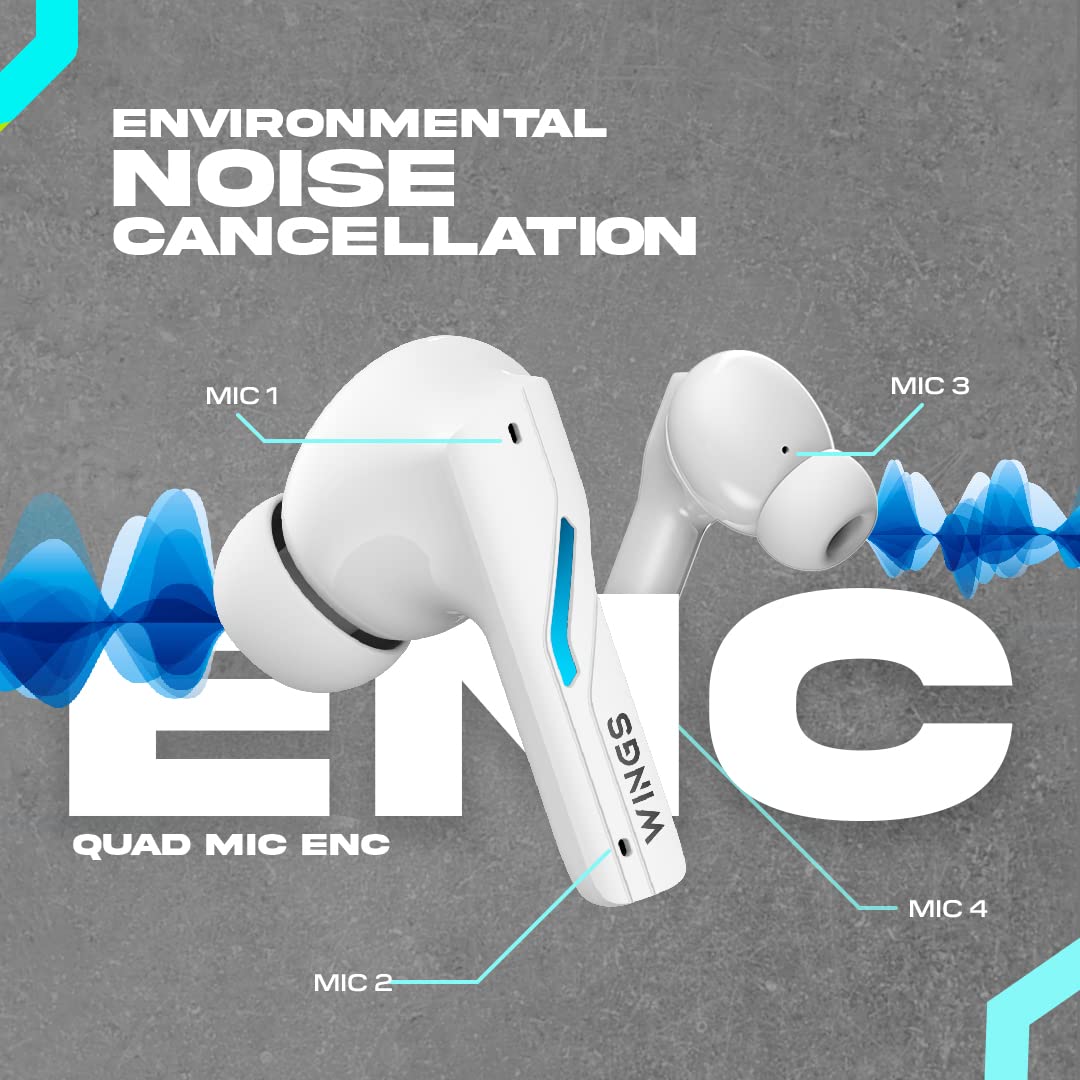
Image: A diagram illustrating the four Environmental Noise Cancellation (ENC) microphones on the Wings Phantom 850 earbuds, designed for clear call quality.
5. Itọju
5.1. Ninu
Mimọ deedee n ṣe iranlọwọ lati ṣetọju didara ohun ati mimọ:
- Rọra nu awọn afikọti ati apoti gbigba agbara pẹlu asọ, gbẹ, asọ ti ko ni lint.
- Yọ awọn imọran eti kuro ki o sọ wọn di mimọ pẹlu ọṣẹ kekere ati omi, lẹhinna gbẹ daradara ṣaaju ki o to tun ṣe.
- Use a dry cotton swab to clean the charging contacts on both the earbuds and the case.
5.2. Omi Resistance
The Wings Phantom 850 earbuds are rated IPX5 water resistant, meaning they can withstand splashes and sweat. They are not designed for submersion in water.
- Maṣe fi agbekọri naa han si omi ṣiṣan tabi wọ wọn lakoko odo tabi iwẹ.
- Rii daju pe awọn agbekọri ti gbẹ ṣaaju gbigbe wọn pada si apoti gbigba agbara lati yago fun ibajẹ.
6. Laasigbotitusita
If you encounter issues with your Wings Phantom 850 earbuds, refer to the following common solutions:
- Ko si Awọn iṣoro Ohun/Asopọmọra:
- Rii daju pe awọn agbekọri mejeeji ti gba agbara.
- Rii daju pe Bluetooth ti ṣiṣẹ lori ẹrọ rẹ ati pe a ti yan awọn agbekọri.
- Gbiyanju aiṣiṣẹpọ ati tun-pipọ awọn agbekọri pẹlu ẹrọ rẹ.
- Tun ẹrọ rẹ bẹrẹ.
- Agbohunsafefe kan Ko Ṣiṣẹ:
- Fi àwọn ètí ìgbọ́rọ̀ méjèèjì padà sínú àpótí ìgbóná, pa ìbòrí náà, dúró fún ìṣẹ́jú díẹ̀, lẹ́yìn náà ṣí i kí o sì tún gbìyànjú lẹ́ẹ̀kan sí i.
- Nu awọn olubasọrọ gbigba agbara kuro lori agbekọri ati ninu ọran naa.
- Awọn iṣoro gbigba agbara:
- Rii daju pe okun gbigba agbara ti sopọ ni aabo.
- Gbiyanju ibudo USB ti o yatọ tabi ohun ti nmu badọgba gbigba agbara.
- Nu awọn olubasọrọ gbigba agbara kuro.
- Iwọn didun kekere/Dídára ohùn tí kò dára:
- Ṣatunṣe iwọn didun lori ẹrọ rẹ mejeeji ati awọn agbekọri.
- Rii daju pe awọn imọran eti ti wa ni edidi daradara ninu odo eti rẹ. Gbiyanju awọn imọran eti titobi oriṣiriṣi.
- Nu eyikeyi idoti kuro lati apapo agbọrọsọ agbekọri.
- Check EQ settings in the Wings Sync App.
Fun iranlọwọ siwaju, jọwọ kan si atilẹyin alabara.
7. Awọn pato
| Ẹya ara ẹrọ | Ẹ̀kúnrẹ́rẹ́ |
|---|---|
| Orukọ awoṣe | Phantom 850 |
| Asopọmọra Technology | Ailokun (Bluetooth 5.3) |
| Bluetooth Ibiti | 15 Mita |
| Audio Driver Type | Dynamic Driver (13mm Composite Drivers) |
| Igbesi aye batiri (Earbuds) | Titi di awọn wakati 10 |
| Lapapọ akoko ere (pẹlu Ọran) | Titi di awọn wakati 50 |
| Gbigba agbara Technology | Bullet Charge™ (15 mins charge = 100 mins playtime) |
| Pataki Ẹya | ENC Quad Mic, Dedicated Gaming Mode (40ms Low Latency), App Support, Open and On Tech™ |
| Omi Resistance Ipele | IPX5 (Lan ati Omi Resistant) |
| Ọna Iṣakoso | Fọwọkan, Ohùn |
| Awọn ẹrọ ibaramu | Cellphones, Desktops, Gaming Consoles, Laptops, Tablets |
| Iwọn Nkan | 150 giramu |
| Ọja Mefa | 10 x 10 x 4 cm |

Aworan: Ohun exploded view diagram illustrating the 13mm composite drivers responsible for high-fidelity audio output in the earbuds.

Image: Information detailing the battery life, showing 50 hours of total playtime with the charging case and 10 hours of playtime on the earbuds alone.
8. Atilẹyin ọja ati Support
Your Wings Phantom 850 Wireless Earbuds come with a 1-odun atilẹyin ọja lati ọjọ ti o ra.
For warranty claims, technical support, or any other inquiries, please refer to the contact information provided on the official Wings webojula tabi rẹ ra iwe.


