1. Ọja Ipariview
The STINGER Audio MT20001 is a 1-channel monoblock Class D amplifier designed to deliver 2000 Watts RMS of continuous power for car audio subwoofer systems. Its compact design and advanced features ensure high efficiency and precise sound control. This amplifier is engineered for robust performance and includes a remote bass knob for convenient level adjustments.

Figure 1: STINGER Audio MT20001 Monoblock Amplifier and Remote Bass Knob.
Fídíò 1: Ìfihàn fídíò ìjọbaasing the STINGER Audio MT Amplifier Series, highlighting key features and design.
2. Alaye Aabo
Jọwọ ka gbogbo awọn ilana ni pẹkipẹki ṣaaju fifi sori ẹrọ ati ṣiṣẹ rẹ ampìdènà. Àìtẹ̀lé àwọn ìlànà wọ̀nyí lè fa ìbàjẹ́ sí ara amplifia, agbọrọsọ, tabi ọkọ ayọkẹlẹ, o si le fagile atilẹyin ọja rẹ.
- A ṣe iṣeduro fifi sori Ọjọgbọn: Nitori idiju ti awọn eto ohun afetigbọ ọkọ ayọkẹlẹ, fifi sori ẹrọ ọjọgbọn jẹ iṣeduro gaan.
- Orisun Agbara: Rí i dájú pé batiri ọkọ̀ náà ti ge asopọ̀ kí o tó ṣe asopọ̀ agbára láti dènà kí iná mànàmáná má ba gbóná.
- Ilẹ-ilẹ ti o tọ: Nigbagbogbo so awọn amplifier's ground terminal securely to a clean, unpainted metal surface of the vehicle chassis.
- Afẹfẹ: Gbe awọn amplifier in a location that allows for adequate air circulation to prevent overheating. Avoid covering the amplifier pẹlu carpets tabi awọn ohun elo miiran.
- Asopọmọra: Use appropriate gauge wiring for power, ground, and speaker connections as specified in the installation section. Incorrect wiring can lead to fire or equipment damage.
- Ifihan Olomi: Pa awọn amplifier away from moisture and liquids.
- Idaabobo igbọran: Fífi ara hàn fún ìwọ̀n ìfúnpọ̀ ohùn gíga fún ìgbà pípẹ́ lè fa ìbàjẹ́ ìgbọ́ran títí láé. Ṣọ́ra nígbà tí o bá ń ṣàtúnṣe ìwọ̀n ìfúnpọ̀ ohùn.
3. Fifi sori ẹrọ ati Oṣo
3.1 Awọn isopọ onirin
Proper wiring is crucial for optimal performance and safety. Refer to the diagrams and instructions below for correct connections.
- Agbara (+12V): Connect a 0/1 gauge power cable from the vehicle's positive battery terminal to the amplifier's +12V terminal. An inline fuse (not included) must be installed within 18 inches of the battery.
- Ilẹ (GND): Connect a 0/1 gauge ground cable from the amplifier's GND terminal to a clean, unpainted metal point on the vehicle chassis. The ground cable should be as short as possible.
- Latọna jijin (REM): Connect a 18-gauge remote turn-on wire from your head unit's remote output to the amplifier ká REM ebute. Eleyi waya yipada awọn amplifier lori ati pa pẹlu rẹ ori kuro.
- Iṣawọle RCA: So awọn okun RCA pọ lati inu ifihan subwoofer ti ẹrọ ori rẹ si amplifier's RCA INPUT terminals.
- RCA Bridge In/Out: Use the BRIDGE IN/OUT terminals to link multiple MT series amplifiers for a bridged system.
- Mono Output (Speakers): Connect your subwoofer(s) to the MONO OUTPUT terminals. This amplifier supports a minimum impedance of 1 Ohm. Use 8 gauge speaker wire for optimal performance.

olusin 2: Ẹyìn view ti awọn amplifier showing power, ground, remote, and mono output terminals.
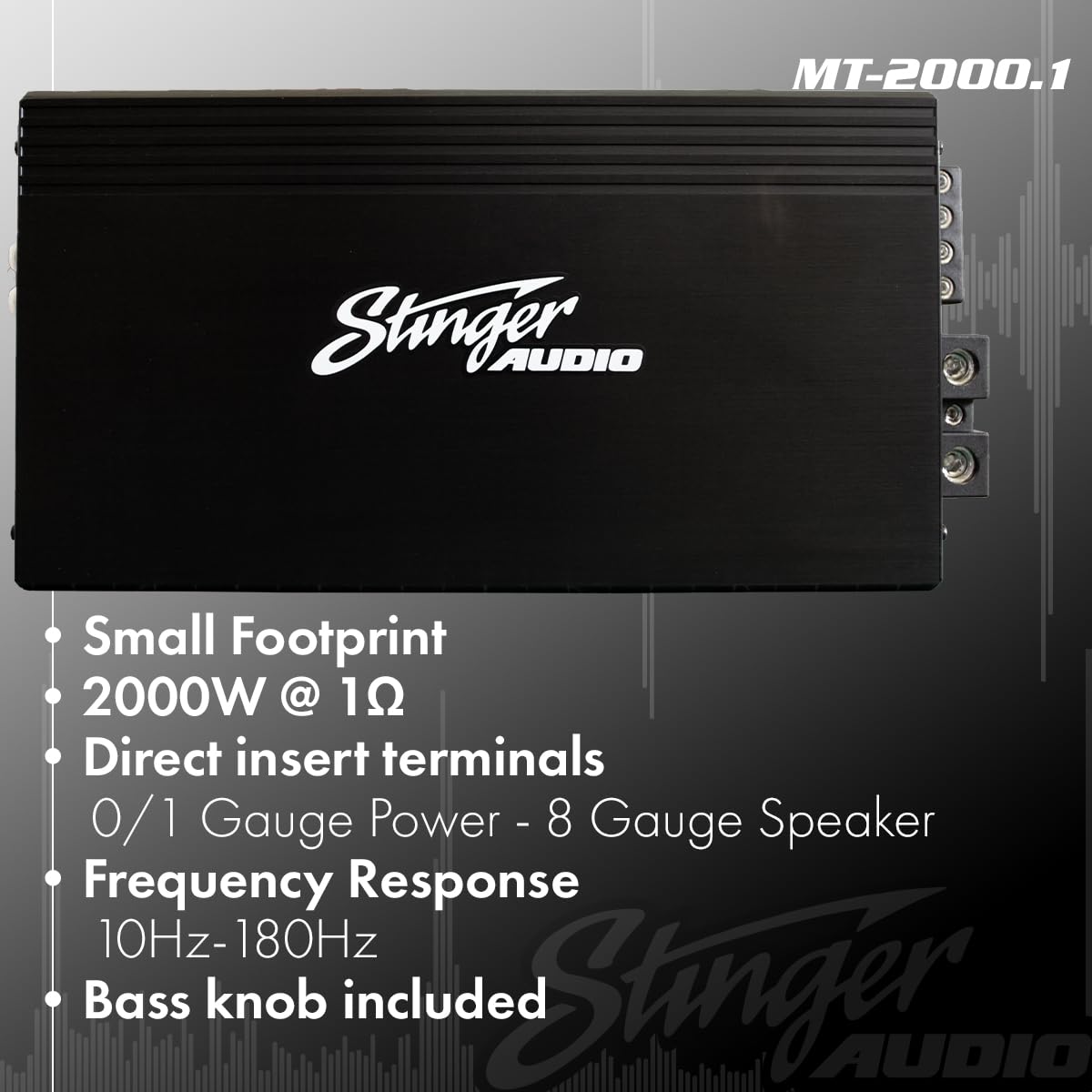
Nọmba 3: Amplifier features including terminal sizes for power (0/1 Gauge) and speaker (8 Gauge).
3.2 Àwọn Ìṣàkóso àti Àtúnṣe
MT20001 naa amplifier features several controls to fine-tune your audio system.
- Gain (Level): Satunṣe awọn input ifamọ ti awọn amplifier lati baramu awọn wu voltage ti ori rẹ kuro. Bẹrẹ pẹlu ere ni o kere ju ki o pọ si laiyara titi ti iwọn didun ti o fẹ yoo waye laisi ipalọlọ.
- Àlẹmọ Pass Kekere (LPF): This filter allows frequencies below the set point to pass through to the subwoofer. Adjustable from 40Hz to 180Hz. Set this to match your subwoofer's frequency response and blend with your main speakers.
- Ajọ Subsonic: This filter removes ultra-low frequencies that are inaudible and can cause damage to your subwoofer. Adjustable from OFF to 50Hz.
- Bass Boost Q: Provides a variable bass boost from 0dB to 12dB at a selectable frequency (30Hz or 80Hz). Use sparingly to avoid distortion.
- Knob Bass Latọna jijin: The included remote bass knob allows for convenient adjustment of the bass level from your listening position.

Nọmba 4: Amplifier control panel showing input, gain, LPF, subsonic, frequency, and bass boost settings.

Figure 5: The remote bass knob for convenient bass level adjustment.
Video 2: Detailed feature overview video for the STINGER Audio MT Amplifier Series, demonstrating its capabilities.
4. Awọn ilana Iṣiṣẹ
Ni kete ti awọn amplifier is correctly installed and wired, follow these steps for operation:
- Agbara Tan: Tan ina ọkọ rẹ ati ẹyọ ori. Awọn ampAtọka agbara lifier yẹ ki o tan imọlẹ.
- Eto Iwọn didun Ibẹrẹ: Start with the head unit's volume at a low level.
- Atunse Gba: Laiyara mu awọn amplifier's gain control (Level) until the desired volume is reached without any audible distortion. If distortion occurs, reduce the gain.
- Atunse Ajọ: Adjust the Low Pass Filter (LPF) and Subsonic Filter to optimize the subwoofer's performance and blend with your other speakers. Experiment with settings to find the best sound for your system.
- Baasi didn: If additional bass impact is desired, carefully adjust the Bass Boost Q. Excessive boost can lead to distortion and potential damage.
- Knob Bass Latọna jijin: Use the remote bass knob for quick and easy adjustments to the subwoofer's output level while listening.
5. Itọju
Itọju deede ṣe iranlọwọ fun idaniloju gigun ati iṣẹ ṣiṣe ti rẹ amplifier.
- Ninu: Lorekore nu awọn ampita lifier pẹlu asọ ti o gbẹ. Yẹra fun lilo awọn kẹmika lile tabi awọn afọmọ abrasive.
- Afẹfẹ: Rii daju pe awọn amplifier's cooling fins are free from dust and debris. Blocked fins can lead to overheating.
- Ṣayẹwo Asopọmọra: Annually, inspect all power, ground, remote, and speaker connections to ensure they are secure and free from corrosion. Loose connections can cause performance issues or damage.
- Awọn Okunfa Ayika: Dabobo awọn amplifier from extreme temperatures and direct sunlight.
6. Laasigbotitusita
Ti o ba ni iriri awọn iṣoro pẹlu rẹ amplifier, kan si itọsọna iṣoro atẹle ṣaaju ki o to kan si atilẹyin.
| Isoro | Owun to le Fa | Ojutu |
|---|---|---|
| Ko si Agbara / Ko si Imọlẹ Atọka | Fúúsì tí ó fẹ́; Agbára/ilẹ̀/ìsopọ̀ latọna jijin; Wáyà tí ó ní àbùkù. | Check and replace fuse; Verify all connections are secure; Test wiring for continuity. |
| Ko si Ijade ohun | RCA cables disconnected; Speaker wires disconnected/shorted; Gain set too low; Head unit not providing signal. | Check RCA and speaker connections; Increase gain; Verify head unit output. |
| Ohun Daru | Gain set too high; Improper filter settings; Speaker impedance mismatch; Damaged speaker. | Reduce gain; Adjust LPF/Subsonic filters; Verify speaker impedance (min 1 Ohm); Inspect speakers for damage. |
| Amplifier Overheating | Ailokun fentilesonu; Imudani agbọrọsọ ju kekere; Lilo iwọn didun giga gigun. | Rii daju pe sisan afẹfẹ to dara ni ayika amplifier; Verify speaker impedance; Reduce volume or allow cooling time. |
| Remote Bass Knob Not Working | Cable disconnected; Faulty knob. | Check connection cable; Contact support if knob is faulty. |
7. Awọn pato
Key technical specifications for the STINGER Audio MT20001 Monoblock Amplifier.
| Ẹya ara ẹrọ | Ẹ̀kúnrẹ́rẹ́ |
|---|---|
| Brand | Oludari |
| Nọmba awoṣe | MT20001 |
| Awọn iwọn Ọja (L x W x H) | 12.16 x 6.1 x 2.09 inches (309 x 155 x 53 mm) |
| Iwọn | 8 iwon |
| Voltage | 9 Volts (DC) |
| Iṣagbesori Iru | Ẹke Fula |
| Ijade agbara | 2000W @ 1 Ohm (Continuous) |
| Idahun Igbohunsafẹfẹ | 10Hz-180Hz |
| Topology | Digital Class-D |
| MOSFET Technology | HEXFET Agbara MOSFET |
| To wa Awọn ẹya ẹrọ | Remote Control Bass Knob |

Figure 6: Detailed dimensions of the STINGER Audio MT20001 Amplifier.

Àwòrán 7: Àwọn ẹ̀yà ara inú ti amplifier, showcasing robust power supplies and HEXFET MOSFET technology.

olusin 8: Ẹgbẹ profile illustrating the Digital Class-D and compact design of the amplifier.
8. Atilẹyin ọja ati Support
For warranty information, technical support, or service inquiries, please refer to the official STINGER Audio webojula tabi kan si wọn onibara iṣẹ Eka. Tọju iwe-ẹri rira rẹ bi ẹri rira fun eyikeyi awọn ibeere atilẹyin ọja.
Fun afikun awọn orisun ati alaye ọja, ṣabẹwo si STINGER Store on Amazon.


