1. Ifihan
This manual provides detailed instructions for the installation, operation, and maintenance of your WIR elektronik eWickler eW930-F radio kit. This kit includes two eWickler eW930-F electric roller shutter winders and one FB-9 remote control, designed to automate your roller shutters for enhanced convenience and security. Please read these instructions carefully before beginning installation or operation to ensure safe and efficient use of the product.
2. Awọn ilana aabo
- Always disconnect power before performing any installation, maintenance, or cleaning.
- Ensure that the roller shutter system is in good working order and free from obstructions before operation.
- Keep children and pets away from moving roller shutters.
- Do not attempt to repair the device yourself. Contact qualified personnel for service.
- Use only original WIR elektronik accessories and spare parts.
- The device is designed for indoor use only. Protect it from moisture and extreme temperatures.
3. Package Awọn akoonu
Your WIR elektronik eWickler eW930-F radio kit should contain the following items:
- 2 x WIR elektronik eWickler Standard eW930-F Surface-Mounted Roller Shutter Winders
- 1 x WIR elektronik FB-9 Remote Control
- 1 x Power plug (for each eWickler unit)
- 1 x C battery (included with remote control)
- Ohun elo iṣagbesori (awọn skru, awọn pilogi ogiri)
4. Awọn ẹya Ọja
The WIR elektronik eWickler eW930-F radio kit offers a range of features for convenient and secure roller shutter automation:
- Iṣakoso Aarin: Operate your roller shutters conveniently via the FB-9 remote control.
- Imudara Aabo: Features smoke detector signal analysis, automatically raising roller shutters in case of fire.
- Ibamu Wapọ: Suitable for all common roller shutters with strap widths between 17 mm and 23 mm.
- Ṣetan Ile Smart: Compatible with WIR-CONNECT for integration into smart home systems.
- Agbara Outage Reserve: Settings are retained for up to 20 hours during a power failure.
- Adjustable Switching Times: Program specific times for automatic raising and lowering of roller shutters.
- Network-Synchronous Clock: Ensures precise timing for automated functions.
- User-Friendly Indicators: Three LEDs provide easy-to-read function status.
- Isẹ idakẹjẹ: Soft start and soft stop functions ensure smooth and silent movement of roller shutters.
- Fifi sori Rọrun: Surface-mounted design eliminates the need for wall breaking or extensive renovation work.
5. Eto ati fifi sori
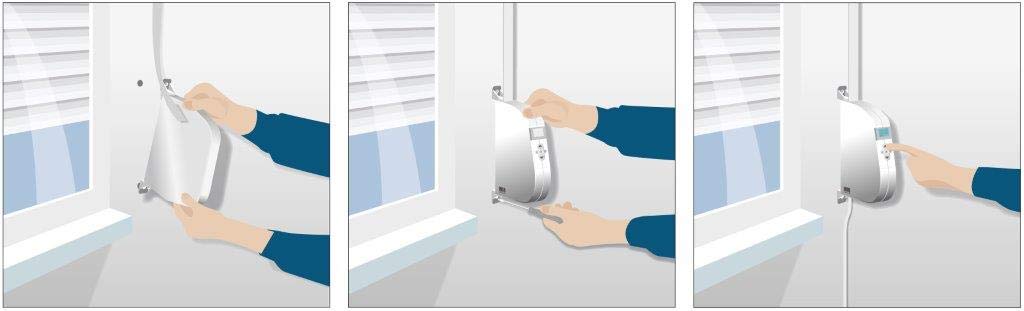
The eWickler eW930-F is designed for easy surface mounting. Follow these steps for installation:
- Mura Ibi Iṣagbesori: Choose a suitable location next to your window frame where the existing roller shutter strap exits the wall. Ensure there is enough space for the eWickler unit.
- Mount the eWickler Unit: Secure the eWickler housing to the wall using the provided screws and wall plugs. Make sure it is level and firmly attached.
- Insert the Roller Shutter Strap: Carefully feed the roller shutter strap into the eWickler unit according to the instructions in the detailed product manual (not provided here, but typically included with the physical product). Ensure the strap is correctly tensioned and aligned.
- So agbara: Plug the eWickler unit into a standard electrical outlet using the provided power plug.
- Iṣeto akọkọ: Follow the specific instructions in the product manual for initial calibration and setting the upper and lower end positions of your roller shutter.

6. Awọn ilana Iṣiṣẹ
Once installed, you can operate your eWickler eW930-F units using the controls on the device or the FB-9 remote control.
6.1. Manual Operation (on device)
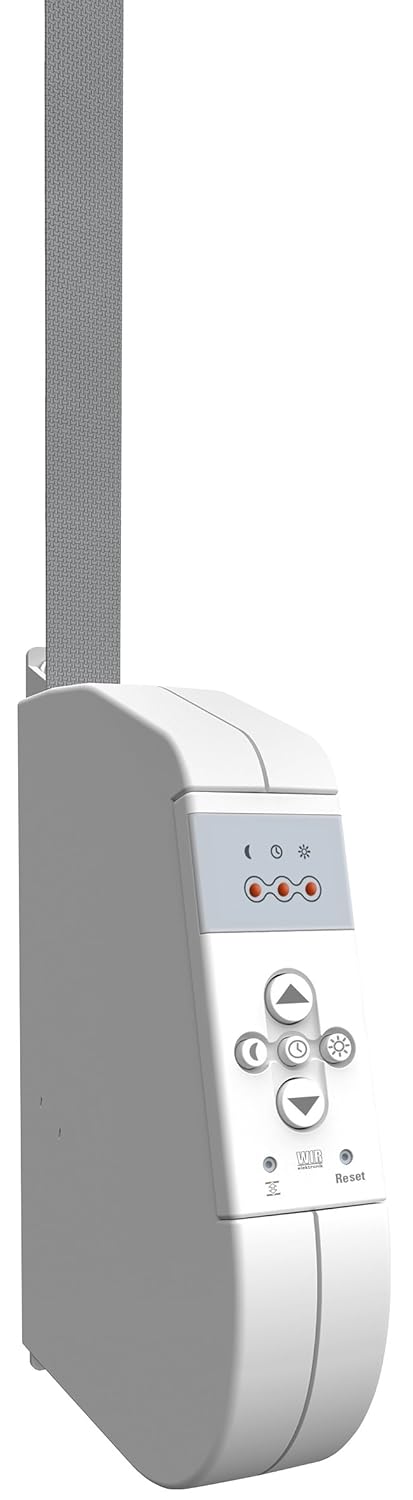
- Bọtini Soke: Press to raise the roller shutter.
- Bọtini isalẹ: Press to lower the roller shutter.
- Bọtini Duro: Press to stop the roller shutter at any desired position.
- Awọn bọtini siseto: Use the dedicated buttons (e.g., clock, sun/moon icons) to set automatic times or activate sensor functions. Refer to the full product manual for detailed programming steps.
6.2. Remote Control Operation (FB-9)
The FB-9 remote control allows for convenient wireless operation of your eWickler units.

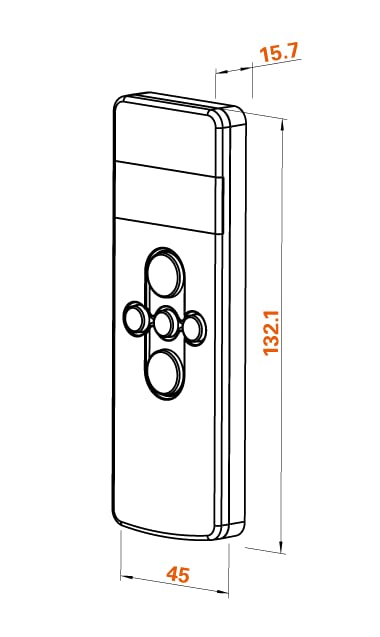
- Pipọpọ: Before first use, the FB-9 remote control must be paired with your eWickler units. Refer to the specific pairing instructions in your product manual.
- Awọn bọtini oke/isalẹ: Use the arrow buttons to raise or lower the selected roller shutter(s).
- Aṣayan ikanni: The FB-9 remote can control multiple eWickler units or groups. Use the channel selection buttons to switch between them.
- Awọn iṣẹ Aifọwọyi: The remote can also be used to activate or deactivate programmed automatic functions (e.g., timed operation, sensor control).
7. Itọju
Regular maintenance ensures the longevity and optimal performance of your eWickler system.
- Ninu: Clean the exterior of the eWickler units and remote control with a soft, dry cloth. Do not use abrasive cleaners or solvents.
- Ayẹwo okun: Periodically check the roller shutter strap for any signs of wear, fraying, or damage. Replace damaged straps immediately.
- Batiri Iṣakoso Latọna jijin: The FB-9 remote control uses a C battery. If the remote's range decreases or it becomes unresponsive, replace the battery.
- Ṣayẹwo eto: Occasionally test the automatic functions and manual operation to ensure everything is working correctly.
8. Laasigbotitusita
If you encounter issues with your eWickler system, refer to the following common problems and solutions:
| Isoro | Owun to le Fa | Ojutu |
|---|---|---|
| Roller shutter does not move. | No power supply; strap jammed; motor fault. | Check power connection; inspect strap for obstructions; contact support if motor fault is suspected. |
| Isakoṣo latọna jijin ko ṣiṣẹ. | Battery empty; remote not paired; out of range. | Replace battery; re-pair remote control with eWickler unit; move closer to the unit. |
| Automatic functions not activating. | Incorrect programming; sensor not activated. | Review and re-program automatic times; ensure any connected sensors are active and functioning. |
| Roller shutter stops mid-way. | Obstruction; end positions not correctly set. | Check for obstructions; re-calibrate end positions according to the product manual. |
If the problem persists after attempting these solutions, please contact WIR elektronik customer support.
9. Awọn pato
Technical details for the WIR elektronik eWickler eW930-F and FB-9 remote control:
- Olupese: WIR elektronik GmbH & Co.KG
- Model Number (eWickler): 1007-000075 (eW930-F)
- eWickler Dimensions (L x W x H): 13.6 x 3.7 x 21.3 cm
- Ohun elo: Ṣiṣu
- Àwọ̀: Funfun
- Strap Width Compatibility: 17 to 23 mm
- Max. Roller Shutter Weight: Titi di 45 kg
- Iru agbara: Wired / Battery operated (for remote)
- Awọn ọna Voltage: 230 Volts
- Idiwon lọwọlọwọ: 1 A
- Torque: 11 Newton-mita
- Iru fifi sori: Oke Oke
- Batiri Iṣakoso Latọna jijin: 1 x C battery (included)
- Ifipamọ Agbara: 20 hours (in case of power failure)
- Yipada Ara: Isakoṣo latọna jijin
- Awọn eroja To wa: Pulọọgi agbara
10. Atilẹyin ọja ati Support
For warranty information and customer support, please refer to the documentation provided with your purchase or visit the official WIR elektronik webojula. Jeki ẹri rira rẹ fun eyikeyi awọn ibeere atilẹyin ọja.
Ibi iwifunni:
- Olupese: WIR elektronik GmbH & Co.KG
- Webojula: Please refer to your product packaging or search online for 'WIR elektronik'.
- Iṣẹ onibara: Contact details can typically be found on the manufacturer's webojula tabi ni awọn to wa kaadi atilẹyin ọja.


