1. Alaye Aabo pataki
Please read all safety instructions carefully before using this product. Failure to follow these instructions may result in injury or damage.
- Ibi: Avoid placing the camera in unstable locations or within reach of children or pets.
- Agbara: Use only the provided AC adapter and power cable. Disconnect power before moving the device.
- Ayika: Keep the camera away from high humidity, dust, and extreme temperatures. This product is not waterproof.
- Itọju: Do not attempt to disassemble or repair the camera yourself. Contact customer support for any issues.

Image: General safety guidelines for camera usage.
2. Package Awọn akoonu
Daju pe gbogbo awọn ohun kan wa ninu package rẹ:
- Galayou G2 Camera Unit
- AC Adapter
- Okun agbara
- Ohun èlò ìfisẹ́pọ̀ (àwọn skru, àwọn ìdákọ́ró)
- Ìwé Ìtọ́sọ́nà fún Àwọn Ará Japan

Image: The Galayou G2 camera and a smartphone displaying its live feed.
3. Eto Itọsọna
3.1 Ni ibẹrẹ Oṣo
- Agbara Tan: Connect the camera to power using the provided AC adapter and cable. The indicator light will turn red.
- Igbasilẹ ohun elo: Download the dedicated 'blurams' app from the App Store (iOS) or Google Play Store (Android).
- Awọn igbanilaaye App: Ensure Bluetooth and Location permissions are enabled for the 'blurams' app in your smartphone settings.
- Kamẹra Tunto: Press and hold the reset button on the camera until you hear a beep sound. The indicator light will flash red and blue alternately, indicating it's ready for network connection.
- Fi Ẹrọ sinu App: Open the 'blurams' app, tap 'Add Device' or the '+' icon. Select your camera model (G2 or similar D1 model) and choose 'Wi-Fi connection via Bluetooth'.
- Asopọ Wi-Fi: Enter your 2.4GHz Wi-Fi network name and password. The camera only supports 2.4GHz Wi-Fi.
- Ayẹwo koodu QR: The app will display a QR code. Hold your smartphone in front of the camera lens to scan the QR code. You will hear a beep sound from the camera upon successful scan.
- Ìmúdájú Ìsopọ̀: The camera will announce 'Connection successful' and then 'Connecting to network'. Once connected, the indicator light will turn solid blue.
3.2 Video Guide: Bluetooth Wi-Fi Connection
Video: This video demonstrates the Bluetooth-assisted Wi-Fi connection method for the D1 camera, which is similar to the G2 model. It shows the steps from app permissions to successful network connection.
3.3 Video Guide: Camera Setup Method
Video: This video provides a general guide on how to set up a Skyworth pet camera, which can be used as a reference for the Galayou G2's setup process.
4. Awọn ilana Iṣiṣẹ
4.1 Live View ati Pan / Pulọọgi Iṣakoso
Once connected, you can access the live feed through the 'blurams' app. The camera offers a 355° horizontal rotation and 52° vertical rotation for comprehensive coverage.
- Pàn/Titẹ: Use the directional controls in the app to remotely adjust the camera's viewigun igun.
- Sun-un oni-nọmba: The camera supports 4x digital zoom to view awọn alaye.

Image: The camera's pan and tilt capabilities, offering a wide field of view.
4.2 Video Didara ati Night Vision
The G2 camera features 2K high-resolution video (1440p) and a 3-megapixel CMOS sensor for clear images. It also provides advanced night vision capabilities.
- Ipinnu 2K: Enjoy clear and detailed video footage.
- Awọn ọna Iran Iran Alẹ: The camera supports three night vision modes: Smart Night Vision (auto-switches between color and black & white based on motion), Color Night Vision (always color), and Infrared Night Vision (always black & white).
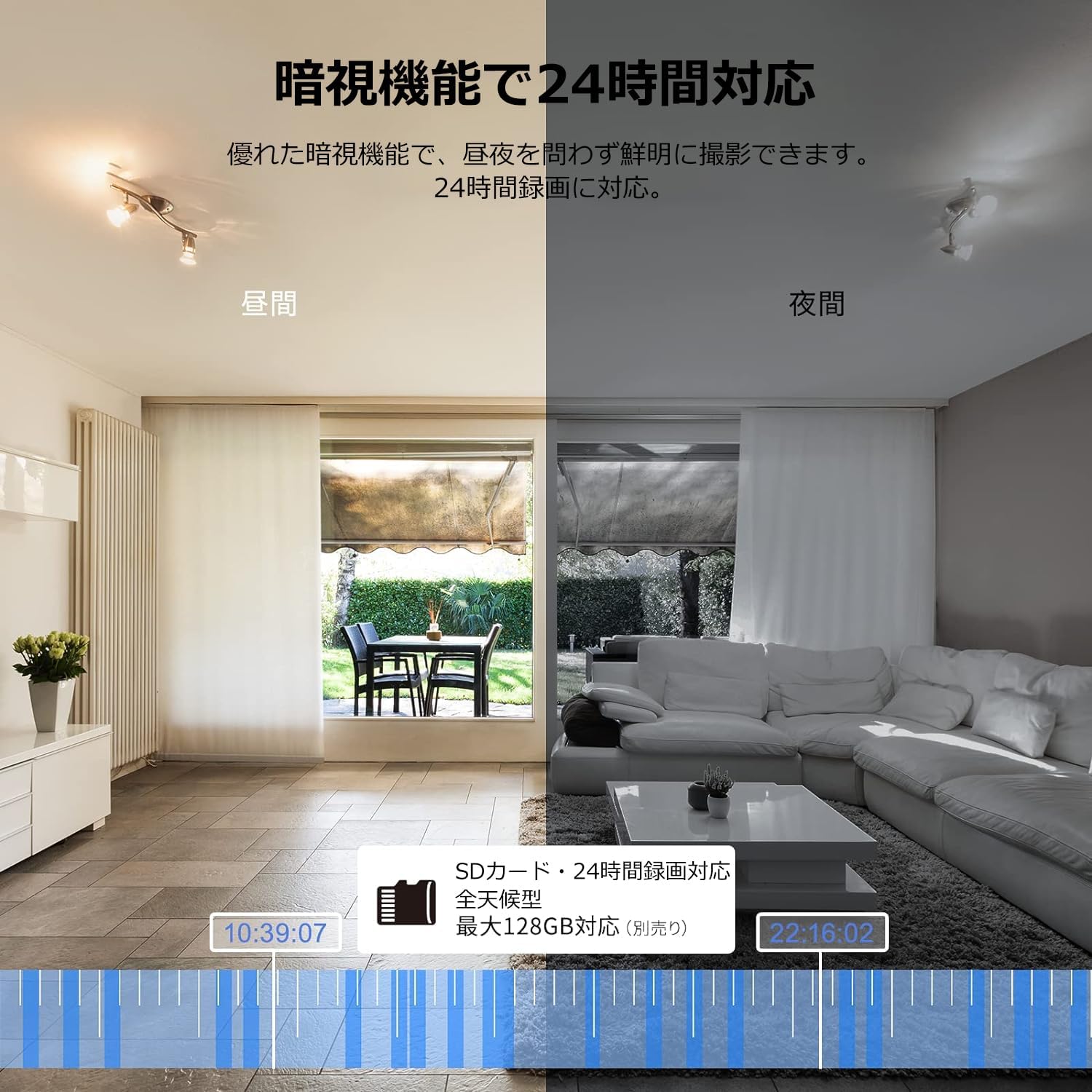
Image: Comparison of day and night vision, demonstrating the camera's ability to record clearly in low light.
4.3 Meji-Ona Audio
Equipped with a microphone and speaker, the camera allows for real-time two-way communication.
- Speak and Listen: Talk to family members or pets through the app, and hear their responses.
- Idinku Ariwo: The two-way audio features noise reduction for clearer sound.

Image: The camera's two-way audio feature, allowing interaction with pets.
4.4 Motion Detection & Automatic Tracking
The camera can detect motion and automatically track subjects within its field of view.
- Awọn titaniji išipopada: Receive instant notifications on your smartphone when motion is detected.
- Ìtẹ̀lé Àìfọwọ́sowọ́pọ̀: The camera will follow detected movement, keeping the subject in frame.
- Iwari eniyan: Advanced AI can differentiate between humans and other moving objects, reducing false alarms.
- Išẹ itaniji: Trigger an alarm sound from the camera via the app to deter intruders.

Image: Motion detection and alarm features, showing alerts on a smartphone.
4.5 Gbigbasilẹ ati Ibi ipamọ
The camera supports both local and cloud storage options for continuous recording.
- Kaadi MicroSD: Supports up to 128GB microSD cards (sold separately) for 24-hour continuous recording with automatic overwriting.
- Ibi ipamọ awọsanma: Optional paid cloud storage service is available for extended recording and backup.
- Fidio funmorawon: Utilizes H.264 and H.265 compression formats for efficient storage.


Images: MicroSD card recording and cloud storage options.
4.6 Ipo Asiri
Activate privacy mode to physically cover the camera lens, ensuring your privacy when needed.
- One-Tap Activation: Easily turn off the lens via the app.
- Physical Cover: The camera physically rotates its lens downwards, blocking the view.

Image: Privacy mode icon.
4.7 Ìṣọ̀kan Alexa
The Galayou G2 is Alexa-certified, allowing for voice control and viewing the camera feed on compatible Alexa devices.
- Awọn pipaṣẹ ohun: Lo awọn pipaṣẹ ohun si view the camera feed on an Echo Show or other Alexa-enabled screen.

Image: Alexa integration with the Galayou G2 camera.
4.8 Multi-Camera Support & Sharing
The app supports adding multiple cameras and sharing access with family members.
- Awọn kamẹra pupọ: Monitor different areas of your home by adding several cameras to the app.
- Pipin idile: Share camera access with up to 4 family members simultaneously.

Image: Family sharing and multi-camera viewing.
4.9 Video Guide: Product Features
Video: This video showcases various features of a Skyworth pet camera, including its monitoring capabilities, which are comparable to the Galayou G2.
4.10 Video Guide: Blurams 300万画素 見守りカメラ
Video: This video highlights the features of a Blurams 3-megapixel monitoring camera, demonstrating functionalities similar to the Galayou G2.
4.11 Video Guide: JUFLSKY 300万画素 360°PTZ機 (Preview)
Fidio: A kukuru ṣaajuview ifihan fidioasing a 300-megapixel 360° PTZ camera, similar in functionality to the G2.
5. Laasigbotitusita
- Ko le Sopọ si Wi-Fi:
- Rii daju pe nẹtiwọki Wi-Fi rẹ jẹ 2.4GHz. Kamẹra ko ṣe atilẹyin awọn nẹtiwọki 5GHz.
- Ṣayẹwo ọrọ igbaniwọle Wi-Fi rẹ fun deede.
- Gbe kamẹra naa sunmọ olutọpa Wi-Fi rẹ.
- Perform a factory reset on the camera and try the setup process again.
- No Live Feed:
- Ṣayẹwo asopọ intanẹẹti rẹ.
- Ensure the camera is powered on and the indicator light is solid blue.
- Restart the app and/or your smartphone.
- Iwari išipopada Ko Ṣiṣẹ:
- Rí i dájú pé a ti ṣiṣẹ́ ìwádìí ìṣísẹ̀ nínú àwọn ètò àpù náà.
- Ṣàtúnṣe ìfàmọ́ra ìwádìí ìṣísẹ̀.
- Rii daju pe ko si awọn idena ti o dina kamẹra naa view.
- Didara fidio ti ko dara:
- Check your internet speed. A stable connection is required for optimal streaming.
- Rii daju pe lẹnsi kamẹra jẹ mimọ.
- Adjust the video quality settings in the app (e.g., from SD to 2K).
6. Awọn pato
| Ẹya ara ẹrọ | Sipesifikesonu |
|---|---|
| Orukọ awoṣe | G2 |
| Iṣagbesori Iru | Tabletop and Ceiling Mount |
| Ipinnu Yaworan fidio | 1440p (2K) |
| Àwọ̀ | Automatic Tracking Camera |
| Awọn irinše to wa | Camera body, AC adapter, Japanese instruction manual, mounting set, power cable |
| Imọ-ẹrọ Ibaraẹnisọrọ Alailowaya | Wi-Fi (2.4GHz nikan) |
| Ipinnu fidio ti o munadoko | 2 Megapixels (300万画素) |
| Aaye ti View | 95 iwọn |
| Ibiti Iran Night | 7 mita |
| Iwọn fireemu | 15 fps |
| Ohun elo | Ṣiṣu |
| Awọn iwọn Ọja (LxWxH) | 7.2 x 7.2 x 10.9 cm |
| Omi Resistance Ipele | Ko mabomire |
| Orisun Imọlẹ | Infurarẹẹdi |
| Iṣeduro Lilo | Aabo inu ile |
| inu ile / ita gbangba Lo | Ninu ile |
| Awọn ẹrọ ibaramu | Smartphone, Tablet, Desktop, Laptop |
| Orisun agbara | Okun Itanna |
| Adarí Iru | App |
7. Atilẹyin ọja ati Support
The Galayou G2 camera comes with a manufacturer's warranty and customer support.
- Atilẹyin ọja: Atilẹyin ọja olupese ọdun 1.
- Oluranlowo lati tun nkan se: For any issues or questions, please contact GALAYOU customer support through the app or visit the official GALAYOU store on Amazon.


