1. Ifihan
Thank you for choosing the ERICKHILL EWM03 Pin-Type Moisture Meter. This device is designed for accurate measurement of moisture content in various materials, including wood and building materials. It features a clear LCD display with backlight, multiple material modes, and convenient functions like data hold and auto-off. Please read this manual thoroughly before use to ensure proper operation and to extend the life of your device.
2. Alaye Aabo
- The measurement pins are sharp. Handle with care to avoid injury.
- Do not insert the pins into live electrical circuits or materials.
- Pa ẹrọ naa mọ kuro ninu omi ati ọriniinitutu giga lati yago fun ibajẹ.
- Ma ṣe gbiyanju lati tunto tabi yi ẹrọ naa pada. Awọn atunṣe yẹ ki o ṣee ṣe nipasẹ oṣiṣẹ ti o peye nikan.
- Yọ awọn batiri kuro ti ẹrọ naa ko ba ni lo fun igba pipẹ lati ṣe idiwọ jijo.
3. Ọja Ipariview
Familiarize yourself with the components of your ERICKHILL EWM03 moisture meter:
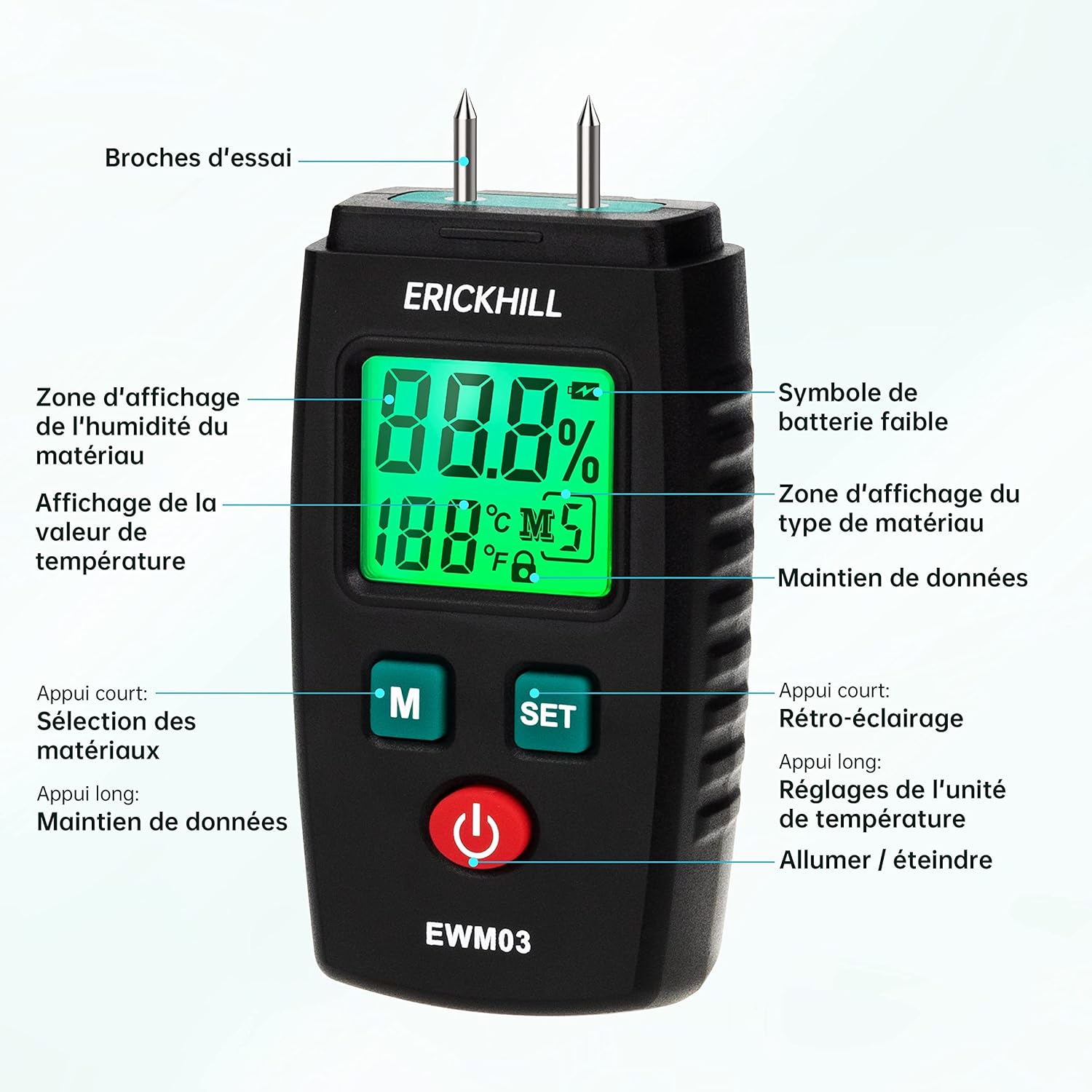
- Awọn Pinni Idanwo: Used to penetrate the material for moisture measurement.
- Ifihan LCD: Shows moisture percentage, temperature, battery status, and selected material mode.
- Bọtini 'M': Short press to select material modes. Long press to activate/deactivate Data Hold.
- Bọ́tìnì 'ṢE': Short press to turn backlight on/off. Long press to switch temperature units (°C/°F).
- Bọtini agbara: Tan ẹrọ naa si tan tabi pa.
- Fila Idaabobo: Covers the test pins when not in use.
4. Eto
4.1 Fifi sori batiri
- Wa ideri iyẹwu batiri ni ẹhin ẹrọ naa.
- Gbe tabi ṣi ideri naa.
- Insert two (2) AAA batteries, observing the correct polarity (+/-) as indicated inside the compartment.
- Pa ideri batiri naa ni aabo.
Akiyesi: Awọn batiri AAA meji wa pẹlu ẹrọ naa.
4.2 Titan / Pa a
- Lati Fi agbara: Press the red power button. The LCD display will illuminate.
- Lati Paarẹ: Press the red power button again. The device will also automatically power off after approximately 10 minutes of inactivity to conserve battery life.
5. Awọn ilana Iṣiṣẹ
5.1 Selecting Material Modes
The ERICKHILL EWM03 offers 5 calibrated modes for different material types. To select a mode:
- Tan ẹrọ naa.
- Short press the 'M' button repeatedly to cycle through the 5 material modes (M1, M2, M3, M4, M5). The selected mode will be displayed on the LCD.

Refer to the table below for detailed information on each material mode:
| Ipo | Ohun elo Iru | Iwọn Iwọn |
|---|---|---|
| M1 | Rhodesian Teak, White Red Bean, Brazilian Walnut | 6.0% ~ 39% |
| M2 | Walnut, Poplar, Teak | 7.0% ~ 48% |
| M3 | Fir, Lauan, White Fir, Maple, Ash, Sandalwood, Elm, Hemlock, Beech, Dipterocarp, Oak | 8.5% ~ 54% |
| M4 | Masson Pine, Chili Trees, White Pine, Larch, Birch, Linden | 9.5% ~ 65% |
| M5 | Bricks and other building materials | 0% ~ 15.2% |
5.2 Gbigba Idiwon
- Remove the protective cap from the test pins.
- Select the appropriate material mode (M1-M5) using the 'M' button.
- Carefully push the test pins into the material you wish to measure. Ensure both pins are fully inserted and make good contact with the material.
- Ka ipin ogorun ọrinrintage displayed on the LCD screen. The temperature of the environment will also be shown.
- After measurement, gently pull the pins out and replace the protective cap.


5.3 Data idaduro Išė
To freeze the current measurement on the display:
- While taking a measurement, long press the 'M' button. The 'HOLD' icon will appear on the display.
- To release the data hold, long press the 'M' button again.
5.4 Backlight Iṣakoso
The LCD backlight improves visibility in low-light conditions:
- Short press the 'SET' button to turn the backlight on.
- Short press the 'SET' button again to turn the backlight off.
5.5 Aṣayan iwọn otutu
Lati yipada laarin Celsius ati Fahrenheit:
- Long press the 'SET' button to toggle between °C and °F.
5.6 Laifọwọyi Power Pa
The device is equipped with an automatic power-off function to save battery life. If no button is pressed for approximately 10 minutes, the meter will automatically shut down.
6. Itọju
6.1 Ninu
- Mu ese ẹrọ rẹ jẹ pẹlu asọ, asọ gbigbẹ.
- Ma ṣe lo abrasive ose tabi epo.
- Ensure the test pins are clean and free of debris after each use.
6.2 Ibi ipamọ
- Always replace the protective cap over the test pins when not in use.
- Tọju ẹrọ naa ni itura, aye gbigbẹ, kuro lati orun taara ati awọn iwọn otutu to gaju.
- Tí o bá ń tọ́jú rẹ̀ fún ìgbà pípẹ́, yọ àwọn bátìrì náà kúrò kí ó má baà jò.
6.3 Batiri Rirọpo
When the low battery symbol appears on the display, replace the batteries as described in Section 4.1. Use only AAA alkaline batteries.
7. Laasigbotitusita
If you encounter issues with your ERICKHILL EWM03, refer to the following common problems and solutions:
- Ẹrọ ko ni agbara lori:
- Ṣayẹwo boya awọn batiri ti fi sori ẹrọ daradara pẹlu polarity to pe.
- Rọpo pẹlu awọn batiri AAA tuntun.
- Kò sí ìwé kíkà tàbí kíkà tí kò dúró ṣinṣin:
- Ensure the test pins are fully inserted into the material and making good contact.
- Verify that the selected material mode is appropriate for the material being tested.
- Clean the test pins if they appear dirty or corroded.
- Awọn kika ti ko pe:
- Ensure the correct material mode is selected.
- Test on a known dry material to verify baseline.
- Consider ambient temperature and humidity, which can slightly influence readings.
- Ifihan ti wa ni baibai tabi yiyi:
- Rọpo awọn batiri.
- Ti ọrọ naa ba wa, kan si atilẹyin alabara.
8. Awọn pato
| Ẹya ara ẹrọ | Sipesifikesonu |
|---|---|
| Awoṣe | EWM03 |
| Ilana wiwọn | Pin-type (invasive) |
| Ibiti a ti n wiwọn (Igi) | 6.0% ~ 65% (depending on mode) |
| Measurement Range (Building Materials) | 0% ~ 15.2% |
| Yiye | ± 2.0% |
| Iwọn otutu | 0°C ~ 50°C (32°F ~ 122°F) |
| Orisun agbara | 2 x AAA batiri (pẹlu) |
| Agbara Aifọwọyi Pa a | Isunmọ. Awọn iṣẹju 10 ti aiṣiṣẹ |
| Awọn iwọn (L x W x H) | 4.3 x 2.44 x 9.35 cm |
| Iwọn | 280 giramu |
| Ohun elo Iwadi | Irin ti ko njepata |
| Casing Ohun elo | PVC |
9. Atilẹyin ọja ati Support
ERICKHILL is committed to providing professional and high-quality meters. Your ERICKHILL EWM03 Moisture Meter comes with:
- 36-Month After-Sales Service: For any issues arising within 36 months of purchase, please contact our customer service for assistance.
- Atilẹyin Imọ-ọjọ igbesi aye: We offer lifetime technical support to ensure you get the most out of your device.
For warranty claims, technical assistance, or any questions regarding your product, please contact ERICKHILL customer support through your purchase platform or the official ERICKHILL webojula.


