1. Ifihan
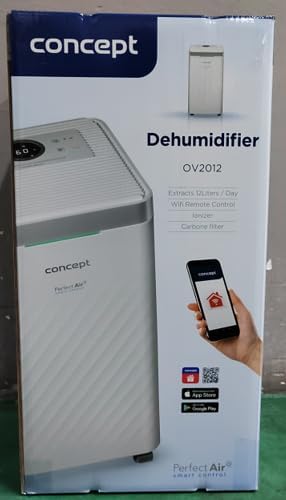
The Concept OV2012 is a versatile appliance designed to improve indoor air quality by combining dehumidification with air purification. This device effectively reduces excess humidity, which can contribute to mold growth and discomfort, while simultaneously filtering airborne pollutants. It features a triple filtration system, intuitive touch controls, and smart app connectivity for convenient operation.

olusin 1: Iwaju view of the Concept OV2012 Dehumidifier.
2. Alaye Aabo
Jọwọ ka gbogbo awọn ilana aabo ni pẹkipẹki ṣaaju lilo ohun elo naa. Ikuna lati tẹle awọn ilana wọnyi le ja si mọnamọna, ina, tabi ipalara nla.
- Rii daju pe ipese agbara voltage baamu aami igbelewọn lori ohun elo naa.
- Ma ṣe ṣiṣẹ ẹyọ naa pẹlu okun agbara ti o bajẹ tabi pulọọgi.
- Keep the appliance away from water and other liquids. Do not immerse it.
- Ma ṣe dina awọn ẹnu-ọna afẹfẹ tabi awọn ita. Rii daju pe aaye to peye ni ayika ẹyọ naa fun ṣiṣan afẹfẹ to dara.
- Unplug the unit before cleaning, maintenance, or when not in use for extended periods.
- Ohun elo yii kii ṣe ipinnu fun lilo nipasẹ awọn eniyan (pẹlu awọn ọmọde) pẹlu idinku ti ara, imọlara, tabi awọn agbara ọpọlọ, tabi aini iriri ati imọ, ayafi ti wọn ba ti fun ni abojuto tabi itọnisọna.
- Má ṣe lo ohun èlò náà ní àwọn ibi tí àwọn gáàsì tàbí èéfín tó lè jóná bá wà.
3. Ọja irinše
Familiarize yourself with the main parts of your Concept OV2012 dehumidifier.
- Ibi iwaju alabujuto: Touch-sensitive interface for setting modes and functions.
- Oju-afẹfẹ: Where processed air is released.
- Ideri Atẹwọle/Alẹmọ: Located at the rear, provides access to the air filters.
- Omi omi: Collects condensed water.
- Continuous Drainage Outlet: Port for attaching a hose for continuous water drainage.
- 360° Rolling Wheels: Fun irọrun gbigbe ti ẹyọkan.

olusin 2: Ẹyìn view of the dehumidifier, showing air intake and water tank.
4. Iṣakoso Panel ati Ifihan
The OV2012 features an intuitive touch control panel with a digital display and LED indicators.
Nọmba 3: Alaye view ti nronu iṣakoso ifọwọkan.
- Bọtini agbara: Yipada ẹyọ naa tan tabi pa.
- Aṣayan Ipo: Cycles through operating modes (Automatic, Continuous, Laundry Drying, Fan).
- Humidity Slider/Buttons: Ṣe atunṣe ipele ọriniinitutu ti o fẹ.
- Bọtini Aago: Sets the delayed on/off time (up to 24 hours).
- Iyara Olufẹ: Adjusts fan speed (usually two levels).
- Bọtini Ioniser: Ó ń mú iṣẹ́ ionizer ṣiṣẹ́ tàbí ó ń mú un kúrò.
- LED Humidity Indicator: Changes color based on current room humidity:
- Pupa: High humidity (RH > 70%)
- Alawọ ewe: Satisfactory humidity (70% ≥ RH ≥ 50%)
- Buluu: Low humidity (RH < 50%)
5. Ni ibẹrẹ Oṣo
- Ṣii silẹ: Farabalẹ yọ dehumidifier kuro ninu apoti rẹ. Ṣe idaduro apoti fun ibi ipamọ iwaju tabi gbigbe.
- Ibi: Place the unit on a firm, level surface. Ensure there is at least 20 cm of clear space around all sides for optimal airflow. The 360° rolling wheels allow for easy positioning.
- Asopọ agbara: Pulọọgi okun agbara sinu iṣan itanna ti ilẹ.
- Omi omi: Rii daju pe o ti fi ojò omi sinu ẹyọ naa daradara.
6. Awọn ọna ṣiṣe
The OV2012 offers four distinct operating modes to suit various needs:
- Ipo Aifọwọyi: The dehumidifier automatically maintains the humidity level you select. The unit will cycle on and off to achieve and sustain the target humidity.
- Ise Tesiwaju: Ideal for long-term drying of very wet areas. In this mode, the unit runs continuously regardless of the ambient humidity. It is recommended to use the continuous drainage hose in this mode.
- Ipo gbigbe ifọṣọ: Accelerates the drying of laundry and helps prevent moisture buildup in the room, reducing the risk of mold.
- Fan Mode (Air Purification without Dehumidification): In this mode, the compressor is off, and only the fan and filtration system operate to purify the air without removing moisture.
Using the Concept Home Mobile Application
The OV2012 can be controlled remotely via the Concept Home mobile application, available for iOS and Android devices. This app allows you to:
- Tan-an tabi pa ẹrọ naa.
- Select desired operating modes.
- Check the current air status in the room.
- Create a precise operating schedule for the dehumidifier.

Figure 4: The Concept Home mobile application for remote control.
7. Omi Imugbẹ
Omi ojò idominugere
When the 2.2-liter water tank is full, the unit will automatically shut off, and an indicator light will illuminate. Carefully remove the water tank, empty it, and reinsert it securely to resume operation.
Imugbẹ ti o tẹsiwaju
For continuous operation without needing to empty the water tank, attach the included hose to the continuous drainage outlet. Direct the hose to a suitable drain, ensuring it is sloped downwards for proper water flow. This allows the unit to operate uninterrupted.
8. Itọju ati Cleaning
Itọju deedee n ṣe idaniloju iṣẹ ṣiṣe to dara julọ ati igba pipẹ ti ẹrọ imukuro rẹ.
Sisẹ Ajọ
The OV2012 features a triple filter system:
- Ajọ eruku: Captures coarse impurities like dust particles, hair, fur, and pollen. This filter should be cleaned regularly.
- Ajọ Erogba ti a mu ṣiṣẹ: Absorbs toxic, suffocating, and foul-smelling gases and vapors, such as formaldehyde, benzene, and cigarette smoke. This filter requires periodic replacement (Optional accessory: Carbon filter - 42394390).
- Ionizer: Refreshes and purifies the air by increasing negatively charged ions, neutralizing odors and absorbing positively charged particles, viruses, and bacteria.
To clean the dust filter, remove the rear filter cover, gently remove the filter, and clean it with a vacuum cleaner or rinse it with water. Ensure it is completely dry before reinserting. Replace the activated carbon filter as recommended by the manufacturer or when you notice a decrease in odor removal effectiveness.

Figure 5: Illustration of the triple filtration system.
Ninu Omi Omi
Periodically clean the water tank with mild detergent and warm water to prevent mold and bacterial growth. Rinse thoroughly and dry before reinserting.
Ita Cleaning
Mu ese ita kuro pẹlu asọ, damp asọ. Ma ṣe lo abrasive ose tabi epo.
9. Itọsọna Laasigbotitusita
Ti o ba pade awọn ọran pẹlu ẹrọ mimu-mimu rẹ, tọka si awọn iṣoro ti o wọpọ ati awọn ojutu wọnyi:
| Isoro | Owun to le Fa | Ojutu |
|---|---|---|
| Ẹka ko ni tan-an | Ko si ipese agbara; Omi omi ti o kun tabi fi sii ni aṣiṣe. | Check power cord connection; Empty and reinsert water tank correctly. |
| Ko si itusilẹ | Room temperature too low; Air filters clogged; Humidity setting too high. | Ensure room temperature is above 5°C; Clean or replace filters; Lower the desired humidity setting. |
| Unit jẹ alariwo | Kuro ko lori kan ipele dada; Afẹfẹ àlẹmọ dí. | Place unit on a flat, stable surface; Clean or replace air filters. |
| Àmì tí ó kún fún àpò omi yóò máa ṣiṣẹ́ lẹ́yìn tí a bá ti tú omi náà | Water tank not fully inserted; Sensor malfunction. | Push the water tank firmly into place; If problem persists, contact customer support. |
Ti iṣoro naa ba wa lẹhin igbiyanju awọn iṣeduro wọnyi, jọwọ kan si atilẹyin alabara.
10. Imọ ni pato
| Ẹya ara ẹrọ | Sipesifikesonu |
|---|---|
| Nọmba awoṣe | OV2012 |
| Dehumidification Performance (max) | 12 liters/day (at 30°C, 80% RH) |
| Iwọn Omi Omi | 2.2 lita |
| Agbara agbara | 210 W (Note: Product description also mentions 245W, refer to product label for exact value) |
| Ariwo Ipele | ≤45 dB |
| Awọn iwọn (W x D x H) | 250 x 250 x 460 mm (25 x 25 x 46 cm) |
| Iwọn Nkan | 10.82 kg |
| USB Ipari | 1.8 m |
| Awọn ọna ṣiṣe | 4 (Automatic, Continuous, Laundry Drying, Fan) |
| Sisẹ Ajọ | Dust filter, Activated Carbon filter, Ionizer |
| Iṣakoso | Touch control, Mobile App (Concept Home) |
| Pataki Awọn ẹya ara ẹrọ | Automatic Shut-off, Timer, 360° wheels, LED Humidity Indicator |

olusin 6: Awọn iwọn ọja.
11. Atilẹyin ọja ati Onibara Support
For warranty information, please refer to the warranty card included with your product or contact your local Concept distributor. For technical support, spare parts, or service inquiries, please contact Concept customer service. Contact details may be found on the product packaging or the official Concept webojula.
Example contact information from product packaging (may vary by region):
- CZ: Zavolejte nám +420 465 471 400, www.my-concept.cz
- SK: Zavolajte nám +421 326 583 465, www.my-concept.sk
- PL: Zadzwoń do nas +48 71 339 04 44, www.my-concept.pl


