1. Ọja Ipariview
The Nexxt Wireless Security Camera offers a robust solution for both indoor and outdoor surveillance. Designed for ease of use and versatility, these cameras provide high-definition video, motion detection, two-way audio, and night vision capabilities, all powered by a built-in rechargeable battery for wire-free operation.
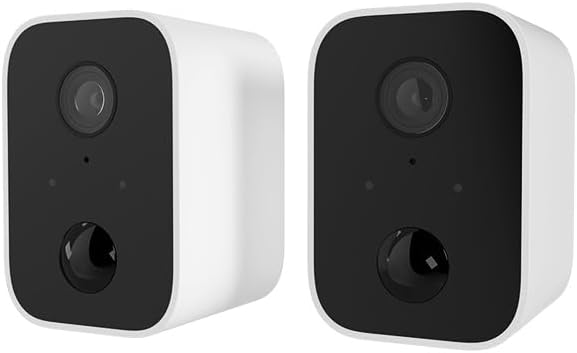
Image: Two Nexxt Wireless Security Cameras, showcasing their compact, white design with black camera faces.
Awọn ẹya pataki:
- 1080P HD Live Video: Crystal clear real-time video and playback.
- Batiri ti a ṣe sinu: Wire-free design for flexible placement and continued operation during power outages.
- IP65 Oju ojo: Durable construction suitable for outdoor use in various weather conditions.
- Iwari išipopada: Sends instant notifications to your smartphone upon detecting movement up to 26ft away.
- Audio Ọna Meji: Communicate directly through the camera using the built-in speaker and microphone.
- Iran Alẹ: Equipped with IR LEDs for clear vision in low-light or dark conditions.
- Ibi ipamọ & Awọsanma: Supports micro-SD card (not included) for local storage and optional cloud storage (subscription required).
- Iṣọkan Ile Smart: Compatible with Amazon Alexa and Google Assistant for voice control.

Image: A single Nexxt security camera surrounded by icons representing its features: Full 1080P HD, Motion detection, Two-way communication, Night vision, Voice activated, IP65 weatherproof, Micro-microSD™ slot, Wall mount bracket included, and Cloud ready.
2. Package Awọn akoonu
Jọ̀wọ́ rí i dájú pé gbogbo àwọn ohun èlò wà níbẹ̀, wọ́n sì wà ní ipò tó dára nígbà tí o bá ṣí àpótí náà. Tí àwọn ohun èlò kan bá sọnù tàbí tí wọ́n bá bàjẹ́, jọ̀wọ́ kan sí ìrànlọ́wọ́ àwọn oníbàárà.
- 2 x Nexxt Wireless Security Cameras
- 2 x iṣagbesori Awọn Biraketi
- 2 x Awọn okun gbigba agbara USB
- 1 x Itọsọna Ibẹrẹ kiakia
- Iṣagbesori skru ati odi ìdákọró

Image: The retail packaging for the Nexxt Smart Wi-Fi battery camera 2-pack, showing the cameras and key features on the box.
3. Eto Itọsọna
3.1 Ngba agbara si Kamẹra
Before initial use, fully charge both cameras. Connect the provided USB charging cable to the camera's charging port and a standard USB power adapter (not included). The charging indicator light will show the charging status.
3.2 Downloading the Nexxt App
Wa fun "Nexxt Home" in the Apple App Store or Google Play Store and download the application. Create an account or log in if you already have one.
3.3 Pipọpọ Kamẹra
- Open the Nexxt Home app and tap the "+" icon to add a new device.
- Select "Security Camera" from the device list.
- Follow the on-screen instructions to put the camera into pairing mode (usually involves pressing a reset button until an indicator light flashes).
- So foonu alagbeka rẹ pọ si nẹtiwọki Wi-Fi 2.4GHz kan. Note: 5GHz networks are not supported.
- The app will display a QR code. Hold your camera approximately 6-8 inches (15-20 cm) in front of your phone's screen until you hear a prompt from the camera.
- Once paired, the camera will connect to your Wi-Fi network, and you can name your device within the app.
3.4 Iṣagbesori Kamẹra
The Nexxt Wireless Security Camera can be easily mounted indoors or outdoors. Choose a location that provides the desired viewigun ati pe o wa laarin ibiti nẹtiwọki Wi-Fi rẹ wa.

Image: A Nexxt security camera mounted on an exterior wall, demonstrating its weatherproof design and easy installation.
- Identify a suitable mounting surface.
- Use the provided mounting bracket as a template to mark drill holes.
- Lu awọn ihò awaoko ki o si fi awọn ìdákọró ogiri sii ti o ba n gbe sinu ogiri gbigbẹ tabi masonry.
- Ṣe aabo akọmọ iṣagbesori si dada nipa lilo awọn skru ti a pese.
- So kamẹra mọ bracket fifi sori ẹrọ ki o si ṣatunṣe igun naa bi o ṣe nilo.

Image: A Nexxt security camera detached from its mounting bracket, showing the connection point for easy installation and removal.
4. Isẹ
4.1 Live View
Open the Nexxt Home app and select your camera from the device list to access the live video feed. You can view gidi-akoko footage lati ibikibi pẹlu isopọ Ayelujara.
4.2 Wiwa išipopada
The camera's motion sensors detect movement up to 26 feet away. When motion is detected, the camera will record a short clip and send a notification to your smartphone. You can adjust motion sensitivity and set detection zones within the app settings.

Image: A dog and a child playing in a yard, with a 'Motion detection' icon overlay, illustrating the camera's ability to detect activity.
4.3 Meji-Ona Audio
To use two-way audio, tap the microphone icon in the live view Ìbáṣepọ̀ ohun èlò náà. Lẹ́yìn náà, o lè sọ̀rọ̀ nípasẹ̀ fóònù rẹ, a ó sì gbé ohùn rẹ jáde nípasẹ̀ agbọ́hùnsọ kámẹ́rà náà. Tú àmì náà sílẹ̀ láti gbọ́.
4.4 Night Vision
Kamẹra naa yipada laifọwọyi si ipo iran alẹ ni awọn ipo ina kekere, pese foo fidio dudu-ati-funfun ko otage. This feature ensures continuous surveillance 24/7.
4.5 Ibi ipamọ Aw
- Micro-SD Kaadi: Insert a micro-SD card (up to 128GB, not included) into the camera's slot for local storage of recordings.
- Ibi ipamọ awọsanma: Nexxt offers optional cloud storage plans for secure, off-site storage of your video recordings. Refer to the Nexxt Home app for subscription details.
4.6 Iṣakoso ohun
Integrate your Nexxt camera with Amazon Alexa or Google Assistant for convenient voice control. Follow the instructions in the Nexxt Home app to link your account with your preferred smart home platform. You can then use voice commands to view ifiwe kikọ sii lori ibaramu smati han.
5. Itọju
5.1 batiri Management
To maximize battery life, ensure the camera is fully charged before deployment. The Nexxt Home app will notify you when the battery level is low. Regular charging is recommended, especially for cameras in high-traffic areas with frequent motion detection.
5.2 Ninu kamẹra
Periodically clean the camera lens and housing with a soft, dry cloth to ensure clear image quality. Avoid using harsh chemicals or abrasive materials that could damage the camera.
5.3 famuwia imudojuiwọn
Nexxt Solutions may release firmware updates to improve performance, add new features, or address security vulnerabilities. The Nexxt Home app will notify you of available updates. It is recommended to keep your camera's firmware up to date for optimal performance and security.
6. Laasigbotitusita
| Isoro | Owun to le Fa | Ojutu |
|---|---|---|
| Camera won't turn on | Batiri kekere; Bọtini agbara ko tẹ ni deede | Charge the camera fully; Press and hold the power button for a few seconds. |
| Ko le sopọ si Wi-Fi | Incorrect Wi-Fi password; Camera too far from router; Only 2.4GHz supported | Ṣàyẹ̀wò ọ̀rọ̀ìpamọ́; Gbé kámẹ́rà sún mọ́ rọ́wọ́ọ̀tì; Rí i dájú pé o ń so mọ́ nẹ́tíwọ́ọ̀kì 2.4GHz kan. |
| Wiwa išipopada ko ṣiṣẹ | Sensitivity too low; Detection zone not set; App notifications disabled | Adjust sensitivity in app; Configure detection zones; Enable notifications for Nexxt Home app. |
| Two-way audio not clear | Poor network connection; Obstruction near microphone/speaker | Check Wi-Fi signal strength; Ensure no obstructions; Reduce background noise. |
| Night vision is blurry | Dirty lens; IR LEDs obstructed | Clean the camera lens; Ensure nothing is blocking the IR LEDs. |
7. Imọ ni pato
| Ẹya ara ẹrọ | Sipesifikesonu |
|---|---|
| Orukọ awoṣe | Battery (Built-in Battery 2PK) |
| Ipinnu Yaworan fidio | 1080p HD |
| inu ile / ita gbangba Lilo | Ita gbangba, inu ile |
| Orisun agbara | Agbara Batiri |
| Ilana Asopọmọra | Wi-Fi (2.4GHz nikan) |
| Adarí Iru | Amazon Alexa, Google Iranlọwọ |
| Iṣagbesori Iru | Ògiri Ògiri |
| International Idaabobo Rating | IP65 Weatherproof |
| Iru Itaniji | Audio ati išipopada |
| Iwọn Nkan | 1.52 poun (fun awọn meji) |
| Package Mefa | 11.69 x 6.5 x 2.56 inches |
| UPC | 798302057661 |
8. Atilẹyin ọja ati Support
8.1 atilẹyin ọja Alaye
Nexxt Solutions products typically come with a 2-year warranty from the date of purchase, covering defects in materials and workmanship. Please retain your proof of purchase for warranty claims. The warranty does not cover damage caused by misuse, accidents, unauthorized modifications, or natural disasters.
8.2 Onibara Support
For technical assistance, troubleshooting, or warranty inquiries, please visit the official Nexxt Solutions website or contact their customer support team. You can often find FAQs, video tutorials, and contact information on their support pages.
Atilẹyin Ayelujara: www.nexxtsolutions.com/support
Please have your product model number (Built-in Battery 2PK) and purchase date ready when contacting support.


