1. Ifihan
Thank you for choosing the Nexxt Indoor Smart Camera. This manual provides essential information for the safe and efficient use of your new device. Please read it thoroughly before installation and operation, and retain it for future reference.
This 1080p HD fixed room camera is designed to provide reliable indoor surveillance with features such as night vision, two-way audio communication, motion detection, and seamless integration with smart home ecosystems like Amazon Alexa and Google Assistant.
2. Alaye Aabo
- Ensure the camera is powered by the provided power adapter. Using unauthorized adapters may damage the device and void the warranty.
- Do not expose the camera to water, moisture, or extreme temperatures. It is designed for indoor use only.
- Yẹra fún gbígbé kámẹ́rà sí ibi tí oòrùn tààrà tàbí nítòsí àwọn orísun ooru.
- Ma ṣe gbiyanju lati tu tabi tun kamẹra ṣe funrararẹ. Tọkasi gbogbo iṣẹ si oṣiṣẹ oṣiṣẹ.
- Keep the camera and its accessories out of reach of children and pets.
- Ensure stable Wi-Fi connectivity for optimal performance.
3. Package Awọn akoonu
Jẹrisi pe gbogbo awọn ohun kan wa ninu package:
- NEXXT Indoor Smart Camera (NHC-I710)
- Adapter agbara
- Duro
- Afowoyi Olumulo (iwe-ipamọ yii)

Image: The retail packaging of the NEXXT Indoor Smart Camera, showing the camera and key features.
4. Ọja Ipariview
The Nexxt Indoor Smart Camera offers a range of features for comprehensive home monitoring:
- Ipinnu HD 1080p ni kikun: Pese ko o ati alaye foo fidiotage.
- Iranran Alẹ Aifọwọyi: Integrated infrared LEDs enable clear monitoring in low-light conditions up to 30 feet.
- Ibaraẹnisọrọ Ọ̀nà Meji: Built-in microphone and speaker allow for real-time audio interaction.
- Iwari išipopada: Ó ń kìlọ̀ fún ọ láti rí ìṣíṣẹ́ láàárín pápá kámẹ́rà náà view.
- Ibi ipamọ agbegbe ati awọsanma: Supports microSD cards (sold separately) and Microsoft Azure cloud storage (subscription sold separately) for recording.
- Iṣọkan Ile Smart: Compatible with Amazon Alexa and Google Assistant for voice control and integration into smart routines.
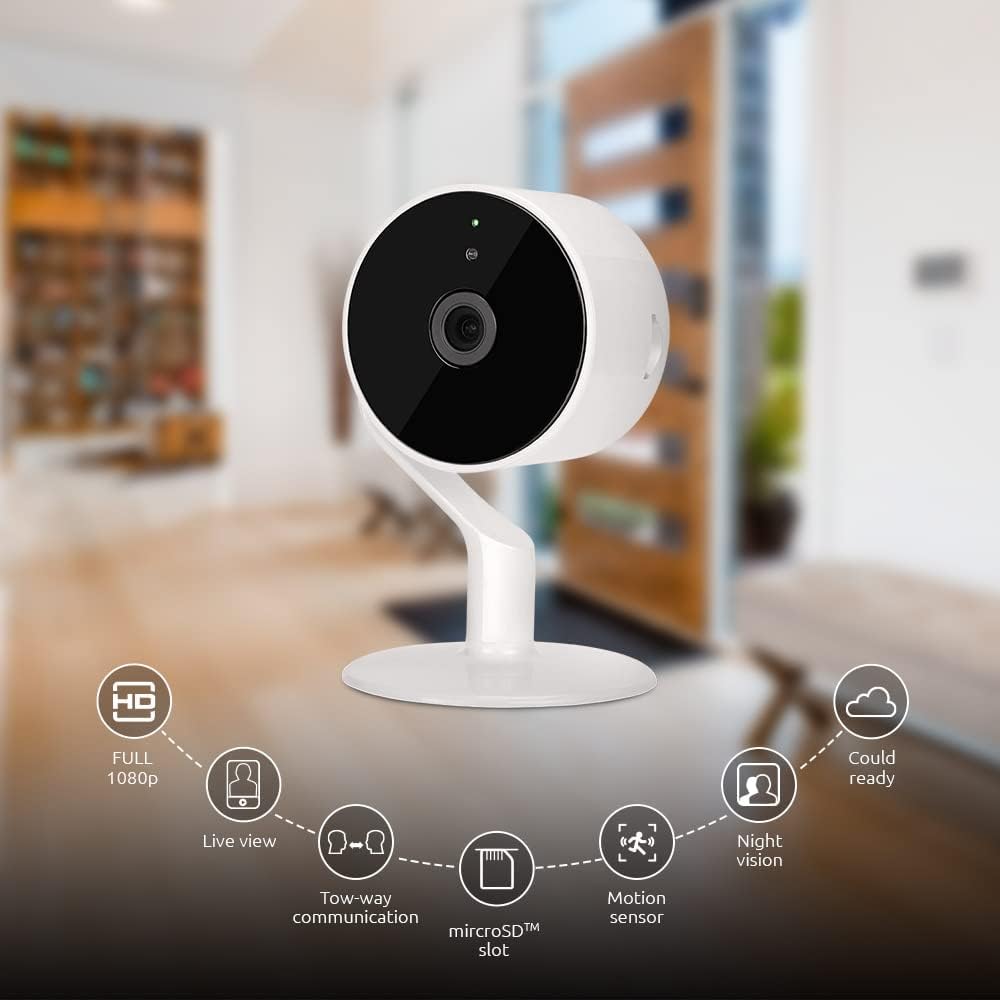
Image: The NEXXT Indoor Smart Camera highlighting its key features: Full HD 1080p, Live View, Two-way communication, microSD slot, Motion sensor, Night vision, and Cloud ready.
5. Eto
5.1 Agbara Lori
- Place the camera on a stable, flat surface or mount it using appropriate hardware (not included).
- Connect the power adapter to the camera's power input port.
- Plug the power adapter into a standard electrical outlet. The camera will power on and its indicator light will begin to flash, indicating it's ready for pairing.
5.2 App fifi sori ati so pọ
To control and monitor your camera, you need to download the Nexxt Home App:
- Gba awọn Next Home App lati awọn Google Play itaja (for Android devices) or the Apple App itaja (for iOS devices).
- Open the Nexxt Home App and create a new account or log in if you already have one.
- Fọwọ ba aami "+" tabi "Fi ẹrọ kun" lati bẹrẹ ilana sisọpọ.
- Select "Camera" or the specific camera model from the list of devices.
- Follow the on-screen instructions in the app to connect the camera to your home Wi-Fi network. This typically involves scanning a QR code displayed on your phone with the camera.
- Once connected, the camera's indicator light will turn solid, and you will see the camera added to your app.

Image: Illustration showing the NEXXT Indoor Smart Camera being set up to function as a webcam, connecting to a laptop.
6. Awọn ilana Iṣiṣẹ
6.1 Live View
From the Nexxt Home App, tap on your camera's name to access the live video feed. You can view gidi-akoko footage of your monitored area.

Image: The NEXXT Indoor Smart Camera on a desk, with text indicating "Full HD resolution" and its ability to provide 1080p high-quality video day or night.
6.2 Meji-Ona Ọrọ
Lakoko ti o wa ni ifiwe view, tap the microphone icon in the app to enable two-way audio. You can speak through your phone, and your voice will be projected through the camera's speaker. Tap the icon again to end communication.

Image: An illustration depicting communication between a person using a phone and another person near the camera, symbolizing the two-way talk feature.
6.3 Night Vision
The camera automatically switches to night vision mode in low-light conditions. You can also manually toggle night vision on/off within the app settings for the camera.

Image: A split image showing a room in daylight on one side and the same room in night vision on the other, demonstrating the camera's night vision capability.

Image: A smartphone screen displaying the Nexxt Home app interface with a night vision toggle switch, overlaid on a room scene, indicating active night vision monitoring.
6.4 Wiwa išipopada & Awọn titaniji
Configure motion detection sensitivity and alert preferences in the app. When motion is detected, you will receive notifications on your smartphone.

Image: A person sleeping in bed with a motion detection icon overlaid, indicating advanced motion detection with an effective range of up to 30 feet.

Image: A woman holding a smartphone displaying the Nexxt Home app, with text indicating that advanced human identification technology helps reduce false alarms and unwanted notifications.
6.5 Gbigbasilẹ & Ibi ipamọ
The camera supports local storage via a microSD card (up to 128GB, not included) and cloud storage via Microsoft Azure (subscription required, sold separately). Insert the microSD card into the designated slot on the camera. Manage recording settings and view foo ti o ti gbasilẹtage through the Nexxt Home App.
6.6 Pipin Wiwọle
You can securely share your camera's security feed with multiple approved devices, allowing family members or trusted individuals to also monitor your home.

Image: Two smartphones displaying the Nexxt Home app, with text stating "Everyone Can Keep Watch" and explaining that the security feed can be securely shared with multiple approved devices.
6.7 Smart Home Integration
The Nexxt Indoor Smart Camera is compatible with Amazon Alexa and Google Assistant. Follow the instructions in your Alexa or Google Home app to link your Nexxt Home account and enable voice commands for your camera.
7. Itọju
- Ninu: Lo asọ ti o rọ, ti o gbẹ lati nu lẹnsi kamẹra ati ara. Maṣe lo awọn olutọpa olomi tabi awọn aerosols.
- Ibi ipamọ: Ti o ba tọju kamera naa fun akoko ti o gbooro sii, ge asopọ kuro ni agbara ki o tọju rẹ si ibi ti o tutu, ti o gbẹ.
- Awọn imudojuiwọn famuwia: Regularly check the Nexxt Home App for available firmware updates to ensure optimal performance and security.
8. Laasigbotitusita
- Kamẹra ko sopọ mọ Wi-Fi:
- Rí i dájú pé nẹ́tíwọ́ọ̀kì Wi-Fi rẹ jẹ́ 2.4GHz. Kámẹ́rà náà kò lè lo 5GHz Wi-Fi.
- Ṣayẹwo ọrọ igbaniwọle Wi-Fi rẹ fun deede.
- Gbe kamẹra naa sunmọ olutọpa Wi-Fi rẹ.
- Tun olulana rẹ ati kamẹra bẹrẹ.
- Ko si laaye view or choppy video:
- Ṣayẹwo iyara asopọ intanẹẹti rẹ.
- Ensure the camera has a strong Wi-Fi signal.
- Close and reopen the Nexxt Home App.
- A ko gba awọn itaniji išipopada:
- Rí i dájú pé a ti ṣiṣẹ́ ìwádìí ìṣísẹ̀ nínú àwọn ètò àpù náà.
- Check your phone's notification settings for the Nexxt Home App.
- Ṣàtúnṣe ìfàmọ́ra ìwádìí ìṣísẹ̀.
- Ohun afetigbọ ọna meji ko ṣiṣẹ:
- Ensure your phone's microphone is enabled for the Nexxt Home App.
- Ṣayẹwo awọn eto iwọn didun lori foonu rẹ ati laarin ohun elo naa.
9. Awọn pato
| Ẹya ara ẹrọ | Sipesifikesonu |
|---|---|
| Orukọ awoṣe | NHC-I710 |
| Ipinnu Yaworan fidio | 1080p HD |
| inu ile / ita gbangba Lilo | Ninu ile |
| Asopọmọra Technology | Ailokun (Wi-Fi) |
| Ilana Asopọmọra | Wi-Fi (2.4GHz) |
| Orisun agbara | Okun Itanna |
| Ibiti Iran Night | 30 Ẹsẹ |
| Adarí Iru | Amazon Alexa, Google Iranlọwọ |
| Iṣagbesori Iru | Tabletop Oke |
| Awọn Iwọn Nkan (L x W x H) | 3 x 7 x 3 inches |
| Iwọn Nkan | 6.7 iwon (0.19 kilo) |
| UPC | 798302056152 |
| International Idaabobo Rating | IP65 |
10. Atilẹyin ọja ati Support
The Nexxt Indoor Smart Camera comes with a 2-odun atilẹyin ọja lati ọjọ ti o ra. Jọwọ ṣe idaduro ẹri rira rẹ fun awọn iṣeduro atilẹyin ọja.
For technical support, troubleshooting assistance, or warranty inquiries, please visit the official Nexxt Solutions website or contact their customer support through the Nexxt Home App.
Next Solutions Webojula: www.nexxsolutions.com


