1. Ifihan
Thank you for choosing the Cecotec TotalPure 2in1 MoonStyle Dark Fan and Air Purifier. This innovative appliance combines the functions of a powerful bladeless fan and an efficient air purifier, designed to enhance your indoor comfort and air quality. Featuring a DC motor, Wi-Fi control, an intuitive LED display, and multiple operating modes, this device offers a superior user experience. Please read this manual thoroughly before use to ensure proper operation, maintenance, and safety.

Image 1.1: The Cecotec TotalPure 2in1 MoonStyle Dark Fan and Air Purifier in a bedroom setting, showcasing awọn oniwe-aso oniru.
2. Awọn ilana aabo
Lati dinku eewu ina, mọnamọna, tabi ipalara, nigbagbogbo tẹle awọn iṣọra aabo ipilẹ wọnyi:
- Ka gbogbo awọn ilana ṣaaju lilo ohun elo naa.
- Rii daju pe ipese agbara voltage baamu aami igbelewọn lori ohun elo naa.
- Maṣe fi ohun elo, okun agbara, tabi pulọọgi sinu omi tabi awọn olomi miiran.
- Yọọ ohun elo kuro ni iṣan agbara nigbati ko si ni lilo, ṣaaju ṣiṣe mimọ, tabi ṣaaju ṣiṣe itọju eyikeyi.
- Jeki ohun elo naa kuro ni arọwọto awọn ọmọde ati awọn ohun ọsin.
- Ma ṣe ṣisẹ ohun elo naa pẹlu okun tabi plug ti o bajẹ, tabi lẹhin aṣiṣe ohun elo tabi ti lọ silẹ tabi bajẹ ni eyikeyi ọna.
- Do not block air openings or operate near curtains or other objects that could block air intake.
- Lo ohun elo nikan fun lilo ile ti a pinnu bi a ti ṣalaye ninu iwe afọwọkọ yii.
- Do not attempt to repair or disassemble the appliance yourself. Contact authorized service personnel.
3. Ọja Ipariview ati irinše
The Cecotec TotalPure 2in1 MoonStyle Dark is designed with user convenience and performance in mind. Below are the main components and key features of your device.

olusin 3.1: Iwaju View

olusin 3.2: Apa View
Awọn ẹya pataki:
- Agbara giga (35W): Delivers strong airflow for effective cooling.
- Imọ-ẹrọ Alailowaya: Provides a safe and elegant design, reducing noise and making cleaning easier.
- Àlẹ̀ Ìṣiṣẹ́ Gíga: Ensures powerful air purification, capturing airborne particles.
- Iṣakoso Wi-Fi: Manage settings conveniently via your smartphone.
- Iboju LED: Displays all operational parameters and air quality information.
- Iṣakoso Fọwọkan & Iṣakoso Latọna jijin: Offers multiple ways to interact with the device.
- Oscillation 120°: Distributes air evenly across the room.
- 9 Speeds & 4 Modes: Customize your experience for various needs and preferences.
- Aago 8-wakati: Set the device to automatically turn off after a specified period.

High Power 35W

Bladeless Design

Afẹfẹ ìwẹnumọ
4. Eto
4.1 Unpacking ati Apejọ
- Ni ifarabalẹ yọ gbogbo awọn paati kuro ninu apoti.
- Gbe ipilẹ sori alapin, dada iduroṣinṣin.
- Insert the main body of the fan/purifier into the base, ensuring it clicks securely into place.
- Connect the power cord to the appliance and then plug it into a suitable electrical outlet.
4.2 Wi-Fi Asopọ Oṣo
To utilize the smart features of your device, connect it to your home Wi-Fi network via the Cecotec smartphone application.
- Download the "Cecotec" app from your smartphone's app store (available for iOS and Android).
- Register or log in to your Cecotec account.
- Follow the in-app instructions to add your new device. This typically involves putting the device into pairing mode (refer to the LED screen for indicators) and connecting to its temporary Wi-Fi hotspot before linking it to your home network.
- Once connected, you can control the fan/purifier remotely and access additional features.
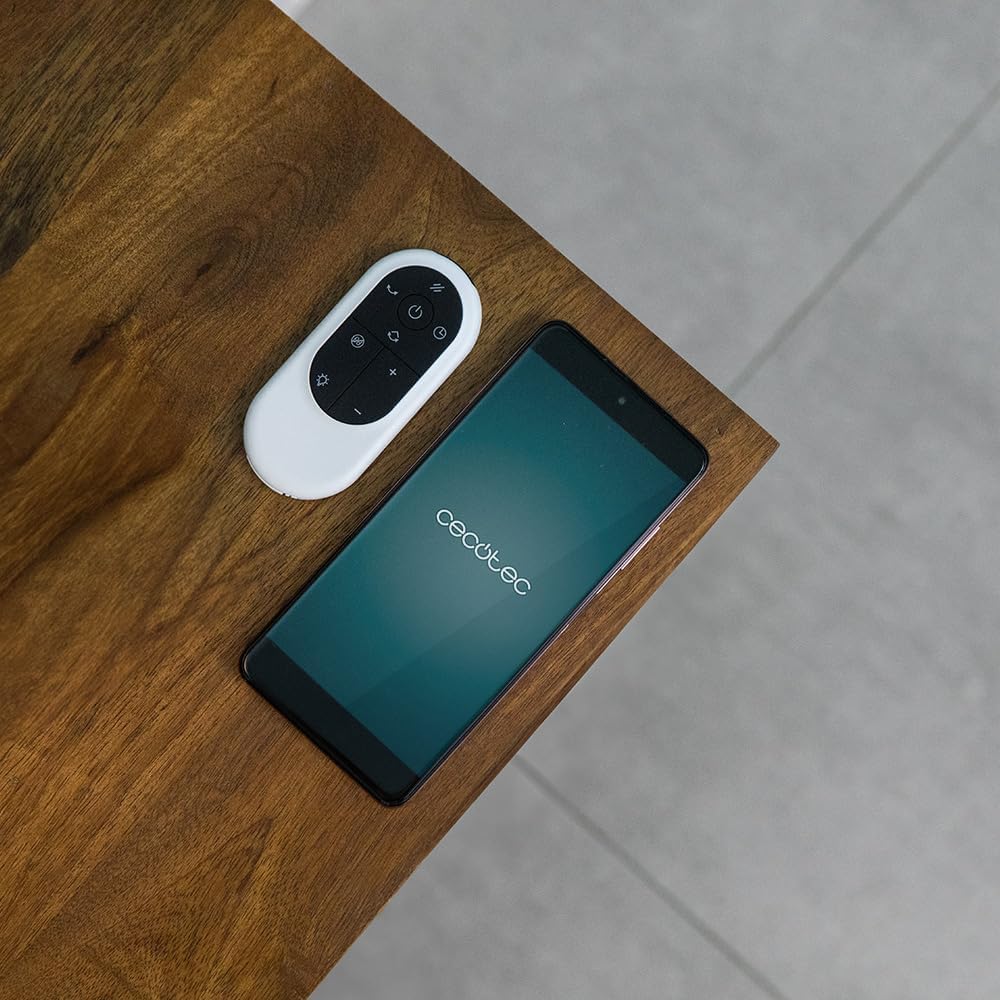
Image 4.1: The remote control and a smartphone displaying the Cecotec app, illustrating the control options.
5. Awọn ilana Iṣiṣẹ
5.1 Igbimọ Iṣakoso ati Ifihan LED
The device features a touch-sensitive control panel and an LED display for easy operation. The LED screen shows current settings, air quality, and other relevant information.

Image 5.1: A hand interacting with the touch control panel on the device.

Aworan 5.2: A sunmọ-soke view of the LED display, showing current settings.
5.2 Modes and Speeds
The fan/purifier offers 9 speed settings and 4 distinct operating modes:
- Ipo deede: Constant airflow at your selected speed.
- Ipo orun: Operates at a lower, quieter speed for undisturbed rest.
- Ipo Adayeba: Ṣe afarawe afẹfẹ adayeba nipasẹ iyatọ iyara afẹfẹ.
- Ipo Aifọwọyi: Adjusts fan speed automatically based on detected air quality.

Olusin 5.3: Pariview of 9 speeds, 4 modes, and 8-hour timer.
5.3 Oscillation Išė
Activate the oscillation function to distribute purified and cooled air across a wider area. The device can oscillate up to 120 degrees.

Image 5.4: The fan demonstrating its 120-degree oscillation capability.
5.4 Aago Išė
Set the timer for up to 8 hours to automatically turn off the appliance, saving energy and providing convenience.
6. Itọju
Regular maintenance ensures the longevity and optimal performance of your Cecotec TotalPure 2in1 MoonStyle Dark.
6.1 Ninu Ohun elo
- Yọọ ohun elo nigbagbogbo ṣaaju ṣiṣe mimọ.
- Mu ese ita gbangba pẹlu asọ, damp asọ. Ma ṣe lo abrasive ose tabi epo.
- Use a soft brush or vacuum cleaner with a brush attachment to gently clean the air intake and outlet grilles.
6.2 Filter Rirọpo
The air purification function relies on a high-efficiency filter. The filter needs to be replaced periodically to maintain purification effectiveness. The LED display may indicate when a filter change is due.

Image 6.1: The internal air filter of the Cecotec TotalPure 2in1 MoonStyle Dark.
- Yọọ ohun elo naa kuro.
- Locate the filter compartment, usually at the rear or side of the main unit.
- Open the compartment and carefully remove the old filter.
- Insert a new genuine Cecotec replacement filter, ensuring it is correctly oriented.
- Pa abala àlẹmọ naa ni aabo.
- Reset the filter life indicator on the device or via the app, if applicable.
Note: Availability of replacement filters may vary. Please contact Cecotec customer support or check their official website for purchasinàwọn àlẹ̀mọ́ ìrọ́pò g.
7. Laasigbotitusita
If you encounter any issues with your Cecotec TotalPure 2in1 MoonStyle Dark, please refer to the following common problems and solutions:
| Isoro | Owun to le Fa | Ojutu |
|---|---|---|
| Ohun elo ko tan. | Ko edidi ni; aṣiṣe iṣan agbara; agbara bọtini ko te. | Rii daju pe okun agbara ti wa ni edidi ni aabo sinu iṣan-iṣẹ iṣẹ. Tẹ bọtini agbara. |
| Afẹfẹ alailagbara. | Low speed setting; blocked air intake/outlet; dirty filter. | Increase speed setting. Check for obstructions. Clean or replace the air filter. |
| Ìmọ́tótó afẹ́fẹ́ tí kò dára. | Dirty or old filter. | Replace the air filter as per maintenance instructions. |
| Awọn oran asopọ Wi-Fi. | Incorrect Wi-Fi password; device too far from router; app issues. | Re-enter Wi-Fi password. Move device closer to router. Restart app and device. |
| Ariwo ti ko wọpọ. | Obstruction inside; unstable surface. | Unplug and check for foreign objects. Place on a stable, flat surface. If noise persists, contact support. |
Tí ìṣòro náà bá ń bá a lọ lẹ́yìn tí a bá ti gbìyànjú àwọn ìdáhùn wọ̀nyí, jọ̀wọ́ kan sí ìrànlọ́wọ́ oníbàárà Cecotec.
8. Awọn pato
Detailed technical specifications for the Cecotec TotalPure 2in1 MoonStyle Dark Fan and Air Purifier:
| Ẹya ara ẹrọ | Sipesifikesonu |
|---|---|
| Brand | Cecotec |
| Nọmba awoṣe | 08249 |
| Àwọ̀ | Dudu |
| Agbara | 35 Wattis |
| Voltage | 230 Volts |
| Ohun elo | Irin ati Ṣiṣu |
| Nọmba ti Awọn iyara | 9 |
| Pataki Awọn ẹya ara ẹrọ | Timer, Wi-Fi Control, Bladeless Technology, LED Display, Oscillation |
| Iwọn Nkan | 8.7 kilo |
| Ọja Mefa | 10P x 10W x 10H millimeters (Approximate, based on provided data) |
| Niyanju Lilo | Cooling, Air Purification |
| Iṣagbesori Iru | Floor Oke |
9. Atilẹyin ọja ati Support
Cecotec products are manufactured to the highest quality standards. This product comes with a standard manufacturer's warranty. For specific warranty terms and conditions, please refer to the warranty card included with your purchase or visit the official Cecotec webojula.
For technical support, troubleshooting assistance, or to inquire about replacement parts (such as filters), please contact Cecotec customer service through their official channels. You can usually find contact information on the Cecotec webaaye tabi lori apoti ọja rẹ.
Atilẹyin Ayelujara: www.cecotec.com


