1. Ifihan
This user manual provides comprehensive instructions for the installation, operation, and maintenance of your Cecotec QLED 70" Smart TV V1Z+ Series. Please read this manual thoroughly before using the television and retain it for future reference. This television combines advanced display technology with smart features to deliver an immersive viewiriri iriri.
2. Alaye Aabo
Máa tẹ̀lé àwọn ìlànà ààbò wọ̀nyí nígbà gbogbo láti dènà ìkọlù iná mànàmáná, iná, tàbí ìbàjẹ́ sí tẹlifíṣọ̀n.
- Ibi ti ina elekitiriki ti nwa: Rii daju pe ipese agbara voltage bá àmì ìdíyelé tó wà lórí TV mu. Má ṣe fi agbára púpọ̀ jù àwọn ibi tí a ti ń ta iná.
- Afẹfẹ: Ma ṣe dina awọn ṣiṣi atẹgun. Gba aaye to peye ni ayika TV fun ṣiṣan afẹfẹ to dara.
- Omi ati Ọrinrin: Keep the TV away from water, rain, or excessive moisture. Do not place objects filled with liquids on the TV.
- Ninu: Unplug the TV before cleaning. Use a soft, dry cloth. Avoid liquid or aerosol cleaners.
- Ibi: Place the TV on a stable, level surface. If wall-mounting, ensure the wall mount is suitable for the TV's weight and installed by qualified personnel.
- Awọn ọmọde: Má ṣe jẹ́ kí àwọn ọmọdé gun orí tẹlifíṣọ̀n tàbí kí wọ́n dúró.
- Mànàmáná: Yọ TV kuro lakoko iji manamana tabi nigbati a ko lo fun igba pipẹ.
3. Package Awọn akoonu
Jẹrisi pe gbogbo awọn ohun kan wa ninu package:
- 1 x Cecotec QLED 70" Smart TV
- 1 x Isakoṣo latọna jijin
- Awọn batiri 1 x AAA (fun isakoṣo latọna jijin)
- 1 x Itọsọna olumulo (iwe yii)
- 1 x Okun Agbara
- 1 x Central Stand (if "Con Peana" model)
4. Ọja Ipariview
Familiarize yourself with the main components and features of your television.

olusin 4.1: Iwaju view of the Cecotec QLED 70" Smart TV with included remote controls.

olusin 4.2: Alaye iwaju view of the Cecotec QLED 70" Smart TV, highlighting its slim bezels.

Figure 4.3: Illustration of the TV's frameless design, enhancing the viewing experience by minimizing borders.

Figure 4.4: Depiction of Chromecast built-in functionality, allowing easy content streaming from mobile devices to the TV.
5. Eto
5.1 Ṣiṣii silẹ
Carefully remove the television from its packaging. It is recommended to keep the original packaging for future transportation or servicing.
5.2 Duro fifi sori
If you intend to use the included central stand, follow these steps:
- Gbe iboju TV si isalẹ lori rirọ, dada alapin lati ṣe idiwọ awọn nkan.
- Ṣe deede iduro pẹlu awọn ihò fifi sori isalẹ ti TV.
- Ṣe aabo iduro ni lilo awọn skru ti a pese.
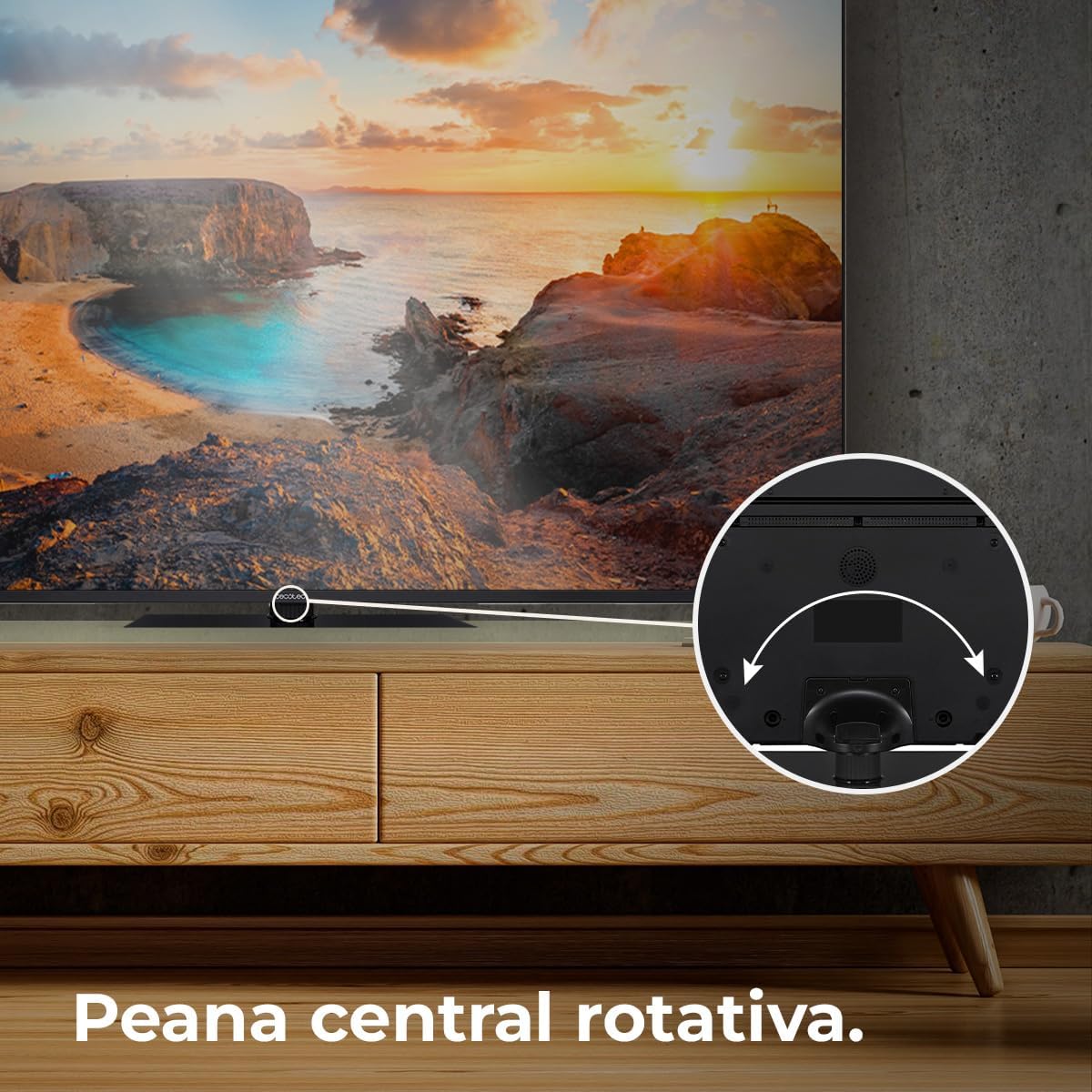
Figure 5.1: The rotative central stand allows for flexible viewing awọn igun.
5.3 Iṣagbesori odi (aṣayan)
For wall mounting, use a VESA-compatible wall mount kit (not included). Consult a professional for installation to ensure safety and proper mounting.
5.4 Awọn isopọ
So awọn ẹrọ rẹ pọ mọ TV nipa lilo awọn ibudo ti o yẹ:
- HDMI: For high-definition devices like Blu-ray players, game consoles, and set-top boxes. This TV supports HDMI 2.1 for high frequencies and resolutions.
- USB: Fun sisopọ awọn ẹrọ ipamọ USB lati mu media ṣiṣẹ files.
- Àjọlò: Fun asopọ intanẹẹti ti a firanṣẹ.
- Agbara: So okun agbara pọ si TV ati lẹhinna si iṣan ogiri.
6. Ṣiṣẹ
6.1 Ni ibẹrẹ Oṣo
Upon first power-on, the TV will guide you through the initial setup process, including language selection, network connection, and Google account sign-in for Android TV 11 features.

Figure 6.1: The Android TV 11 interface provides access to a wide collection of applications for an optimal user experience.
6.2 Ipilẹ Awọn iṣẹ
- Titan/Apapa: Tẹ bọtini agbara lori isakoṣo latọna jijin tabi TV.
- Aṣayan igbewọle: Use the "Input" button on the remote to switch between HDMI, TV, and other sources.
- Iṣakoso iwọn didun: Lo awọn bọtini iwọn didun Up / Isalẹ.
- Lilọ kiri: Lo pad itọsọna ati bọtini OK lati lilö kiri awọn akojọ aṣayan.
6.3 Smart TV Awọn ẹya ara ẹrọ
Your Cecotec Smart TV runs on Android TV 11, offering a rich smart experience:
- Oluranlọwọ Google: Lo àwọn àṣẹ ohùn nípasẹ̀ ìṣàkóso latọna jijin láti wá àkóónú, ṣàkóso àwọn ẹ̀rọ ilé ọlọ́gbọ́n, àti láti gba ìwífún.
- Chromecast ti a ṣe sinu: Easily cast content from your smartphone, tablet, or computer directly to the TV.
- Google Play itaja: Download and install a wide variety of apps, games, and streaming services.
6.4 Aworan Eto
Ṣe ilọsiwaju rẹ viewing experience with these advanced picture technologies:
- Ipinu UHD 4K: Enjoy ultra-sharp images with high definition, revealing even the smallest details.
- Imọ-ẹrọ QLED: Delivers vibrant and realistic colors with exceptional contrast.
- HDR10+: Processes images for greater color depth and dynamic range.
- Dolby Vision: Optimizes each frame for purer and more realistic images.
- MEMC (Iṣiro Iṣipopada, Biinu išipopada): Adds compensation frames to generate smoother and sharper images, especially beneficial for fast-moving scenes.
- 10-Bit Display: Reproduces over 1 billion colors for a richer and more nuanced picture.

Figure 6.2: Experience ultra-high definition images with 4K UHD and QLED technology.

Figure 6.3: MEMC technology ensures fluid movements and more defined details in fast-paced scenes.

Figure 6.4: HDR 10 provides greater color depth in every image, enhancing realism.

Figure 6.5: The 10-bit display reproduces over 1 billion colors for superior image quality.
6.5 Eto ohun
Mu iriri ohun rẹ dara si:
- Dolby Atmos: Provides immersive 360° multi-dimensional surround sound.
- Subwoofers: Integrated subwoofer system improves bass and creates a superior audio experience.

Figure 6.6: Dolby Vision and Dolby Atmos combine for purer images and multi-dimensional surround sound.

Figure 6.7: The integrated subwoofer enhances bass for a superior audio experience.
6.6 ayo Awọn ẹya ara ẹrọ
- Low Latency for Gaming (ALLM): Automatically configures latency to improve your console gaming experience.

Figure 6.8: HDMI 2.1 with Auto Low Latency Mode (ALLM) improves your console gaming experience.
7. Itọju
- Isọsọ iboju: Rọra nu iboju naa pẹlu asọ ti ko ni lint. Fun awọn ami alagidi, die-die dampen the cloth with water or a screen-specific cleaner. Do not spray liquid directly onto the screen.
- Ìfọ̀mọ́ ilé iṣẹ́ ilé: Lo asọ asọ ti o gbẹ lati nu minisita TV kuro.
- Eruku: Nigbagbogbo eruku awọn šiši fentilesonu lati ṣe idiwọ igbona.
8. Laasigbotitusita
Tí o bá ní ìṣòro pẹ̀lú tẹlifíṣọ̀n rẹ, wo àwọn ìṣòro àti ojútùú tí ó wọ́pọ̀ wọ̀nyí:
| Isoro | Owun to le Fa | Ojutu |
|---|---|---|
| Ko si Agbara | Okun agbara ti ge asopọ; Agbara iṣan oro. | Ṣàyẹ̀wò ìsopọ̀ okùn agbára. Gbìyànjú ọ̀nà ìjáde mìíràn. |
| Ko si Aworan, ṣugbọn Ohun ti wa ni Lọwọlọwọ | Orisun titẹ sii ti ko tọ; Loose HDMI/AV USB. | Select correct input source. Reconnect cables securely. |
| Ko si Ohun, ṣugbọn Aworan wa Bayi | Volume muted or too low; Audio settings incorrect. | Unmute volume or increase level. Check audio output settings. |
| Isakoṣo latọna jijin Ko Ṣiṣẹ | Àwọn bátìrì tí ó ti kú; Ìdènà láàrín remote àti TV. | Rọpo awọn batiri. Yọ eyikeyi idena kuro. |
| Awọn oran Asopọ Wi-Fi | Ọ̀rọ̀ ìpamọ́ tí kò tọ́; Àwọn ìṣòro rédíò; TV ti jìnnà jù sí rédíò. | Verify password. Restart router. Move TV closer or use Ethernet. |
Tí ìṣòro náà bá ń bá a lọ lẹ́yìn tí a bá ti gbìyànjú àwọn ìdáhùn wọ̀nyí, jọ̀wọ́ kan sí ìrànlọ́wọ́ oníbàárà Cecotec.
9. Awọn pato
| Ẹya ara ẹrọ | Ẹ̀kúnrẹ́rẹ́ |
|---|---|
| Nọmba awoṣe | VQU11070Z+S (03632) |
| Iwon iboju | 70 inches / 178 cm |
| Ifihan ọna ẹrọ | QLED |
| Ipinnu | 4K UHD (3840 x 2160 awọn piksẹli) |
| Eto isesise | Android TV 11 |
| Oṣuwọn sọtun | 50 Hz |
| Pataki Awọn ẹya ara ẹrọ | Chromecast Built-in, HDR10+, Dolby Vision, Dolby Atmos, Subwoofers, Google Voice Assistant, MEMC, 10-Bit Display, Low Latency for Gaming (HDMI 2.1 ALLM), Rotative Central Stand, Eye Safe (minimizes blue light emission) |
| Asopọmọra | Ethernet, Wi-Fi (implied by Android TV), HDMI 2.1 |
| Apakan Ipin | 16:9 |
| Awọn iwọn ọja (pẹlu iduro) | 27.9 cm (depth) x 157.5 cm (width) x 92.4 cm (height) |
| Iwọn Ọja | 27.58 kg |
| Agbara Agbara Kilasi | F (based on 114 kWh/1000h) |
| Ipilẹṣẹ | Spain |

Figure 9.1: Energy efficiency label for the Cecotec QLED 70" Smart TV. For more details, scan the QR code or visit eprel.ec.europa.eu/qr/1677956.
10. Atilẹyin ọja ati Support
Your Cecotec QLED 70" Smart TV is covered by a manufacturer's warranty. Please refer to the warranty card included in your package for specific terms and conditions. For technical support, service, or inquiries, please visit the official Cecotec webojula tabi kan si wọn onibara iṣẹ Eka. Tọju iwe-ẹri rira rẹ bi ẹri rira fun awọn iṣeduro atilẹyin ọja.
For more information, visit the official Cecotec store: Cecotec Store


