1. Ifihan
Thank you for choosing the Cecotec Conga 11090 Spin Revolution Home&Wash Robot Vacuum Cleaner. This advanced robot is designed to provide comprehensive cleaning for your home, combining powerful vacuuming with effective mopping capabilities and an automatic self-emptying and mop-washing station. Please read this manual carefully before using the product to ensure proper operation, maintenance, and safety.
2. Awọn Ilana Aabo pataki
Nigbagbogbo tẹle awọn iṣọra aabo ipilẹ nigba lilo awọn ohun elo itanna lati dinku eewu ina, mọnamọna, tabi ipalara.
- Ka gbogbo awọn ilana ṣaaju lilo ohun elo naa.
- Má ṣe jẹ́ kí àwọn ọmọdé máa lo robot náà. Máa ṣe àbójútó àwọn ọmọdé àti ẹranko nígbà tí robot náà bá ń ṣiṣẹ́.
- Ṣe idaniloju agbara voltage ibaamu awọn voltage itọkasi lori awọn Rating aami.
- Má ṣe lo robot náà lórí ilẹ̀ tí ó tutu tàbí ní àwọn ibi tí omi ti dúró.
- Jeki irun, aṣọ alaimuṣinṣin, awọn ika ọwọ, ati gbogbo awọn ẹya ara kuro lati awọn ṣiṣi ati awọn ẹya gbigbe.
- Má ṣe gbé àwọn nǹkan ńlá, àwọn nǹkan mímú, tàbí omi pẹ̀lú robot náà.
- Pa robot náà kí o sì yọ ibudo gbigba agbara kúrò kí o tó ṣe ìtọ́jú tàbí ìwẹ̀nùmọ́ èyíkéyìí.
- Lo awọn asomọ ati awọn ẹya ẹrọ ti olupese ṣe iṣeduro nikan.
- Store the robot and charging station indoors in a cool, dry place.
- Do not operate the robot if it has been dropped, damaged, left outdoors, or dropped into water.
3. Package Awọn akoonu
Jẹrisi pe gbogbo awọn paati wa ninu package:
- 1 x Ohun èlò ìfọmọ́ ẹ̀rọ robot
- 1 x Fẹlẹ ẹgbẹ
- 2 x Rotating Mops
- 1 x Self-emptying Base with 2 Tanks (1 x Clean Water Tank, 1 x Dirty Water Tank)
- Àpò eruku 1 x
- 1 x Okun Agbara
- 1 x Self-cleaning Brush
- 1 x Multifunction Brush
- 1 x Ilana itọnisọna

4. Ọja Ipariview
The Conga 11090 Spin Revolution Home&Wash is an intelligent cleaning solution featuring advanced navigation and comprehensive cleaning capabilities.
4.1 Isenkanjade Igbale Robot
- Lilọ kiri Smart: Equipped with iTech Laser Eye technology for precise mapping and obstacle avoidance.
- Ifamọ ti o lagbara: Delivers up to 5000 Pa suction power for effective dirt and debris removal.
- Spin Revolution Mopping: Features two rotating mops for deep scrubbing and floor cleaning.
- Igbesi aye batiri gigun: Provides up to 140 minutes of cleaning autonomy.


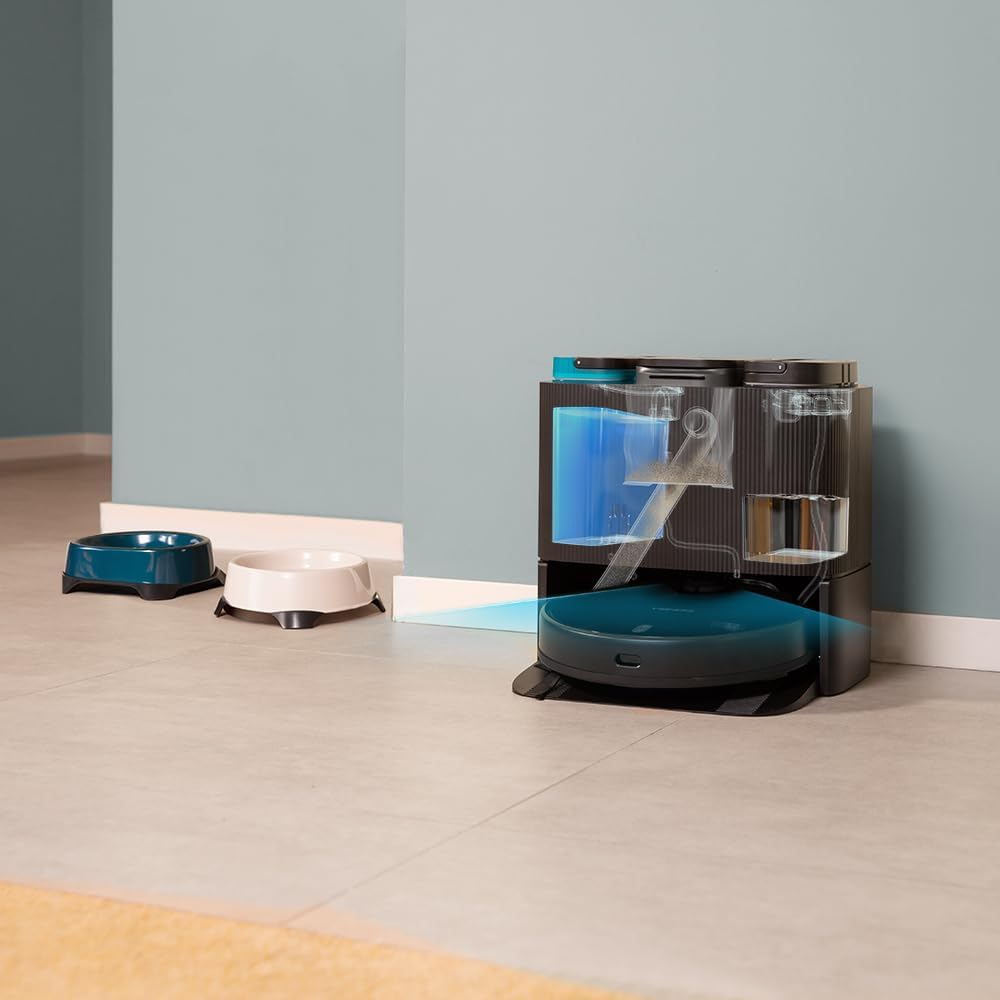
4.2 Self-Emptying and Mop-Washing Station
- Àkójọ eruku aládàáṣe: The robot automatically empties its dustbin into a 2L dust bag in the station.
- Automatic Mop Washing: The station cleans the robot's mopping pads with clean water from its 2.8L tank and collects dirty water in a 2.4L tank.
- Apẹrẹ Rọrun: Reduces manual intervention for a truly hands-free cleaning experience.


5. Eto
5.1 Ṣiṣii ati Gbe
- Ni ifarabalẹ yọ gbogbo awọn paati kuro ninu apoti.
- Choose a suitable location for the self-emptying station. Ensure there is at least 1.5 meters of clear space in front of the station and 0.5 meters on either side.
- Plug the power cable into the station and connect it to a power outlet.
5.2 Gbigba agbara akọkọ
Place the robot onto the charging contacts of the self-emptying station. Ensure the robot is properly aligned. The robot will begin charging automatically. For first use, it is recommended to fully charge the robot before operation.
5.3 App sori ati Asopọ
Download the "CECOTEC" app from your smartphone's app store (iOS or Android). Follow the in-app instructions to connect your robot to your home Wi-Fi network (2.4 GHz) and Bluetooth. The app provides enhanced control and mapping features.

6. Ṣiṣẹ roboti
6.1 Bibẹrẹ a Cleaning ọmọ
- Nipasẹ Bọtini Robot: Press the power button on the robot to start a general cleaning cycle.
- Nipasẹ App: Open the CECOTEC app. You can select various cleaning modes such as "Clean All", "Spot Clean", "Zone Clean", or schedule cleanings.

6.2 Ṣíṣe àwòrán àti Ìtọ́sọ́nà
The robot uses its iTech Laser Eye to create a detailed map of your home during its first cleaning cycle. This map can be viewed and customized in the app. You can set virtual walls, restricted zones, and specific cleaning areas.

6.3 Automatic Self-Maintenance
During and after cleaning cycles, the robot will automatically return to its station to empty its dustbin and wash its mopping pads. The frequency of these actions can be configured in the app.
7. Itọju
Itọju deede ṣe idaniloju iṣẹ ṣiṣe ti o dara julọ ati ki o fa igbesi aye ti ẹrọ igbale robot rẹ.
7.1 Cleaning the Robot
- Fẹlẹ akọkọ: Remove the main brush and clean it regularly using the provided self-cleaning brush to remove tangled hair and debris.
- Fẹlẹ ẹgbẹ: Check and clean the side brush for any tangled hair or debris. Replace if worn.
- Mopping Pads: Although the station washes them, it is recommended to manually remove and rinse the mopping pads periodically.
- Awọn sensọ: Wipe all sensors (cliff sensors, laser sensor) with a clean, dry cloth to ensure proper navigation.

7.2 Maintaining the Self-Emptying Station
- Apo eruku: Replace the dust bag in the station when it is full. The app will notify you.
- Awọn tanki omi: Regularly empty the dirty water tank and refill the clean water tank. Clean both tanks to prevent mold or odor buildup.
- Washing Tray: Clean the washing tray where the mops are cleaned to remove any residue.

8. Laasigbotitusita
If you encounter issues with your robot, refer to the following common problems and solutions:
| Isoro | Owun to le Fa | Ojutu |
|---|---|---|
| Robot ko ni tan-an. | Low battery; power cable not connected. | Place robot on charging station; ensure power cable is securely connected. |
| Rọ́bọ́ọ̀tì kò lè rí ibùdó gbigba agbára. | Station is blocked; robot is too far. | Ensure clear space around station; manually place robot closer to station. |
| Iṣẹ ṣiṣe mimọ ti ko dara. | Brushes tangled; dustbin full; mops dirty. | Clean main/side brushes; empty dustbin/replace bag; clean mopping pads. |
| Robot di nigbagbogbo. | Obstacles; dark surfaces; dirty sensors. | Clear obstacles; use virtual walls in app; clean sensors. |
| App asopọ oran. | Incorrect Wi-Fi password; 5GHz network; Bluetooth off. | Verify Wi-Fi password; ensure 2.4GHz network; enable Bluetooth; restart robot and router. |
9. Awọn pato
| Ẹya ara ẹrọ | Ẹ̀kúnrẹ́rẹ́ |
|---|---|
| Brand | Cecotec |
| Orukọ awoṣe | Conga 11090 Spin Revolution Home&Wash |
| Nọmba awoṣe | 08105 |
| Àwọ̀ | Dudu |
| Awọn iwọn Ọja (Robot) | 34.3 x 34.5 x 10.8 cm |
| Iwọn Ọja | 11.25 kg |
| Voltage | 120 Volts |
| Ariwo Ipele | 75 dB |
| Akoko Iṣiṣẹ | Up to 2 hours and 20 minutes (140 minutes) |
| Agbara Apo Eruku (ibudo) | 2 liters |
| Clean Water Tank Capacity (Station) | 2.8 liters |
| Dirty Water Tank Capacity (Station) | 2.4 liters |
| Pataki Awọn ẹya ara ẹrọ | Wireless, Automatic Shut-off, iTech Laser Eye Navigation |
| Awọn ẹrọ ibaramu | Smartphones (via CECOTEC App) |
10. Atilẹyin ọja ati Support
Cecotec products are manufactured to high-quality standards. For warranty information, please refer to the warranty card included in your product packaging or visit the official Cecotec website. For technical support, troubleshooting assistance, or spare parts, please contact Cecotec customer service or the retailer from whom you purchased the product.
Atilẹyin Ayelujara: Ṣabẹwo si Cecotec Brand Store on Amazon fun afikun alaye ọja ati awọn orisun atilẹyin.


